
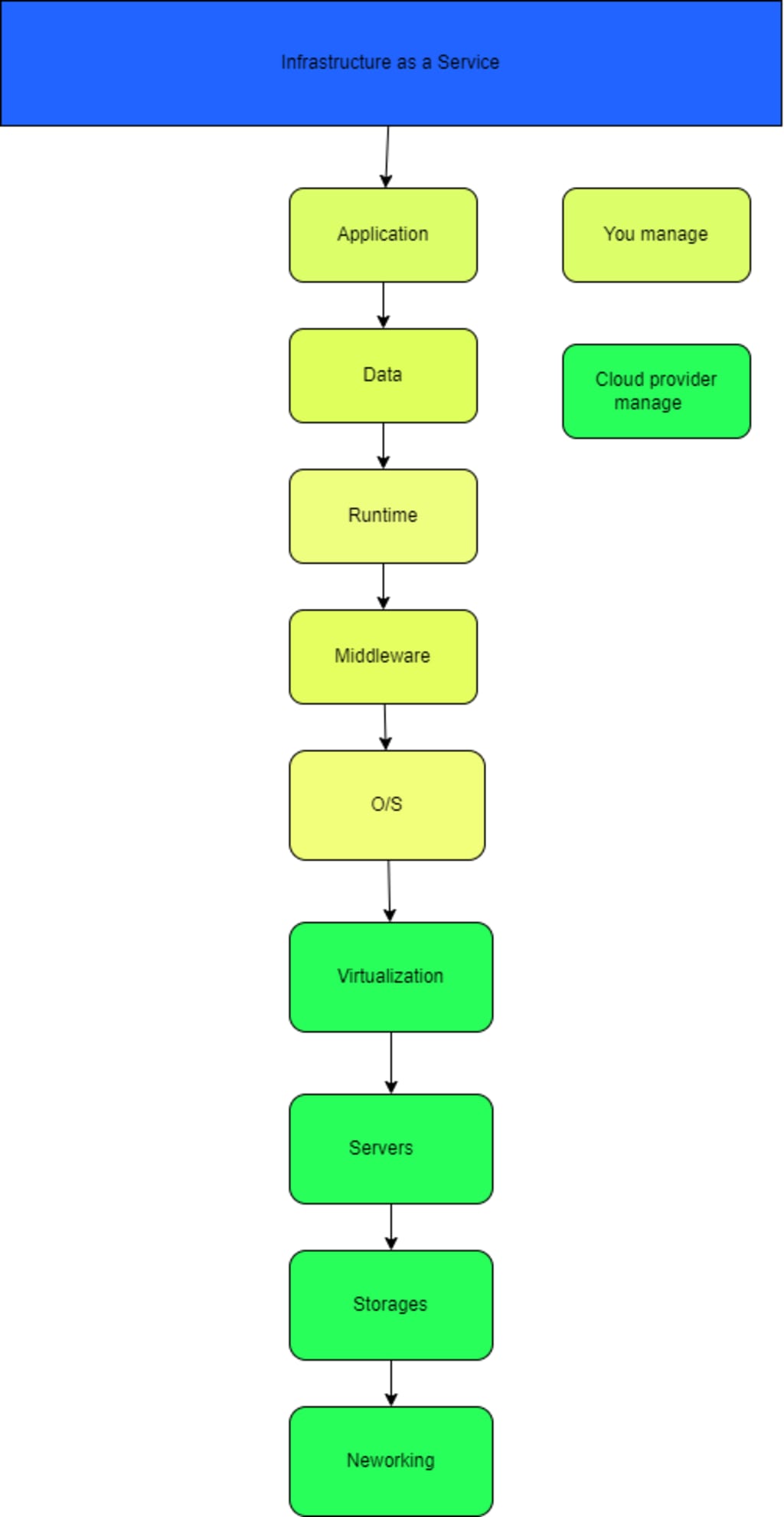
IAAS (Infrastructure as a Service) in AWS Cloud refers to the provisioning of virtualized computing resources over the internet.
Amazon Elastic Compute Cloud (EC2), Amazon Elastic Block Store (EBS), and Amazon Virtual Private Cloud (VPC). These services allow users to launch and manage virtual machines, storage volumes, and network configurations
Amazon Elastic Compute Cloud
1. Amazon Elastic Compute Cloud (EC2) is a web service that provides resizable virtual computing resources in the AWS cloud. With EC2, you can launch and configure virtual machines (known as instances), which can run a variety of operating systems, including Windows and Linux.
2. You can choose from a variety of instance types, each optimized for different types of workloads. For example, some instance types are optimized for compute-intensive workloads, while others are optimized for memory-intensive workloads.
3. EC2 also provides a variety of storage options for your instances, including Amazon Elastic Block Store (EBS) volumes and instance store volumes. You can also use Amazon Elastic File System (EFS) for shared file storage.
4. EC2 also allows for a high level of customization and control, such as the ability to configure security groups and network access control lists, as well as the ability to launch instances in a Virtual Private Cloud (VPC) for added security.
5. EC2 is a pay-as-you-go service and users pay only for the resources they use. Users can also use Auto Scaling and Elastic Load Balancing to automatically scale their EC2 resources based on demand.
Amazon Elastic Block Store
Block storage service for Amazon Elastic Compute Cloud (EC2) instances. EBS provides persistent storage for your EC2 instances, which means that the data on an EBS volume will persist even after the EC2 instance is terminated.
EBS provides two types of volumes:
1. General Purpose (SSD) volumes: These volumes are well-suited for a wide range of workloads, such as boot volumes, small to medium-sized databases, and development and test environments.
2. Provisioned IOPS (SSD) volumes: These volumes are designed for I/O-intensive workloads, such as large databases and enterprise applications. They provide a higher level of IOPS (input/output operations per second) and throughput than General Purpose (SSD) volumes.
3. EBS also allows you to take snapshots of your volumes, which can be used to create new volumes or to protect your data from accidental deletion. These snapshots can be stored in Amazon S3, and you can also use them to create Amazon Machine Images (AMIs) for use with EC2 instances.
EBS is also a pay-as-you-go service and you pay for only what you use. It's also possible to use Amazon CloudWatch to monitor the performance of EBS volumes and to set up alarms to notify you of any issues.
Amazon Virtual Private Cloud
Amazon Virtual Private Cloud (VPC) is a service that enables you to launch Amazon Elastic Compute Cloud (EC2) instances and other AWS resources into a virtual network that you've defined. This virtual network closely resembles a traditional network that you'd operate in your own data center, with the benefits of using the scalable infrastructure of Amazon Web Services (AWS).
A VPC allows you to:
1. Define a virtual network topology that closely matches your own network
2. Control how your network and the Amazon EC2 resources inside your network are exposed to the Internet
3. Provide secure communication between instances launched in your VPC and the Internet, or other AWS services or your own data center
You can create a VPC that has public and private subnets, each with its own set of security and access controls. You can also connect your VPC to your own data center using industry-standard encrypted IPsec VPN connections.
You can create and customize VPCs according to your organization's security and compliance needs, and it's also possible to use security groups and network access control lists to increase the security of your VPC.
In summary, VPC allows you to have full control over your virtual network environment, including selection of your own IP address range, creation of subnets, and configuration of route tables and network gateways.
Auto Scaling
1. Auto Scaling is a service provided by Amazon Web Services (AWS) that allows you to automatically scale your Amazon Elastic Compute Cloud (EC2) and Amazon Elastic Container Service (ECS) instances based on demand.
2. Auto Scaling automatically increases or decreases the number of instances in your fleet to maintain a desired number of instances. The desired number of instances is determined by the Auto Scaling policies that you configure. These policies can be based on CloudWatch metrics such as CPU utilization, network traffic, and custom metrics.
3. Auto Scaling also allows you to configure scaling policies that respond to changes in CloudWatch Alarms. For example, you can set up an alarm that sends a message to an Auto Scaling group when the average network latency of your instances exceeds a certain threshold. When the alarm is triggered, Auto Scaling can automatically increase the number of instances in your group to handle the increased traffic.
Auto Scaling also enables you to scale out or scale in based on the schedule, this is known as Scheduled Scaling. It allows you to scale your resources up or down according to your schedule, for example, if you know that your website receives more traffic on certain days or at certain times, you can schedule scaling actions to prepare for the increased traffic.
Auto Scaling provides a simple and effective way to ensure that you have the appropriate number of instances available to handle the load on your application, without having to manually provision or terminate instances. It also helps to reduce costs by only provisioning the number of instances you actually need.
Elastic Load Balancing
Elastic Load Balancing (ELB) is a service provided by Amazon Web Services (AWS) that automatically distributes incoming network traffic across multiple Amazon Elastic Compute Cloud (EC2) instances. This service helps to ensure that your application is highly available and can handle a large amount of incoming traffic.
There are two types of Elastic Load Balancers available on AWS: Application Load Balancer (ALB) and Network Load Balancer (NLB).
1. Application Load Balancer (ALB) operates at the application layer and is best suited for routing HTTP/HTTPS traffic. It allows you to route a client request to one of the available service instances based on the content of the request. It also supports advanced features such as path-based routing, host-based routing, and redirects, among others.
2. Network Load Balancer (NLB) operates at the network layer and is best suited for handling TCP/UDP traffic, it's also optimized for extremely high performance and extremely low latencies.
ELB automatically detects and replaces any instances that fail to respond to its health checks, keeping your application available and responsive to incoming requests. ELB also provides a static IP address (known as a "DNS name") that you can use to refer to your load balancer, which makes it easy to direct traffic to your application.
In summary, Elastic Load Balancing automatically distributes incoming traffic across multiple Amazon EC2 instances, increasing the availability and scalability of your application, and also helps to minimize the impact of instance failures on your application.
About the Creator
Keep reading
More stories from writers in Interview and other communities.
Part 2 Interview With Joe Patterson, Author Of Melanin Memoirs
This is my second interview with Joe Patterson. His 4th anniversary writing on Vocal will be in March 2026. He has one achievement on Vocal, The Other Foot. He has over 17,000 reads on Vocal since he started on Vocal in 2022. Joe Patterson is very creative poet and rapper. Joe is deep thinker and I feel it is reflected in his latest published book, Melanin Memoirs.
By Mariann Carroll26 days ago in Interview
The Piggy Project
I’ve had so many names in this life I lose track of which ones were ever really mine and which ones I wore because someone needed me to. Some were handed to me before I had words to refuse them, before I knew what they meant, before I knew I could say no. Most weren’t meant to hurt. That doesn’t mean they didn’t leave marks. Marks that told me who I belong to, who I am by way of who claims me, recognizes me in the good and bad, who walks beside me.
By Fatal Serendipity7 days ago in Confessions




Comments
There are no comments for this story
Be the first to respond and start the conversation.