
The Best Computer Monitors for Work in 2025
Clear, reliable displays to boost focus and productivity this year


A few months ago, I was juggling Zoom calls, spreadsheets, and Photoshop all on a single, outdated monitor. My eyes were tired, colors looked washed out, and switching windows felt like running a marathon without shoes. That frustration pushed me to test different monitors designed specifically for work setups.
The truth is, in 2025, computer monitors aren’t just “screens.” They’re tools that affect how productive, comfortable, and creative you can be. Pick the wrong one, and you’ll deal with headaches, slow workflows, and wasted money. Pick the right one, and your entire day flows smoother emails, edits, presentations, and everything in between.
After testing dozens of options, I’ve narrowed it down to a handful of the best monitors for work this yearc overing different needs and budgets.
Detailed Product Reviews
1. Dell UltraSharp U2723QE

Dell UltraSharp U2723QE 27-inch 4K IPS monitor is built for professionals who value clarity and reliability. Thin bezels make it perfect for dual setups, while factory-calibrated colors shine in editing or design work.
Key Features:
27-inch 4K IPS panel
USB-C, HDMI, and DisplayPort connectivity
Adjustable ergonomic stand
Excellent brightness and color accuracy
Pros:
Stunning 4K visuals
Multiple connectivity options
Ideal for productivity and creative tasks
Cons:
Premium price tag
Built-in speakers are weak
Final Verdict:
Best suited for professionals who need a dependable, all-around performer. Worth the investment if you want one monitor that excels in both performance and ergonomics.
2. LG 34WN80C-B UltraWide

The LG 34WN80C-B UltraWide feels like productivity superpowers in one screen. At 34 inches, it replaces a dual setup for some users, giving you panoramic room to spread out documents, browser tabs, and apps.
Key Features:
34-inch curved ultrawide display (3440x1440)
USB-C, HDMI, and DisplayPort support
Great color coverage and immersion
Sleek, minimal design
Pros:
Amazing workspace for multitasking
USB-C makes laptop connections simple
Immersive curved design
Cons:
Needs a large desk
Not as bright as premium 4K monitor
Final Verdict:
Perfect for multitaskers who hate switching windows. Great for work-from-home setups where space is less of a concern.
3. ASUS ProArt Display PA278QV
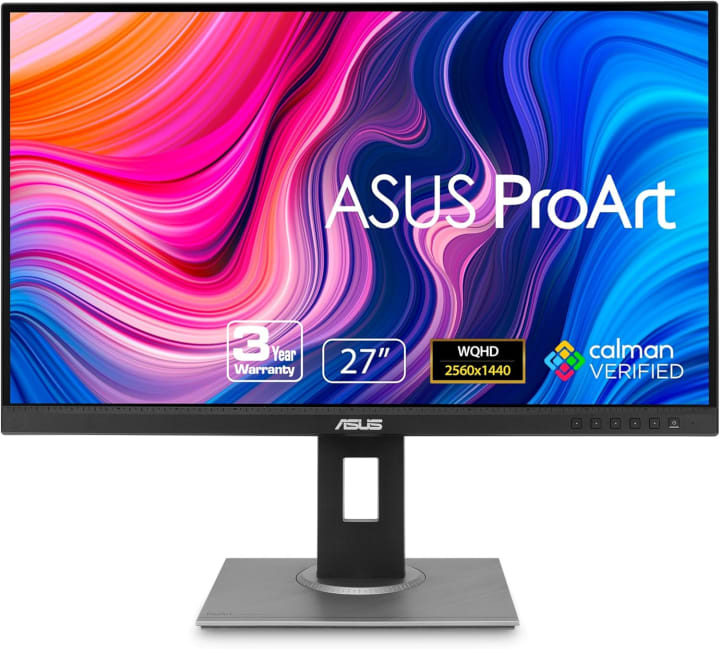
ASUS ProArt Display PA278QV 27-inch QHD monitor delivers professional-level color accuracy without a painful price tag. It’s aimed at creatives and office workers who need precision but also care about value.
Key Features:
27-inch QHD (2560x1440) IPS display
Factory-calibrated color accuracy
Fully adjustable stand
HDMI, DisplayPort, and USB hub
Pros:
Excellent value for the quality
Strong color accuracy out of the box
Flexible ergonomics
Cons:
Not 4K resolution
No USB-C connectivity
Final Verdict:
Best for budget-conscious professionals or students who want accuracy and comfort without overspending.
Top Picks Section
Overall Best: Dell UltraSharp U2723QE sharp visuals, ergonomic design, and excellent connectivity.
Editor’s Choice: LG 34WN80C-B UltraWide immersive ultrawide monitor that’s a multitasker’s dream.
Budget Pick: ASUS ProArt Display PA278QV affordable but color-accurate and dependable.
How It Works Section
Computer monitors use LCD, IPS, or OLED technology to display images. Work monitors often prioritize:
Resolution for sharp text and detailed graphics (1080p, 1440p, or 4K).
Refresh rate for smooth visuals (60Hz is fine for work, higher if you also game).
Color accuracy for tasks like design or video editing.
Connectivity like HDMI, DisplayPort, and USB-C to pair easily with laptops or desktops.
Unlike TVs, work monitors are built for long hours of productivity: better eye-care features, adjustable stands, and minimal bezels for dual setups.
Buying Guide – How to Choose the Right Work Monitor
When shopping for a work monitor, consider these factors:
Budget: Prices range widely. Higher doesn’t always mean better—focus on what fits your workflow.
Resolution: 4K is amazing for detail, but 1440p is often enough for most office tasks.
Size and space: 27-inch is a sweet spot, while ultrawide requires more desk space.
Connectivity: USB-C is a lifesaver for modern laptops.
Ergonomics: Adjustable stands reduce strain during long work hours.
Color accuracy: Important for designers, editors, and content creators.
FAQs
Q1: Is 4K necessary for work monitors?
Not always. 4K is fantastic for design and detail-heavy work, but 1440p often offers a good balance of clarity and cost.
Q2: Are ultrawide monitors better than dual monitors?
Depends on your preference. Ultrawide gives seamless space without bezels, while dual monitors let you mix and match resolutions and sizes.
Q3: Can work monitors also be used for gaming?
Yes, but most prioritize color and comfort over refresh rate. If gaming is a priority, look for at least 120Hz refresh.
Q4: Do I need USB-C connectivity?
Not mandatory, but it’s incredibly convenient for MacBooks and newer laptops. It allows charging and display through a single cable.
Q5: What’s the best size for a work monitor?
27 inches is ideal for most desks. Bigger screens like 32-inch or ultrawide monitors are better if you have the space.
Conclusion
Choosing the right monitor for work in 2025 comes down to balancing budget, space, and your workflow needs. The Dell UltraSharp U2723QE is the best overall choice for clarity and ergonomics. The LG 34WN80C-B UltraWide delivers unmatched multitasking efficiency, while the ASUS ProArt PA278QV proves you don’t need to overspend to get professional-grade quality.
No matter which you pick, upgrading your monitor will “definately” transform the way you work reducing eye strain, boosting focus, and making your day smoother.
Amazon Disclaimer
As an Amazon Associate, I earn from qualifying purchases. This comes at no extra cost to you, but it helps support honest testing and reviews like this.

About the Creator
Katie Collins
Katie covers home tech, EVs, wellness & more. She aims to help people make smart buying choices & reach life goals.
Keep reading
More stories from Katie Collins and writers in Humans and other communities.
Our Favorite iPhone 7 Plus Cases
Last month, I dropped my iPhone 7 Plus while rushing out of a coffee shop. It slipped from my hand, bounced once on the pavement, and my heart sank before I even picked it up. The good news? The screen survived. The bad news? The cheap case I bought on impulse had cracked at the corner and barely cushioned the fall. That moment made me realize how many of us underestimate the importance of a good phone case not just any case, but one that combines protection, comfort, and style for everyday use.
By Katie Collins4 months ago in Humans



Comments
There are no comments for this story
Be the first to respond and start the conversation.