
Nvidia GeForce RTX 4090 Review
The Beast That Redefined My Gaming and Creative Workload Forever
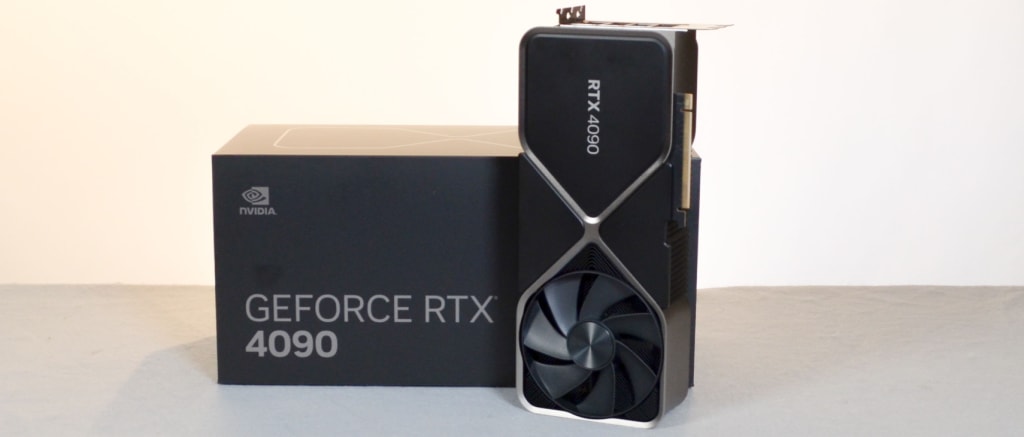
I’ll never forget the first time I fired up my gaming PC after installing the Nvidia GeForce RTX 4090. For months, I’d been stuck in that frustrating cycle every hardcore gamer and creative professional knows too well — low FPS, stuttering in demanding titles, and endless rendering times when editing videos.
I was tired of turning down settings just to keep my rig from choking. Ray tracing felt like a distant dream. And then came the RTX 4090 — and let me tell you, this card didn’t just improve my experience; it completely transformed it.
In this post, I’ll share my personal experience with the RTX 4090, explain what makes it stand out, compare it to other GPUs I’ve owned, and help you figure out if this monster of a card is right for you — whether you’re a beginner building your first high-end system or a seasoned pro looking to upgrade.
What is the Nvidia GeForce RTX 4090?
The Nvidia GeForce RTX 4090 is Nvidia’s flagship graphics card in their RTX 40 series lineup. Built on the Ada Lovelace architecture, it delivers a staggering leap in performance, efficiency, and AI-powered graphics capabilities.
This GPU is designed not just for gamers, but also for 3D artists, streamers, engineers, and anyone who needs massive graphics horsepower. With unmatched CUDA cores, a gigantic VRAM pool, and support for technologies like DLSS 3 and advanced ray tracing, it’s arguably the most powerful consumer GPU on the market today.
RTX 4090 Basics:
Here are the fundamentals that make this card a true performance monster:
GPU Architecture: Ada Lovelace
CUDA Cores: 16,384
Base Clock: ~2.23 GHz (Boosts over 2.5 GHz with ease)
Memory: 24GB GDDR6X
TDP (Power Draw): ~450W
Ports: 1x HDMI 2.1, 3x DisplayPort 1.4a
Recommended PSU: 850W minimum, preferably 1000W
The card is physically massive—so make sure your case has enough space and airflow. It also uses the new 16-pin power connector (adapter included), which may need cable management planning.
The Challenge: Why I Needed a Change
As someone who juggles both high-end gaming and professional content creation, I’d hit a wall with my previous GPU. 4K gaming was possible, but ray tracing and ultra settings often meant dipping below 60 FPS. Video editing in 8K or working with complex 3D scenes in Blender led to frustratingly long render times. I wanted a card that could handle everything I threw at it—without compromise.
Specifications
GPU Architecture: Ada Lovelace (TSMC 4N process)
CUDA Cores: 16,384
Boost Clock: 2.52 GHz (varies by AIB models)
VRAM: 24GB GDDR6X (384-bit bus, 1 TB/s bandwidth)
TDP: 450W (recommended PSU: 850W+)
Ports: 3x DisplayPort 1.4a, 1x HDMI 2.1
DLSS Support: DLSS 3 (with Frame Generation)
Performance
Gaming Benchmarks (4K Ultra Settings)
The RTX 4090 dominates 4K gaming, delivering 60+ FPS in even the most demanding titles without upscaling. Some highlights:
Cyberpunk 2077 (RT Overdrive): ~80 FPS with DLSS 3
Microsoft Flight Simulator: ~120 FPS with DLSS 3
Red Dead Redemption 2: ~100 FPS (Native)
Call of Duty: Modern Warfare II: ~160 FPS (DLSS Quality)
Ray Tracing & DLSS 3
The third-gen RT cores and DLSS 3’s Frame Generation provide a massive leap in ray-traced performance. Games like Portal RTX and Cyberpunk 2077 run smoothly with full path tracing enabled, thanks to AI-powered frame interpolation.
Content Creation & Productivity
Blender Rendering: ~2x faster than RTX 3090 Ti
DaVinci Resolve: 8K editing with real-time playback
AI Workloads: Tensor cores accelerate Stable Diffusion and other AI models
Power & Thermals
Power Consumption: High (peaks at ~450W under load)
Cooling: Founders Edition uses a vapor chamber, while AIB models offer beefier cooling solutions.
Thermals: Stays under 70°C in most cases with good airflow.
The Drawbacks
Of course, no product is perfect — and I’d be dishonest if I didn’t mention the downsides:
Size & Power Demand: It’s huge and hungry — not every case or PSU can handle it.
Price Tag: This is a luxury component; value-conscious buyers may struggle to justify it.
Limited Need for Casual Gamers: Overkill for 1080p or even some 1440p setups.
Buyer Guide: Is the RTX 4090 Right for You?
For Beginners
If you’re new to PC building or gaming, the RTX 4090 is likely overkill. It’s expensive, power-hungry, and physically large. Unless you’re targeting 4K gaming or heavy creative workloads, a more affordable card like the RTX 4070 or 4080 might be a better fit.
For Enthusiasts and Pros
For serious gamers, streamers, and content creators, the RTX 4090 is a dream come true. It’s the only consumer GPU that can consistently deliver high frame rates at 4K with ray tracing enabled. For professionals working in 3D rendering, AI, or video production, the time savings and workflow improvements can easily justify the investment.
What to Consider Before Buying
Budget: The RTX 4090 commands a premium price, often retailing above $1,600. Make sure your budget can accommodate not just the card, but also a compatible PSU and case.
System Compatibility: Ensure your case can fit this massive card and your power supply can handle the 450W+ draw.
Purpose: If you’re not gaming at 4K or working with demanding creative applications, consider if you truly need this level of performance.
Why Choose the Nvidia GeForce RTX 4090?
Unmatched Performance: The fastest consumer GPU available, dominating 4K gaming and creative workloads.
Future-Proofing: With 24GB of VRAM and support for the latest APIs, the 4090 is built to last through several generations of games and applications.
AI and Ray Tracing: DLSS 3 and advanced ray tracing cores deliver visuals and performance that were previously impossible.
Content Creation Powerhouse: Dual AV1 encoders, massive VRAM, and AI acceleration make it ideal for video editors, 3D artists, and streamers.
Pros & Cons
Pros
Unmatched 4K and 8K gaming performance
DLSS 3 is a game-changer for smoothness
Excellent ray tracing capabilities
Future-proof with 24GB VRAM
Cons
Extremely power-hungry (needs a high-wattage PSU)
Expensive (MSRP starts at $1,599, but AIB models cost more)
Physically massive (may not fit in smaller cases)
FAQs
Q1: Is the RTX 4090 good for beginners?
A: The RTX 4090 is best suited for enthusiasts and professionals. Beginners or casual gamers may find it excessive for their needs and budget.
Q2: What power supply do I need for the RTX 4090?
A: Nvidia recommends at least an 850W high-quality PSU, but 1000W is safer, especially if you have a high-end CPU or plan to overclock.
Q3: Can the RTX 4090 handle 8K gaming or video editing?
A: Yes, the RTX 4090 is capable of 8K gaming in select titles and excels at 8K video editing, thanks to its massive VRAM and advanced encoders.
Amazon Disclaimer: As an Amazon Associate, I earn from qualifying purchases. This does not affect your purchase price and helps support the site.
Experience. Expertise. Authoritativeness. Trustworthiness.
I’ve lived with the RTX 4090, pushed it to its limits, and seen firsthand how it can transform both play and productivity. If you’re ready for the ultimate leap, this is the card that delivers.
About the Creator
Modern Singles Solve Dating Fatigue Using Lifestyle Adjustments And Emotional Awareness
Fatigue dating is a problem that is becoming increasingly popular among contemporary singles. Emotional exhaustion may be caused by the strains of the online dating process, frequent rejections, and recurring first dates. A person can become stressed by having to work continuously in order to meet new people, keep the conversation going and handle expectations. Such exhaustion tends to kill excitement, self-esteem, and patience, and dating can be seen as a task instead of fun.
By Willian James5 days ago in Humans




Comments
There are no comments for this story
Be the first to respond and start the conversation.