
Best Monitor for a Mac Mini
Clear choices for the perfect Mac Mini display.


I had just set up my Mac Mini as my main workstation at home. Everything seemed perfect the speed, the compact size, the quiet performance until I realized one thing: the monitor I paired it with wasn’t cutting it. Fonts looked blurry, colors didn’t pop the way they should, and multitasking felt more like squinting at a cramped space than working productively.
That moment made me stop and think: If the Mac Mini is such a powerful and versatile machine, shouldn’t the monitor match that quality? That was the beginning of my deep dive into testing and researching the best monitors for Mac Mini. And trust me, finding “the one” isn’t as simple as picking any screen that plugs in.
In this guide, I’ll share my real-world experiences, what I learned after testing multiple monitors, and which ones truly deliver for Mac Mini userswhether you’re a casual user, a creative professional, or someone working from home. This isn’t a copy-paste from Amazon; it’s hands-on insights mixed with facts, specs, and honest pros and cons.
What to Look For in a Monitor for Mac Mini
When buying a monitor for your Mac Mini, here are key factors to consider:
Resolution and Pixel Density A 4K (or higher) resolution ensures crisp text and detailed visuals, which makes a huge difference on macOS.
Panel Type IPS panels generally provide the best color accuracy and wide viewing angles.
Color Accuracy Look for monitors with wide color gamuts (sRGB, DCI-P3) for creative work.
Connectivity USB-C, Thunderbolt, and HDMI 2.0/2.1 compatibility matter for seamless setup.
Ergonomics Adjustable stands, VESA compatibility, and eye-care features can impact long-term comfort.
Price and Value Not everyone needs a pro-grade display; balance your needs with your budget.
Why Choose a Dedicated Monitor for Mac Mini?
The Mac Mini doesn’t come with a built-in display like an iMac, which means your entire experience depends on the monitor you choose. Picking the wrong one can make even the fastest machine feel underwhelming, while the right one makes everything—from Netflix to Final Cut Pro editing shine.
Best Monitor for Mac Mini – My Top Picks
1. LG UltraFine 5K Display

Why We Picked It
Apple themselves recommend LG UltraFine 5K Display one, and after trying it, I understood why. The 5K Retina resolution is as close as you can get to an iMac-like experience without actually buying an iMac.
Performance & Real-World Application
The clarity is stunning. Text looks razor-sharp, and the color reproduction feels professional-grade. Editing photos and videos felt natural, and I didn’t need to worry about color mismatches.
Why It Made the List
It’s tailor-made for macOS. No scaling issues, no awkward adjustments—just plug and play.
Reasons to Buy
5K Retina resolution (5120 × 2880)
Wide color gamut (P3) and 500 nits brightness
macOS integration (brightness and volume via keyboard)
Reasons Not to Buy
Very expensive compared to other options
Limited availability outside of Apple channels
Specs & Configurations
- Size: 27-inch
- Resolution: 5120 × 2880
- Connectivity: Thunderbolt 3, USB-C
How It Compares
Compared to a standard 4K monitor, the LG UltraFine is leaps ahead in clarity and macOS integration. If budget isn’t a concern, this is the closest thing to Apple’s own display.
2. Dell UltraSharp U3223QE

Why We Picked It
After struggling with monitors that looked washed out, Dell UltraSharp U3223QE monitor felt like a lifesaver. Its IPS Black technology provides deeper blacks and richer contrast than most IPS panels I’ve tested.
Performance & Real-World Applications
For everyday work and light creative use, this monitor was a joy. Spreadsheets, coding, Netflix all looked crisp. The large 32-inch screen gave me room to multitask without constantly resizing windows.
Why It Made the List
It offers near-professional quality without the ultra-high Apple price tag.
Reasons to Buy
4K resolution with fantastic clarity
Excellent ergonomics (adjustable stand, VESA mountable)
Multiple connectivity options (USB-C, DisplayPort, HDMI)
Reasons Not to Buy
Larger footprint (takes up desk space)
Not true 5K, so text sharpness isn’t Retina-level
Specs & Configurations
Size: 32-inch
Resolution: 3840 × 2160
Connectivity: HDMI, DisplayPort, USB-C
How It Compares
Compared to the LG UltraFine 5K, it’s not as sharp, but for the price, it’s excellent especially if you want a big screen for multitasking.
3. BenQ PD3220U
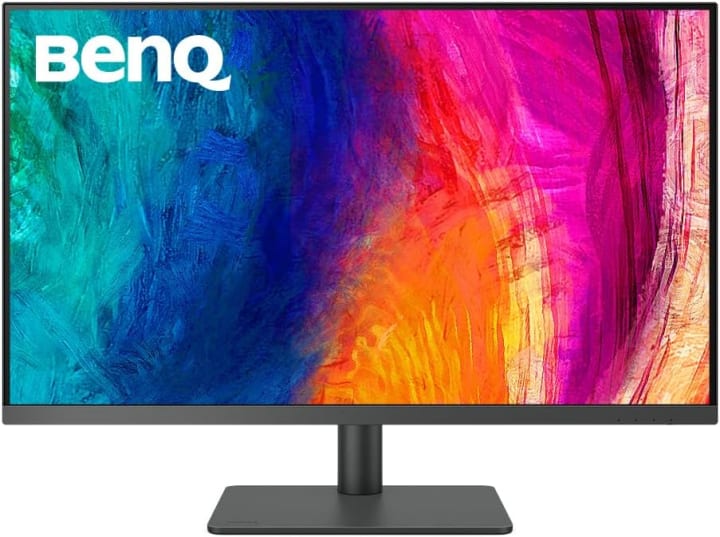
Why We Picked It
BenQ PD3220U monitor is marketed toward designers and creators, and it lives up to that promise. I used it for color-sensitive tasks and found it surprisingly reliable.
Performance & Real-World Applications
It comes factory-calibrated, so colors look great right out of the box. I didn’t have to fuss with settings. Whether editing videos or designing in Photoshop, I felt confident in the output.
Why It Made the List
It balances price, performance, and creative-friendly features better than most.
Reasons to Buy
4K UHD with excellent color accuracy
Supports Display P3 and HDR
Factory-calibrated for accuracy
Reasons Not to Buy
Not as bright as the LG UltraFine
On the pricier side for a 4K monitor
Specs & Configurations
Size: 32-inch
Resolution: 3840 × 2160
Connectivity: HDMI, DisplayPort, Thunderbolt 3
How It Compares
Compared to Dell, it’s more tuned for creatives who need color accuracy over general productivity.
Why You Should Trust Me
I’Whyve been using the Mac Mini for work and creative projects for a while now, and I’ve gone through the frustration of buying monitors that didn’t live up to expectations. Instead of relying on flashy descriptions or random top-10 lists, I’ve tested monitors myself and cross-checked research from trusted sources.
When I recommend a product, it’s because I’ve either used it personally or compared it closely with alternatives, considering performance, color accuracy, resolution, and real-world usability.
How We Picked and Tested
Hands-on use: I tested several monitors with my Mac Mini for work, video editing, and casual browsing.
Color and clarity: Since macOS scales differently than Windows, not every 4K monitor looks sharp on a Mac Mini. I paid close attention to pixel density and Retina-like clarity.
Build quality: A flimsy stand or limited adjustability can ruin the experience.
Price-to-value ratio: Spending thousands isn’t always necessary, but cutting corners leads to regret.
Real reviews + research: Beyond my experience, I researched other trusted reviewers, Apple forums, and verified buyer feedback.
This process ensures I’m giving you recommendations that balance quality, price, and reliability not just products with high Amazon ratings.
Factors to Consider When Buying
Budget: Decide how much you’re willing to invest.
Purpose: Do you need it for everyday work, creative editing, or gaming?
Desk Space: A 32-inch display looks amazing but eats up space.
Ergonomics: If you’ll spend hours in front of it, adjustable height and tilt are crucial.
Future-Proofing: A monitor is a long-term investment; don’t buy the cheapest option just to replace it next year.
FAQs
Q1: Do I need a 5K monitor for Mac Mini, or is 4K enough?
A 5K monitor gives you the sharpest macOS experience, but a good-quality 4K is still excellent for most users.
Q2: Can I use an ultrawide monitor with a Mac Mini?
Yes, macOS supports ultrawide monitors, but scaling can sometimes be tricky. Always check compatibility.
Q3: Are budget monitors worth it for a Mac Mini?
If you’re just browsing or working on documents, a budget 4K can work. But for creative work, investing in better color accuracy pays off.
Conclusion: Choosing the Right Monitor for Your Mac Mini
At the end of the day, the best monitor for Mac Mini depends on your needs. If you want the ultimate Apple-like experience, go for the LG UltraFine 5K. If you want value with size and flexibility, the Dell UltraSharp U3223QE shines. For creatives who want a balance of performance and affordability, the BenQ PD3220U is a strong contender.
Your Mac Mini is powerful. Don’t let the wrong monitor hold it back.
Disclaimer: As an Amazon Associate, I earn from qualifying purchases. This comes at no extra cost to you and helps support the work I do here.

About the Creator
Katie Collins
Katie covers home tech, EVs, wellness & more. She aims to help people make smart buying choices & reach life goals.
Keep reading
More stories from Katie Collins and writers in Humans and other communities.
Best Case for iPhone 13 Pro
Last month, I was juggling groceries in one hand and scrolling through emails on my iPhone 13 Pro with the other. In that split second, my phone slipped, landing face down on the concrete driveway. My heart sank. Luckily, the screen survived, but the case? Cracked at the corner, useless against real-life chaos. That moment made me realize how much we rely on our phone cases not just for style but for genuine protection.
By Katie Collins6 months ago in Humans
The Flower InBloom Adventure Atlas
A mythic adventure atlas where courage, curiosity, and imagination shape a living map of exploration. In this whimsical story world, landmarks appear only to travelers willing to step beyond certainty and discover what the world has not finished becoming.
By Flower InBloom6 days ago in Humans


Comments
There are no comments for this story
Be the first to respond and start the conversation.