
What Is the Best CPU Cooler for Gaming? (Top Picks)
Discover what the best CPU cooler for gaming is. Explore top air and liquid coolers, expert tips, and FAQs to keep your gaming PC cool and fast.


What Is the Best CPU Cooler for Gaming?
if you love gaming, you know how hot your computer can get. That’s why it’s important to ask: What is the best CPU cooler for gaming? A good cooler keeps your CPU cool, quiet, and fast. Without one, your games might lag or even crash.
In this guide, we’ll help you pick the best CPU cooler for your gaming setup. We’ll explain the types of coolers, show you the top choices, and answer your questions. Let’s dive in!
Why You Need the Best CPU Cooler for Gaming
Gaming makes your CPU work hard. When it works hard, it gets hot. If it gets too hot, it slows down. That’s called thermal throttling. It can make your games stutter or freeze.
To stop this, you need a CPU cooler. It pulls heat away from your CPU. This helps your computer stay cool and run smoothly. So, if you want better performance, a cooler is a must.
Types of CPU Coolers for Gaming
Before we find out what is the best CPU cooler for gaming, let’s look at the two main types:
1. Air Coolers
Air coolers use fans and metal fins to move heat away. They are:
- Easy to install
- Budget-friendly
- Great for most gamers
However, they can be big and may not fit in small cases.
2. Liquid Coolers (AIO)
Liquid coolers use water and a pump to cool your CPU. They are:
- Better for high-end gaming
- Quieter under load
- Sleek and stylish
But they cost more and are a bit harder to install.
How to Choose the Best CPU Cooler for Gaming
Even though we’ve listed the best coolers, you still need to pick the right one for your setup. Here’s how:
1. Check Your CPU
Some CPUs run hotter than others. For example, Intel Core i9 or AMD Ryzen 9 need better cooling than a Ryzen 5.
2. Look at Your Case Size
Big coolers need big cases. Always check the cooler’s size and your case’s space.
3. Think About Noise
Some coolers are loud. If you like quiet gaming, pick a cooler with low noise levels.
4. Set Your Budget
You don’t need to spend a lot. There are great coolers under $50. But if you want the best, be ready to pay more.
The Top 4 Best CPU Coolers for Gaming That You Can Buy Today
- 🥇 Best Overall: Arctic Liquid Freezer III A-RGB
- 🥈 Best Air Cooler: Noctua NH-D15 G2
- 🥉 Best Budget Liquid Cooler: Cooler Master MasterLiquid Core II
- 🏅 Best Budget Air Cooler: Arctic Freezer 36
1. 🥇 Best Overall: Arctic Liquid Freezer III A-RGB

Looking for a cooler that doesn’t just keep your CPU chilled but also adds flair to your build? The ARCTIC Liquid Freezer III 360 A-RGB might just be your perfect match. Whether you're pushing frame rates in AAA titles or streaming your gameplay, this all-in-one (AIO) water cooler delivers performance, aesthetics, and smart engineering in one sleek package.
Why Gamers Love the ARCTIC Liquid Freezer III 360 A-RGB
Let’s break down what makes this cooler a top contender in the world of gaming CPU coolers:
- 360mm Radiator with Pre-Installed Fans: The triple-fan setup (200–2000 RPM) ensures efficient heat dissipation, even under heavy loads. The fans are optimized for static pressure, making them ideal for dense radiators.
- Integrated VRM Cooling: A standout feature is the built-in VRM fan on the pump block. It actively cools the voltage regulator modules—something most AIOs overlook. This means better stability during long gaming sessions or overclocking.
- PWM-Controlled Pump and Fans: The pump and fans adjust automatically based on your CPU’s temperature. This keeps noise levels low when you're browsing and ramps up cooling when you're gaming hard.
- Intel & AMD Compatibility: With support for LGA1851, LGA1700, and AMD AM5/AM4 sockets, this cooler is ready for the latest processors. It even includes a contact frame for Intel sockets to improve thermal contact and reduce CPU bending.
- Aesthetic Appeal: The white finish and A-RGB lighting on both the fans and pump cap make it a visual treat. Whether you're building a white-themed rig or just want your setup to glow, this cooler delivers.
Real-World Performance: What to Expect
So, how does it perform in a gaming rig?
- Thermal Efficiency: In stress tests, the Liquid Freezer III 360 A-RGB keeps high-end CPUs like the Intel Core i9 and Ryzen 9 well below throttling thresholds—even during extended gaming marathons.
- Noise Levels: Thanks to its thick radiator and optimized fan curves, it remains whisper-quiet under moderate loads. Even at full tilt, the noise is more of a soft hum than a distracting roar.
- VRM Temperatures: The dedicated VRM fan can reduce motherboard temperatures by up to 5°C, which is a big deal if you're overclocking or running demanding workloads.
Installation Experience: A Few Things to Know
Installing the ARCTIC Liquid Freezer III 360 A-RGB is mostly straightforward, but there are a few quirks:
- Intel Users: You’ll need to replace the stock socket bracket with ARCTIC’s included contact frame. It’s a bit more involved but ensures better thermal contact.
- Cable Management: ARCTIC cleverly routes fan and RGB cables through the sleeved tubing, keeping your build clean and clutter-free.
- Case Compatibility: The 38mm-thick radiator is chunkier than most. Make sure your case supports 360mm radiators with extra clearance.
Is It Worth It?
Absolutely—if you want a high-performance CPU cooler for gaming that balances cooling power, aesthetics, and value. It’s especially ideal for:
- Gamers with high-end CPUs
- Builders who want a white-themed or RGB-lit setup
- Overclockers looking for VRM cooling support
- Anyone who values quiet performance
The ARCTIC Liquid Freezer III 360 A-RGB isn’t just another AIO—it’s a thoughtfully engineered solution that addresses real-world gaming needs. From its VRM fan to its sleek design, it’s built to impress both inside and out.
2. 🥈 Best Air Cooler: Noctua NH-D15 G2

If you're wondering whether air cooling can still compete with liquid solutions in 2025, the Noctua NH-D15 G2 answers with a confident yes. This dual-tower beast is the gold standard for gamers who want top-tier thermal performance without diving into the world of pumps and radiators. Whether you're running an AMD AM5 chip or Intel’s latest LGA1851 processor, this cooler is built to handle the heat, literally.
Why the Noctua NH-D15 G2 Stands Out
Let’s be honest—Noctua’s signature brown-and-beige color scheme isn’t for everyone. But once you look past the aesthetics, you’ll find a cooler that’s all about performance, reliability, and silence. Here’s what makes it a standout choice for gamers:
- Dual-Tower Heatsink: Design With two massive fin stacks and eight heat pipes, the NH-D15 G2 offers exceptional surface area for heat dissipation. This means lower CPU temps even during marathon gaming sessions.
- Next-Gen NF-A14x25r G2 Fans: These 140mm fans are engineered for high static pressure and low noise. They spin up to 1500 RPM and feature Noctua’s advanced SSO2 bearings for long-term durability.
- Socket Compatibility: Supports Intel LGA1851, LGA1700, and AMD AM5/AM4 out of the box. No need for extra brackets or adapters—just plug and play.
- Offset Design for Better Clearance: The asymmetrical layout improves RAM and PCIe slot clearance, making it easier to build in tighter spaces without sacrificing cooling power.
- Premium Accessories Included: From NT-H2 thermal paste to a Torx T20 screwdriver and low-noise adapters, Noctua includes everything you need for a smooth installation.
Real-World Gaming Performance
So, how does it perform when the pressure’s on? In benchmark tests, the NH-D15 G2 keeps high-end CPUs like the Ryzen 9 7950X and Intel Core i9-14900K well below thermal throttling thresholds, even under full load.
- Idle Temps: 30–35°C
- Gaming Load: 60–70°C
- Stress Testing: Peaks around 80°C, depending on ambient temps and case airflow
And the best part? It does all this while staying whisper-quiet. Even at full speed, the fans produce less than 25 dBA—quieter than a whisper in a library.
Installation Tips for a Hassle-Free Setup
Installing a large air cooler can feel intimidating, but Noctua makes it surprisingly easy:
- Use the SecuFirm2+ Mounting System: It’s rock-solid and supports both Intel and AMD platforms.
- Apply the NT-H2 Thermal Paste: A small pea-sized dot in the center is all you need.
- Attach Fans After Mounting: This gives you more room to maneuver and avoids bent fins.
- Check RAM Clearance: Standard-height RAM fits fine, but tall modules may require repositioning the front fan.
Is the NH-D15 G2 Right for You?
If you’re building a high-performance gaming PC and want air cooling that rivals AIOs, this cooler is a no-brainer. It’s ideal for:
- Gamers who value silence and stability
- Overclockers looking for thermal headroom
- Builders who prefer low-maintenance cooling
- Users who want long-term reliability (backed by a 6-year warranty)
Yes, it’s big. Yes, it’s brown. But if you care more about cooling performance and acoustic comfort than RGB flash, the Noctua NH-D15 G2 is worth every penny.
3. 🥉 Best Budget Liquid Cooler: Cooler Master MasterLiquid Core II

If you're building a gaming PC on a budget but still want the cooling power of a premium setup, the Cooler Master 360 Core II AIO CPU Liquid Cooler is a game-changer. It’s proof that you don’t need to spend a fortune to keep your high-performance CPU cool and quiet—even during intense gaming marathons.
Why the Cooler Master 360 Core II Is a Budget Winner
Let’s face it: not all budget coolers are created equal. Some cut corners on performance, others on build quality. But this one? It strikes a rare balance between affordability, aesthetics, and thermal efficiency. Here’s what makes it stand out:
- 360mm Radiator with Triple 120mm PWM Fans: More surface area means better heat dissipation. The included fans spin up to 1750 RPM, delivering solid airflow without sounding like a jet engine.
- G9R Dual Chamber Pump: This upgraded pump design improves water flow and pressure, helping your CPU stay cooler under load. It’s also quieter than older models, which is a big plus for streamers and content creators.
- Infinity Mirror aRGB Pump Cap: Want your rig to look as cool as it runs? The infinity mirror effect adds a futuristic glow, syncing beautifully with your system’s lighting setup.
- 400mm Tubing for Flexible Mounting: Whether you’re top-mounting or front-mounting the radiator, the long tubing gives you the flexibility to build your way.
- Broad Compatibility: Supports AMD Ryzen AM5/AM4 and Intel LGA 1851/1700 platforms out of the box. No extra brackets, no headaches.
Real-World Gaming Performance
So, how does it hold up in actual gameplay? Surprisingly well. In tests with CPUs like the Ryzen 9 7900X and Intel Core i9-14900K, the Cooler Master 360 Core II kept temperatures in check even during CPU-heavy titles like Cyberpunk 2077 and Baldur’s Gate 3.
- Idle Temps: 32–36°C
- Gaming Load: 65–75°C
- Stress Testing: Peaks around 80°C, which is impressive for a cooler in this price range
And the noise? Minimal. Even at full fan speed, it stays under 35 dBA—quiet enough to keep your focus on the game, not the hum of your PC.
Installation: Easier Than You’d Expect
Cooler Master had DIY builders in mind. The installation process is smooth, even for first-timers:
- Pre-installed Fans: Saves time and effort.
- Unified Cable System: One cable handles both ARGB and PWM, reducing clutter.
- Clear Instructions: Whether you're on Intel or AMD, the included guide walks you through every step.
Just don’t forget to grab some thermal paste—it’s not included in the box.
Who Should Buy This Cooler?
The Cooler Master 360 Core II AIO is perfect for:
- Gamers upgrading from stock coolers
- Budget-conscious builders who want liquid cooling
- Streamers and creators who value quiet performance
- Anyone who wants a stylish, RGB-lit setup without overspending
In short, this cooler punches well above its price tag. It may not dethrone the top-tier AIOs, but for its cost, it delivers reliable cooling, sleek design, and broad compatibility—all without breaking the bank.
4. 🏅 Best Budget Air Cooler: Arctic Freezer 36
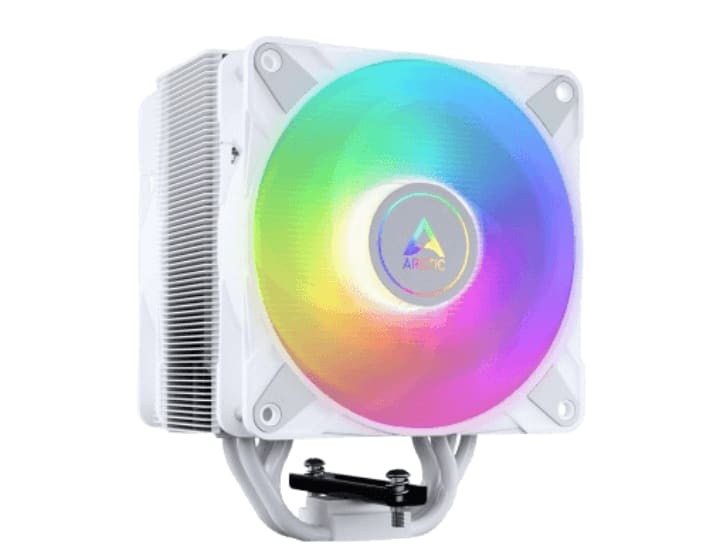
If you're hunting for a budget-friendly CPU air cooler that doesn’t skimp on performance or style, the ARCTIC Freezer 36 A-RGB is a standout pick. It’s designed for gamers and PC builders who want solid thermal control, whisper-quiet operation, and a splash of RGB—all without draining their wallet.
Why the ARCTIC Freezer 36 A-RGB Deserves Your Attention
This cooler may be affordable, but it’s packed with features that punch well above its price tag. Let’s take a closer look:
- Single-Tower, Push-Pull Design: Equipped with two 120mm P-series fans in a push-pull configuration, it maximizes airflow through the heatsink for better heat dissipation. This setup is rare at this price point and gives it a performance edge.
- Pressure-Optimized Fans (200–2000 RPM): The included fans are tuned for static pressure, making them ideal for dense fin stacks. They’re also PWM-controlled, so they only ramp up when needed, keeping your rig cool and quiet.
- ARGB Lighting with a Clean Aesthetic: Want your build to glow? The A-RGB fans add vibrant lighting effects that sync with your motherboard’s RGB software. Available in black or white, it fits a wide range of build themes.
- Four Direct-Touch Heatpipes: These copper heatpipes make direct contact with your CPU, improving thermal transfer and helping maintain boost clocks during gaming or multitasking.
- MX-6 Thermal Compound Included: No need to buy paste separately—ARCTIC includes a tube of its high-performance MX-6 thermal compound, known for its excellent conductivity and easy application.
Real-World Performance: Cool, Quiet, and Capable
So, how does it perform in the heat of battle? Surprisingly well for a cooler under $40:
- Idle Temps: 33–36°C
- Gaming Load: 60–70°C
- Stress Testing: Peaks around 75–80°C on CPUs like the Ryzen 7 7700X or Intel Core i5-14600K
Even better, it stays quiet under pressure. The fans rarely exceed 35 dBA, making it a great choice for streamers or anyone who values a peaceful workspace.
Installation: Quick and Painless
ARCTIC designed the Freezer 36 with ease-of-use in mind. Here’s what makes setup a breeze:
- Tool-Free Fan Mounting: The fans snap into place—no clips or screws required.
- Universal Socket Support: Compatible with Intel LGA 1700/1851 and AMD AM4/AM5 platforms.
- Compact Footprint: At just 159mm tall, it fits in most mid-tower cases and doesn’t block RAM slots.
Who Should Choose the Freezer 36 A-RGB?
This cooler is ideal for:
- Budget-conscious gamers building mid-range systems
- First-time builders looking for an easy install
- RGB lovers who want style without overspending
- Users upgrading from stock coolers for better temps and lower noise
In short, the ARCTIC Freezer 36 A-RGB is a budget air cooler that doesn’t feel budget. It’s efficient, quiet, and stylish—everything you need to keep your CPU cool without breaking the bank.
Installation Tips for CPU Coolers
Installing a cooler might seem hard, but it’s not too bad. Here are some tips:
- Read the manual: Every cooler is different.
- Use thermal paste: Most coolers come with it. If not, buy a good one.
- Tighten screws evenly: This helps the cooler sit flat on the CPU.
- Plug in the fan or pump: Don’t forget this step!
Performance Tips for Gamers
Once your cooler is installed, here’s how to get the best results:
- Keep your case clean: Dust can block airflow.
- Use good case fans: They help move hot air out.
- Check temps with software: Tools like HWMonitor or Core Temp are free.
Conclusion
So, what is the best CPU cooler for gaming? The answer depends on your needs. If you want the best of the best, go for the Arctic Liquid Freezer III A-RGB. If you prefer air cooling, the Noctua NH-D15 G2 is amazing. And if you’re on a budget, the Arctic Freezer 36 is a solid pick.
No matter what you choose, a good cooler will make your games run better and your PC last longer. Stay cool and game on!
FAQ: What Is the Best CPU Cooler for Gaming?
Q1: Do I need a CPU cooler for gaming? Yes! Gaming makes your CPU hot. A cooler keeps it safe and fast.
Q2: Is air cooling enough for gaming? For most gamers, yes. But if you overclock or use a high-end CPU, liquid cooling is better.
Q3: What size cooler should I get? It depends on your case. Always check the size before buying.
Q4: Are liquid coolers hard to install? They take a bit more time, but most come with clear instructions.
Q5: How long do CPU coolers last? Good ones can last 5–7 years or more, especially air coolers.
About the Creator
Perfect Tech Views
Welcome to Perfect Tech Views—your go-to source for clear, unbiased, and insightful tech knowledge. Whether you're a pro, a beginner, or just exploring gadgets, we've got you covered with expert guidance!
Keep reading
More stories from Perfect Tech Views and writers in Gamers and other communities.
Best Noctua CPU Cooler (Quiet and Powerful Performance)
When it comes to keeping your computer cool and quiet, the best Noctua CPU cooler is often the top choice. Noctua is known around the world for making high-quality air coolers. These coolers are quiet, powerful, and built to last. Whether you're building a gaming PC or a workstation, Noctua has a cooler that fits your needs.
By Perfect Tech Views7 months ago in Gamers
Master the Meta: How to Increase Legendarity Fast in Rush Royale 2026
The landscape of Rush Royale shifted dramatically with the introduction of the Legendarity system. For veteran players, the old days of simply stacking critical damage percentage are over. In 2026, your prowess is no longer measured solely by how many common units you have painstakingly leveled up to 15.
By Richard Baileya day ago in Gamers




Comments (1)