
Steamdeck 2-Week Review
Is it the next big console? Or something negligible?

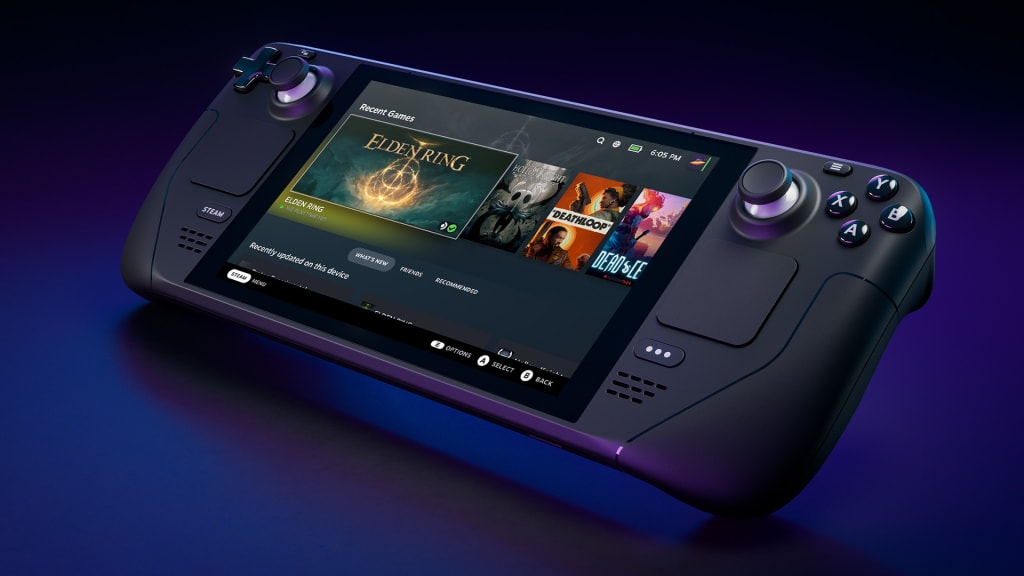
Recently, I got my Steamdeck console shipped to my house after waiting for almost a year. I was so excited that I waited in the mailroom for the mailman to come in, so I got the package before it was even checked in. I couldn't wait to play PC games on a handheld, which would also allow me to focus more on my online classes by deleting addicting games from the PC itself. So far, I've messed around and enjoyed it a lot, so I want you all to know how it really is, either before you get yours or before you decide to start saving the equivalent of hundreds of USD to get one in 2023.
For this review, I'm only going to discuss what I know from games I have played, which isn't much yet. These include Agatha Knife, Mechanika, VR Chat, Holocure, Shining Resonance Refrain, and Skullgirls. However, I am now familiar with the logistics of setting up the Deck's layout for various games, which is simple for gamers used to changing control settings. If you are not, there are various set gameplay layouts either officially or from the community. I will also discuss the desktop mode, controllers, and other aspects I feel are important.
1: The First Things You See: Games and menus
I've had minimal to no issues with the official Deck layouts just fine for RPGs, simulation games, and even fighting games (specifically Skullgirls). I've only really had to do manual button remapping for non-steam games or just for personal preference. You can press the "steam" button at any time to view or change controller settings, so you're never stuck in a game if your layout happens to be incompatible, which is nice anti-asshole design component.
If you're one to follow news from your library games and their devs, the Home screen is there for you. At the top, your most recent games (played or newly installed) will show up, and the news will continue below that. You can read the updates just as well as on any other Steam app or site.
When you open the Deck library, the first tab shows games in your library that are confirmed to run smoothly with the Steam Deck and its controls without user intervention, which is honestly another anti-asshole design choice. This prevents us from having to scroll through every game in our libraries in order to see what's confirmed to work well on the Deck. Although I will admit, the UI feels slightly clunky, the ease of access to games and settings makes up for it.
If you keep going, you'll have access to all your games, your collections, and even non-steam apps. The system will prompt you to download Google Chrome, but everything else is up to the user. Itch.io has detailed instructions on their website for how to download and play Itch games, whether they be Linux-compatible or not, on the Steamdeck. For those unaware, the Steamdeck is able to run Windows-only games due to a compatibility software called Proton, which you can force-run on non-Steam apps (it runs automatically for Steam apps). Basically, you can run anything that's not Mac-only.
2: Is it really also a PC? Yes.
As anyone following the news of this console knows, the Steamdeck not only plays PC games on a handheld, but it acts as an actual PC. It uses a Linux distro with a Dolphin desktop that can be accessed from the "steam" button menu (if you are unable to find it, go to "power" and then click "change to desktop mode"). The desktop starts out plain with only two shortcuts. One is to go back to the default mode (called "Gaming Mode"), and the other is for the Steam desktop app. The desktop app is necessary to add non-Steam games to your Steamdeck. This is done through the same means as any other PC: you find "Add non-Steam Game" under the "Games" tab at the top of the app, and you find the executable file for the game you want to add. The Itch.io tutorial also explains this process with photos throughout in case it gets confusing.
Note: For Windows-only games on Itch, you have to manually download the .zip file from the site and extract it into its own folder. You can't auto-install it from the itch desktop app, which will only work if the game is linux-compatible.
While testing sites such as Itch and Youtube in-browser, I found that even though the room I was in had spotty wifi, I had a smooth experience, and videos played in high quality without issue. The main gripe for some (especially if you have hand/arm issues like me) is that the mouse is controlled by the touchpad. This makes sense, of course, as many laptops use the same sort of tech, but it can be hard to get precise when you are only using your thumb. The scrolling also takes a bit to get used to since using the D-pad doesn't normally work. The best way to scroll is to click the scroll bar and just move up and down without letting go.
However, I would be remiss to not bring up the many creators and tinkerers that have turned their Steamdecks into fully functional standing PCs. There are quite a few videos of people who have experimented with different OS, added custom components, utilized Bluetooth in unique ways, and a lot more creative things. Valve seems to be supportive of this tinkering since it was the one to tell users they can get other OS like Windows 10 on the console, and they've also featured some people using the Steamdeck in creative ways as a form of PR for it. While I will not encourage or discourage the usage of emulators, I have heard that those familiar with setting them up will easily be able to play them as non-Steam games on the Deck.
3: The Hardware- Externally
The Deck itself is shaped like a larger and wider Nintendo Switch and is completely black. The sides of the Deck feel similar to the feeling of a Joy-Con with the R and LR buttons in the same place. When laying down, the Deck has space underneath itself so as to let the fans continue to work properly. The fan is normally super quiet: I have only really heard it get louder when I am playing VR chat and change avatars too quickly (but this doesn't affect gameplay!). The controls feel more ergonomic and sophisticated than the Switch as well.
On the left side, there is a 4-way D-pad, a gyro pad (all-way controller), and a touchpad. I personally haven't been in a situation where the left touchpad has been used, but I imagine if you're dominant on the left side, you can change it in settings. The 4-way D-pad is smooth plastic with a small dip in the center, which is also just great for sensory reasons. The gyro pads (there is another on the right side for camera movement and such) are covered in what I believe is silicone with little notches all around the edges. The amount of times I've just rubbed my thumbs in circles around those edges are countless and frequent. There isn't much of a mechanical feel to them, either, in a good way. The buttons are relatively quiet.
The right side, as a gamer might expect, has a second gyro pad, the ABXY buttons (arranged Playstation-style), and a second touchpad below them. The right touchpad is the one I use the most to control cursors in desktop mode and in games that use the touchpad/gyro layout (the main default layout besides WASD + mouse). The ABXY buttons are small and of the same size, honestly about the size as the ones on a Switch joy-con, so they are easier to press together (but of course, it's still not extemely easy). I was able to test these capabilities in Skullgirls, and after I got used to the controls (took maybe 5 minutes of the tutorial), I had it down.
The Future of the Deck?
Now, do I think this is the console to end all consoles? That the Steamdeck will be a competitor on the level of Nintendo, Microsoft, and Sony? Of course, I can't say for sure, but my initial impression is that it still feels like a Steam-specific novelty console. The distribution of the Deck has also been severely delayed due to the pandemic, so anybody ordering one now won't get it until at least 2023. It will be hard for Valve to get non-Steam users or new gamers to use the console, even if distribution becomes as simple as it is for the Big Three. The learning curve for new gamers, especially children, to use the console would be inaccessibly steep. While this isn't Valve's market, it's not one they can afford to ignore.
Maybe in 2024, things will be different, but as of now, I'm not sure if the hype will be the same outside of the Steam PC gaming community, especially as strictly PC and strictly console gamers tend to be opposing groups.
Valve has been unsuccessful with hardware releases in the past, and being unable to market outside of the community that already has its own hardware is an issue. The price for the Deck is also, depending on the model, expensive even for a well-known console today. My Switch is $200 less than what I got my Deck for, and I didn't even get the top model. The top model costs more than a new XBox or Playstation (even sometimes a gaming laptop), which is hard to justify.
So, I'm skeptical, but I could be completely proven wrong if Valve pulls something good out of its hat and is able to reach into the console gaming market. This console is a good one, and I hope Valve is able to give it that final push into the mainstream gaming world.
CONCLUSION (Tl;Dr):
The Steamdeck is a console that delivers on all of Valve's promises: it runs compatible Steam games with ease, it runs as well as a modern standing PC, and it's portable. They did not skimp on the technical specs of the console, the specific of which you can look up on the Steam Store page for it if I remember correctly. This is not a rip-off Switch; it is very much its own concept with its own unique UI and utilization of Linux and open-source software. Overall, it meets the high expectations put in place; it just has a difficult audience.
Final rating: 8.5/10
About the Creator
Eli Mendoza
I'm an author who wants to keep doing creative writing! My first novel is a YA LGBTQ fiction novel called Theory of Reality, published just last May! You can find it on Amazon or Kobo.
Keep reading
More stories from Eli Mendoza and writers in Gamers and other communities.
The Owls are Dead
There she is again, in her usual spot: a haphazard-- but very durable-- web-like contraption made of assorted weeds and branches stretching between two oak trees. My nest isn't far from there, so I see her on the days that I wake up before the sun sets.
By Eli Mendoza4 years ago in Fiction
8 Usage-Based Allocation Systems Inside Cloud Solutions
Cloud computing has changed how businesses handle their technology costs. Companies no longer need to guess their resource needs months in advance. The old days of buying expensive servers that sit idle are gone. Today's cloud platforms offer something better and smarter. They let you pay only for what you actually use.
By Arthur Leoabout 7 hours ago in Gamers




Comments
There are no comments for this story
Be the first to respond and start the conversation.