
Should I Buy Two 4TB or One 8TB NVMe SSD? (Storage Comparison Guide)
Should I buy two 4TB or one 8TB NVMe SSD? Learn the pros, cons, performance, cost, reliability, and best use cases to make the right storage decision.

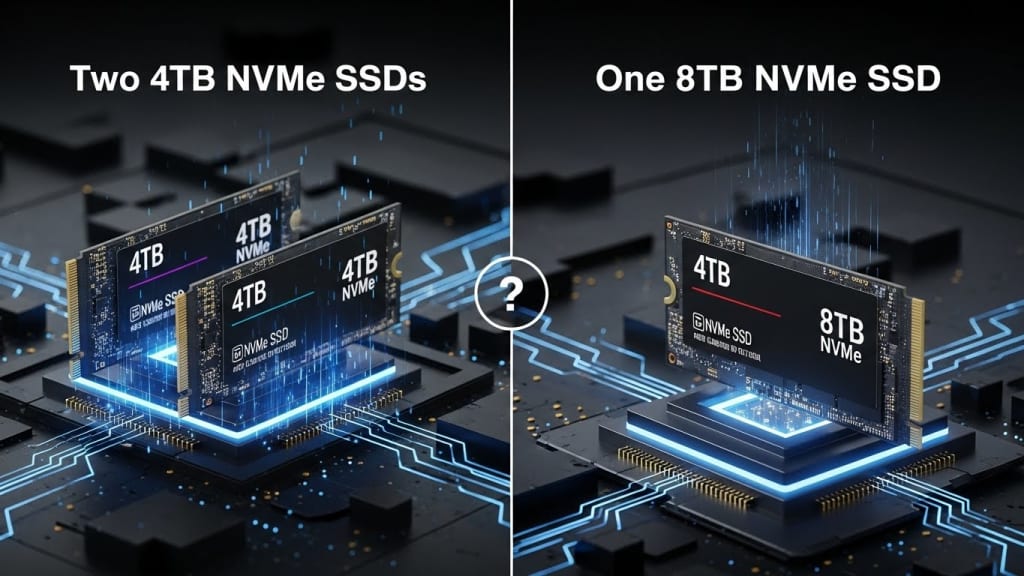
Should I buy two 4TB or one 8TB NVMe SSD?
Should I buy two 4TB or one 8TB NVMe SSD? This question is very common today because storage needs are growing fast. Games are bigger, videos are sharper, and software takes up more space than ever. Therefore, choosing the right SSD size matters more than before.
However, the choice is not as simple as it sounds. While both options give you 8TB of total storage, they behave very differently in real life. Because of that, performance, safety, price, and future upgrades must be considered carefully.
In this guide, you will clearly understand whether two 4TB NVMe SSDs or one 8TB NVMe SSD is better for you. Moreover, this article will help gamers, creators, and regular users make a smart choice.
Understanding NVMe SSDs Before You Decide
Before comparing options, it helps to understand what NVMe SSDs are. Therefore, let us keep it simple.
NVMe stands for Non-Volatile Memory Express. It is a fast way for SSDs to talk to your computer. Unlike older SATA SSDs, NVMe SSDs use the PCIe slot, which allows much higher speeds.
As a result, NVMe SSDs are used in gaming PCs, laptops, workstations, and servers. Because of their speed, they load games faster and move files quickly.
What Does Two 4TB NVMe SSDs Mean?
When you buy two 4TB NVMe SSDs, you get two separate drives. Therefore, each drive works on its own.
You can use one drive for Windows and apps, and the other drive for games or files. Also, you can set them up in RAID if your system supports it.
Because of this flexibility, many users prefer two smaller drives.
What Does One 8TB NVMe SSD Mean?
When you buy one 8TB NVMe SSD, all your storage is on a single drive. Therefore, everything stays in one place.
This setup is very clean and simple. However, it also means that if the drive fails, all data could be lost.
Still, many professionals choose one large drive because it reduces complexity.
Should I Buy Two 4TB or One 8TB NVMe SSD for Performance?
Performance is often the first thing people care about. Therefore, let us break it down step by step.
Read and Write Speeds
Most modern NVMe SSDs offer very similar speeds. However, larger drives sometimes perform slightly better.
Because of that, one 8TB NVMe SSD may have better sustained write speeds than a 4TB drive. Still, the difference is small for most users.
On the other hand, two 4TB NVMe SSDs can run tasks at the same time. Therefore, one drive can read data while the other writes data.
As a result, multitasking can feel smoother with two drives.
Real-World Performance
In real life, you may not notice a big speed difference. Games load fast on both options. Videos export quickly on both options.
So, performance alone should not decide everything.
Should I Buy Two 4TB or One 8TB NVMe SSD for Reliability?
Reliability is very important, especially for important files.
Risk of Failure
If one 8TB NVMe SSD fails, all your data is gone. Therefore, backups become very important.
However, if one 4TB drive fails, the other drive still works. Because of this, two drives reduce risk.
Backup Strategy
With two drives, you can back up one drive to the other. Therefore, safety improves without extra hardware.
Still, cloud backups or external drives are always recommended.
Should I Buy Two 4TB or One 8TB NVMe SSD for Cost?
Price matters for most buyers. Therefore, let us talk about money.
Price Per TB
Usually, two 4TB NVMe SSDs cost less than one 8TB SSD. This happens because very large drives cost more to make.
So, if the budget is tight, two 4TB drives often offer better value.
Sales and Availability
8TB NVMe SSDs are rare and expensive. Therefore, discounts are less common.
However, 4TB SSDs are popular. As a result, sales happen more often.
Should I Buy Two 4TB or One 8TB NVMe SSD for Gaming?
Gamers often ask this question. Therefore, here is a clear answer.
Game Storage
Modern games are huge. Some games need over 150GB. Because of that, storage fills up fast.
With two 4TB SSDs, you can separate games from the system. Therefore, reinstalling Windows becomes easier.
Load Times
Load times are nearly the same on both options. So, gaming speed should not worry you.
Should I Buy Two 4TB or One 8TB NVMe SSD for Video Editing?
Video editors need fast and reliable storage.
Project Organization
With two drives, you can keep footage on one drive and software on another. Therefore, editing becomes smoother.
Large Files
An 8TB drive can hold massive projects in one place. Therefore, file management feels simpler.
However, data safety favors two drives.
Should I Buy Two 4TB or One 8TB NVMe SSD for Everyday Use?
For normal users, simplicity matters.
Ease of Use
One 8TB drive is easy to manage. You see one drive letter and one storage bar.
On the other hand, two drives need more organization.
Upgrading Later
With two 4TB drives, you can upgrade one drive later. Therefore, flexibility increases.
Power Consumption and Heat Comparison
Power and heat are often ignored, but they matter.
Heat Output
One large SSD can get warmer during heavy use. Meanwhile, two drives spread the heat.
As a result, system cooling can work better with two drives.
Power Use
The power difference is small. However, two drives may use slightly more power.
Motherboard Slot Availability Matters
Your motherboard plays a big role.
Limited M.2 Slots
If your motherboard has only one M.2 slot, one 8TB SSD is the only option.
Multiple Slots
If you have two or more M.2 slots, two 4TB SSDs become a smart choice.
Should I Buy Two 4TB or One 8TB NVMe SSD for RAID?
RAID setups can change everything.
RAID 0
Two 4TB SSDs in RAID 0 increase speed. However, risk increases.
RAID 1
RAID 1 mirrors data. Therefore, safety improves, but usable space drops to 4TB.
One 8TB SSD cannot do RAID alone.
Future Proofing Your Storage Choice
Future needs should always be considered.
Software Growth
Games and software keep getting bigger. Therefore, storage needs will grow.
Upgrade Path
Two 4TB SSDs allow easier upgrades. One drive can be replaced later.
Pros and Cons Summary
Two 4TB NVMe SSDs – Pros
- Better value for money
- Improved data safety
- Flexible storage setup
- Easier upgrades
Two 4TB NVMe SSDs – Cons
- Needs more M.2 slots
- Slightly more setup effort
One 8TB NVMe SSD – Pros
- Simple and clean setup
- Fewer cables and settings
- Slightly better sustained speeds
One 8TB NVMe SSD – Cons
- Higher cost
- Single point of failure
- Limited upgrade flexibility
Who Should Buy Two 4TB NVMe SSDs?
You should buy two 4TB NVMe SSDs if:
- You want better value
- You care about data safety
- You multitask often
- Your motherboard supports it
Who Should Buy One 8TB NVMe SSD?
You should buy one 8TB NVMe SSD if:
- You want simplicity
- You have only one M.2 slot
- You manage backups well
Conclusion
Should I buy two 4TB or one 8TB NVMe SSD? The answer depends on how you use your computer. If you want better value, flexibility, and safety, two 4TB NVMe SSDs are usually the smarter choice. However, if you prefer simplicity and clean storage management, one 8TB NVMe SSD can work very well.
Both options offer excellent speed and performance, so you will not feel slow either way. Therefore, check your motherboard, budget, and future plans before deciding. In the end, the best choice is the one that fits your needs today and tomorrow.
FAQ – People Also Ask
Is it better to have one big SSD or two smaller ones?
Two smaller SSDs offer better flexibility and safety. However, one big SSD is simpler to manage.
Do two NVMe SSDs make a PC faster?
They can improve multitasking, but normal use feels similar.
Is an 8TB NVMe SSD worth it?
It is worth it if you need simplicity and have the budget.
Can I mix different NVMe SSD sizes?
Yes, different sizes work fine together.
Which option is safer for data?
Two 4TB NVMe SSDs are safer if one drive fails.
About the Creator
Perfect Tech Views
Welcome to Perfect Tech Views—your go-to source for clear, unbiased, and insightful tech knowledge. Whether you're a pro, a beginner, or just exploring gadgets, we've got you covered with expert guidance!
Keep reading
More stories from Perfect Tech Views and writers in Gamers and other communities.
Is Acer Aspire Go 15 a Good Laptop? (Guide for Daily Users)
Is Acer Aspire Go 15 a good laptop for students, home users, and office workers? This question is asked by many people who want a budget-friendly laptop that works well every day. Because laptops are expensive, choosing the right one matters a lot. Therefore, this detailed guide will help you decide clearly and confidently.
By Perfect Tech Views3 months ago in Gamers
20 Horror Game Masterpieces to Play Before You Die
Horror games have a unique ability to evoke fear and adrenaline, making them a beloved genre among gamers. However, there are some horror video games that will blow your mind, and you should play them to experience the sensations they offer. For this reason, I asked the AI about the best horror video games available, since I find it difficult to choose among so many options.
By Ninfa Galeano5 days ago in Gamers



Comments