
Is a 27 Inch Monitor Too Big? (Complete Guide)
Is a 27-inch monitor too big? Discover if this screen size is right for gaming, work, or study. Learn pros, cons, and tips for choosing the perfect monitor size.

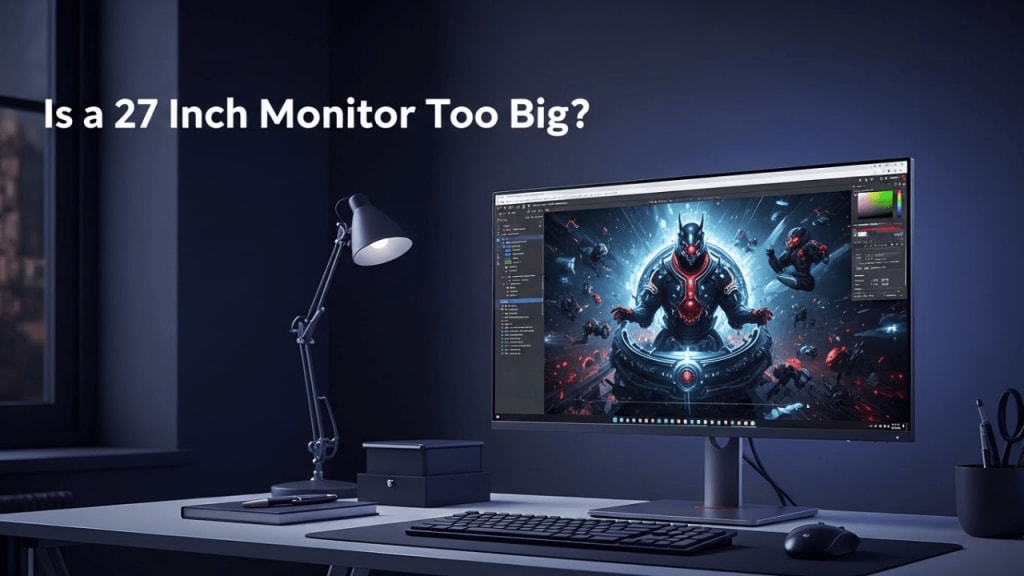
Is a 27-inch monitor too big? This is a question many people ask when shopping for a new screen. Whether you are a gamer, a student, or a professional, choosing the right monitor size matters.
A monitor that is too small can feel cramped, while one that is too large can overwhelm your desk. Because of this, the 27‑inch monitor has become one of the most popular choices worldwide. But is it really too big? Let’s explore this in detail.
📏 What Does “27 Inch Monitor” Mean?
- The size refers to the diagonal measurement of the screen.
- A 27‑inch monitor is about 24 inches wide and 13.5 inches tall.
- It usually fits well on medium‑sized desks.
🖥️ Is a 27 Inch Monitor Too Big for Gaming?
Many gamers wonder if a 27‑inch monitor is too big. The answer depends on distance and resolution.
- Viewing Distance: If you sit 2–3 feet away, the size feels perfect.
- Resolution Matters: At 1080p, pixels may look stretched. At 1440p or 4K, the image looks sharp.
- Immersion: Larger screens make games more immersive.
- Competitive Gaming: Some pro players prefer smaller monitors (24 inches) for faster eye movement.
💼 Is a 27 Inch Monitor Too Big for Work?
For office tasks, a 27‑inch monitor is often ideal.
- Multitasking: You can open two windows side by side.
- Clarity: Text is easier to read at higher resolutions.
- Comfort: Less scrolling means a smoother workflow.
However, if your desk is very small, the monitor may feel oversized.
📚 Is a 27 Inch Monitor Too Big for Students?
Students often ask: Is a 27-inch monitor too big for studying?
- Research and Writing: A bigger screen helps with multiple tabs.
- Online Classes: Video calls look clearer.
- Budget Concerns: 27‑inch monitors are more expensive than 24‑inch ones.
🪑 Ergonomics: Is a 27 Inch Monitor Too Big for Your Desk?
- Desk Size: A desk at least 30 inches deep is recommended.
- Eye Strain: Sitting too close can cause discomfort.
- Posture: The top of the screen should be at eye level.
🔍 27 Inch vs 24 Inch Monitors
- 24-inch: Compact, cheaper, good for small desks.
- 27-inch: Larger, better for multitasking, sharper at higher resolutions.
🔍 27 Inch vs 32 Inch Monitors
- 32-inch: Great for movies and design work.
- 27 Inch: Balanced size, easier to fit on most desks.
🖼️ Resolution and Screen Quality
- 1080p (Full HD): May look pixelated on 27 inches.
- 1440p (QHD): Perfect balance of sharpness and performance.
- 4K (Ultra HD): Extremely sharp, but requires strong hardware.
✅ Pros of a 27 Inch Monitor
- Great for multitasking
- Sharp visuals at higher resolutions
- Immersive gaming experience
- Fits most desks
❌ Cons of a 27 Inch Monitor
- Can feel too big on small desks
- More expensive than smaller monitors
- Requires higher resolution for best results
👨💻 Who Should Buy a 27 Inch Monitor?
- Gamers who want immersion
- Students who multitask
- Professionals who work with documents, spreadsheets, or designs
- Content Creators who edit videos or photos
⚙️ Tips for Setting Up a 27 Inch Monitor
- Place it at least 2 feet away.
- Adjust brightness to reduce eye strain.
- Use a monitor arm for flexibility.
- Pair with an ergonomic chair.
Final Verdict: Is a 27 Inch Monitor Too Big?
No, a 27‑inch monitor is not too big for most people. It is actually the sweet spot between small and oversized screens. With the right resolution and desk setup, it feels comfortable and practical.
📝 Conclusion
So, is a 27-inch monitor too big? The answer is no for most users. It is large enough to provide comfort, clarity, and immersion, yet small enough to fit on standard desks. Gamers, students, and professionals all benefit from this size. However, if your desk is very small or your budget is tight, a 24‑inch monitor may be better. Overall, the 27‑inch monitor is a balanced choice that works well in most situations.
❓ FAQ Section
Q1: Is a 27-inch monitor too big for 1080p resolution? Yes, at 1080p, the pixels may look stretched. A 1440p resolution is better.
Q2: Is a 27-inch monitor too big for competitive gaming? Some pro gamers prefer 24 inches, but 27 inches is fine for casual and immersive play.
Q3: Is a 27-inch monitor too big for small desks? If your desk is less than 30 inches deep, it may feel oversized.
Q4: Is a 27-inch monitor too big for office work? No, it is perfect for multitasking and reading documents.
Q5: Is a 27-inch monitor too big compared to 32-inches? No, 32 inches is much larger. A 27‑inch monitor is more balanced for everyday use.
About the Creator
Perfect Tech Views
Welcome to Perfect Tech Views—your go-to source for clear, unbiased, and insightful tech knowledge. Whether you're a pro, a beginner, or just exploring gadgets, we've got you covered with expert guidance!
Keep reading
More stories from Perfect Tech Views and writers in Gamers and other communities.
Best Budget Motherboard and Processor for Gaming (Guide)
The best budget motherboard and processor for gaming is the heart of any affordable gaming PC. Without a strong CPU and a reliable motherboard, your system cannot deliver smooth frame rates or handle modern titles. In 2025, gamers want affordable yet powerful options, and luckily, both AMD and Intel have released CPUs that balance performance and price.
By Perfect Tech Views4 months ago in Gamers
U4gm Diamond Dynasty Red Diamond Cards: Which One Truly Dominates MLB The Show 26?
MLB The Show 26 has taken Diamond Dynasty to an entirely new level, and nothing has the community more excited than the ultra-rare Red Diamond cards. These cards aren’t just for collectors—they can completely change the outcome of Ranked Mode matches, turning a close game into a legendary comeback. But with so many options available, which Red Diamond cards truly stand out?
By Dangyc Ding4 days ago in Gamers



Comments