
How to Make D&D Maps: Free Tools, Tips, and Shortcuts for Beginners
A Practical Guide to Creating Immersive Dungeons & Dragons Maps Without Spending a Dime

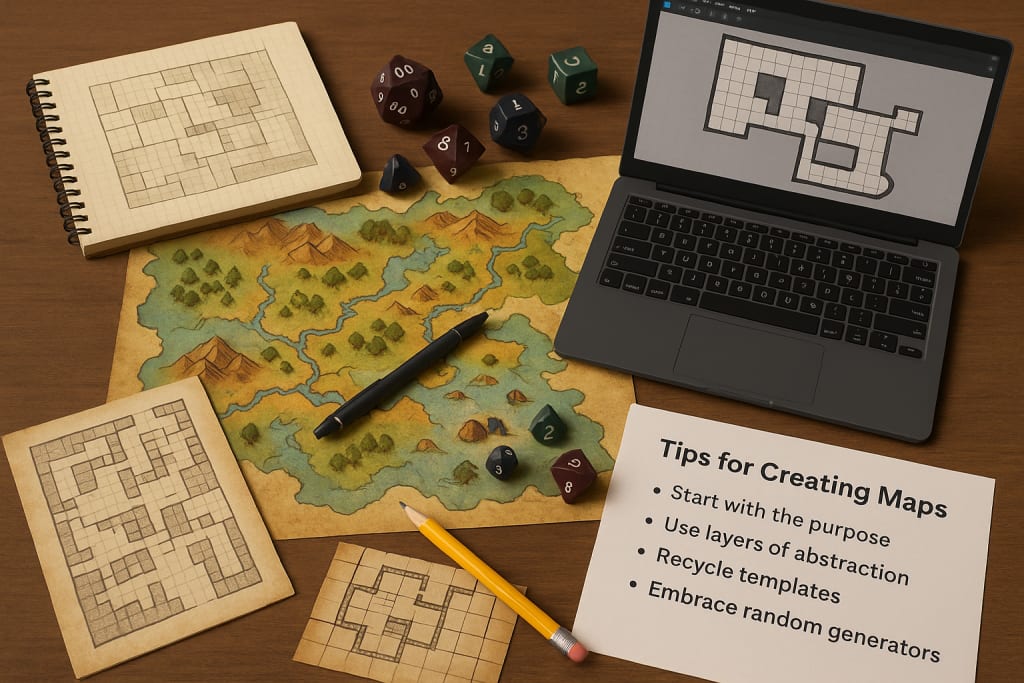
Whether you're a new Dungeon Master sketching your first tavern or a worldbuilder trying to map out an entire continent, creating maps for Dungeons & Dragons can feel overwhelming.
The sheer amount of artistic pressure, design choices, and technical options might tempt you to give up before you begin. But here's the secret: you don’t need to be an artist, or spend a dime, to make beautiful, functional D&D maps.
In this article, we’ll break down the process of map-making into manageable parts. We’ll explore powerful free tools, clever tips, and beginner-friendly shortcuts that will help you bring your world to life with confidence.
Why Maps Matter in Dungeons & Dragons
Maps are more than background visuals or tactical surfaces. They’re storytelling devices. A battle map turns a vague combat description into a vivid moment.
A regional map gives your players a sense of place and scale. Even a rough hand-drawn dungeon can ignite the imagination more than paragraphs of exposition.
A good map anchors your players. It sparks creativity, improves communication, and makes your world feel real. But what makes a “good” map?
Clarity. Purpose. Atmosphere. You don’t need flawless artistry—you need to serve the game.
Before You Begin: Understand What Kind of Map You Need
There are several types of D&D maps, each with its own function. Before jumping into tools or design, decide what kind of map you’re making.
1. World Maps (Campaign Maps):
These show continents, countries, kingdoms, and geographical features. They're often more artistic and abstract than tactical.
2. Regional Maps:
Used for specific territories like a single kingdom, forest, island, or area between towns. These help track travel and terrain.
3. City or Settlement Maps:
These offer layout and detail for towns, villages, or cities. They help during urban exploration and roleplay-heavy sessions.
4. Dungeon Maps:
The most common battle maps, often used for interior spaces like castles, ruins, caves, or sewers.
5. Encounter or Combat Maps:
These are gridded and sized to scale, typically showing small environments where battles or key events occur.
Knowing your purpose helps shape every design decision. Do you need realism or abstraction? Are you tracking exploration or facilitating combat?
Free D&D Map-Making Tools That Beginners Can Master
Here are the best free tools you can use without needing artistic talent or technical experience.
1. Inkarnate (Free Version)
One of the most user-friendly map tools. The free version lets you create stunning world, region, and city maps with drag-and-drop assets. Great for beginners who want polished results without a steep learning curve.
Strengths: Intuitive interface, high-quality assets.
Limitations: Limited features compared to Pro version, no grid overlays for tactical combat.
2. Dungeon Scrawl
Perfect for quick dungeon maps. It’s browser-based, lightweight, and focused on drawing grid-based interiors like castles, crypts, and caves.
Strengths: Extremely easy to use, fast output, auto-labeling.
Limitations: No regional or world map options.
3. Mipui
An underrated gem for tactical maps. Think of it like a cross between MS Paint and battle map software. Great for GMs who want simplicity and grids.
Strengths: Collaborative features, grid snap, no learning curve.
Limitations: Limited art assets, basic visuals.
4. Tiamat the Tile Mapper
Tiamat lets you build maps using pre-drawn tiles from various tile sets. It’s simple and gives a classic feel to dungeons.
Strengths: Drag-and-drop interface, grid-aligned assets.
Limitations: Dated graphics, lacks HD detail.
5. Wonderdraft (One-Time Purchase, but with a free alternative: Azgaar’s Fantasy Map Generator)
If you're considering eventually upgrading, Wonderdraft is often praised, but Azgaar’s Fantasy Map Generator is a free, browser-based alternative that gives you detailed world maps with randomized geography.
Tips for Creating Better Maps Without Burning Out
You don’t have to create an entire continent in one night. You don’t even need to draw every wall of every dungeon. Use these tips to make map-making easier and faster.
Start with the Purpose, Not the Art
Before designing, ask yourself: What do my players need from this map? If it's for a dungeon crawl, clarity is key. If it's a world map, mood and mystery matter more than detail.
Use Layers of Abstraction
Not every map needs to be hyper-detailed. A hand-drawn coastline with a few labeled cities might be all you need for a campaign map. Keep it light where it matters less.
Recycle and Modify Existing Templates
There are hundreds of free templates and base maps online. Download them, modify names, and adjust geography to suit your campaign. Don’t reinvent the wheel.
Embrace Random Generators
Tools like Donjon, Azgaar, and Watabou’s City Generator create entire cities, dungeons, or landscapes in seconds. You can use them as-is or as a starting point to customize further.
Save Time with Symbols and Assets
Most mapping tools provide built-in symbols: trees, mountains, ruins, roads. Use these to create variety and structure fast. You don’t need to draw every brick or bush.
Shortcuts That Help You Map Faster
- Use grids for combat maps. Set your tool to snap to a grid and block out major spaces quickly.
- Limit color choices. Stick to 2–3 tones when hand-drawing to keep it clean and readable.
- Label clearly, but don’t overdo it. Only name the locations relevant to your current story arc.
- Mirror existing maps. Flip them or change entrances to turn old dungeons into fresh challenges.
- Sketch on paper, digitize later. Sometimes, it’s faster to draw a layout with pen and paper, then recreate it in a tool.
How to Share and Use Your Maps in Play
Once your map is ready, decide how you’ll present it.
In-person: Print on regular paper or tile across multiple sheets for larger dungeons. Laminate for reusable dry-erase functionality.
Online games (VTTs): Tools like Roll20, Foundry VTT, and Owlbear Rodeo allow for direct map uploads. Export your map as a PNG or JPEG file.
Before game night, test the scale and line-of-sight. A quick dry run can prevent tech hiccups later.
You Can Make Great Maps—Even as a Beginner
Making D&D maps doesn’t require you to be a professional artist, and it certainly doesn’t require a massive budget. With a handful of free tools, a bit of patience, and the right mindset, you can create maps that inspire your players, guide your storytelling, and elevate your entire campaign.
Start small. Experiment freely. Don’t aim for perfection. Your first map won’t be your best—but it will be yours. And with every dungeon you draw or city you place on the coastline, you’ll grow more confident, more creative, and more in control of the worlds you build.
So grab your mouse, open a browser, and start mapping. Adventure waits.
About the Creator
Richard Bailey
I am currently working on expanding my writing topics and exploring different areas and topics of writing. I have a personal history with a very severe form of treatment-resistant major depressive disorder.
Keep reading
More stories from Richard Bailey and writers in Gamers and other communities.
Assassin’s Creed Shadows: Best Skills to Unlock First for Each Character
Why Early Skill Choices Matter in Assassin’s Creed Shadows Assassin’s Creed Shadows introduces a bold dual-protagonist system that deeply changes how you approach stealth, combat, and exploration.
By Richard Bailey7 months ago in Gamers
Sea of Thieves Will Make You Feel Like a True Pirate in a Dangerous Open World
Few modern games capture the spirit of adventure quite like Sea of Thieves. Developed by Rare and published by Xbox Game Studios, this Xbox experience throws players into a shared world where freedom, risk, and cooperation define every moment. It is not just about reaching a destination, but about the unpredictable journey that unfolds along the way.
By Lukáš Hrdlička6 days ago in Gamers


Comments
There are no comments for this story
Be the first to respond and start the conversation.