
CPU Liquid Coolers with Display: Enhancing Performance and Style
The CPU liquid cooler with a display is one such innovation that has greatly increased in popularity in the rapidly changing world of computer technology.

Introduction
The CPU liquid cooler with a display is one such innovation that has greatly increased in popularity in the rapidly changing world of computer technology. These coolers not only offer efficient CPU cooling options but also give your system a little more aesthetic appeal. The incorporation of a display in CPU liquid coolers provides a special fusion of aesthetics and utility, enabling users to keep track of system performance, display bespoke visuals, or even show animated GIFs. In this post, we will go into the world of CPU liquid coolers with screens, covering their characteristics, things to think about before buying, and why they have grown in popularity among PC fans.
Specifications
Different system requirements call for different-sized and shaped CPU liquid coolers with screens. There are a number of specifications to consider when choosing a cooler:
Resolution: The display's resolution dictates the degree of clarity and detail. Higher resolutions produce crisper images, ensuring that the data or graphics displayed are readable and aesthetically pleasing.
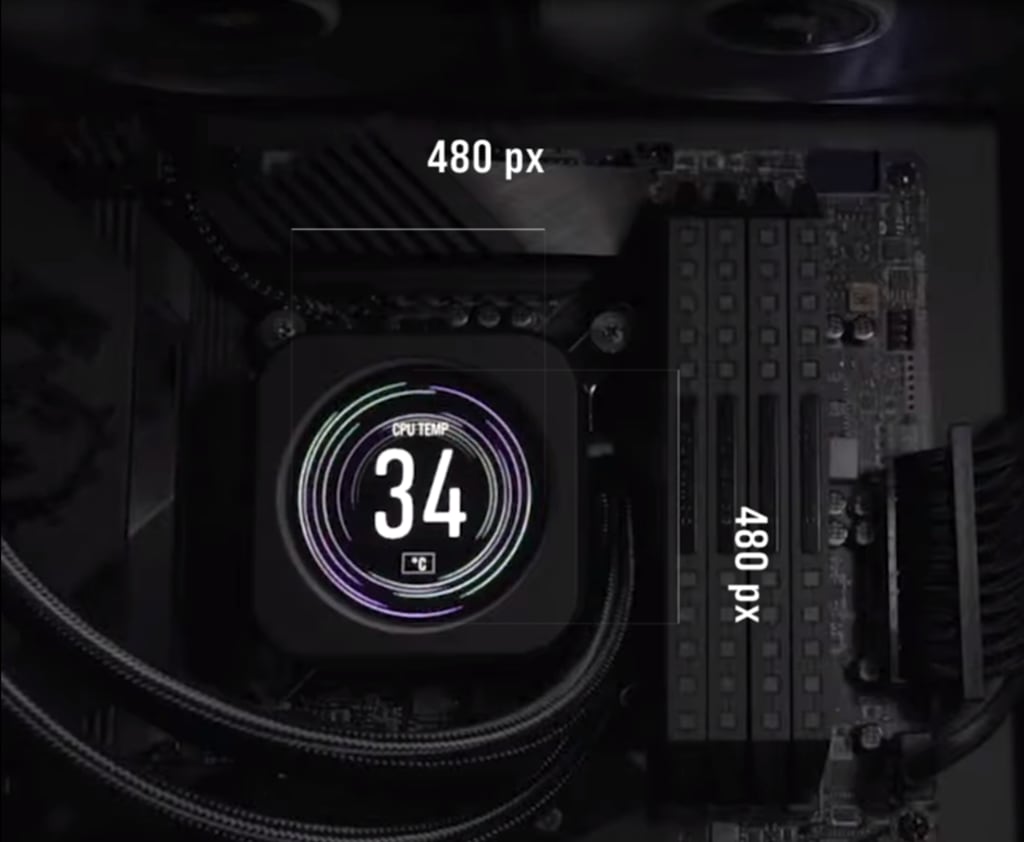
In comparison with the NZXT Kraken 7 and Corsair iCUE ELITE CPU Cooler LCD Display, Kraken has a Resolution:320 x 320 pixels and Brightness:650 cd/m² and Corsair iCUE has an IPS LCD screen with a 480 x 480 resolution and ultra-bright 600cd/m² backlight. Corsair provides a better product at a very low price in comparison with the NZXT.
Refresh Rate: The refresh rate describes how frequently the display updates its content each second. A more seamless visual experience is produced by animations that are smoother and motion blur that is reduced when the refresh rate is increased.
Software Support: To fully utilise a CPU cooler with a display, software compatibility and accessibility are essential. Strong software support enables customization possibilities, including temperature and fan speed monitoring, system data display, and the creation of unique graphics.
Cooling Performance: Although the aesthetic appeal is appealing, it is crucial to make sure that the CPU liquid cooler offers superior cooling results. For your CPU's best thermal management, look for coolers with effective heat dissipation, dependable pump systems, and high-quality fans.

Factors to Consider Before Buying
To achieve the optimum fit for your system before purchasing a CPU liquid cooler with a display, take into account the following aspects:
Check the cooler's compatibility with your CPU socket before purchasing. To prevent installation problems, it is essential to establish compatibility because different CPUs use different mounting techniques.
- Size and Fit: Examine the cooler's measurements and compare them to the space that is available in your PC case. Some coolers might have bigger radiators or thicker tubing, which could affect how well they work with the design of your system.
- Budget: Establish a spending limit and look for coolers that fit inside it. Remember that more expensive versions with cutting-edge features and larger displays could cost more.
- User Reviews: Research and read reviews from other users to acquire insight into the cooler's dependability, performance, and user-friendliness. Real-world experiences can provide significant information to help you make an informed decision.
Example:-
Corsair iCUE ELITE CPU Cooler LCD Display Upgrade Kit: The iCUE ELITE CPU Cooler LCD Display Upgrade Kit is a remarkable addition to Corsair's iCUE series. It takes the cooling performance of the iCUE ELITE CPU cooler to the next level by incorporating a vibrant LCD display on the CPU block. This display allows users to showcase custom images, animations, system statistics, and even personalized logos directly on the cooler.
*Corsair Has an updated version of this too. Visit the website for more information.
Conclusion
CPU liquid coolers with screens have emerged as an enticing component in contemporary PC designs. Their ability to provide adequate cooling while also improving the looks of your system has increased their popularity among gamers, multimedia makers, and PC enthusiasts. Consider parameters including resolution, refresh rate, software support, and cooling performance when purchasing a cooler. Additionally, consider compatibility, size, budget, and user reviews to make a well-informed purchase. By carefully weighing these factors, you can select a CPU liquid cooler with a display that not only fits your cooling requirements but also adds style and functionality to your PC system. Accept the visual prowess and performance benefits provided by these coolers, and push your computing to the next level.
About the Creator
Sonu K
Hi there, My Name is SonuK. You can find me on LinkedIn. I’m a Strategist, Consultant, Blogger, Expert tech enthusiast, and product reviewer - By Profession!
Company - Bus Booking
Linktr.ee - IntrCity SmartBus
Pinterest - View
Far Cry 6 Will Drop You Into a Revolution You Won’t Forget Anytime Soon
Few open-world shooters offer the combination of freedom, story, and chaos like Far Cry 6. Developed by Ubisoft Toronto and published by Ubisoft, Far Cry 6 immerses players in a living world on Xbox where danger lurks around every corner and the fight for freedom is never straightforward.
By Lukáš Hrdlička2 days ago in Gamers




Comments
There are no comments for this story
Be the first to respond and start the conversation.