
Best RAM for Ryzen 5 5600X in 2026 (Top Contenders)
Discover the best RAM for Ryzen 5 5600X to boost your PC’s performance. Learn about top options, key features, and tips for choosing the right memory.

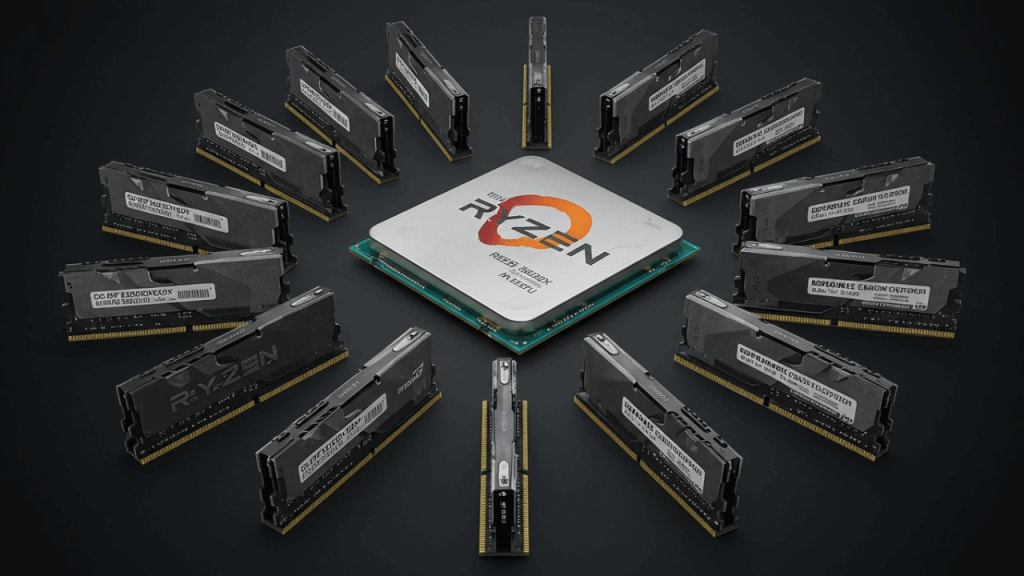
If you’re building or upgrading a PC with the Ryzen 5 5600X, choosing the best RAM is crucial for getting the most out of your system. The Ryzen 5 5600X is a powerful processor, but it performs best when paired with the right memory.
In this guide, we’ll explore the best RAM options for the Ryzen 5 5600X, explain what to look for, and answer common questions to help you make the best choice.
Key Features to Look for in RAM for Ryzen 5 5600X
When selecting RAM for your Ryzen 5 5600X, there are a few important factors to consider:
1. Speed (MHz) : RAM speed is measured in megahertz (MHz). For the Ryzen 5 5600X, a speed of 3200 MHz or higher is recommended. Faster RAM allows your processor to handle data more efficiently, which is especially important for gaming and heavy workloads.
2. Capacity (GB) : The amount of RAM you need depends on your usage. For most users, 16GB is enough for gaming and everyday tasks. However, if you’re into content creation or heavy multitasking, 32GB might be a better choice.
3. Latency (CL) : Latency, or CAS Latency (CL), measures how quickly the RAM responds to requests. Lower latency means faster performance. Look for RAM with a low CL number, such as CL16 or CL18, for the best results.
4. Dual-Channel Support : Using two sticks of RAM in dual-channel mode can improve performance compared to a single stick. Make sure your motherboard supports dual-channel configurations.
5. Compatibility : Ensure the RAM you choose is compatible with your motherboard and processor. Most modern RAM is DDR4, which works well with the Ryzen 5 5600X.
How to Install RAM in Your System
Installing RAM is a simple process. Here’s a quick guide:
- Turn off your PC and unplug it from the power source.
- Open the case and locate the RAM slots on your motherboard.
- Insert the RAM sticks into the slots, ensuring they are properly aligned.
- Press down gently until the clips on the sides snap into place.
- Close the case, plug in your PC, and power it on.
Tips for Optimizing RAM Performance
To get the most out of your RAM, follow these tips:
- Enable XMP/DOCP in BIOS: This ensures your RAM runs at its advertised speed.
- Keep your system cool: Overheating can affect RAM performance, so ensure proper airflow in your case.
- Update your BIOS: Sometimes, a BIOS update can improve RAM compatibility and performance.
The Top 4 Best RAMs for Ryzen 5 5600X That You Can Buy Today
1. G.SKILL Trident Z Royal Series RAM
2. G.Skill Trident Z Neo Series RAM
3. CORSAIR VENGEANCE LPX RAM
4. CORSAIR Dominator Platinum RGB RAM
1. G.SKILL Trident Z Royal Series RAM
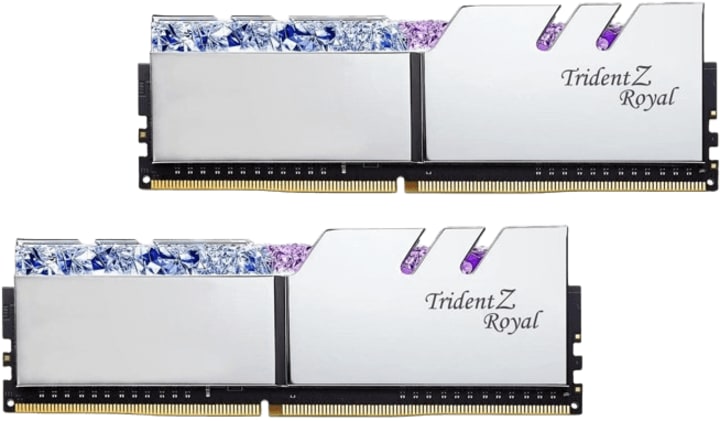
When it comes to pairing your Ryzen 5 5600X with top-tier RAM, the G.SKILL Trident Z Royal Series stands out as a premium choice. This RAM isn’t just about performance—it’s a statement piece for your build, combining cutting-edge technology with stunning aesthetics. But is it the right fit for your Ryzen 5 5600X? Let’s dive in and explore why this RAM might be the perfect upgrade for your system.
Why Choose G.SKILL Trident Z Royal Series?
The G.SKILL Trident Z Royal Series is designed for enthusiasts who demand both style and substance. Here’s what makes it a standout option:
- Blazing Fast Speeds: With a speed of 4000 MT/s, this RAM ensures your Ryzen 5 5600X can handle even the most demanding tasks with ease. Whether you’re gaming, streaming, or editing videos, the high speed reduces bottlenecks and keeps your system running smoothly.
- Low Latency: Featuring a CAS latency of CL18-22-22-42, this RAM strikes a balance between speed and responsiveness, making it ideal for gaming and multitasking.
- Stunning Design: The Trident Z Royal Series is known for its crystal-like RGB lighting and premium silver finish. It’s not just RAM—it’s a centerpiece for your build.
- Intel XMP Support: While designed for Intel systems, this RAM works seamlessly with Ryzen processors when paired with the right motherboard and BIOS settings.
Performance with Ryzen 5 5600X
The Ryzen 5 5600X thrives on fast, efficient memory, and the G.SKILL Trident Z Royal Series delivers exactly that. Here’s how it enhances your system:
- Gaming Performance: Faster RAM speeds reduce load times and improve frame rates, giving you a competitive edge in games.
- Multitasking: With 32GB (2x16GB), you can run multiple applications simultaneously without slowing down your system.
- Future-Proofing: The high capacity and speed ensure your system remains relevant for years to come, even as software demands increase.
Installation and Compatibility
Worried about compatibility? Don’t be. Here’s what you need to know:
- Motherboard Support: Ensure your motherboard supports DDR4 RAM and has the necessary slots for dual-channel configurations.
- BIOS Settings: To achieve the advertised 4000 MT/s speed, enable XMP (Extreme Memory Profile) in your BIOS. This ensures the RAM runs at its full potential.
- Cooling Considerations: While the Trident Z Royal Series has a sleek design, make sure your CPU cooler doesn’t interfere with the RAM sticks.
Quick Tips for Maximizing Performance
To get the most out of your G.SKILL Trident Z Royal Series RAM:
- Enable XMP: This ensures your RAM runs at its advertised speed.
- Keep Your System Cool: Proper airflow prevents overheating, which can affect RAM performance.
- Update Your BIOS: A BIOS update can improve compatibility and stability with high-speed RAM.
Final Thoughts
The G.SKILL Trident Z Royal Series is more than just RAM—it’s a performance powerhouse and a visual masterpiece. If you’re building a high-end system with the Ryzen 5 5600X, this RAM offers the speed, capacity, and style to take your setup to the next level.
2. G.Skill Trident Z Neo Series RAM
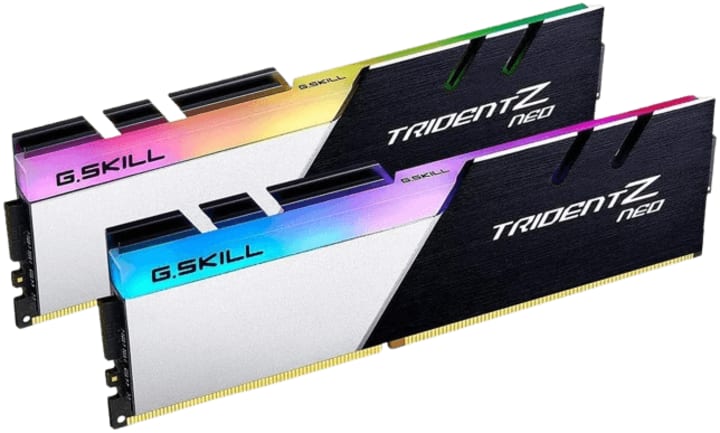
The second contender in our lineup of the best RAM for Ryzen 5 5600X is the G.Skill Trident Z Neo Series. Designed specifically for AMD Ryzen processors, this RAM combines high performance, sleek aesthetics, and excellent compatibility to deliver an exceptional experience. But what makes it stand out, and is it the right choice for your Ryzen 5 5600X build? Let’s break it down.
Why G.Skill Trident Z Neo Series is a Top Choice
The G.Skill Trident Z Neo Series is a favorite among PC enthusiasts, and for good reason. Here’s why it’s a strong contender:
- Optimized for Ryzen: Unlike many RAM kits designed for Intel systems, the Trident Z Neo Series is tailored for AMD Ryzen processors, ensuring seamless compatibility and performance.
- High Speed and Low Latency: With a speed of 3600 MT/s and a tight CAS latency of CL16-19-19-39, this RAM strikes the perfect balance for gaming, multitasking, and content creation.
- Efficient Power Consumption: Operating at just 1.35V, it’s energy-efficient without compromising on performance.
- Stunning RGB Lighting: The sleek design and customizable RGB lighting add a touch of elegance to your build, making it as visually appealing as it is powerful.
Performance with Ryzen 5 5600X
The Ryzen 5 5600X is a beast of a processor, and pairing it with the G.Skill Trident Z Neo Series unlocks its full potential. Here’s how:
- Gaming Performance: The 3600 MT/s speed and low latency ensure smooth gameplay, faster load times, and improved frame rates.
- Multitasking and Productivity: With 32GB (2x16GB), you can effortlessly handle demanding applications, whether you’re editing videos, streaming, or running virtual machines.
- Future-Proofing: The high capacity and speed make this RAM a great investment for future-proofing your system.
Installation and Compatibility
Wondering if the G.Skill Trident Z Neo Series will work with your setup? Here’s what you need to know:
- Motherboard Compatibility: Ensure your motherboard supports DDR4 RAM and has the necessary slots for dual-channel configurations.
- XMP Support: While optimized for Ryzen, this RAM also supports Intel XMP profiles. Simply enable XMP in your BIOS to achieve the advertised 3600 MT/s speed.
- Cooling Considerations: The Trident Z Neo’s design is compact, but double-check that your CPU cooler doesn’t interfere with the RAM sticks.
Tips for Maximizing Performance
To get the most out of your G.Skill Trident Z Neo Series RAM:
- Enable XMP/DOCP: This ensures your RAM runs at its full speed.
- Keep Your System Cool: Proper airflow prevents thermal throttling and maintains optimal performance.
- Update Your BIOS: A BIOS update can improve compatibility and stability with high-speed RAM.
Final Thoughts
The G.Skill Trident Z Neo Series is more than just RAM—it’s a performance-driven, visually stunning upgrade for your Ryzen 5 5600X build. Whether you’re a gamer, content creator, or multitasker, this RAM delivers the speed, capacity, and reliability you need to take your system to the next level.
3. CORSAIR VENGEANCE LPX RAM
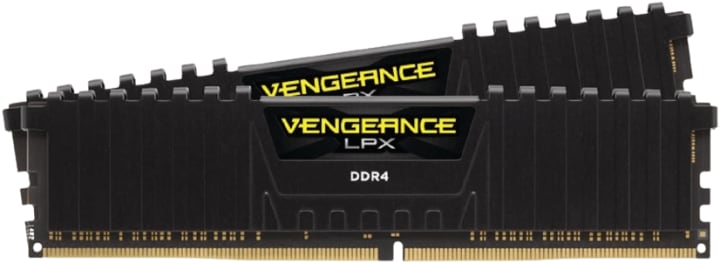
The third contender in our search for the best RAM for Ryzen 5 5600X is the CORSAIR VENGEANCE LPX. Known for its reliability, performance, and affordability, this RAM is a popular choice among gamers and PC builders alike. But does it live up to the hype when paired with the Ryzen 5 5600X? Let’s explore why this RAM might be the perfect fit for your build.
Why CORSAIR VENGEANCE LPX Stands Out
The CORSAIR VENGEANCE LPX is a no-nonsense RAM kit that delivers solid performance without breaking the bank. Here’s what makes it a standout option:
Solid Performance: With a speed of 3200 MHz and a CAS latency of CL16-18-18-36, this RAM strikes a great balance between speed and responsiveness, making it ideal for gaming and everyday tasks.
- Compact Design: The low-profile heat spreader ensures compatibility with most CPU coolers, making it a great choice for smaller builds.
- Energy Efficiency: Operating at just 1.35V, it’s power-efficient while still delivering reliable performance.
- Affordable Price: If you’re on a budget but still want quality RAM, the VENGEANCE LPX offers excellent value for money.
Performance with Ryzen 5 5600X
The Ryzen 5 5600X is a versatile processor, and the CORSAIR VENGEANCE LPX complements it well. Here’s how:
- Gaming Performance: The 3200 MHz speed ensures smooth gameplay and faster load times, while the low latency reduces stuttering and lag.
- Multitasking: With 16GB (2x8GB), you can comfortably run multiple applications simultaneously, whether you’re gaming, streaming, or browsing.
- Ease of Use: The plug-and-play design makes installation a breeze, even for beginners.
Installation and Compatibility
Worried about compatibility? Here’s what you need to know:
- Motherboard Support: Ensure your motherboard supports DDR4 RAM and has the necessary slots for dual-channel configurations.
- XMP Support: To achieve the advertised 3200 MHz speed, enable XMP (Extreme Memory Profile) in your BIOS. This ensures the RAM runs at its full potential.
- Cooling Considerations: The low-profile design ensures compatibility with most CPU coolers, but double-check your setup to avoid any issues.
Tips for Maximizing Performance
To get the most out of your CORSAIR VENGEANCE LPX RAM:
- Enable XMP: This ensures your RAM runs at its advertised speed.
- Keep Your System Cool: Proper airflow prevents overheating, which can affect RAM performance.
- Update Your BIOS: A BIOS update can improve compatibility and stability with high-speed RAM.
Final Thoughts
The CORSAIR VENGEANCE LPX is a reliable, affordable, and high-performing RAM kit that pairs beautifully with the Ryzen 5 5600X. Whether you’re building a gaming rig or a productivity powerhouse, this RAM delivers the performance you need without breaking the bank.
4. CORSAIR Dominator Platinum RGB RAM
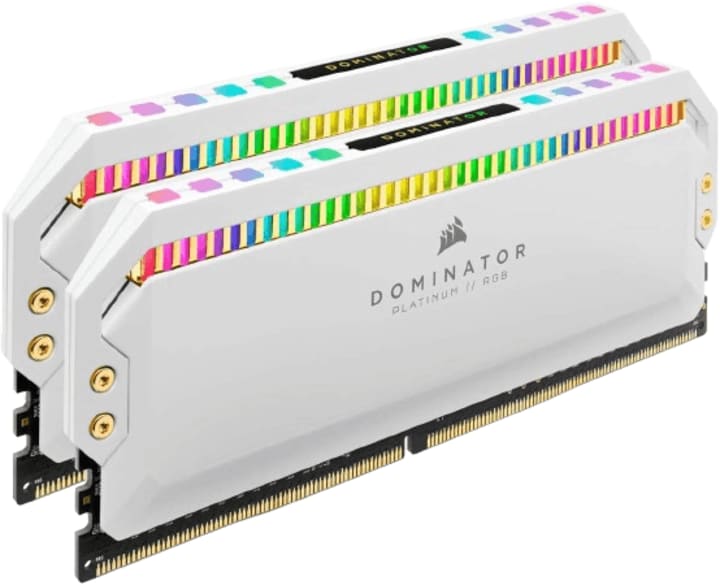
The fourth and final contender in our search for the best RAM for Ryzen 5 5600X is the CORSAIR Dominator Platinum RGB. This RAM is the epitome of luxury and performance, combining cutting-edge technology with stunning aesthetics.
But does it deliver the performance to match its premium price tag, and is it the right choice for your Ryzen 5 5600X build? Let’s dive in and find out.
Why CORSAIR Dominator Platinum RGB is a Top-Tier Choice
The CORSAIR Dominator Platinum RGB is designed for enthusiasts who want the best of the best. Here’s what makes it stand out:
- Premium Build Quality: Featuring a sleek, anodized aluminum heat spreader and customizable RGB lighting, this RAM is as much a visual centerpiece as it is a performance powerhouse.
- High Performance: With a speed of 3200 MHz and a CAS latency of C16, it delivers excellent performance for gaming, content creation, and multitasking.
- Large Capacity: The 32GB (2x16GB) configuration ensures you have plenty of memory for even the most demanding tasks.
- Advanced Cooling: The patented DHX cooling technology ensures optimal thermal performance, even under heavy loads.
Performance with Ryzen 5 5600X
The Ryzen 5 5600X is a high-performance processor, and the CORSAIR Dominator Platinum RGB is the perfect match for it. Here’s how it enhances your system:
- Gaming Performance: The 3200 MHz speed and low latency ensure smooth gameplay, faster load times, and improved frame rates.
- Content Creation: With 32GB of memory, you can handle resource-intensive tasks like video editing, 3D rendering, and multitasking with ease.
- Future-Proofing: The large capacity and high speed make this RAM a great investment for future-proofing your system.
Installation and Compatibility
Worried about compatibility? Here’s what you need to know:
- Motherboard Support: Ensure your motherboard supports DDR4 RAM and has the necessary slots for dual-channel configurations.
- XMP Support: To achieve the advertised 3200 MHz speed, enable XMP (Extreme Memory Profile) in your BIOS. This ensures the RAM runs at its full potential.
- Cooling Considerations: The Dominator Platinum’s design is sleek but tall, so double-check that your CPU cooler doesn’t interfere with the RAM sticks.
Tips for Maximizing Performance
To get the most out of your CORSAIR Dominator Platinum RGB RAM:
- Enable XMP: This ensures your RAM runs at its advertised speed.
- Customize RGB Lighting: Use CORSAIR’s iCUE software to personalize the RGB lighting and sync it with your other components.
- Keep Your System Cool: Proper airflow prevents overheating, which can affect RAM performance.
- Update Your BIOS: A BIOS update can improve compatibility and stability with high-speed RAM.
Final Thoughts
The CORSAIR Dominator Platinum RGB is more than just RAM—it’s a statement piece for your build. With its premium design, high performance, and advanced cooling, it’s the perfect choice for enthusiasts who want the best RAM for Ryzen 5 5600X.
Conclusion
Choosing the best RAM for Ryzen 5 5600X can significantly enhance your PC’s performance. Whether you’re a gamer, content creator, or multitasker, the right RAM can make a big difference. Look for high-speed, low-latency RAM with enough capacity to meet your needs.
The Corsair Vengeance LPX, G.Skill Trident Z Neo, and Crucial Ballistix are all excellent options to consider. Remember to check compatibility with your motherboard and enable XMP/DOCP for optimal performance. With the right RAM, your Ryzen 5 5600X will run smoothly and efficiently.
FAQ
1. What is the best RAM speed for Ryzen 5 5600X?
A speed of 3200 MHz or higher is recommended for the Ryzen 5 5600X.
2. Is 16GB enough for Ryzen 5 5600X?
Yes, 16GB is sufficient for most users, including gamers and multitaskers.
3. Can I use 3600 MHz RAM with Ryzen 5 5600X?
Yes, 3600 MHz RAM works well with the Ryzen 5 5600X and can improve performance.
4. Does Ryzen 5 5600X support DDR4 RAM?
Yes, the Ryzen 5 5600X is compatible with DDR4 RAM.
5. How do I enable XMP for my RAM?
You can enable XMP in your motherboard’s BIOS settings. Look for the XMP or DOCP option and turn it on.
By following this guide, you’ll be able to choose and optimize the best RAM for your Ryzen 5 5600X, ensuring a smooth and powerful computing experience.
About the Creator
Perfect Tech Views
Welcome to Perfect Tech Views—your go-to source for clear, unbiased, and insightful tech knowledge. Whether you're a pro, a beginner, or just exploring gadgets, we've got you covered with expert guidance!
Keep reading
More stories from Perfect Tech Views and writers in Gamers and other communities.
Discover the Best RAMs for i9 9900k in 2026
When it comes to building or upgrading a high-performance PC, choosing the best RAM for i9 9900k is crucial. The Intel Core i9 9900k is a powerful processor, and pairing it with the right RAM can significantly enhance your system’s speed and efficiency.
By Perfect Tech Views4 months ago in Gamers
From Battle Royale to a Global Digital Platform
When Fortnite first gained popularity, it was known mainly as a fast-paced battle royale game. Over time, however, Fortnite evolved into something much broader. Today, it functions as a global digital platform that blends gaming, creativity, social interaction, and live entertainment. This shift did not happen through hype or exaggeration, but through steady development and changing player behavior.
By Games Mode Ona day ago in Gamers
Rsvsr Monopoly GO! Strategy Guide: Maximize Rewards and Complete Challenges
Monopoly GO! is more than just rolling dice—it’s a fast-paced game of strategy, timing, and careful planning. With daily challenges, special events, and competitive tournaments, understanding how to play strategically can make the difference between slow progression and rapid success.
By Billo Nali3 days ago in Gamers



Comments