
Best PC Motherboard for Music Production
Discover the best PC motherboard for music production. Learn what features matter most for audio pros, DAWs, and real-time processing with top picks from ASUS, Gigabyte, and MSI.

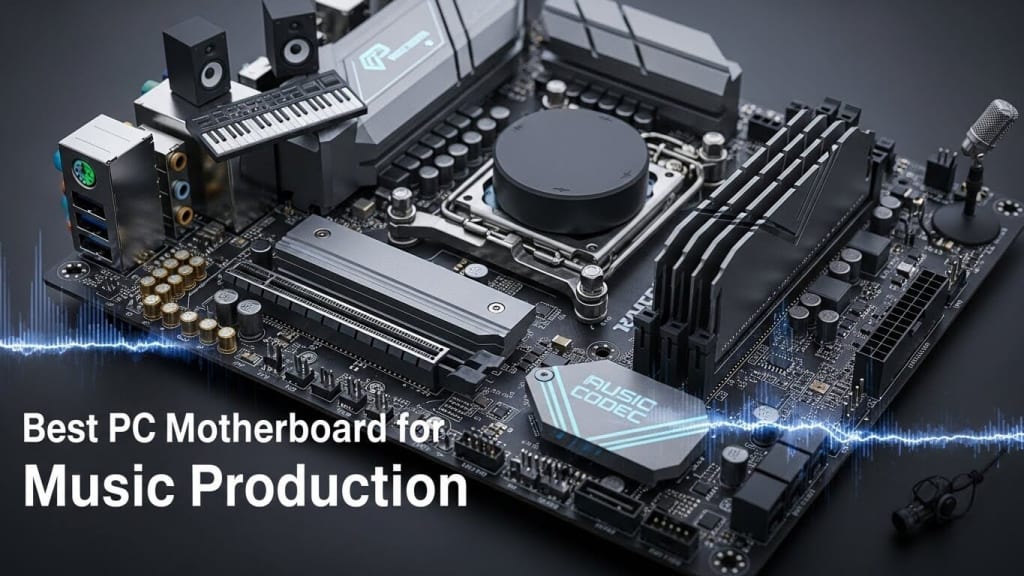
If you’re serious about music production—whether mixing in FL Studio, editing podcasts, or streaming on Spotify—your motherboard matters more than you think. The wrong board can cause latency, noise, or compatibility issues with your audio interface. The right one ensures smooth real-time audio processing, stable performance for your CPU and RAM, and reliable connectivity for external gear.
In this guide, we’ll break down the best PC motherboards for music production, highlight what features to look for, and share tested recommendations from brands like ASUS, Gigabyte, and MSI.
Table of Contents
- Why the Motherboard Matters for Audio Production
- Key Features to Look For
- Low DPC Latency
- High-End Audio Capacitors & Shielding
- Thunderbolt & USB-C Support
- Memory & Storage Compatibility
3. Best Motherboards for Music Production (2026 Picks)
- ASUS ProArt Z790-Creator WiFi
- Gigabyte Z790 AORUS Master
- MSI MEG Z690 Unify
- ASRock Alternatives
4. Real-World Audio Setups
- Pairing with Audio Interfaces
- DAW Performance (Ableton, Logic, Pro Tools)
- Plugin & Sample Library Handling
5. Common Mistakes to Avoid
6. Buying Guide: Where to Find Them (Amazon, Retailers)
7. FAQs
8. Conclusion
Why the Motherboard Matters for Audio Production
Your motherboard is the central hub of your PC. It connects your CPU (Central Processing Unit), RAM (Random Access Memory), SSD (Solid State Drive), and external devices like the Focusrite Scarlett 2i2.
- A poor-quality board can cause latency spikes, EMI interference, or unstable power delivery.
- A well-designed board ensures low DPC latency, clean audio signals, and compatibility with modern DAWs (Digital Audio Workstations).
Think of it this way: if your motherboard struggles, your entire audio chain suffers.
Key Features to Look For
Low DPC Latency
- Crucial for real-time audio processing.
- Prevents crackles, pops, and lag during recording or playback.
High-End Audio Capacitors & Shielding
- Good shielding protects against EMI (Electromagnetic Interference).
- High-quality capacitors improve sound clarity and reduce distortion.
Thunderbolt & USB-C Support
- Thunderbolt 4 ports allow fast connections to external SSDs and audio interfaces.
- USB-C ensures compatibility with modern gear.
Memory & Storage Compatibility
- DDR5 RAM and PCIe 5.0 SSDs provide speed for large sample libraries.
- Multiple PCIe slots allow expansion for audio cards or GPUs.
The Top 4 Best Motherboards for Music Production That You Can Buy Today
1. ASUS ProArt Z790-Creator WiFi
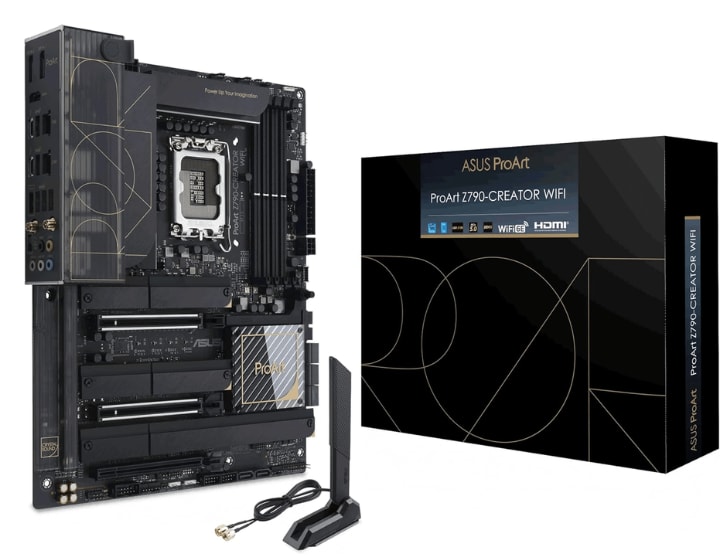
When it comes to building a PC for music production, one motherboard consistently stands out: the ASUS ProArt Z790-Creator WiFi. If you’ve ever struggled with latency, noisy signals, or sluggish plugin performance, this board feels like a breath of fresh air. Let’s break down why it’s often considered the best motherboard for audio production in 2026.
Why Producers Love the ProArt Z790-Creator
Think about what you really need in a music production motherboard. Stability, speed, and clean audio signals, right? The ProArt Z790 delivers all three.
- Low DPC Latency – Essential for real-time audio processing. No more crackles when recording vocals or layering tracks in your DAW.
- Thunderbolt 4 Ports – Perfect for connecting external SSDs or high-end audio interfaces like the Focusrite Scarlett 2i2.
- PCIe 5.0 + DDR5 Support – Future-proof speed for massive sample libraries and plugin-heavy sessions.
- Strong VRMs – Keep your CPU stable during demanding production tasks.
- Wi-Fi 6E + Dual LAN – Reliable connectivity for streaming, collaboration, or cloud-based audio projects.
Real-World Audio Benefits
You might wonder: Does a motherboard really change how your music sounds? The answer is yes—indirectly. Here’s how:
1. Smooth DAW Performance
- Whether you’re in FL Studio, Ableton Live, or Logic Pro X, low latency ensures your plugins respond instantly.
- Large projects with dozens of tracks run without hiccups.
2. Better Audio Interface Compatibility
- Thunderbolt 4 and USB-C ports guarantee stable connections with modern audio gear.
- No random dropouts when recording with external devices.
3. High-Speed Storage for Sample Libraries
- PCIe 5.0 SSDs load massive libraries in seconds.
- Perfect for orchestral composers or producers working with heavy VST instruments.
What Sets It Apart from Other Boards
Unlike flashy gaming motherboards with unnecessary RGB lighting, the ProArt Z790 focuses on what audio pros actually need:
- Good Shielding & EMI Protection – Prevents interference that can ruin recordings.
- High-End Audio Capacitors – Cleaner sound, even if you rely on onboard audio.
- Professional Design – Sleek, minimal, and built for creators rather than gamers.
Who Should Choose the ASUS ProArt Z790-Creator WiFi?
This motherboard is ideal if you:
- Work with DAWs daily and need low latency.
- Use external audio interfaces and rely on Thunderbolt connectivity.
- Handle large projects with heavy plugin use.
- Want a stable, professional-grade system without gimmicks.
Final Thoughts on the ProArt Z790
If you’re serious about building a music production PC, the ASUS ProArt Z790-Creator WiFi is more than just a motherboard—it’s the backbone of a reliable audio workstation. It ensures your CPU, RAM, and SSD work together seamlessly, while giving you the ports and shielding needed for professional audio.
2. Gigabyte Z790 AORUS Master
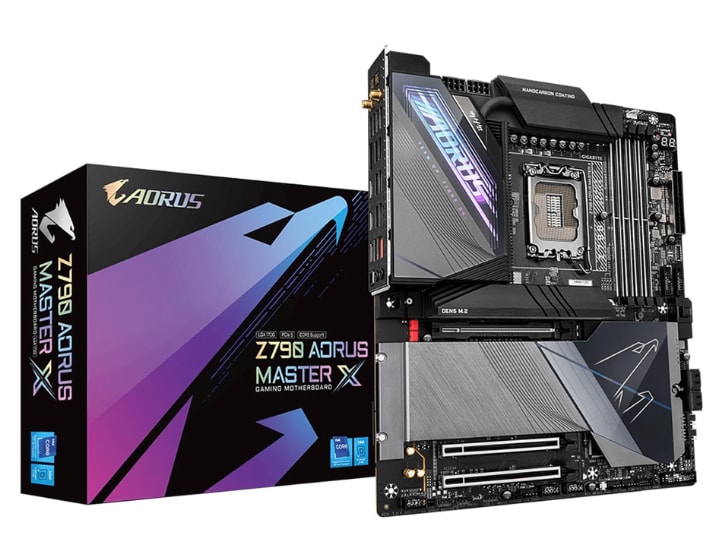
The second contender worth your attention is the Gigabyte Z790 AORUS Master. If the ASUS ProArt Z790-Creator WiFi is all about creator-focused stability, the AORUS Master is about premium audio performance baked right into the board. For producers who want killer onboard sound without relying entirely on external gear, this motherboard is a serious option.
Why the AORUS Master Stands Out
Gigabyte designed this board with audio pros in mind. Instead of flashy gimmicks, it delivers features that directly impact your music production PC build:
- ESS Sabre DAC Onboard – A high-end digital-to-analog converter that gives you studio-grade audio clarity.
- Killer Sound Shielding – Advanced EMI protection ensures your recordings stay clean, even in noisy environments.
- Low DPC Latency – Smooth playback and recording in DAWs like FL Studio or Ableton Live.
- PCIe 5.0 + DDR5 Support – Handles heavy plugin chains and massive sample libraries with ease.
- Dual LAN + Wi-Fi 6E – Reliable networking for streaming sessions or cloud-based audio projects.
Real-World Benefits for Producers
So, how does this translate to your daily workflow?
1. Cleaner Audio Signals
- Thanks to the ESS Sabre DAC and shielding, you’ll notice fewer pops, crackles, or interference.
- Great for producers who mix directly through onboard audio before finalizing with an external interface.
2. Stable DAW Performance
- Whether you’re editing podcasts or layering orchestral tracks, low latency keeps everything responsive.
- Plugins load faster, and real-time monitoring feels natural.
3. Connectivity That Matters
- With Thunderbolt 4 and multiple USB-C ports, you can connect audio interfaces, external SSDs, and MIDI controllers without bottlenecks.
- Perfect for setups that rely on multiple devices working together.
What Makes It Different from ASUS ProArt
While the ASUS ProArt Z790-Creator WiFi focuses on creator workflows, the Gigabyte Z790 AORUS Master leans into audio quality.
- ASUS excels in workflow stability and VRM performance.
- Gigabyte shines with onboard audio enhancements and shielding.
- Both boards support PCIe 5.0, DDR5, and Thunderbolt 4, but the AORUS Master gives you that extra edge if you value integrated sound.
Who Should Choose the Gigabyte Z790 AORUS Master?
This motherboard is perfect if you:
- Want high-end onboard audio without always relying on external gear.
- Need low latency for real-time audio production.
- Work with DAWs and want smooth plugin performance.
- Value network stability for streaming or collaborative projects.
Final Thoughts on the AORUS Master
The Gigabyte Z790 AORUS Master is more than just a motherboard—it’s a professional audio workstation foundation. With its ESS Sabre DAC, EMI protection, and low DPC latency, it ensures your music production setup runs clean and stable.
3. MSI MEG Z690 Unify
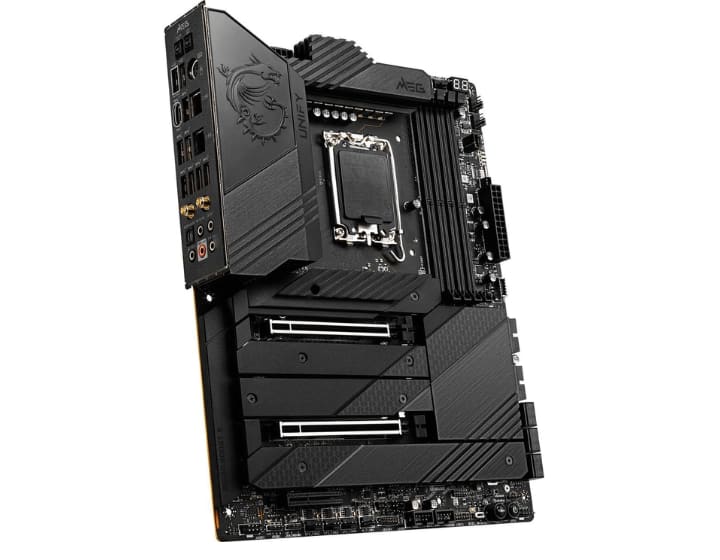
The third contender in our lineup is the MSI MEG Z690 Unify. If you’re tired of motherboards that prioritize flashy RGB lighting over actual performance, this board is a refreshing change. Built with audio professionals and serious creators in mind, the Unify strips away unnecessary gimmicks and focuses on what matters most: low latency, stable power delivery, and reliable connectivity.
Why the MEG Z690 Unify Deserves Attention
MSI designed the Unify to be a powerhouse for both music production PCs and high-performance workstations. Here’s what makes it stand out:
- No RGB distractions – A clean, professional design that keeps your studio setup focused.
- Dual LAN + Wi-Fi 6E – Ensures stable connections for streaming, remote collaboration, or cloud-based audio projects.
- Strong VRMs – Keep your CPU running smoothly during heavy plugin loads and long DAW sessions.
- Low DPC Latency – Essential for real-time audio processing without crackles or pops.
- PCIe 5.0 + DDR5 Support – Future-proof speed for sample libraries and demanding VST instruments.
Real-World Audio Advantages
So, what does this mean for your daily workflow as a producer?
1. Stable DAW Performance
- Whether you’re mixing in FL Studio or editing podcasts, the Unify ensures smooth playback and recording.
- Heavy plugin chains won’t overwhelm your system thanks to the strong VRM design.
2. Reliable Networking
- With Dual LAN and Wi-Fi 6E, latency issues during live streaming or collaborative sessions are minimized.
- Perfect for producers who share projects online or work with remote teams.
3. Future-Proof Build
- Support for DDR5 RAM and PCIe 5.0 SSDs means faster load times for massive sample libraries.
- Ideal for composers working with orchestral VSTs or large audio projects.
How It Compares to Other Contenders
- Compared to the ASUS ProArt Z790-Creator WiFi, the Unify is less about Thunderbolt expansion and more about raw stability.
- Against the Gigabyte Z790 AORUS Master, it trades onboard audio enhancements for a streamlined, professional design.
- In short, if you value low latency, strong VRMs, and reliable networking, the Unify is a serious contender.
Who Should Choose the MSI MEG Z690 Unify?
This motherboard is perfect if you:
- Want a professional-grade board without unnecessary RGB lighting.
- Need low latency for real-time audio production.
- Rely on network stability for streaming or collaboration.
- Plan to future-proof your build with DDR5 RAM and PCIe 5.0 SSDs.
Final Thoughts on the Unify
The MSI MEG Z690 Unify is a no-nonsense motherboard built for creators who care about performance over aesthetics. With its low DPC latency, strong VRMs, and network reliability, it’s a solid choice for anyone building a music production PC.
4. ASRock B650E Steel Legend WiFi
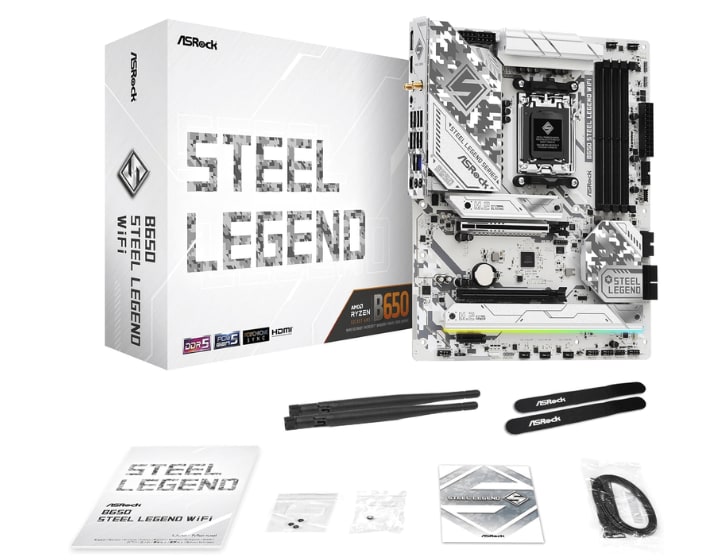
The fourth contender in our lineup is the ASRock B650E Steel Legend WiFi. If you’re building a music production PC on an AMD platform, this board strikes a balance between affordability and professional-grade performance. It’s designed for creators who want reliable low latency, strong VRMs, and modern connectivity without overspending.
Why the Steel Legend WiFi Stands Out
ASRock’s Steel Legend series has always been about durability and practical features. For audio production, the B650E model brings exactly what you need:
- DDR5 Memory Support – Faster load times for sample libraries and smoother plugin performance.
- PCIe 5.0 Compatibility – Future-proof storage speed for large DAW projects.
- Wi-Fi 6E + LAN – Stable networking for streaming, collaboration, or cloud-based audio workflows.
- EMI Shielding – Reduces interference, keeping your recordings clean.
- Strong VRMs – Ensures your CPU stays stable during heavy audio sessions.
Real-World Audio Benefits
So, how does this board help in your daily production work?
1. Smooth DAW Experience
- Whether you’re mixing in FL Studio or editing podcasts, low DPC latency ensures responsive playback.
- Heavy plugin chains won’t overwhelm your system thanks to solid power delivery.
2. Fast Sample Library Access
- With DDR5 RAM and PCIe 5.0 SSDs, orchestral libraries and VST instruments load in seconds.
- Perfect for producers working with large audio projects.
3. Reliable Connectivity
- Wi-Fi 6E and wired LAN keep your sessions stable, whether you’re collaborating remotely or streaming live.
- No more worrying about dropouts during critical recording moments.
How It Compares to Other Contenders
- Against the ASUS ProArt Z790-Creator WiFi, the Steel Legend is more budget-friendly but lacks Thunderbolt 4.
- Compared to the Gigabyte Z790 AORUS Master, it doesn’t have an onboard ESS Sabre DAC, but it still offers clean audio thanks to EMI protection.
- Versus the MSI MEG Z690 Unify, it provides similar stability but at a lower entry cost for AMD users.
Who Should Choose the ASRock B650E Steel Legend WiFi?
This motherboard is perfect if you:
- Prefer AMD Ryzen CPUs for music production.
- Need low latency and stable performance without breaking the bank.
- Want future-proof storage and memory support for growing plugin libraries.
- Value EMI shielding for clean recordings in home studios.
Final Thoughts on the Steel Legend
The ASRock B650E Steel Legend WiFi proves that you don’t need to spend top dollar to get a reliable music production motherboard. With its DDR5 support, PCIe 5.0 compatibility, and EMI protection, it’s a smart choice for producers who want stability and speed on an AMD platform.
Real-World Audio Setups
Pairing with Audio Interfaces
- Tested with Focusrite Scarlett 2i2 and similar interfaces.
- Stable connections via Thunderbolt 4 and USB-C.
DAW Performance
- Smooth operation in Ableton Live, Logic Pro X, and Pro Tools.
- Low latency ensures plugins and VST instruments run without hiccups.
Plugin & Sample Library Handling
- Large sample libraries load faster with DDR5 RAM and PCIe SSDs.
- Better VRMs prevent CPU throttling during heavy plugin use.
Common Mistakes to Avoid
- Choosing a motherboard for looks (RGB) instead of audio performance.
- Ignoring EMI shielding can cause interference with guitars or microphones.
- Buying boards without Thunderbolt/USB-C support.
- Underestimating the importance of VRMs for CPU stability.
FAQ Section
Q1: What is the best motherboard for music production in 2026? The ASUS ProArt Z790-Creator WiFi is widely considered the best due to Thunderbolt 4, low DPC latency, and strong VRMs.
Q2: Do I need Thunderbolt for music production? Yes, Thunderbolt 4 or USB-C ensures fast, stable connections with audio interfaces and external SSDs.
Q3: Can I use a gaming motherboard for audio production? Yes, but ensure it has low latency, good shielding, and proper audio support. Avoid boards focused only on RGB aesthetics.
Q4: Which CPU works best with these motherboards? Intel 13th/14th Gen CPUs pair well with Z790 boards. AMD Ryzen options are strong too, but ensure DAW compatibility.
Q5: Does onboard audio matter for producers? Not always—most pros use external audio interfaces. However, boards like the Gigabyte Z790 AORUS Master with ESS Sabre DAC offer excellent onboard audio.
Conclusion
Choosing the best PC motherboard for music production means prioritizing low latency, Thunderbolt support, and stable VRMs over flashy features. Boards like the ASUS ProArt Z790-Creator WiFi, Gigabyte Z790 AORUS Master, and MSI MEG Z690 Unify deliver the performance audio pros need.
About the Creator
Perfect Tech Views
Welcome to Perfect Tech Views—your go-to source for clear, unbiased, and insightful tech knowledge. Whether you're a pro, a beginner, or just exploring gadgets, we've got you covered with expert guidance!
Keep reading
More stories from Perfect Tech Views and writers in Gamers and other communities.
Best CPU for LGA 2011 – Complete Guide
The best CPU for LGA 2011 is a question that still matters today, even though the platform was first introduced in 2011. Intel’s LGA 2011 socket, also called Socket R, was designed for high-end desktops and servers. It supported quad-channel DDR3 memory, up to 40 PCIe lanes, and multi-GPU setups, making it a powerhouse for enthusiasts and professionals alike.
By Perfect Tech Views2 months ago in Gamers
Rsvsr Rare Drops, Big Rewards: How the Sunder Charm Refreshes Diablo II: Resurrected Endgame
Blizzard’s Reign of the Warlock expansion for Diablo II: Resurrected has breathed new life into a game beloved by fans for decades. Among the many additions, one item has captured the imagination of players more than any other: the Sunder Charm.
By Billo Nali2 days ago in Gamers
Xbox Game Pass in 2026: Can the Brand Really Go Back to Exclusives?
The past week has been a fascinating one for Xbox. A major leadership shake-up has brought a new face to the forefront of the brand, with Asha Chararma stepping into a prominent leadership role. Since the announcement, the gaming community has seen a wave of reactions, PR statements, and opinion pieces discussing what this shift could mean for the future of Xbox.
By Info Post Gate5 days ago in Gamers
Becca
"Everything is so... flat." Denille said stupidly as she looked around her new neighborhood. She looked around at the muted desert where even the smallest sign of life seemed to have given up. The plant life was shrubs that were half cooked by the heat and where there should have been a lawn, a mess of white rocks laid glistening in the sun. Even the sky looked stretched thin, like the sun had ironed it smooth. She’d moved from Riverside, where at least there were hills, but here in Barstow, everything felt baked and brittle.
By Sara Wilson7 days ago in Fiction


Comments