
Best Mice You Can Buy
I will show you the 3 best mice you can buy today!

In the world of gaming and productivity, choosing the right mouse can greatly influence performance, comfort, and overall experience. A quality mouse provides the precision, speed, and ergonomics necessary to excel, whether you're navigating a fast-paced game or managing complex workflows. From basic models to highly specialized ones, today's market offers a wide range of options tailored to different needs.
For example, the Logitech Signature M650 L Wireless Mouse strikes a balance between performance and affordability, making it a popular choice for both casual gamers and everyday users. Meanwhile, Apple's sleek Magic Mouse is known for its minimalist design and seamless integration with macOS, appealing to those who value aesthetics and functionality. On the high-end spectrum, the Logitech MX Master 3S stands out as a top-tier mouse, boasting advanced features like customizable buttons, ergonomic design, and hyper-fast scrolling for power users who demand more from their devices.
Whether you’re a gamer looking for speed and precision or a professional seeking versatility, the right mouse can significantly enhance your performance. This article will guide you through the key features and factors to consider when choosing the best gaming mouse for your needs.
Logitech Signature M650 L Wireless Mouse
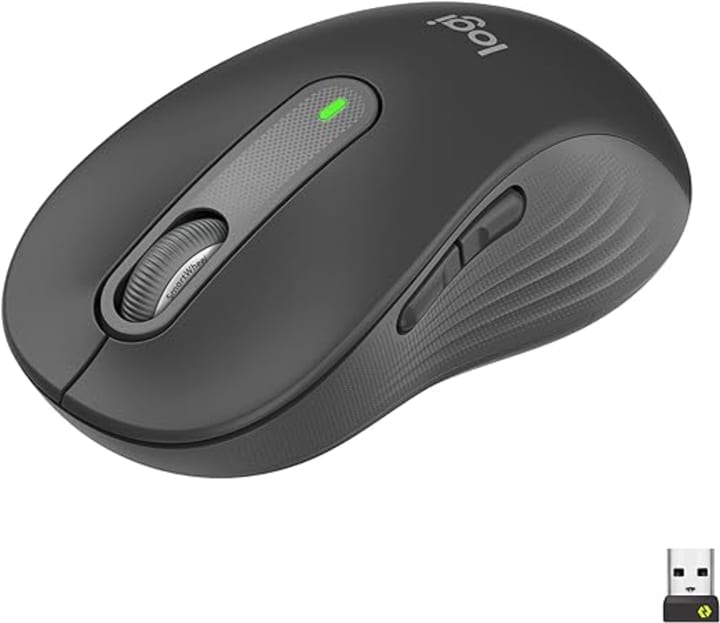
The Logitech Signature M650 L Wireless Mouse is designed for users seeking a reliable, comfortable, and efficient everyday mouse without compromising on modern features. As part of Logitech's broader lineup, this model offers a perfect balance between performance and affordability, making it ideal for both casual users and professionals.
Key Features:
Comfort-Oriented Design: The M650 L is specifically crafted for larger hands, providing an ergonomic shape that ensures long-term comfort. Its contoured shape and soft rubber side grips make it easy to handle during extended use, reducing strain and fatigue.
Wireless Connectivity: This mouse uses advanced wireless technology, offering a stable connection either through Bluetooth or Logitech's proprietary Logi Bolt USB receiver. This flexibility ensures compatibility with a wide range of devices, including PCs, laptops, and even tablets.
Silent Clicks: One of its standout features is the SilentTouch technology, which significantly reduces clicking noise, making it perfect for quiet environments such as offices or shared workspaces.
High-Precision Optical Sensor: Equipped with a high-precision sensor, the M650 L allows for smooth and accurate cursor control on most surfaces, supporting a DPI range of up to 4000 for precise movements.
Customizable Buttons: The mouse includes programmable buttons via the Logitech Options software, allowing users to assign frequently used commands or shortcuts, streamlining workflows.
Long Battery Life: With an impressive battery life of up to 24 months on a single AA battery, the M650 L eliminates the need for frequent recharging.
Overall, the Logitech Signature M650 L Wireless Mouse is an excellent choice for those seeking a comfortable, quiet, and efficient mouse for daily use. Its combination of ergonomic design, wireless flexibility, and customizable features makes it a solid option for both productivity tasks and casual gaming.
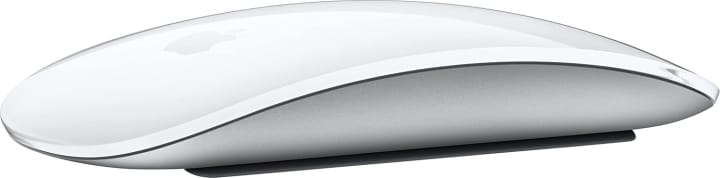
The Apple Magic Mouse is a sleek, minimalist device designed to seamlessly integrate with Apple's ecosystem, offering a unique multi-touch surface that sets it apart from traditional mice. Its innovative design and touch-based controls make it ideal for users who value aesthetics, simplicity, and functionality in their peripherals.
Key Features:
Multi-Touch Surface: One of the Magic Mouse’s most distinctive features is its fully touch-sensitive surface. This allows users to perform a variety of gestures, such as swiping between web pages, scrolling vertically or horizontally, and zooming, similar to using a trackpad. These gestures make navigation intuitive and fluid, enhancing the overall macOS experience.
Wireless and Rechargeable: The Magic Mouse connects via Bluetooth. It’s powered by a built-in rechargeable battery, which can last for weeks on a single charge.
Ambidextrous Design: The mouse features a symmetrical, low-profile design that works equally well for left- and right-handed users. Its smooth, seamless look is consistent with Apple’s design philosophy.
Seamless macOS Integration: As an Apple product, the Magic Mouse is optimized for macOS. It effortlessly pairs with Apple devices, and its gestures are fully integrated into macOS, making it a natural extension of the system’s interface. This tight integration enhances productivity for Apple users, especially those involved in creative work like photo or video editing.
Precision and Smooth Tracking: The Magic Mouse provides accurate and smooth tracking on various surfaces, with a laser sensor that ensures precise cursor movements.
While the Apple Magic Mouse is renowned for its sleek design and advanced touch features, it may not suit everyone, particularly those who prioritize ergonomics or need a more traditional mouse for gaming or long sessions. However, for Apple users seeking a stylish and efficient device that complements their macOS experience, the Magic Mouse remains a top choice.

The Logitech MX Master 3S is a premium wireless mouse designed for professionals and power users who demand precision, customization, and comfort. Building on the success of the MX Master series, the 3S introduces refined features and advanced technology that make it ideal for productivity-intensive tasks such as graphic design, video editing, and software development.
Key Features:
Ergonomic Design: Crafted to provide long-lasting comfort, featuring a sculpted shape that supports the hand naturally. The thumb rest, along with strategically placed buttons, ensures an intuitive and fatigue-free experience, even during extended use.
Silent Clicks: One of the most notable upgrades in the MX Master 3S is its silent click technology, which significantly reduces noise while maintaining the satisfying tactile feedback of each click. This makes it perfect for quiet work environments without sacrificing the feel of responsiveness.
8K DPI Optical Sensor: The 3S features an advanced 8,000 DPI optical sensor that delivers precise tracking on any surface, including glass. This high level of accuracy is perfect for users working across multiple screens or those requiring fine-tuned cursor control.
MagSpeed Electromagnetic Scrolling: The wheel offers two modes: a ratchet mode for precise, step-by-step scrolling and a free-spin mode for fast, fluid scrolling through long documents or web pages. This functionality significantly enhances productivity in data-heavy tasks.
Customizable Buttons: With six customizable buttons, users can assign specific functions or macros to streamline workflows. The Logitech Options software makes it easy to configure the buttons according to individual needs, enhancing efficiency for tasks like copy-pasting, switching between apps, or controlling media.
Multi-Device Connectivity: The MX Master 3S supports easy switching between up to three devices, allowing users to seamlessly control multiple computers or tablets with a single mouse. It connects via Bluetooth or the included Logi Bolt USB receiver, offering flexibility for various setups.
Long Battery Life: With its rechargeable battery, the MX Master 3S offers up to 70 days of use on a single charge and also three hours of use from just one minute of charging.
Cross-Platform Compatibility: While optimized for Windows and macOS, the MX Master 3S also works with Linux and iPadOS, making it versatile for various work environments.
Overall, the Logitech MX Master 3S stands out as a top-tier choice for professionals who need precision, customization, and comfort. It’s one of the best productivity mice on the market, particularly for users who handle complex, multi-tasking workflows.
Choosing the right mouse can make a significant difference in both productivity and gaming performance. From the Logitech Signature M650 L Wireless Mouse with its affordability and comfort, to the sleek and gesture-driven Apple Magic Mouse, and the powerhouse Logitech MX Master 3S designed for professional users, each of these mice offers unique features that cater to different needs. Whether you're a casual user, creative professional, or a multitasking expert, investing in a mouse that aligns with your requirements can enhance your overall experience. Ultimately, selecting the right mouse comes down to your personal preferences, whether it's silent clicks, ergonomic design, or cutting-edge functionality that matters most to you.
About the Creator
Teo R.
i just started making these articles, but i will talk about different type of products and tell you the best ones you can buy!
Keep reading
More stories from writers in Gamers and other communities.
Palworld TCG Guide: Release Date, How to Play, and Bushiroad Card List
The survival gaming world was recently rocked by an announcement that many saw coming but few expected to be this ambitious. Pocketpair has officially pulled back the curtain on the Palworld Trading Card Game, a physical tabletop experience developed in partnership with the industry giants at Bushiroad.
By Richard Bailey5 days ago in Gamers
From Stories to Systems
For a long time, this space has been a bit… quiet. If you’ve stumbled across this blog before, you might have seen short stories, poems, or bits of fiction—creative experiments written at different points in my life. That part of me hasn’t disappeared. I still love storytelling, world-building, and exploring ideas through narrative.
By D. E. King6 days ago in Gamers
The Devil's Cut
“Comrade, finally you’re awake.” The voice was smooth, sensual. A flickering incandescent bar was all that lit the white, sterile room. All Vladimir remembered was everything going black. He tried to move his arms and found them strapped to the gurney.
By Matthew J. Fromm7 days ago in Fiction


Comments