
Unlocking the Power of AI for Optimal Cloud Performance with AWS DevOps Guru
An inside look at DevOps Guru

AWS DevOps Guru is a machine learning-powered operations management service provided by Amazon Web Services (AWS) that helps you improve the performance and stability of your applications. It uses AI algorithms to analyze cloud resource utilization and performance data from AWS resources such as Amazon EC2 instances, Amazon RDS databases, and Amazon S3 storage. It provides real-time operational insights and recommendations for improving application performance, reducing costs, and avoiding issues before they occur.
AWS DevOps Guru provides three main features:
Root Cause Analysis: DevOps Guru can detect and diagnose performance issues by analyzing resource utilization, network performance, and other key performance metrics.
Proactive Recommendations: DevOps Guru provides recommendations on how to optimize resources and resolve potential performance issues, as well as recommendations for scaling and cost optimization.
Anomaly Detection: DevOps Guru uses machine learning algorithms to identify unusual behavior patterns and alert you to potential performance issues before they become critical.
AWS DevOps Guru is designed to be used by both DevOps and operations teams and can integrate with existing AWS services like CloudWatch, AWS Config, and Amazon CloudTrail.
DevOps Guru workflow:
The DevOps Guru workflow integrates with several AWS services, including Amazon CloudWatch, AWS CloudTrail, Amazon Simple Notification Service, and AWS Systems Manager. The following diagram shows a detailed workflow that includes how it works with other AWS services.
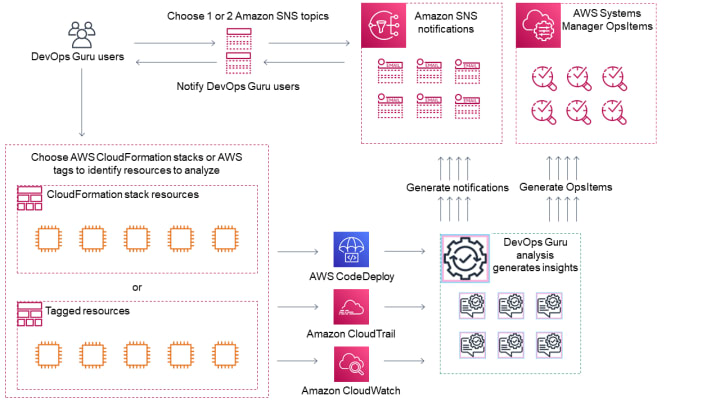
The AWS DevOps Guru workflow typically consists of the following steps:
Data Collection: AWS DevOps Guru collects and analyzes data from your AWS resources to gain insights into resource utilization, performance, and cost optimization opportunities.
Anomaly Detection: DevOps Guru uses machine learning algorithms to identify unusual behavior patterns in your AWS environment and notify you of potential performance issues.
Root Cause Analysis: If an issue is detected, DevOps Guru analyzes the underlying cause of the issue and provides recommendations on how to resolve it.
Proactive Recommendations: DevOps Guru provides recommendations on how to optimize resources, resolve performance issues, and improve application performance.
Insights and Visualizations: DevOps Guru provides actionable insights and visualizations through its console, making it easy for you to understand the state of your AWS environment and take action on any issues or recommendations.
Continuous Monitoring: DevOps Guru continues to monitor your AWS environment in real-time, providing alerts and recommendations as new issues arise or changes are made.
Overall, the AWS DevOps Guru workflow helps you improve the performance and stability of your applications by providing real-time operational insights and recommendations for resolving issues, optimizing resources, and reducing costs.
Amazon DevOps Guru Pricing:
AWS DevOps Guru is priced based on the number of Amazon CloudWatch metrics analyzed and the number of Amazon EC2 instances, Amazon RDS databases, and Amazon S3 storage resources analyzed. The cost of DevOps Guru includes the cost of Amazon CloudWatch metrics and the cost of the AWS resources analyzed.
There are two pricing components to AWS DevOps Guru:
Metrics Analysis: This component covers the cost of analyzing Amazon CloudWatch metrics and is based on the number of metrics analyzed. The cost of analyzing metrics starts at $0.30 per metric per month and varies based on the volume of metrics analyzed.
Resource Analysis: This component covers the cost of analyzing AWS resources, including Amazon EC2 instances, Amazon RDS databases, and Amazon S3 storage. The cost of analyzing resources starts at $0.50 per resource per month and varies based on the volume of resources analyzed.
It is important to note that AWS DevOps Guru offers a free tier that allows you to analyze up to 100 Amazon CloudWatch metrics and 10 resources (such as Amazon EC2 instances and Amazon RDS databases) per month at no charge. This can be a great way to try out the service and see if it meets your needs before committing to a paid plan.
You can find more detailed information about the pricing for AWS DevOps Guru on the AWS website.
Amazon DevOps Guru Security:
AWS DevOps Guru is designed with security in mind, and uses a number of security measures to protect your data and applications. Some of the key security features of DevOps Guru include:
Encryption: DevOps Guru stores your data in encrypted form and uses SSL/TLS to secure communications between your devices and AWS.
Encryption is an important part of DevOps Guru security.
· Encryption of data at-rest
· Encryption of data in-transit
Data in transit security, is provided by default and data at rest security, users can configure when they create project or build.
Users can improve the security of their resource analysis and insight generation by configuring DevOps Guru to use an interface VPC endpoint.
Access Control: You can use AWS Identity and Access Management (IAM) to control who has access to your DevOps Guru data and resources, and to define granular permissions for those users.
Amazon DevOps Guru Use cases:
AWS DevOps Guru can be used in a variety of scenarios to improve the performance and stability of your applications. Some common use cases include:
Performance Optimization: DevOps Guru can help you identify performance bottlenecks in your applications and provide recommendations for improving performance, reducing latency, and increasing efficiency.
Cost Optimization: DevOps Guru can help you reduce your AWS costs by providing recommendations for optimizing your resources, reducing waste, and controlling costs.
Anomaly Detection: DevOps Guru can detect and alert you to unusual behavior patterns in your applications, helping you proactively identify and resolve potential issues before they become critical.
Root Cause Analysis: DevOps Guru can help you diagnose the root cause of performance issues in your applications and provide recommendations for resolving them.
DevOps Automation: DevOps Guru can be integrated with other AWS services, such as AWS CloudFormation and AWS CodeDeploy, to automate DevOps processes and improve the speed and efficiency of your operations.
Disaster Recovery: DevOps Guru can help you prepare for and recover from disasters by providing recommendations for improving your disaster recovery strategy, testing your disaster recovery plans, and reducing downtime.
These are just a few examples of the many use cases for AWS DevOps Guru. Whether you are a DevOps engineer, a system administrator, or a developer, DevOps Guru can help you improve the performance, stability, and security of your applications on the AWS cloud.
About the Creator
Senthil Nathan
Cloud Tinkerer
Keep reading
More stories from Senthil Nathan and writers in FYI and other communities.
The race for quantum supremacy
Quantum computing is a type of computing that is based on the principles of quantum mechanics. While classical computing is based on bits that can only exist in one of two states (0 or 1) at any given time, quantum computing uses quantum bits, or qubits, which can exist in multiple states at the same time.
By Senthil Nathan3 years ago in FYI
A Failed Artist, A Disillusioned Poet, An Underpaid Game Show Host
I took my son and niece to Gori, a small town in Georgia where Joseph Stalin was born. They talked me into visiting the Stalin's Museum, the largest in the post-Soviet space. I had resisted going there because I just can't stand the monster and know enough about him, or so I thought.
By Lana V Lynx18 days ago in FYI
Vitrectomy Surgery Explained: When It’s Recommended and What Patients Should Expect
Vitrectomy surgery is a type of eye surgery that involves the removal of the vitreous gel from the eye. The vitreous is the clear, gel-like substance that fills the center of the eye and helps it maintain its shape. This surgery is primarily recommended to treat a variety of retinal problems, and it plays a vital role in restoring vision for patients with specific eye conditions.
By Franklin Norton2 days ago in FYI


Comments