
When AI Features Stress Mobile App Performance Limits?
A first-person look at how AI-powered features quietly push mobile apps toward performance, battery, and responsiveness limits


I knew something had changed the first time the app felt warm in my hand.
Not hot. Just warm enough to notice.
The feature itself worked. The AI response appeared. The demo flowed. Stakeholders were happy.
Yet something felt off.
The app no longer felt light. It felt busy.
That was my first real signal that AI features don’t just add capability to mobile apps. They quietly push against limits that most teams underestimate.
Why AI Feels Easy in Demos but Heavy in Real Use
AI features tend to look harmless in short demos.
- You tap once.
- You wait a moment.
- You see a smart response.
On a high-end device, that delay feels acceptable.
Real usage is different.
People trigger features repeatedly. They switch screens mid-request. They use older phones. They expect the app to remain smooth while the AI does its work.
Google research has shown that even small increases in response time can lead to noticeable drops in engagement on mobile. Google has also shared that users are highly sensitive to delays beyond a few seconds, especially when the UI appears frozen.
AI workloads stretch those seconds quietly.
Mobile Apps Were Built for Short Bursts, Not Sustained Thinking
Traditional mobile apps are optimized for brief tasks.
- Open
- Tap
- Scroll
- Close
AI features break that pattern.
Inference takes time. Network calls grow larger. Background work increases. Memory stays occupied longer than before.
Apple documentation on mobile performance has repeatedly warned that sustained CPU usage and memory pressure degrade responsiveness and battery life over time, even when individual tasks appear fast.
AI doesn’t spike the system once. It keeps it busy.
That difference matters.
Why Performance Problems Appear Gradually
The most frustrating part is that nothing breaks immediately.
The app launches fine. The feature works. Metrics look stable at first.
Then weeks pass.
Battery complaints appear.
Scrolling feels less smooth.
Animations drop frames during AI responses.
NVIDIA research on on-device inference has highlighted that repeated AI workloads can accumulate thermal and power impact even when single inferences seem lightweight.
The system doesn’t fail. It tires.
Network Cost Most Teams Ignore
Many AI features rely on remote models.
That means larger payloads.
Longer waits.
More retries on unstable connections.
On paper, it looks manageable.
In real life, mobile networks fluctuate constantly.
Google has published data showing that mobile network latency can vary widely even within the same session. AI requests magnify that variation because they tend to be heavier than typical API calls.
When the network stalls, the app stalls with it unless carefully designed.
Why Older Devices Suffer First
High-end phones hide problems.
They have faster CPUs. More memory. Better thermal handling.
Older devices tell the truth.
AI workloads that feel smooth on a flagship phone can choke mid-range devices. Memory pressure increases. The OS intervenes. Background tasks get killed.
Apple has documented that aggressive background activity leads to system throttling, especially on devices with limited resources.
Users don’t care why it happens.
They just feel the slowdown.
The Battery Drain Users Notice but Rarely Report
Battery drain is one of the quietest performance failures.
Users don’t file tickets saying the AI feature drained their battery. They simply stop using it.
According to Android developer research shared by Google, excessive background processing is one of the top contributors to user dissatisfaction, even when the app remains functional.
AI features often introduce background work that feels invisible during development but obvious during daily use.
If the app feels costly to use, people avoid it.
Why Profiling Needs to Change With AI
Traditional profiling focuses on screens and flows.
- Startup time
- Frame drops
- API latency
AI changes the focus.
Now I profile sustained usage.
Repeated triggers.
Memory over time.
Battery impact across sessions.
OpenAI has discussed how inference costs grow with repeated usage patterns, not just single requests. That applies directly to mobile apps that encourage frequent AI interactions.
Testing once is no longer enough.
The UX Cost of Waiting for Intelligence
Even when AI responses are accurate, waiting changes behavior.
Users hesitate.
They double tap.
They interrupt flows.
Jakob Nielsen Group research has long shown that delays beyond a few seconds break the feeling of direct manipulation. AI features push apps closer to that boundary.
If the UI does not clearly communicate progress, users assume something went wrong.
That uncertainty damages trust.
Why AI Shifts the Performance Budget
Every app has an unspoken performance budget.
- How much CPU it can use.
- How much memory it can hold.
- How much battery it can consume.
AI features spend that budget quickly.
Once the budget is gone, other parts of the app suffer.
Animations stutter. Input feels delayed. Background tasks fail.
Teams often blame the wrong parts of the system.
The issue isn’t bad UI code. It’s that the budget has been reassigned.
What I See in Teams Shipping AI Fast
Teams move fast because AI feels urgent.
Roadmaps fill up. Features stack. Optimization gets postponed.
In environments like mobile app development Seattle, I’ve seen teams ship powerful AI features only to spend months recovering performance afterward.
The mistake is not ambition.
The mistake is assuming mobile limits will adapt.
They won’t.
What Actually Helps Before Things Break
The teams that avoid major pain do a few things early.
- They throttle AI usage intentionally.
- They cache results aggressively.
- They move work off the main thread without exception.
- They design UI states that tolerate waiting gracefully.
They accept that AI responses are probabilistic and plan for retries and failures.
Most importantly, they test under stress, not ideal conditions.
Why Users Feel the Difference Before Metrics Do
Performance dashboards lag behind experience.
By the time metrics degrade, users have already adjusted their behavior.
- They open the app less.
- They avoid the AI feature.
- They trust it less.
Microsoft research on perceived performance has shown that users notice changes long before systems flag them as critical.
AI stress shows up emotionally before it shows up numerically.
The Tradeoff Teams Must Face
AI features can add real value.
- They can save time.
- They can guide decisions.
- They can reduce effort.
But they are not free.
They demand resources mobile apps don’t have in abundance.
Ignoring that reality doesn’t make it go away. It pushes the cost onto users.
What I’ve Learned the Hard Way
AI doesn’t just change what an app can do.
It changes how the app feels.
If the app feels heavier, warmer, slower, or less responsive, users notice immediately.
They don’t care that the feature is smart.
They care that the app still feels good to use.
The Quiet Line Teams Should Not Cross
There is a point where intelligence starts competing with usability.
When AI features cross that line, the app loses its character.
The best mobile apps feel effortless.
If AI removes that feeling, something is wrong.
The Real Question Worth Asking
The question isn’t whether AI features work.
The question is whether the app still feels like a mobile app after they arrive.
When AI features stress mobile app performance limits, the answer shows up in subtle ways.
- Warm phones.
- Delayed taps.
- Quiet disengagement.
That’s where the real cost lives.
And once users feel it, no amount of intelligence makes up for the loss of trust.
Frequently Asked Questions
Why do AI features impact mobile app performance more than traditional features?
AI features often require sustained CPU usage, larger memory allocation, and heavier network activity. Unlike traditional features that complete quickly, AI workloads tend to run longer and repeat more frequently, putting continuous pressure on mobile hardware and operating systems.
Why do AI performance problems usually appear after launch?
Because short demos and initial testing don’t reflect real usage. Performance issues surface over time as users trigger AI features repeatedly, use older devices, switch networks, and keep apps open longer than expected.
Why does the app feel slower even when AI responses are correct?
Performance is about perception, not correctness. Even small delays during AI processing can interrupt smooth interactions, causing animations to stutter or taps to feel delayed, which makes the app feel heavier overall.
How do AI features affect battery life?
AI workloads increase background processing, CPU usage, and network activity. Over time, this drains battery faster, especially on mid-range and older devices. Users often notice battery impact before they notice other performance issues.
Why do older devices struggle more with AI features?
Older devices have limited memory, slower processors, and stricter thermal limits. AI tasks that run smoothly on high-end phones can overwhelm these devices, leading to throttling, UI lag, or background task termination.
Can on-device AI solve performance problems?
On-device AI reduces network latency but increases CPU and memory usage. It can help in some cases, but it introduces different performance tradeoffs that still need careful optimization and testing under real conditions.
Why do metrics not show AI-related issues immediately?
Most monitoring focuses on crashes and response times, not gradual degradation. AI-related performance stress often shows up as heat, battery drain, or subtle UI lag that users feel before dashboards detect problems.
What should teams test when adding AI features?
Teams should test long sessions, repeated AI interactions, low network conditions, background and foreground transitions, and battery usage over time. Testing only single interactions is not enough.
How can teams protect user experience while adding AI?
By setting usage limits, caching results, moving work off the main thread, designing clear loading states, and prioritizing responsiveness over feature density. AI should feel supportive, not intrusive.
What is the biggest mistake teams make with AI in mobile apps?
Assuming that mobile performance limits will adapt to AI workloads. Mobile constraints are fixed, and ignoring them shifts the cost directly onto users through slower performance and reduced trust.
About the Creator
Ash Smith
Ash Smith writes about tech, emerging technologies, AI, and work life. He creates clear, trustworthy stories for clients in Seattle, Indianapolis, Portland, San Diego, Tampa, Austin, Los Angeles, and Charlotte.
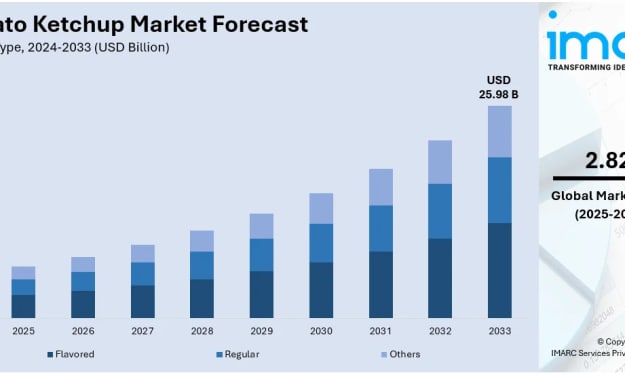
Tomato Ketchup Market Trends: Retail Expansion, Emerging Markets Growth & Industry Forecast to 2033
The global tomato ketchup market is witnessing a significant transformation, fueled by the rapid expansion of fast-food chains, evolving culinary habits, and a growing consumer inclination toward convenient yet flavorful condiments. According to IMARC Group’s latest data, the global tomato ketchup market size was valued at USD 20.18 Billion in 2024. Looking forward, IMARC Group estimates the market to reach USD 25.98 Billion by 2033, exhibiting a CAGR of 2.82% from 2025-2033.
By Andrew Sullivan3 days ago in Futurism
Dark Space
It Felt Like Heaven Somewhere in the past lurking. The darkness prevailed and began to manifest. The tendrils of black and jade formulated and brought forth anew. For ‘SYN’ had arisen and all the guilt and darkness of Deep Space phenomena and noumena came forth in a human form. Or was it just a dream. A clouded memory from deep with in my mind. Welcome ‘SYN’ to the space voyage. May your travels bring you to the light.........
By Nigel Sanders3 days ago in Futurism



Comments
There are no comments for this story
Be the first to respond and start the conversation.