
Top 7 ChatGPT Prompts for Analysts Who Want Clearer Insights and Less Busywork
Tech

If you work with data, you know the pain: hours cleaning up spreadsheets, writing the same commentary over and over, and trying to surface something meaningful before the next meeting. In 2025, the analysts who stand out aren’t just the best at Excel—they’re the ones using ChatGPT to slash busywork and deliver sharper insights, faster.
Here are the 7 prompt stacks every analyst should use to save hours, impress stakeholders, and spend more time on real analysis—not admin.
ChatGPT Became My Insight Engine and Reporting Assistant
ChatGPT, now my go-to assistant, handles everything from daily data prep to making my presentations pop. I start most mornings with:
“Summarize the top trends, anomalies, and risks in this [sales/operations/marketing] dataset. Use plain English and prioritize what matters most to [stakeholder].”
With one prompt, I get a focused, jargon-free summary that’s ready to share.
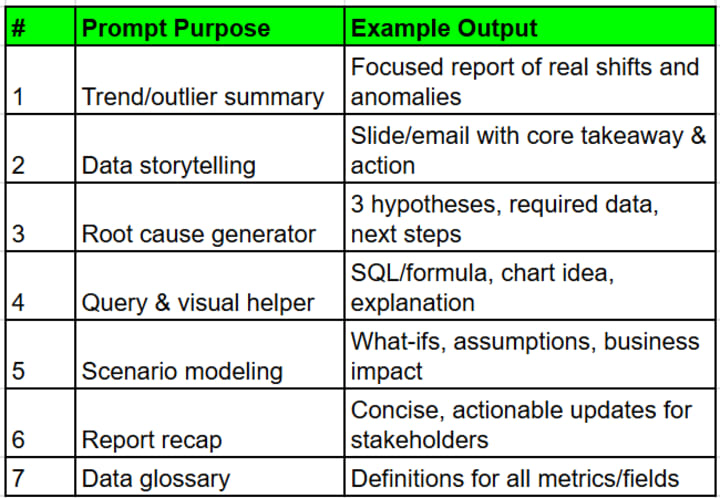
Prompt #1: Trend and Outlier Detection
“Review this dataset (paste key columns or upload summary). List three emerging trends, two surprising outliers, and what they could mean for the business.”
ChatGPT flags what deserves attention and suggests the first questions to ask.
Prompt #2: Stakeholder-Ready Data Stories
“Turn these numbers into a one-slide summary for [audience]. Highlight the core takeaway, risks, and one recommendation for next steps.”
Result:
Stakeholders get the “so what?” instantly—no more glazed eyes in meetings.
Prompt #3: Root Cause Hypotheses
“Given this sudden change in [KPI/metric], suggest three possible root causes, the data needed to confirm each, and a next step for investigation.”
Now, instead of guessing or chasing hunches, I investigate what matters.
Prompt #4: Ad Hoc Query and Visualization Stack
“Write a SQL query (or spreadsheet formula) to pull [insight], and describe the best chart or visual to show it. Explain why this visual fits the story.”
I get code, context, and a dashboard-ready chart idea in one shot.
Prompt #5: Scenario & Sensitivity Analysis
“Model three what-if scenarios for [metric/goal]. Summarize how each would impact the next quarter’s results, and note assumptions.”
No more messy ‘what if?’ email chains—just clear, focused scenarios with action points.
Prompt #6: Report Automation and Recaps
“Summarize last month’s report into a 200-word email update. Focus on wins, risks, and what the team needs to focus on next.”
Cuts hours from monthly cycles and keeps teams aligned.
Prompt #7: Data Dictionary and Glossary Builder
“From this data set, generate a clear glossary for all columns/metrics. Define each in simple terms for new team members.”
Every onboarding just got easier, and data silos shrink.
I Store and Share All My Prompts in Chatronix
Every prompt, template, and insight I use is saved in chatronix.ai all ai in 1 tools:
- Tag prompts by use case, department, or project
- Archive the best analysis stories and recaps for future reference
- Share prompt packs with new analysts for instant upskilling
Ready to stop slogging and start shipping sharper insights? Try chatronix.ai all ai in 1 tools and see what happens when you automate your busywork.
Table: 7 ChatGPT Prompts Every Analyst Needs
The Real Result: Faster Insights, Happier Teams, No More All-Nighters
- Reporting and analysis done in a fraction of the time
- Meetings and updates are actionable, not overwhelming
- New team members onboard in days—not weeks of doc reading
- More time spent on real business impact, less on repetitive busywork
If you’re ready for sharper insights with less effort, automate your workflow with ChatGPT and Chatronix—and watch your value skyrocket. Get started and let your next data story tell itself.
About the Creator
About Binding Prometheus
I want to start actively advocating on behalf of my own work, and the most valuable part of my canon is, without a doubt, Binding Prometheus, the play I have been working on since 2019 and only finished in 2023 as part of my MA. The play itself is an amalgamation of a million different inspirations. On one end, it evokes the Ancient Greek myth-play, deriving its own title from the earliest extant work of Western drama we have, Aeschylus’s Prometheus Bound. On the other end, it borrows significantly from the sci-fi bulwarks from over the years, namely Mary Shelley’s Frankenstein and Karel Capek’s Rossum’s Universal Robots. The play could be an episode of Black Mirror, I fear. I don’t know. I’ve only ever seen one episode of Black Mirror.
By Steven Christopher McKnight18 days ago in Futurism
Shooting Ranges Market: Safety Training Demand, Modern Facilities & Recreational Shooting Trends
According to IMARC Group's latest research publication, global shooting ranges market size reached USD 1.3 Billion in 2024. Looking forward, IMARC Group expects the market to reach USD 2.5 Billion by 2033, exhibiting a growth rate of 6.72% during 2025-2033.
By sujeet. imarcgroup6 days ago in Futurism



Comments
There are no comments for this story
Be the first to respond and start the conversation.