
SSD vs. HDD: Which Do You Need?
SSDs vs. HDDs: Key Differences, Pros & Cons to Help You Choose the Right Storage Solution for Your Needs and Budget.
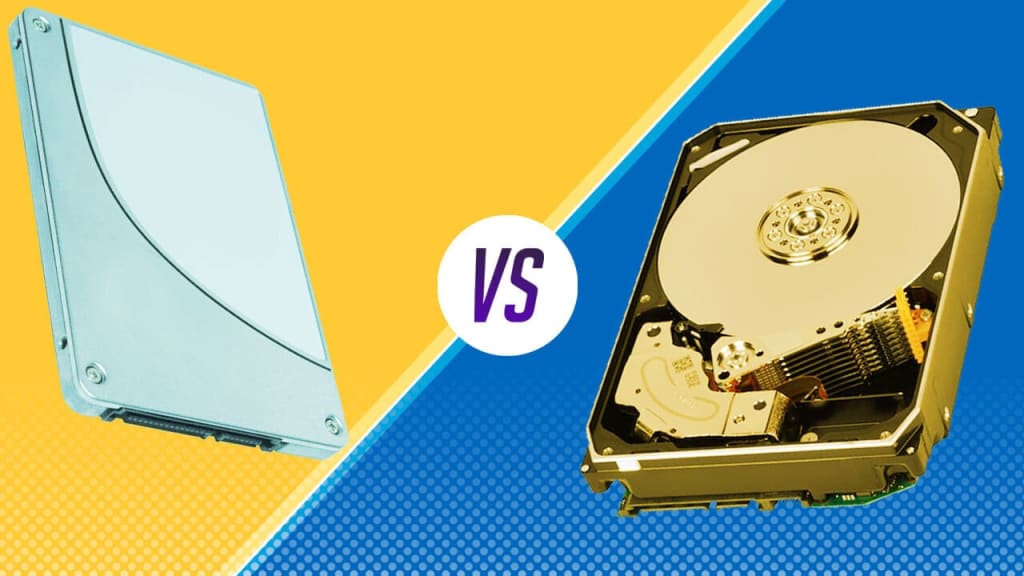
Key Differences Between SSDs and HDDs:
Hard disk drives (HDDs) and solid-state drives (SSDs) are the two primary options you'll probably encounter while searching for computer storage. Getting the best option for your system will depend on your needs, as each has advantages and disadvantages. To assist you in making an informed choice, let's examine the main distinctions between speed, capacity, and affordability.
What Is an SSD?
An SSD, or Solid-State Drive, is a storage device that uses flash memory to store data. Unlike traditional HDDs, SSDs have no moving parts, which makes them significantly faster and more durable. They work similarly to USB flash drives but on a much larger scale, offering quick access to your files, applications, and operating system.
What Is an HDD?
A Hard Disk Drive, or HDD, is a traditional storage device that uses spinning magnetic disks to read and write data. It has been the standard for decades and is still widely used today, especially for storing large amounts of data at a lower cost. However, because HDDs rely on mechanical parts, they tend to be slower and more prone to wear and tear over time.
Speed: How Fast Do You Need Your Storage?
SSDs: Lightning-Fast Performance
One of the biggest advantages of SSDs is their speed. Since they have no moving parts, data can be accessed almost instantly. This results in faster boot times, quicker application launches, and a generally smoother user experience. If speed is a priority for you—whether for gaming, video editing, or just everyday tasks—an SSD is the clear winner.
HDDs: Slower but Reliable
HDDs, on the other hand, are much slower because they rely on spinning disks and a mechanical read/write head. This means it takes longer to find and retrieve data, leading to longer boot times and slower application performance. However, if you're not in a hurry and just need a place to store files, an HDD can still do the job.
Storage Capacity: How Much Space Do You Need?
SSDs: Limited but Expanding
SSDs have traditionally been more expensive per gigabyte compared to HDDs, meaning their storage capacities have been lower. However, as technology advances, SSD capacities are increasing, and prices are dropping. You can now find SSDs with several terabytes (TB) of storage, but they still tend to cost more than an HDD of the same size.
HDDs: More Storage for Less Money
If you need a lot of storage for a lower price, HDDs are still the best option. You can easily find HDDs with 2TB, 4TB, or even more at a fraction of the cost of an SSD. This makes them ideal for storing large files like movies, photos, and backups.
Durability and Lifespan: Which Lasts Longer?
SSDs: Built to Last
Since SSDs don’t have moving parts, they are more resistant to physical damage. They are less likely to fail due to drops or shocks, making them ideal for laptops and portable devices. However, SSDs have a limited number of write cycles, meaning their lifespan is based on how much data is written and erased over time. That said, modern SSDs last for many years before showing any signs of wear.
HDDs: Mechanical Wear and Tear
HDDs are more vulnerable to physical damage because they have spinning disks and moving parts. A sudden drop or even consistent movement can lead to data loss or failure. While they can last a long time with proper care, they are generally more fragile than SSDs.
Price: Budget Considerations
SSDs: A Higher Cost for Better Performance
SSDs are more expensive than HDDs, especially when comparing storage sizes. However, the price gap is narrowing, and if you value speed and reliability, an SSD is worth the investment. Many people opt for a smaller SSD for their operating system and essential applications, combined with an HDD for additional storage.
HDDs: Affordable and Accessible
HDDs remain the budget-friendly choice, making them a great option if you need a lot of storage without spending too much. They are widely available and offer excellent value, especially for archiving data and media files.
Energy Efficiency and Noise: Which Is Quieter and Uses Less Power?
SSDs: Silent and Energy-Efficient
Since SSDs have no moving parts, they generate no noise and use less power. This makes them an excellent choice for laptops, as they help extend battery life and keep your device running quietly.
HDDs: Noisy and Power-Hungry
HDDs consume more power and produce noise due to their spinning disks and moving parts. While the noise isn’t always noticeable, it can be an issue in quiet environments. Additionally, higher power consumption means shorter battery life for laptops.
Gaming and Performance: Which One is Better?
For gamers, SSDs are the preferred choice. They reduce load times significantly, providing a smoother gaming experience. Open-world games, in particular, benefit from the faster data retrieval of an SSD. While HDDs can still store games, they often lead to longer load times and stuttering in certain games.
Which One Should You Choose?
Choose an SSD If…
If you want a fast, reliable, and durable storage option that enhances your computer’s performance, an SSD is the way to go. It’s perfect for gaming, creative work, and everyday use where speed matters.
Choose an HDD If…
If you need lots of storage at a lower price and don’t mind slower speeds, an HDD is a solid choice. It’s ideal for backups, mass storage, and non-performance-intensive tasks.
Final Thoughts
Your needs and financial situation will determine whether you choose an SSD or an HDD. Choose an SSD if speed, robustness, and efficiency are important to you. An HDD is still a good choice if you need a lot of storage at a lesser price. Many customers discover that the ideal balance between price and speed is achieved by combining the two—using an HDD for bulk storage and an SSD for the operating system. Regardless of your preference, one of the best ways to enhance your computer experience is to upgrade your storage.
About the Creator
Keep reading
More stories from writers in Futurism and other communities.
Product Lifecycle Management (PLM) Software Market Analysis: Adoption, Features, and Forecasts
Growing product complexity, shorter development cycles, and need for cross-functional collaboration are driving growth in the PLM software market. Manufacturers adopt PLM to manage design data, improve innovation speed, and reduce time to market. According to IMARC Group's latest research publication, The global product lifecycle management (PLM) software market size reached USD 28.4 Billion in 2024. Looking forward, IMARC Group expects the market to reach USD 47.7 Billion by 2033, exhibiting a growth rate (CAGR) of 5.89% during 2025-2033.
By James Whitmanabout 9 hours ago in Futurism
Embedded Processor Market: Innovation, AI Integration, and Growth Trends
According to IMARC Group's latest research publication,The global embedded processor market size was valued at USD 21.15 Billion in 2024. Looking forward, IMARC Group estimates the market to reach USD 36.63 Billion by 2033, exhibiting a CAGR of 5.98% from 2025-2033.
By James Whitman4 days ago in Futurism
One Hard Thing
Stop me if you’ve heard this one before: You have the number, you know your schedule- you’ve even picked out the perfect day and time to make this appointment. Shoot, you’ve even picked out alternative days and times just in case their schedules can’t accommodate you!
By Taylor Rigsby8 days ago in Motivation
Killing him slowly
There’s an intruder in my house again. He stumbles through the door, wet carrier bags in hand. He’s bought me offerings. I show my appreciation, letting him caress my beautiful body. He wants to touch me. I rub myself against his legs. He sighs, dropping the bags. He can’t resist touching me. Running his hand slowly down my spine, I arch my back towards his caress, let out a low purr. It’s what we both need.
By N J Delmas5 days ago in Horror


Comments
There are no comments for this story
Be the first to respond and start the conversation.