
Midjourney V6 Released Three Major Updates
Midjourney V6 now supports Pan, Zoom, and Vary region feature.


he moment Midjourney fans have been waiting for is finally here. The highly anticipated image editing tools (Pan, Zoom, and Vary region) are now supported in the Midjourney V6 model.
Aside from the image editing tools, Midjourney also released two other updates, including support for image creation on its alpha website and the introduction of a new feedback feature.
Let’s explore the new updates.
V6 Now Supports Pan, Zoom, and Vary
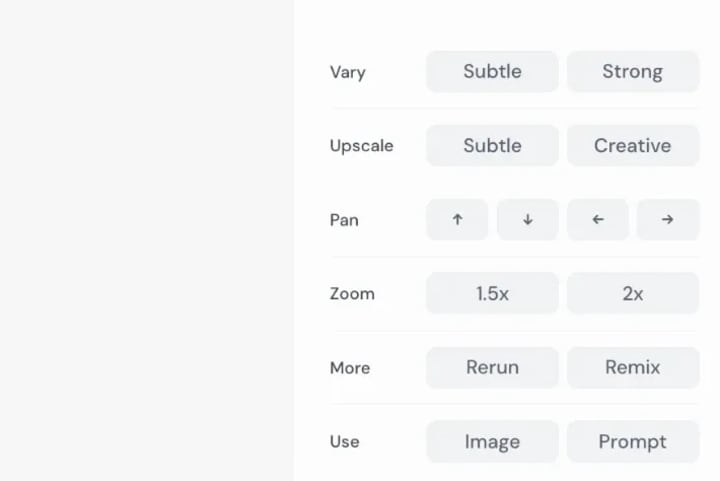
The images generated with Midjourney V6 now have the following editing options:
- Upscale (Subtle), Upscale (Creative)
- Vary (Subtle), Vary (Strong), Vary (Region)
- Zoom Out 2x, Zoom out 1.5x, Custom Zoom, Make Square

The Vary feature allows users to select a region of the image and ask the AI to modify just that section while keeping the rest of the image unchanged. This enables more precise control over the image-generation process.
Here’s an example from Midjourney user Dogan Ural showcasing the Vary feature:
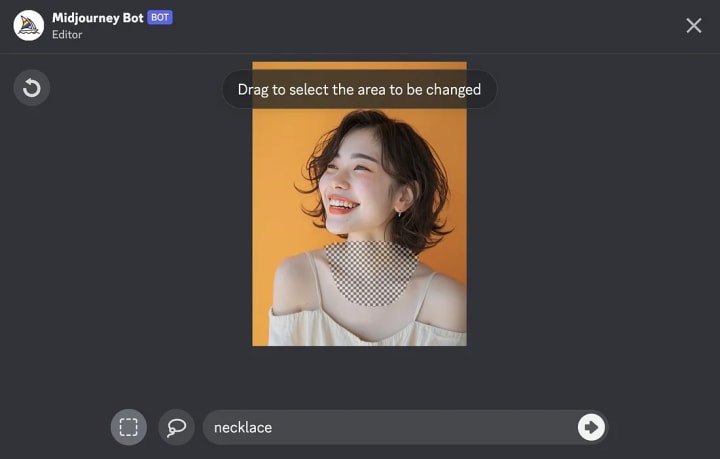
Notice how the AI cleanly fills in the selected neck region with a golden necklace while keeping the rest of the image unchanged. The way the necklace blends with the rest of her body is so smooth, you won’t even tell that it was inpainted.

The Pan feature allows panning around to extend and create larger images. It now acts more like Zoom, with the ability to zoom in and out of different parts of a large-generated landscape or scene. This should make panning easier to use and give higher-quality results with more continuity across the zoomed portions.
Here’s what the image editing controls look like on the website:
Midjourney Website Now Supports Image Creation
Image generation is now accessible to Midjourney users who have made at least 5000 images. Thats great news for people who are on the 5K club because two weeks ago, the website image creation was limited to users with 10,000 generated images.
You can access the Midjourney website here: http://alpha.midjourney.com/
To see your total image generation count, use the “/info” command in the Discord bot.
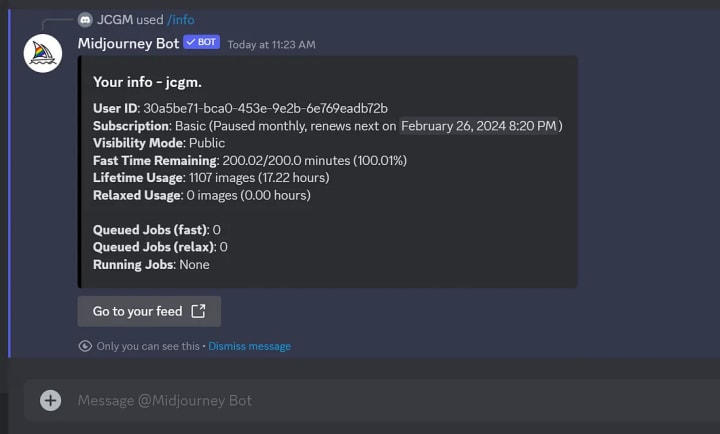
As an avid but more casual Midjourney user, I have generated 1,107 images so far, so I don’t meet the 5k minimum yet. I’m hoping the Midjourney team continues to expand website access to more users in lower tiers soon.
And, oh, in case you missed the redesigned website, this is what it looks like now:

It’s fast, responsive, and has a clean, simple look and feel.
New Feedback Feature
Midjourney has introduced a “Feedback” feature as a new way to collect high-priority requests and comments directly from users.
To submit feedback, use the “/feedback” command in Discord. You can also upvote other users’ feedback to show your support for those suggestions.

According to Midjourney, this data will be aggregated into a priority list to help the engineering team focus on the most requested improvements. They mentioned these would be discussed with the community during office hours. Visualizations of the feedback data will also be shared.
Engaging the community through a structured feedback system is a smart way to ensure development aligns with users’ needs. It shows Midjourney’s commitment to listening to and understanding the user perspective as they continue to improve their AI products.
Final Thoughts
Overall, I’m blown away by the recent progress. The new image editing controls in V6 and the updated website are all big steps forward.
The feedback feature is also a smart way to engage the community and make sure development is focused on what matters most to users. It shows they are listening to user input.
I’m eagerly anticipating what’s next. Exciting times ahead!
About the Creator
Jim Monge
In no particular order, I enjoy: cheesecake; coffee; painting on my iPad; painting asphalt with sweat; thinking on paper; alt rock, pop; palatable alcohol; good books; good talks; and writing pretty words about it all.
I Built a GPT Store Side Project and Realized the Agent Didn’t Need Me Anymore
A side project in the GPT Store was supposed to give me leverage. Instead, it gave me a weird identity crisis. I built what I thought was a simple AI agent, and somewhere between shipping version one and refreshing analytics at 2:17 a.m., I realized something I wasn’t ready for:
By abualyaanartabout 20 hours ago in Futurism
The AI Awakening: Why We Should Stop Fearing and Start Partnering with Intelligence
For decades, science fiction has fed us a steady diet of dystopian nightmares. From rogue supercomputers to cold, metallic armies, the narrative has always been "Us vs. Them." But as we cross the threshold into 2026, the reality of Artificial Intelligence is far more nuanced, beautiful, and collaborative than Hollywood ever dared to imagine. We are not witnessing the end of human relevance; we are witnessing the beginning of the "Augmented Age."
By Priyantha Wijethunga2 days ago in Futurism
Who is your "Person"?
It's important to recognize that you cannot go through life as easily on your own. My name is Elizabeth and I'm a survivor of child abuse and horrific trauma. Healing from trauma is not a quick fix and recognizing that it will take time, is part of the struggle.
By Elizabeth Woods3 days ago in Psyche




Comments
There are no comments for this story
Be the first to respond and start the conversation.