
iOS 18.6: Everything You Need to Do After the Update
New Features, Bug Fixes, Security Enhancements & Optimization Tips You Can’t Afford to Miss


📱 Introduction: Why This iOS Update Is More Than Just a Patch
On July 30, 2025, at 9:00 AM, Apple rolled out iOS 18.6, a powerful system update that goes beyond the usual round of bug fixes. Packed with critical security patches, EU-specific features, and performance enhancements, this release is a must-install for iPhone and iPad users.
But updating your software is only half the job. To truly reap the benefits of iOS 18.6, there are key actions you should take right after installation. This guide walks you through what’s new, why it matters, and what to do next to keep your device smooth, secure, and efficient.
🔐 1. Enhanced Security: Stronger Than Ever
Apple’s commitment to user privacy and device security shines in this release. iOS 18.6 introduces multiple layers of protection designed to keep your data safe in an increasingly risky digital environment.
Key Security Improvements:
Advanced Encryption Protocols: Stronger mechanisms now protect everything from saved passwords to Apple Pay data.
Unauthorized Access Prevention: Better gatekeeping means fewer chances for hackers to bypass your lock screen or access stored information.
Malware Vulnerability Fixes: Apple has patched vulnerabilities that could’ve been exploited by malicious apps or scripts.
> Why it matters:
Whether you're doing online banking, managing work files, or just browsing, iOS 18.6 ensures your private data stays exactly that—private.
🛠️ 2. System Stability & Bug Fixes
Beyond security, iOS 18.6 squashes a number of annoying bugs that have been nagging users for months.
What’s Fixed:
Photos App Sharing Glitch: Users can now seamlessly share Memory Movies without crashes or freeze-ups.
Performance Lags: Minor system bugs that caused apps to freeze or slow down have been resolved.
Background App Refresh Issues: Apps now refresh more consistently, improving multitasking.
User tip:
If you’ve noticed smoother animations and snappier response times since the update — you’re not imagining things.
🌍 3. A Game-Changer for EU Users: App Marketplaces Unlocked
Thanks to new EU digital regulations, Apple has opened the door to third-party app marketplaces — a monumental shift for users in Europe.
What’s New for EU Users:
Install Apps from the Web: Bypass the App Store for the first time in iPhone history.
Alternative App Stores: Users can now explore curated marketplaces beyond Apple's walled garden.
Enhanced App Management Options: Including more control over app permissions and system access.
Important:
Even with this freedom, Apple ensures core security layers remain intact — so sideloading apps doesn’t mean sacrificing safety.
⚙️ 4. What to Do Right After Updating
Think you’re done once the update finishes installing? Not quite. Here’s your post-update checklist:
✅ Step-by-Step Optimization:
1. Update All Apps
Go to App Store > Your Profile > Update All
Ensures compatibility and prevents app crashes on the new system.
2. Check for Carrier Settings Updates
Go to Settings > General > About
If a carrier update is available, you’ll get a prompt.
These updates improve network connectivity and voicemail reliability.
3. Reboot Your Device
A fresh restart helps the system settle in post-update and flush out cache clutter.
4. Recalibrate Battery (Optional but Helpful)
Fully charge your phone to 100%
Use it till it drains to 0%
Recharge to full again without interruptions
Helps align battery health indicators with actual performance.
🚀 5. Performance Upgrades You’ll Actually Notice
Apple isn’t just fixing things — it’s also making things better, especially if you're running an older device like the iPhone 13 or 14.
Real-World Performance Benefits:
Faster App Launches: Noticeably quicker, even for larger apps like Final Cut Mobile or GarageBand.
System Smoothness: Transitions feel more fluid; reduced lag even under heavy multitasking.
Battery Life Improvements: Better power management extends daily usage by 5–10% depending on your habits.
> Bonus for Gamers:
iOS 18.6 optimizes Metal 3 rendering, so mobile games like Genshin Impact or Call of Duty Mobile now load faster with fewer frame drops.
📊 6. Battery Tips Post-Update
Even though battery life is expected to improve, some users may experience temporary drain after updating. This is normal — here’s how to manage it:
Tips to Maximize Battery Efficiency:
Turn off Background App Refresh for non-essential apps
Use Low Power Mode during idle hours
Monitor battery usage under Settings > Battery
Remove outdated widgets you no longer use
Pro Tip:
Battery performance usually stabilizes within 48–72 hours post-update. Give it some time.
📤 7. Clean House: App & Storage Cleanup
Now’s a great time to declutter. Here’s what to do:
App Audit:
Delete unused or rarely used apps.
Offload large games or media apps that you don’t need daily.
Storage Check:
Go to Settings > iPhone Storage
Delete old files, downloads, or duplicate photos using built-in suggestions.
🧠 8. Privacy Settings You Should Revisit
With new encryption layers and app permissions in iOS 18.6, take a moment to double-check your privacy settings:
Key Areas to Review:
Location Services
Microphone & Camera Access
App Tracking Transparency
Health & Fitness Data Sharing
Visit: Settings > Privacy & Security
Make sure you're only sharing what you're comfortable with.
🧭 9. Siri & Spotlight Enhancements
iOS 18.6 also brings smarter search and more contextual Siri suggestions, although Apple hasn’t highlighted this feature much.
What’s New:
Faster Siri Query Responses
Improved Spotlight Search Accuracy
Custom Shortcut Recommendations Based on Routine
Try searching for a file, contact, or photo — Spotlight feels faster and more accurate than ever.
⏱️ 10. Use Screen Time to Monitor Post-Update Changes
Keep tabs on how your device behaves after the update.
Things to Watch:
Screen-on time vs. battery usage
Unexpected background activity
App crash reports (Settings > Privacy > Analytics)
🧑💻 11. Developer or Public Beta User? Here's What to Know
If you're on a beta version (like iOS 19 beta), iOS 18.6 is your stable fallback. Consider switching if you:
Experience frequent crashes
Use your phone for work or critical tasks
Rely on battery efficiency
To switch:
1. Go to Settings > General > VPN & Device Management
2. Remove the beta profile
3. Restart your phone
4. Then install the latest public release
🛡️ 12. Final Thoughts: Don’t Delay This Update
iOS 18.6 is more than just maintenance — it's a significant step forward for security, performance, and customization (especially for EU users). By staying up to date:
You avoid security risks
Your device works better
You prepare for future features like iOS 19
So whether you’re an iPhone 15 Pro Max user or holding onto an iPhone SE, this update was made for you. Take 15 minutes out of your day and install it — then follow the checklist above to make the most of it.
Like and subscribe
About the Creator
Muhammad Abbas khan
Writer....
Keep reading
More stories from Muhammad Abbas khan and writers in Futurism and other communities.
Tomorrow’s Children
The Forecast Year: 2146 — Solar Arc Sector 12, Neo-Earth Grid. The sky above shimmered with artificial stars—satellite-generated constellations synchronized with the global heartbeat. Below, humans watched from pod homes stacked like honeycombs, each hexagonal unit humming with regulated calm.
By Muhammad Abbas khan7 months ago in Futurism
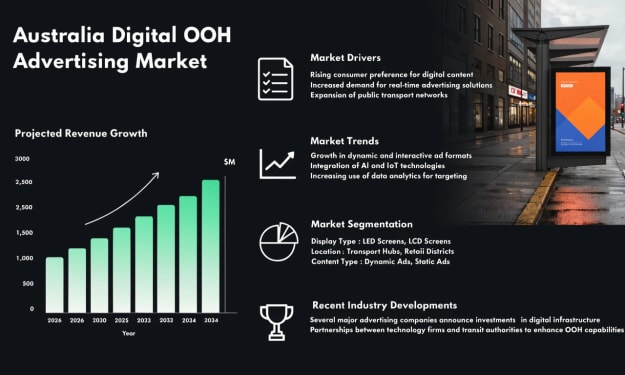
Australia Digital OOH Advertising Market: Technology Adoption, Audience Targeting & Programmatic Growth
According to IMARC Group, the Australia digital out-of-home (OOH) advertising market reached USD 474.2 Million in 2025 and is projected to grow to USD 1,096.9 Million by 2034, exhibiting a compound annual growth rate (CAGR) of 9.47% during 2026–2034. The market’s expansion reflects the rapid digital transformation of outdoor advertising infrastructure across Australia. Increasing smartphone penetration, advancements in display technologies and the growing shift from traditional static billboards to data-driven digital platforms are redefining how brands connect with audiences. Government-backed smart city initiatives and the rising integration of programmatic buying are further strengthening market momentum.
By Kevin Cooper7 days ago in Futurism
Preparing for a Future Ruled by Artificial Intelligence
A few months ago, I watched a video of a robot answering customer calls better than a human agent. It spoke clearly, responded instantly, and never sounded tired. For a moment, I felt uneasy. If machines can talk, write, design, and even think faster than us, where do students stand in this new world? That question stayed with me. Artificial Intelligence is no longer a futuristic idea. It’s already part of our daily routines. It recommends what we watch, corrects our grammar, suggests what we should buy, and even helps doctors diagnose diseases. For students, especially those dreaming about stable careers, this rapid change can feel overwhelming. But after thinking deeply about it, I realized something important: The future does not belong to those who fear AI. It belongs to those who prepare for it. The real challenge is not competing with machines — it is learning how to work alongside them.
By Shahid Zaman7 days ago in Futurism



Comments
There are no comments for this story
Be the first to respond and start the conversation.