
How to Use ChatGPT-4 for Free in 2025
The Most Easiest Ways to Access ChatGPT-4

OpenAI's ChatGPT-4 has revolutionized the way we interact with AI, but many are looking for ways to use it for free without paying for a subscription.
A common question many people ask is, “Is ChatGPT-4 free to use?” The short answer is yes, however, with some caveats.
Thankfully, there are several ways to access ChatGPT-4 at no cost, and in this article, I’ll walk you through each one of them.
I’ve tried these methods, and I can tell you that they work like a charm. So let’s dive in and explore how to use ChatGPT-4 for free in 2025.
Method 1: Using ChatGPT for Free on Bing
Bing is not just a search engine - it has teamed up with OpenAI to integrate ChatGPT-4 into its search results. The best part? You can use ChatGPT-4 for free via Bing’s chat feature.
How to Use ChatGPT-4 on Bing
Step 1: Open Bing
Go to Bing website. If you haven’t already, sign in to your Microsoft account (don’t worry if you don’t have one; creating one is easy and free).
Step 2: Access the Copilot Feature
Look for the "Copilot" tab on the top of the page or in the sidebar. This is the Bing Chat/Copilot feature powered by ChatGPT-4.

Step 3: Start Chatting
You can start by click on the "Copilot" tab, and a conversation window will pop up. There you can type in your query or start a conversation with ChatGPT-4 model. You can enjoy the seamless GPT-4 experience in Bing without any payment.
Method 2: Using ChatGPT-4 on ChatGPT 4 Online
ChatGPT 4 Online is a super convenient website that offers free, no-signup access to ChatGPT-4. It’s simple, fast, and even lets you search the web while chatting. This is perfect if you're looking for quick answers or want to use ChatGPT-4 without any hassle.
How to Use ChatGPT-4 on ChatGPT 4 Online
Step 1: Visit ChatGPT 4 Online

Open your browser and go to chatgpt4online.org. There’s no need to sign up or log in - it’s completely free and requires no registration.
Step 2: Find the Chatbot
On the homepage, click on the ChatGPT 4 Online button, it'll take you to the ChatGPT-4 chatbot. Just type on it whatever query you've, and you’re ready to go.

Step 3: Start Chatting
Now that you’re on the chatbot, simply type your question or prompt, and ChatGPT-4 will respond in real-time. You can even ask it to search the web for more specific or up-to-date information.
This method is great for anyone who wants to use ChatGPT-4 quickly without creating an account, making it one of the most convenient ways to access this powerful AI.
Method 3: Access ChatGPT-4 on Hugging Face
Hugging Face is a platform for machine learning and artificial intelligence enthusiasts, and they offer an easy way to try out ChatGPT-4 for free.
How to Use ChatGPT-4 on Hugging Face
Step 1: Go to Hugging Face
Head over to the Hugging Face website. If you don’t have an account, it’s a good idea to sign up (it’s free).
Step 2: Find the ChatGPT-4 Model
Use the search bar to find “ChatGPT-4” or navigate to the models section. You should see OpenAI’s ChatGPT-4 listed there.
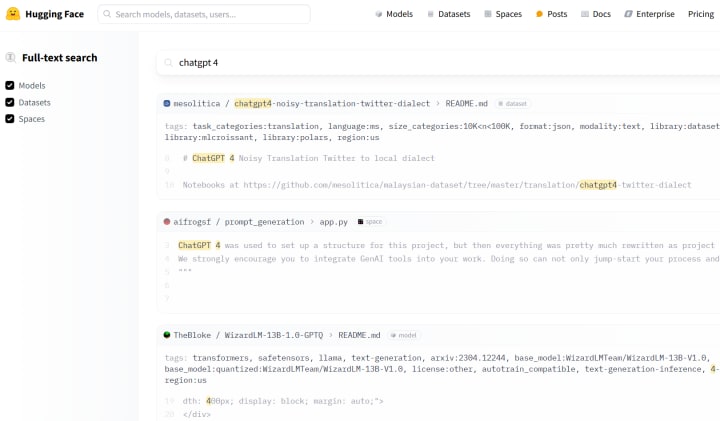
You need to click on the ChatGPT-4 model. There, you’ll be able to start chatting with it directly. Hugging Face allows you to interact with the model in a straightforward interface, and you can ask anything.
This is a great way to explore ChatGPT-4 without paying a dime, and Hugging Face often gives you access to powerful models like GPT-4 with no subscription required.
Method 4: Use ChatGPT-4 for Free on Perplexity AI
Perplexity AI is another platform that offers free access to ChatGPT-4. It’s a handy resource if you’re looking to get AI-driven answers with no restrictions.
How to Use ChatGPT-4 on Perplexity AI
Step 1: Open Perplexity AI
Go to perplexity.ai from your device.
Step 2: Sign-Up with your Gmail.
You need to signup Perplexity AI to enable Perplexity Pro feature which will let you use GPT-4 . Just jump straight into the platform and signup.

Step 3: Start Asking Questions
In the search bar, enter a question or a topic you want to discuss. ChatGPT-4 will generate insightful responses for you in real time.
Perplexity AI’s interface makes it an excellent tool for anyone seeking quick information powered by GPT-4.
Method 5: Use ChatGPT-4 on OpenAI’s Playground (With Free Trial)
This might not be entirely free long-term, but OpenAI’s Playground is a great place to experiment with ChatGPT-4 within certain usage limits.
How to Use ChatGPT-4 on OpenAI’s Playground
Step 1: Go to OpenAI’s Playground
Visit OpenAI Playground from your browser.
Step 2: Sign Up for an Account
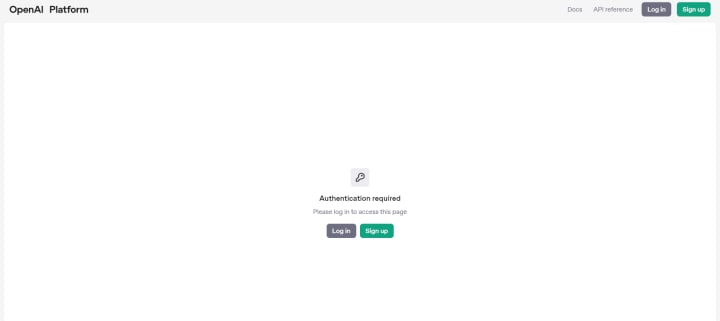
Create a free account on OpenAI (if you don’t already have one).
Step 3: Choose GPT-4 Model
After signing up, select the GPT-4 model from the available options in the Playground.
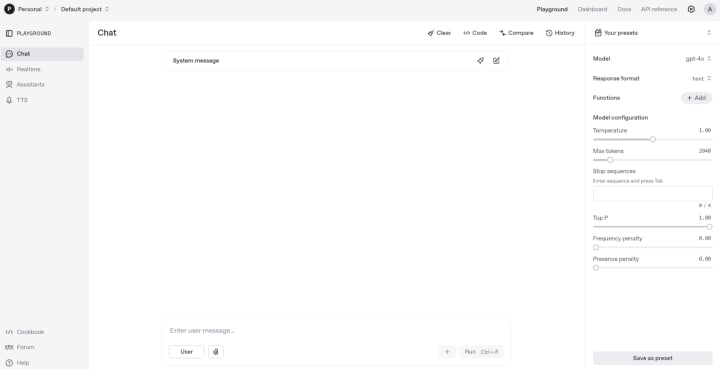
Step 4: Start Experimenting
Now you can input your text and interact with ChatGPT-4. OpenAI gives you some free credits when you sign up, which can be used to chat and explore the AI’s capabilities.
While OpenAI’s Playground is great for experimentation, keep in mind that once your free credits run out, you’ll need to either purchase more credits or rely on other methods.
Final Thoughts
In 2025, there are more ways than ever to access ChatGPT-4 for free. Whether you’re using Bing’s integration, Hugging Face’s model, ChatGPT 4 Online's chatbots or one of the other platforms I’ve covered, each of these methods offers a seamless and cost-free experience with one of the most powerful AI models out there.
I’ve tried all of these methods, and I can confidently say that they’re all reliable ways to get your hands on ChatGPT-4 without having to pay for a subscription. Give them a try and see how they can help you with your projects, research, or just casual chats.
About the Creator
Keep reading
More stories from Henry James and writers in Futurism and other communities.
ChatGPT Alternatives: Best AI Tools to Try
AI chatbots have taken the world by storm, making everything from casual conversations to complex research easier than ever. Among them, ChatGPT has become a household name, but it’s not the only option out there. Whether you’re looking for a free alternative, a tool with more research-focused capabilities, or something with a unique edge, there are plenty of great choices.
By Henry James11 months ago in 01
About Binding Prometheus
I want to start actively advocating on behalf of my own work, and the most valuable part of my canon is, without a doubt, Binding Prometheus, the play I have been working on since 2019 and only finished in 2023 as part of my MA. The play itself is an amalgamation of a million different inspirations. On one end, it evokes the Ancient Greek myth-play, deriving its own title from the earliest extant work of Western drama we have, Aeschylus’s Prometheus Bound. On the other end, it borrows significantly from the sci-fi bulwarks from over the years, namely Mary Shelley’s Frankenstein and Karel Capek’s Rossum’s Universal Robots. The play could be an episode of Black Mirror, I fear. I don’t know. I’ve only ever seen one episode of Black Mirror.
By Steven Christopher McKnight21 days ago in Futurism
Global LED Lighting Market Trends & Summary: A Bright Future for Energy-Efficient Illumination
Introduction: Lighting the Way Toward a Sustainable Future The global lighting industry is undergoing one of the most transformative phases in its history, driven by sustainability goals, technological innovation, and rising energy costs. At the center of this transformation stands LED (Light Emitting Diode) lighting—an energy-efficient, long-lasting, and environmentally friendly alternative to traditional lighting technologies.
By Aaina Oberoiabout 15 hours ago in Futurism


Comments
There are no comments for this story
Be the first to respond and start the conversation.