
How to Charge Your MacBook in Your Car: A Complete Guide
Safely and Efficiently Power Up Your Laptop During Road Trips


Charging your MacBook in your car can be a lifesaver when you’re on the road. Whether you’re commuting, traveling, or simply need to power up while away from a traditional outlet, understanding how to charge your laptop safely and efficiently is crucial. In this guide, we’ll explore everything you need to know about charging a MacBook in your car, including the tools you’ll need, step-by-step instructions, and safety considerations.

Why Would You Need to Charge Your MacBook in a Car?
There are several scenarios where charging your MacBook in a car becomes essential:
Long Commutes: Professionals who work remotely might need to charge their laptops during long commutes or while traveling for business.
Road Trips: Travelers often rely on laptops for navigation, entertainment, or staying connected.
Emergency Situations: When power outages or unexpected delays occur, your car becomes a valuable charging station.
With the right tools and techniques, you can charge your MacBook efficiently without compromising the health of your device or your car’s battery.
Tools and Equipment You’ll Need
To charge your MacBook in your car, you’ll need a few specific tools:
1. A High-Powered Car Charger
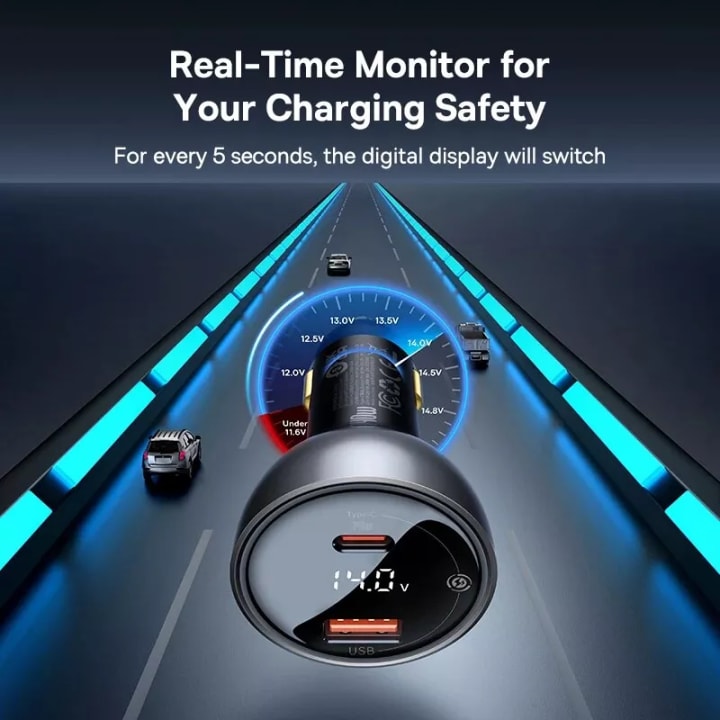
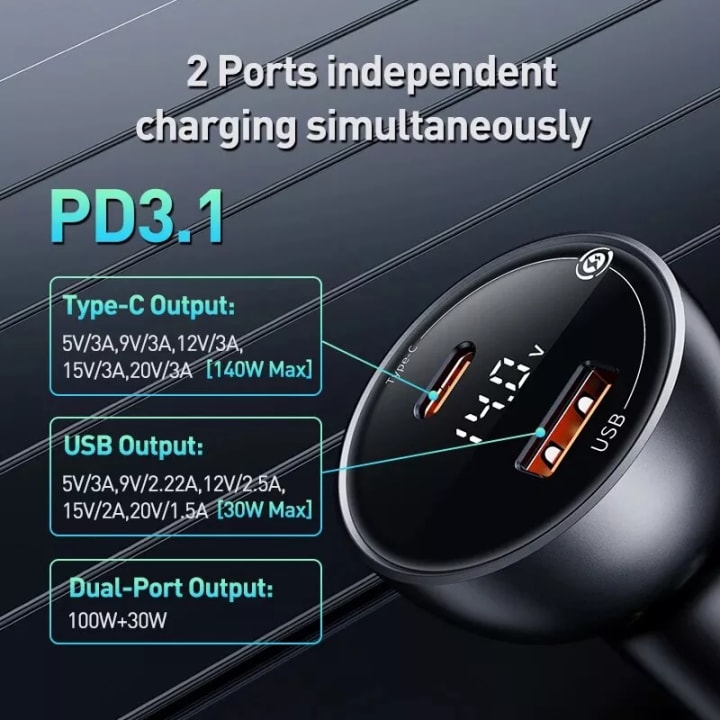
Look for a car charger with sufficient wattage to handle a MacBook. The 140W PD3.1 Car Charger is an excellent choice, as it provides:

140W maximum output, suitable for charging laptops.
Type-C and USB-A ports for versatility.
Support for USB PD 3.1 and QC 3.0 fast-charging protocols.
2. A USB-C to USB-C Cable
If your MacBook supports USB-C charging, ensure you have a high-quality cable that can handle high power levels, such as the 140W PD3.1-certified cable.
3. A Power Inverter (Optional)
For older MacBook models with MagSafe connectors or traditional chargers, you may need a power inverter to convert your car’s DC power into AC power.
4. A Reliable Car Battery
Ensure your car’s battery is in good condition to handle the additional power load without draining quickly.

Step-by-Step Guide to Charging Your MacBook in a Car
Follow these steps to safely and effectively charge your MacBook in your car:
Step 1: Check Your MacBook’s Power Requirements
Before you begin, identify your MacBook’s charging wattage. Most MacBook Air models require 30-60W, while MacBook Pro models need 61-140W. Ensure your car charger or power inverter matches these requirements.
Step 2: Plug in the Car Charger
Insert the car charger into your vehicle’s lighter port or 12V accessory socket. Make sure the connection is secure.
Step 3: Connect Your MacBook
Use the appropriate cable (USB-C or MagSafe) to connect your MacBook to the car charger. If you’re using a power inverter, plug your MacBook’s standard AC charger into the inverter, then connect the inverter to the car’s power outlet.
Step 4: Monitor Charging Progress
Once connected, your MacBook should begin charging. Check the battery indicator on your laptop to ensure it’s receiving power. If the charging is slow, verify that the charger provides enough wattage.
Step 5: Avoid Overloading the System
Do not use other high-power devices simultaneously, as this can overload your car’s electrical system. Prioritize your MacBook if multiple devices need charging.
Safety Tips for Charging Your MacBook in a Car
Charging a laptop in a car requires careful attention to safety. Here are some essential tips:
Use a Certified Charger: Always use high-quality chargers, like the 140W PD3.1 Car Charger, to prevent overheating or damage.
Avoid Charging While the Car Is Off: Charging your MacBook with the engine off can drain your car’s battery, potentially leaving you stranded.
Monitor Heat Levels: Check both your car charger and MacBook for overheating during use. If either becomes too hot, disconnect and allow them to cool.
Unplug When Not in Use: Disconnect the charger when your MacBook is fully charged or not in use to conserve power and prevent wear on your car’s battery.
Secure Your Devices: Ensure your laptop and charger are stable during travel to avoid accidents or damage.
Common Questions About Charging a MacBook in a Car
1. Can I Charge a MacBook Pro in My Car?
Yes, but you’ll need a car charger capable of delivering sufficient wattage. The 140W PD3.1 Car Charger is ideal for MacBook Pro models, offering fast and efficient charging.
2. Is It Safe to Charge My MacBook in a Car?
Charging your MacBook in a car is safe if you use the right equipment and follow safety guidelines. Avoid cheap, uncertified chargers that could damage your devices.
3. How Long Does It Take to Charge a MacBook in a Car?
Charging times vary based on your MacBook model, charger wattage, and car’s electrical system. High-powered chargers like the 140W PD3.1 can charge a MacBook Pro from 0 to 50% in about 30 minutes.
4. Will Charging My MacBook Drain My Car Battery?
Charging your MacBook with the engine running minimizes the risk of draining your car’s battery. If the engine is off, prolonged charging can deplete the battery.
Benefits of the 140W PD3.1 Car Charger
For those frequently on the go, investing in a high-quality car charger like the 140W PD3.1 offers numerous advantages:
Fast Charging: Quickly power up your MacBook, smartphone, or tablet.
Multi-Device Compatibility: Charge multiple devices simultaneously with USB-C and USB-A ports.
Durability: Made with premium materials to withstand daily use.
Compact Design: Fits neatly in your car without taking up space.
Examples of Real-Life Scenarios
1. Business Travelers
Imagine you’re heading to a meeting and realize your MacBook battery is low. With a car charger, you can quickly power up during your drive and arrive prepared.
2. Digital Nomads
For those who work remotely, staying connected is essential. A reliable car charger ensures your MacBook stays powered, even in remote locations.
3. Students on the Go
Students juggling classes, projects, and part-time jobs can use a car charger to stay productive during commutes or between activities.
Conclusion
Charging your MacBook in your car doesn’t have to be complicated or risky. With the right tools, such as the 140W PD3.1 Car Charger, and a little know-how, you can keep your devices powered up no matter where you are. By following this guide, you’ll ensure safe, efficient charging and make the most of your time on the road.
Whether you’re a professional, student, or traveler, having a reliable car charger is a game-changer. Equip yourself with the knowledge and tools to stay connected and productive wherever your journey takes you.
About the Creator
Your Personal Alchemique
Exploring the intersection of tech, design, and luxury. At Alchemique, I share smart gadgets, stylish upgrades, and essentials that elevate modern living.
Keep reading
More stories from Your Personal Alchemique and writers in Futurism and other communities.
Revolutionizing Pet Travel: The Luxury Cat Space Capsule Backpack
Traveling with my cat, Luna, used to be a stressful experience for both of us. Luna, a naturally curious and playful feline, would become anxious in traditional carriers. She hated being confined, and I always felt guilty when she cried during trips to the vet or while running errands. I knew I had to find a better solution—something that would keep her calm and comfortable while making my life easier.
By Your Personal Alchemiqueabout a year ago in Futurism
The Death of Trust: Can AI Mimic Your Soul?
I recently watched a video of an old friend of mine. In the clip, he was sobbing, confessing to a betrayal that seemed completely out of character. I almost reached for my phone to call him, my heart heavy with a mix of anger and confusion.
By Alex Sterling 6 days ago in Futurism
Battery Charger Market: Smart Charging Systems, IoT Integration & Industry Growth Ahead
According to IMARC Group's latest research publication, The global battery charger market size reached USD 28.1 Billion in 2025. Looking forward, IMARC Group expects the market to reach USD 40.0 Billion by 2034, exhibiting a growth rate (CAGR) of 3.90% during 2026-2034.
By sujeet. imarcgroup4 days ago in Futurism



Comments
There are no comments for this story
Be the first to respond and start the conversation.