
How I Combined Gemini CLI and MCP Tools to Supercharge My AI Development Workflow
A hands-on guide to using Gemini CLI with powerful MCPs like Context7, TaskMaster, and SmolAgents.
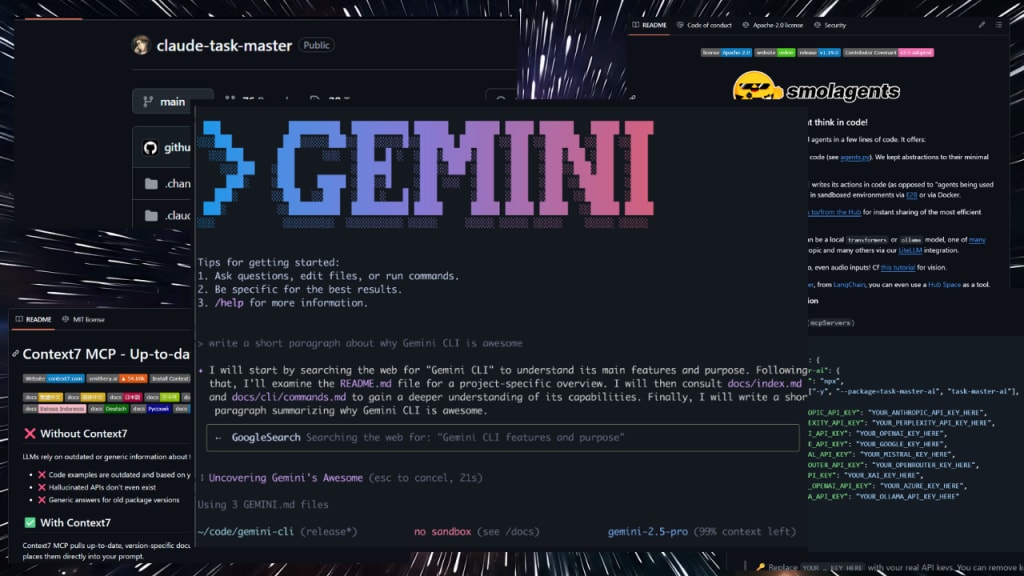
I've been diving deep into the emerging world of AI-enhanced developer tooling. One of the most transformative discoveries I’ve made is Gemini CLI—a command-line interface that acts as a direct bridge to Google's Gemini AI models. But it’s not just a simple prompt tool. With its plugin architecture and support for MCP (Multi-Command Plugins), it has become a powerful AI assistant embedded right into my terminal.
At first glance, Gemini CLI feels like just another AI wrapper, but when you start experimenting with MCP integrations like Context7, TaskMaster-AI, and SmolAgents, you realize you’re working with something much more modular and capable. Each plugin adds a different layer of intelligence and context-awareness, creating a synergistic system that feels more like working with a small team of agents than a single assistant.
The Power of the MCP Ecosystem
Let’s start with the Context7 MCP. This tool fetches real-time, version-specific documentation, code snippets, and dev resources straight from trusted sources like GitHub, Stack Overflow, and official docs. Instead of opening browser tabs or copy-pasting examples, I can ask Gemini CLI for a JavaScript method or a Python snippet, and it pulls contextual responses from the exact framework version I’m using. It’s like having Stack Overflow built into your shell—but smarter.
Then there's TaskMaster-AI, a plugin that allows you to configure OpenAI or Google API keys and run agents based on those models. It’s particularly useful for performing automated tasks like summarizing code, generating test cases, or managing project todos via natural language. It’s a great tool to layer onto Gemini CLI when you want the flexibility of model choice and deeper agent logic.
Finally, I added SmolAgents, a minimalistic agent system that focuses on combining tools and file context to execute tasks like editing, writing, or building within your local repo. It may be lightweight, but it fills an important gap: handling specific file-oriented tasks without bloating your terminal experience.
How They Work Together
These plugins don’t compete—they collaborate. When I ask a broad question like, “How do I set up JWT authentication in Express?”, Gemini CLI uses Context7 to fetch updated docs and sample code. TaskMaster-AI takes that context and suggests a sequence of tasks or best practices. SmolAgents then offers to scaffold a boilerplate structure in my local project folder. Each tool builds on the last.
The best part? I didn’t need to manually invoke each plugin. Once installed and referenced correctly in the settings.json inside .gemini, the system intelligently decides which plugin to call based on my prompt. It’s surprisingly seamless.
What I Learned
Using Gemini CLI with these MCPs has changed the way I approach AI tooling. It’s no longer just about asking AI a question—it's about integrating AI into your workflow. You start treating your terminal like a living dashboard of intelligent modules, each assisting your development journey in a contextual, up-to-date way.
I’ve gone from relying on bookmarks and disconnected AI tools to a unified environment where documentation, task agents, and project support live in the same command line space. It’s faster, cleaner, and honestly more fun.
Final Thoughts
If you’re a developer who loves exploring cutting-edge tools, I highly recommend checking out Gemini CLI and adding MCPs like Context7, TaskMaster-AI, and SmolAgents. You don’t need to be a DevOps expert to install them—and the productivity boost is almost immediate.
AI isn’t just for chat windows anymore. With tools like these, it’s becoming part of your daily dev environment—quietly helping, always learning.
📽️ Watch the full step-by-step tutorial on YouTube:
How to Install & Use Gemini CLI For Advanced Use With MCP Tools
Don’t forget to like and subscribe if this helped you get started!
About the Creator
About Binding Prometheus
I want to start actively advocating on behalf of my own work, and the most valuable part of my canon is, without a doubt, Binding Prometheus, the play I have been working on since 2019 and only finished in 2023 as part of my MA. The play itself is an amalgamation of a million different inspirations. On one end, it evokes the Ancient Greek myth-play, deriving its own title from the earliest extant work of Western drama we have, Aeschylus’s Prometheus Bound. On the other end, it borrows significantly from the sci-fi bulwarks from over the years, namely Mary Shelley’s Frankenstein and Karel Capek’s Rossum’s Universal Robots. The play could be an episode of Black Mirror, I fear. I don’t know. I’ve only ever seen one episode of Black Mirror.
By Steven Christopher McKnight20 days ago in Futurism
Carbon Felt and Graphite Felt Market: Battery Technology Demand, Flow Batteries & Energy Transition
According to IMARC Group's latest research publication, global carbon felt and graphite felt market size reached USD 551.7 Million in 2024. Looking forward, IMARC Group expects the market to reach USD 1,114.8 Million by 2033, exhibiting a growth rate (CAGR) of 8.13% during 2025-2033.
By sujeet. imarcgroupa day ago in Futurism



Comments
There are no comments for this story
Be the first to respond and start the conversation.