
Gemini’s Creepy Android Expansion: How to Lock Down Your Messages Spoiler: It’s Not Easy
Is Google's Gemini Spying on Your Texts? Here’s What Fluffy Would Want You to Do About It.


Google’s AI ambitions have taken a controversial turn with its recent enforcement of Gemini integration across Android messaging apps. As of July 8, 2025, Gemini Google’s flagship AI assistant now operates in WhatsApp, Messages, and other third-party apps even for users who previously disabled these features. This stealthy opt-in override has ignited a firestorm over data control and transparency.
The Privacy Settings Loophole
If you thought disabling Gemini’s app integrations would keep it from accessing your chats, think again. Google quietly updated its support policies this week, granting Gemini permission to process data in messaging platforms regardless of prior user preferences. While the company claims users can block these interactions, its documentation contradicts itself: disabling the setting may still allow activity logs to persist for up to 72 hours, and there’s no clear path to fully sever Gemini’s access.
Mixed Signals from Google
The confusion deepens with Google’s conflicting guidance. Email notifications sent to Android users insist Gemini can be “fully disabled via Settings,” yet the company’s own troubleshooting articles admit lingering data syncs and ambiguous permissions. Critics argue this opacity undermines informed consent, particularly given Gemini’s ability to analyze personal conversations for ad targeting or model training.
How to Push Back (For Now)
While a complete opt-out remains elusive, proactive users can take steps to minimize exposure:
- Revoke “Open by Default” permissions for Gemini in Settings > Apps > Gemini.
- Disable app-specific integrations under Settings > Google > Gemini Activity.
- Avoid voice commands that trigger Gemini in third-party apps.
Be warned: these workarounds may not fully block data flows, and Google’s 72-hour retention window complicates real-time privacy.
The Bigger Picture: AI vs. User Agency
This forced integration underscores a growing tension in tech balancing AI innovation with user autonomy. As Gemini entrenches itself deeper into Android’s ecosystem, questions mount: Should core device functions prioritize corporate AI goals over individual preferences? And why are privacy toggles reversible without explicit consent?
For now, Android users are left navigating a murky opt-out labyrinth. Until regulators or public pressure demand clarity, vigilance and skepticism toward “convenience” updates may be the best defense.
Your Move, Google
The ball is in the tech giant’s court to clarify retention policies, simplify controls, and end the contradictory messaging. Until then, share your experiences in the comments: Have you noticed Gemini in places it shouldn’t be?
Podcasts about Google’s Gemini Privacy Concerns
Two brief audios that summarize and go over more about the latest hurdles we can look forward to jumping through with these latest developments. While workarounds do work for now, rest assured that we can look forward to having to keep an eye out on our settings.
Google's Gemini AI Sparks User Confusion (3 mins)
Google's new update allows its Gemini AI to access third-party apps like WhatsApp, overriding previous user settings. Users struggle with unclear guidance on disabling Gemini, as Google fails to provide straightforward instructions. The update raises privacy concerns, with data stored for 72 hours even if app activity is off. Users are left frustrated, drawing parallels to Microsoft's historical antitrust issues with Internet Explorer.
Android Now Lets Gemini Access Third-Party Apps by Default (6 mins)
Google is rolling out changes allowing its Gemini AI to access third-party apps like WhatsApp on Android devices, even if users previously blocked such access. Users must take action to prevent this, but Google's guidance is unclear and doesn't fully explain how to disable or remove Gemini. Even with settings off, data may be stored for 72 hours. Removing Gemini entirely is difficult, leaving many users frustrated and concerned about privacy.
#GoogleGemini #AndroidPrivacy2025 #AIPrivacyCrisis #TechEthics #DataControlNow #TechBlogger #BlogPostAlert #WritingTech #PrivacyPaws
About the Creator
LesD
I enjoy a small circle of friends, love animals and my family, and am always up for conversations that cover a variety of topics. My favorite people embrace knowledge and love the pursuit of the unknown.
Deadline Looms as Anthropic Rejects Pentagon Demand to Remove AI Safeguards
A showdown is unfolding between Anthropic and the U.S. Department of Defense after CEO Dario Amodei formally rejected a Pentagon ultimatum to loosen safeguards on the company’s AI model, Claude.
By Behind the Techabout 24 hours ago in Futurism
Australia Wealth Management Market: HNWI Growth, Digital Transformation & Regulatory Evolution
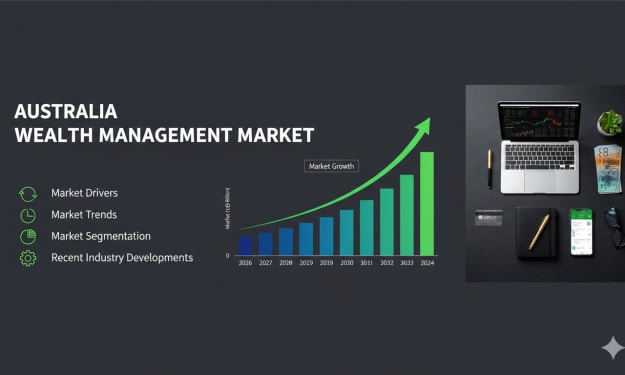
According to IMARC Group, the Australia wealth management market reached USD 118.6 Million in 2025 and is projected to expand to USD 222.2 Million by 2034, exhibiting a compound annual growth rate (CAGR) of 7.00% during 2026–2034. This sustained expansion reflects structural changes in capital accumulation, digital advisory platforms and regulatory oversight across Australia. Wealth management services—including portfolio advisory, retirement planning, tax structuring and estate planning—are increasingly critical as individuals accumulate assets through entrepreneurship, property investments and superannuation growth. As high-net-worth individuals (HNWIs) expand in number and financial sophistication, demand for tailored, transparent and digitally enabled advisory services continues to rise.
By Kevin Cooper5 days ago in Futurism


Comments
There are no comments for this story
Be the first to respond and start the conversation.