
Cloudflare R2 2026 Pricing Features and AWS S3 Comparison
How I discovered that egress fees were silently draining my cloud budget, why Cloudflare R2 completely changed the economics of storing and delivering content, and what I learned while comparing it with AWS S3 for real-world, high-traffic workloads.


When I first started using cloud storage for my projects, I didn’t pay much attention to egress fees. I assumed they were just part of running anything online. But the deeper I went into hosting media files and high-traffic assets, the more I realized how destructive these fees can be. AWS, for example, charges $0.09 per GB of data transferred to the internet. That means a simple site serving around 20 TB every month ends up paying roughly $1,700 just for bandwidth. It shocked me how quickly that adds up, especially when traffic scales faster than revenue.
That’s what led me to explore Cloudflare R2. The idea of zero egress fees sounded almost unreal at first. But once I started comparing the costs and testing the workflows myself, I noticed how dramatically different my bills became. Suddenly, the storage bill was predictable again. No more surprises. And for the first time, I felt like I wasn’t being penalized for growing my audience.
I wanted to break down my experience in a clearer, more personal way, especially as R2’s pricing structure moves into 2026. I also wanted to share what I learned about where R2 excels, where AWS S3 still makes sense, and how I now decide between the two depending on the workload.
Understanding Cloudflare R2 from My Perspective
I remember when R2 launched in 2021. Cloudflare positioned it as a direct challenge to AWS S3, and that caught my attention because S3 had long been the industry default. What truly separated R2 wasn’t the storage price or the API compatibility—it was the decision to eliminate egress fees entirely.
For me, that single change shifted the entire cost equation. R2 integrates with Cloudflare’s global network of over 300 data centers, which means my stored content is automatically served from the closest edge location. I don’t have to configure regions or think about replication rules; R2 handles it behind the scenes.
Another thing I appreciated was the S3 compatibility. I could point my existing tools and code toward R2 simply by switching the endpoint URL. I didn’t have to rewrite anything. SDKs, libraries, workflows—they all behaved the same way.
How R2 Pricing Works for Me
Heading into 2026, R2’s pricing has stayed simple. I pay for storage, Class A operations, and Class B operations. Storage costs $0.015 per GB per month. If I store 1 TB, I pay $15. That’s it.
Cloudflare bills storage based on average daily usage. So if I stored 100 GB for half the month and 200 GB for the other half, I’m billed as if I stored 150 GB. It’s straightforward and easy to predict.
Class A operations—uploads, deletes, and listing requests—cost $4.50 per million, and the first million every month is free. Most of my projects barely scratch that limit.
Class B operations—essentially reads—cost $0.36 per million, with the first 10 million free. For context, a site with 300,000 page views where each page loads three images would still stay within the free tier.
Cloudflare also introduced an Infrequent Access tier a while ago. It costs less for storage but charges more for operations and has a 30-day minimum usage requirement. I use this tier only for data I know I won’t delete or modify for at least a month.
What surprised me the most, though, was how generous the free tier is. With 10 GB of storage, one million Class A ops, and ten million Class B ops every month, I realized I could run small sites at zero cost.
Comparing This to AWS S3
I’ve used AWS S3 for years, and its pricing structure is powerful but complex. S3 Standard starts at $0.023 per GB in most US regions. There are multiple storage classes—Standard, Standard-IA, One Zone-IA, Glacier, Glacier Deep Archive—and the costs vary across regions.
Request pricing is also layered: PUT requests cost around $0.005 per thousand, while GET requests cost around $0.0004 per thousand. It seems small at first, but with large workloads, it grows quickly.
The real challenge, though, is data transfer. The first 100 GB out of S3 is free every month, but after that, I pay $0.09 per GB for the first 10 TB. When I calculated costs for a media project serving 20 TB monthly, I realized egress alone costs over $1,700.
Cloudflare R2, by comparison, would cost me just $15 for that same workload, because the bandwidth is free.
When R2 Saves Me Money
If my workload involves delivering large amounts of content—images, video, software downloads—R2 wins every time. The cost advantage is huge. The more bandwidth I serve, the more dramatic the savings become.
For example, storing 1 TB and serving 20 TB monthly on S3 costs about $1,723. R2 costs $15. The difference is unbelievable.
If storage retrieval is frequent or unpredictable, R2’s pricing is also cleaner and easier to estimate. I don’t have to think about cross-region requests, replication fees, or egress multipliers.
When S3 Still Makes Sense for Me
Even though I love the pricing model of R2, there are situations where AWS S3 remains the better choice.
If I’m storing hundreds of terabytes of archival data, Glacier Deep Archive is extremely cheap. R2’s Infrequent Access tier helps, but it can’t compete with Glacier for deep storage.
When I’m building projects that depend heavily on the AWS ecosystem—Lambda triggers, Athena queries, Glue pipelines—S3 is the natural fit. AWS has nearly two decades of maturity and integrations.
S3 also offers advanced compliance features like Object Lock and Access Points. If a project requires strict governance and audit trails, S3 handles that more comprehensively.
What I Like About R2 Beyond Pricing
The simplicity is refreshing. I don’t pick regions or deal with replication rules. Everything is automatically available across Cloudflare’s network. That alone saves me time.
I also use Cloudflare Workers often, and R2 integrates seamlessly with it. Having compute and storage share the same edge network speeds up a lot of my workflows.
Recently, event notifications were introduced, letting me trigger Workers when objects change. That brings R2 much closer to S3’s event-driven capabilities.
Performance Impressions
Cloudflare’s global edge network gives R2 a speed advantage for public assets. Their tests showed 20–40% faster response times than S3 for public bucket access. I’ve seen similar improvements in my own projects, especially for users outside my primary region.
My Migration Experience
AWS removed egress fees for migrations in 2024, which made moving my content much easier. I used Cloudflare’s Super Slurper tool to copy buckets over. It handled everything and only billed me for the operations on R2’s side.
For ongoing migrations, I used Sippy, which pulls objects into R2 as they’re requested. That allowed a smooth, zero-downtime transition.
How I Choose Between R2 and S3 Today
If my workload involves heavy data delivery, public media, or anything bandwidth-intensive, I choose R2. The savings aren’t small—they’re transformative.
If the workload is deeply integrated into AWS services or compliance requirements, I choose S3.
Sometimes, I even combine both. R2 for high-traffic public assets, S3 for deep archives or AWS-native pipelines. It gives me the best balance of cost and capability.
Final Thoughts
As 2026 approaches, the divide between S3 and R2 has become clearer for me. S3 remains unmatched for enterprise features, compliance, and ecosystem depth. But R2 is a game-changer for bandwidth-heavy use cases. Its zero-egress model feels like the future of object storage.
Whenever I plan a new project now, I always calculate the total cost, especially the bandwidth portion. And more often than not, R2 ends up being the smarter, more predictable, and far more affordable option.
About the Creator
Eira Wexford
Eira Wexford is a seasoned writer with 10 years in technology, health, AI and global affairs. She creates engaging content and works with clients across New York, Seattle, Wisconsin, California, and Arizona.
Keep reading
More stories from Eira Wexford and writers in Futurism and other communities.
Why Some Companies Struggle With AI Adoption?
I clearly remember the first time a leadership team turned down integrating AI into their daily routines. It was one of those warm Los Angeles afternoons when sunshine strikes downtown skyscrapers at acute angles. In that unnecessarily cold meeting room, chilled by air conditioning and doubt, across from me sat a group of executives.
By Eira Wexford3 months ago in Futurism
LED Light Face Mask Market 2026: Investment Potential & Emerging Consumer Trends
According to IMARC Group's latest research publication, The global LED light face mask market size reached USD 357.6 Million in 2025. Looking forward, IMARC Group expects the market to reach USD 882.5 Million by 2034, exhibiting a growth rate (CAGR) of 10.60% during 2026-2034.
By sujeet. imarcgroup7 days ago in Futurism
Journal of Behavioral Homeostasis
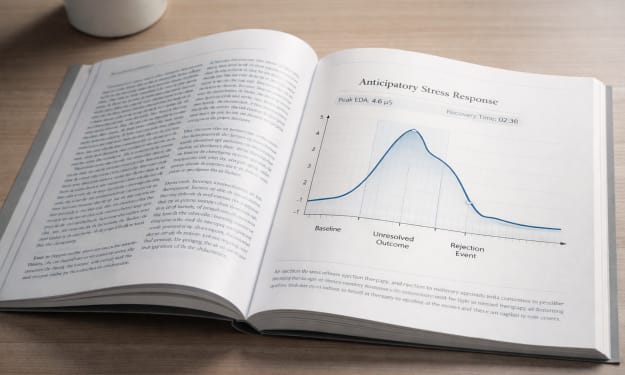
Journal of Behavioral Homeostasis Vol. 52, Issue 1 (2043) On the Therapeutic Function of Rejection Yielded Expectation Adaptation and the Regulation of Anticipatory Stress Abstract Chronic exposure to unresolved outcomes has emerged as a significant source of sustained psychological stress in contemporary environments characterized by continuous evaluation and delayed feedback. Yielded Expectation Adaptation (YEA) therapy was developed to reduce distress associated with rejection through structured exposure to definitive negative outcomes. Early clinical trials demonstrated measurable reductions in physiological arousal and cognitive rumination following controlled refusal events, despite participants reporting subjective disappointment. Subsequent adoption beyond clinical settings introduced voluntary and recreational applications collectively described as “outcome rehearsal.” This study examines therapeutic efficacy alongside broader cultural implications arising from the normalization of definitive outcomes as a mechanism of emotional regulation. Background Modern individuals navigate an unprecedented volume of unresolved outcomes. Applications remain pending without timelines. Messages linger unanswered. Creative work circulates through opaque review systems that offer neither clarity nor closure. Even social interaction increasingly unfolds within structures that defer resolution, producing prolonged periods of suspended expectation. While anticipation has traditionally been framed as motivational tension, emerging research suggests that sustained uncertainty carries significant cognitive and physiological costs. Patients presenting with chronic anticipatory stress frequently describe difficulty disengaging from unresolved possibilities, reporting persistent rumination, impaired attentional recovery, and elevated baseline anxiety. Clinical observation revealed an unexpected pattern: for many individuals, the distress associated with waiting exceeded the distress of rejection itself. Participants described negative outcomes as “sharp but clean,” contrasting them with the diffuse strain of indefinite possibility. Once an outcome was known — even an unfavorable one — subjects reported immediate reductions in cognitive load and renewed capacity for directed attention. These observations prompted investigation into whether rejection, when encountered deliberately and under controlled conditions, might function not solely as a negative experience but as a regulatory one. Yielded Expectation Adaptation therapy emerged from this line of inquiry. The approach centers on structured exposure to definitive refusal, designed to reduce anticipatory distress by recalibrating emotional responses to negative outcomes. Early implementations included simulated evaluative scenarios, scripted interpersonal declines, and guided exercises in which participants intentionally sought low-stakes rejection experiences. Initial reception within clinical communities was cautious. The idea that rejection might serve therapeutic ends appeared counterintuitive; however, preliminary findings consistently demonstrated improved physiological recovery following outcome resolution. Participants did not report enjoying rejection. They reported relief at the end of waiting. Subsequent literature began referring to the model simply as YEA therapy. Early Clinical Findings Pilot studies focused on individuals experiencing persistent anticipatory distress, including professionals navigating competitive hiring processes, creatives engaged in repeated submission cycles, and individuals reporting prolonged uncertainty within interpersonal relationships. Across multiple trials, participants undergoing YEA therapy demonstrated faster emotional recovery following negative feedback compared to control groups receiving traditional cognitive reframing interventions. Notably, the therapeutic effect appeared tied not to reinterpretation of rejection but to outcome definitiveness. When uncertainty was removed, even unfavorable results allowed subjects to reorganize attention and resume forward-directed behavior. Emotional stabilization occurred independently of outcome desirability. Whether such stabilization enhances persistence toward uncertain objectives was not assessed in initial trials. Initial findings were drawn from three pilot cohorts totaling 124 participants across clinical and non-clinical populations. Measures included heart-rate variability, post-session cortisol sampling, and standardized rumination inventories administered at 24-hour intervals. While sample sizes were limited, consistency across cohorts prompted further investigation into non-traditional applications of the model. Researchers initially framed these findings as evidence that emotional regulation may depend less on outcome valence than on outcome clarity — a distinction that would later prove central to understanding YEA’s broader cultural trajectory. Expansion Beyond Clinical Contexts As familiarity with YEA therapy increased, individuals began applying its principles independently outside clinical settings. Participants experimented with deliberate exposure to minor refusals, describing the practice as preparation rather than treatment. Examples included requesting unlikely accommodations, submitting creative work to rapid-response review forums, and engaging in structured interpersonal exchanges designed to produce immediate closure. In some peer-led sessions, participants delivered timed refusals limited to brief standardized phrases, preventing narrative elaboration and accelerating outcome resolution. These practices were soon described collectively as outcome rehearsal. The stated aim was efficiency: eliminate prolonged anticipation, reduce emotional backlog, restore equilibrium. Online communities formed around shared rehearsal strategies. Forums tracked experiments in shortening decision cycles. Informal gatherings organized structured refusal exchanges modeled on early YEA exercises. Participants described feeling clearer following sessions, attributing relief not to rejection itself but to the restoration of certainty. By 2041, digital platforms offered guided outcome simulations. Users submitted proposals or personal statements for predetermined rejection responses, receiving definitive outcomes in place of extended uncertainty. What began as resilience training increasingly functioned as routine maintenance. Longitudinal Observations Extended tracking of frequent YEA participants revealed sustained reductions in anticipatory distress across professional and interpersonal domains. Subjects reported decreased reactivity to uncertainty and increased willingness to disengage from prolonged evaluative processes. Participants described these changes as increased realism or maturity. However, longitudinal analysis identified convergence toward modest, low-volatility objectives and a gradual reduction in variance among reported long-term goals. Engagement with speculative creative work, competitive applications, and relational pursuits involving delayed feedback declined across cohorts. These shifts were rarely framed as losses. Participants instead described calibration, emphasizing efficiency and emotional sustainability. Goal selection trended toward incremental trajectories. Despite these patterns, expressions of desire for authentic acceptance outcomes remained consistent. Participants reported increasing comfort with rejection while continuing to articulate longing for genuine affirmation. Rejection, when rehearsed, appeared to lose much of its destabilizing force. Whether it also lost its capacity to clarify what was genuinely wanted remained unclear. Discussion The widespread adoption of YEA suggests that relief from uncertainty fulfills a significant psychological need. Across populations, participants demonstrate reduced anticipatory distress following structured exposure to definitive outcomes. Emotional recovery accelerates. Rumination declines. Individuals report increased stability and improved capacity to disengage from unresolved possibilities. These outcomes align with predictive regulation models, which propose that the brain prioritizes clarity over desirability when restoring equilibrium. Rejection functions less as injury than as resolution — a definitive update that permits cognitive reorganization. The normalization of outcome rehearsal may therefore represent an adaptive response to environments saturated with deferred evaluation. Participants frame YEA engagement as a method of preserving energy, shortening the waiting cycle, and maintaining emotional efficiency. Longitudinal findings suggest equilibrium and expansion may not scale proportionally. Frequent YEA engagement correlates with decreased participation in high-variance pursuits and reduced tolerance for prolonged uncertainty. Emotional volatility declines alongside willingness to pursue outcomes perceived as unlikely. Participants continue to describe themselves as hopeful. Structured rejection reduces destabilization but does not eliminate longing. The wish to be chosen persists even as individuals become increasingly skilled at rehearsing refusal. It remains unclear whether the growing cultural preference for definitive outcomes represents an evolution in resilience or a recalibration of perceived attainability. Emotional equilibrium may be achieved through strengthened tolerance of disappointment. It may also be achieved through subtle contraction of the scale at which individuals are willing to hope. Further research is required to determine whether widespread engagement with YEA strengthens individuals against disappointment — or gradually reduces the range of futures they consider reachable. Author’s Notes: Current findings suggest that individuals do not appear to want less; rather, they appear increasingly practiced at relinquishing desire before it encounters resistance. The reduction of distress may indicate progress; whether it reflects expansion or contraction remains unresolved.
By Mina Carey7 days ago in Futurism
Belle of the Bayou
Bad move, cher. Not just the slip of her kitten heel on the rainy February cobblestones in the Fourth Ward. She got caught snooping. Detective Deleon clucked and strutted like a rooster in his rush to clear her from the scene, waving cigar smoke to and fro as he gesticulated amid the thick air of the speak easy. An experienced crime reporter, Marie knew better than to let the coppers catch her on the wrong side of the line, but curiosity had gotten the better of her.
By Maia Gadwall the metAlchemist7 days ago in Fiction



Comments
There are no comments for this story
Be the first to respond and start the conversation.