
Why Do Smart UI/UX Designers Prefer RGB to Assign Colors?
Exploring the Logic Behind RGB Color Choices in UI/UX Design
The right colors matter a lot especially when you are designing UI/UX for websites or some mobile app. You may be surprised to know but colors do evoke behaviors and actions. You might have seen CTA buttons in bright colors, mostly “RED”. That’s just an example.
There are different color coding and systems. RGB and CMYK are the two major ones. When you are designing something for “Print”, CMYK will be the better choice. But when you are designing something for digital media like for Website, mobile app, or even social media banners, you should choose RGB.
Choosing the right colors doesn’t end here because RGB has different systems or ways to assign colors. For example web designers often use HEX codes or values to assign colors to elements. HSL (Hue, Saturation and Lightness) is another system but less common. And there come RGB values which are the easiest ones to understand but still not very common.
It’s a fact that smart designers prefer RGB to assign colors while designing UI/UX. Why so, that’s what we are going to discuss below:
The Basics: Understanding RGB and HEX
Before we dig into the why, let's understand the what. As we discussed above RGB (Red, Green, Blue) and HEX (Hexadecimal) are both systems used to represent colors in digital designs.
- RGB values are based on a combination of red, green, and blue light. Each color is represented by three numbers ranging from 0 to 255, indicating the intensity of red, green, and blue components.
- HEX codes, on the other hand, are six-digit codes used in web design. Each color is represented by a combination of six hexadecimal digits, like #FF5733.
Coming Back to Preference for RGB
Now let’s discuss our main question, “Why do smart UI/UX designers prefer RGB to assign colors?”
1. Precision and Flexibility
RGB values offer more precision and flexibility when we compare it to HEX color codes. That’s why designers can better fine-tune the intensity of each color component in this system. It allows them to access a broader spectrum of colors than HEX.
Choosing RGB becomes crucially important when you are working on projects that require exact color matching. For example, when working for a big brand with a registered trademark, a minor difference in color matching can result in rejection.
2. Easy to Understand
For designers, RGB values are easier to understand because these are in decimal values.
RGB is based on the primary colors of light. That’s what we learn since our childhood in our science books. And that’s why the idea aligns with how we perceive colors in the natural world. This makes it easier for designers to visualize and play with colors directly.
3. Compatibility with Popular Design Tools
Though all the image editing or designing software comes with all major color modes and systems but what if I tell you that all the software are mainly designed for RGB? Yes that’s true and that’s why whenever you install popular apps or software like Adobe Photoshop, Illustrator or CorelDraw, the default color setting is RGB.
And if you open the color window, you will see RGB color value system to select the desired color. So we can say that RGB system of assigning colors is universal and compatible with all the design tools. And if you design something using RGB values, your design will look consistent across different apps and platforms.
4. Consistency Across Devices
Digital displays—including monitors, televisions, and mobile screens—use RGB to display colors. By using RGB values, designers can ensure that colors appear consistently across various devices, enhancing the user experience.
Similarly, when businesses collect feedback through digital platforms, they often compare tools like Confirmit vs Qualtrics to determine which best supports their survey needs. Ensuring color consistency in these platforms helps maintain a seamless and professional brand identity.
Limitations of HEX Codes
HEX codes are widely used in web design. But this color assigning system comes with some limitations. Here I’m going to mention some of these limitations.
Lack of Precision
HEX codes are less precise than RGB values. 100% matching color using HEX codes is not possible. They represent colors in a more generalized way. It becomes challenging to achieve delicate variations in color especially when designing for brands.
Conversion Hassles
Converting between HEX and RGB can be tedious. Moreover, while converting there can be errors that can destroy your design aesthetics and theme. Designers can convert HEX values to decimal if they want to convert but that will be a tiring practice.
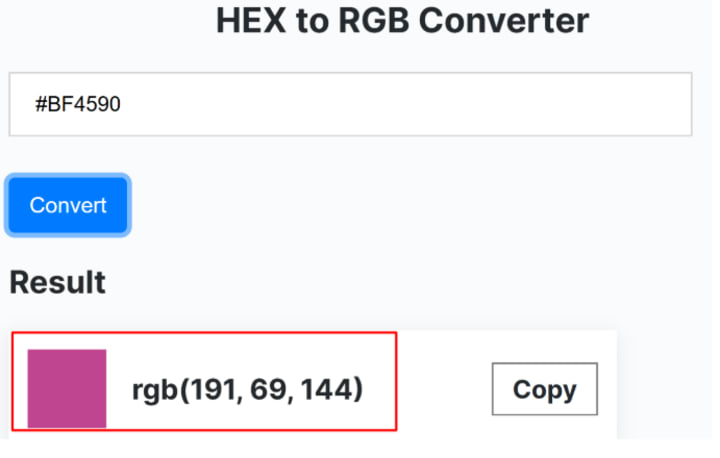
For easy conversion between HEX to RGB can be done easily with the help of online tools. There are plenty of HEX to RGB converters online. Working of all these color converters is almost the same. For example, I use the HEX to RGB converter by Minifier.org, as it’s free and easy to use.
Limited Understanding
HEX codes are not easy to understand as compared to RGB values which are in decimal. For someone new to design, interpreting a six-digit hexadecimal code can be challenging. RGB values are a more straightforward approach for new designers as well.
Conclusion
Though HEX and RGB are both the most prevalent in the design world. But smart designer prefer using RGB values rather. That’s because it’s easy to understand and they get the liberty to achieve precision. RGB values are more crucial when you are designing something for the big names and brands. But if you are assigned some color in HEX codes, you can easily convert using some online HEX to RGB converter.
About the Creator
Keep reading
More stories from Smith Matt and writers in Education and other communities.
What is Webflow? A Beginner's Guide
Introduction Building a professional website without coding has never been easier, but I want to thanks to Webflow. Whether you're a designer, entrepreneur, or freelancer, Webflow is a powerful, user-friendly platform for creating custom websites without needing to write a single line of code. Unlike traditional website builders, Webflow provides advanced design capabilities while maintaining simplicity and efficiency.
By Smith Matt10 months ago in Education
The $73,000 Text Message That Changed Everything
"Just realized I missed the quarterly payment deadline by one day. How bad is this?" I stared at the message, knowing I was about to deliver devastating news. My client—a successful entrepreneur who built his tech consulting firm from zero to $3.2 million in annual revenue—had just cost himself $73,000.
By Nth Degree Tax6 days ago in Education
How Audit Management Solutions Streamline ESG Compliance
Corporate credibility is increasingly defined by Environmental, Social, and Governance (ESG) compliance. Stakeholders, including shareholders, regulatory authorities, consumers, and employees, are placing greater demands on organizations to operate transparently, ethically, and sustainably.
By Matthew Luke5 days ago in Education




Comments
There are no comments for this story
Be the first to respond and start the conversation.