
Usability Role in Websites
Role of Usability in Websites Design and Evaluation
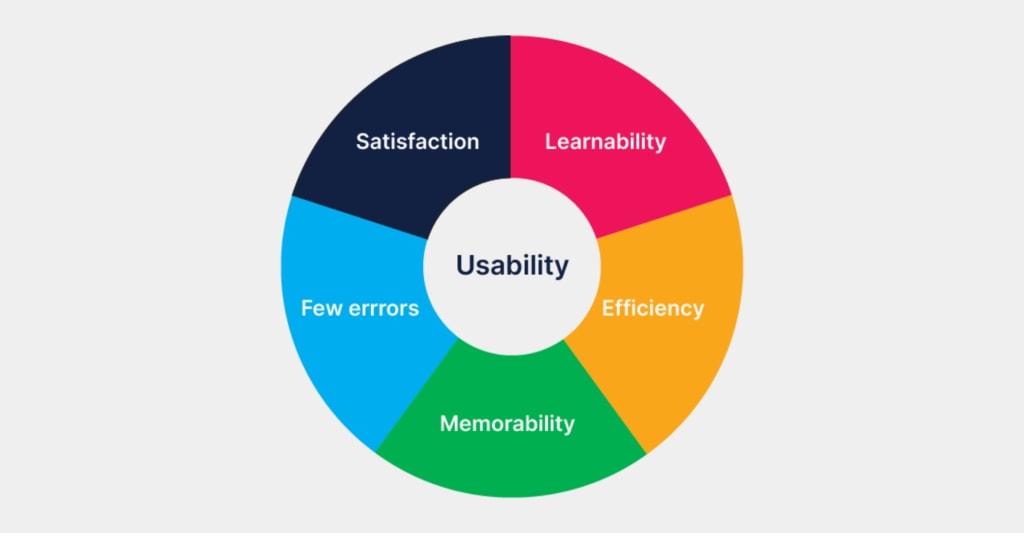
Usability plays a critical role in the design of web platforms. It refers to the ease of use and overall user experience provided by a website or application.
Simplicity: Keeping the design and navigation simple and straightforward.
Consistency: Maintaining consistent design elements and patterns throughout the website.
Clarity: Presenting information and instructions in a clear and understandable manner.
Feedback: Providing timely and informative feedback to users, such as confirmation messages or error notifications.
Responsiveness: Ensuring the website performs well across different devices and screen sizes.
A platform that is well-designed with good usability can significantly enhance user satisfaction, engagement, and the achievement of desired goals. Here are some key aspects of usability in web platform design:
1. User-Centered Design: Usability begins with understanding the target users and their needs. Conducting user research, such as interviews, surveys, and usability testing, helps designers gain insights into user preferences, behaviors, and pain points. This information informs the design decisions to create a platform that caters to the users' requirements.
User-centered design is an approach that involves understanding the needs, goals, and behaviors of the target users throughout the design process. It focuses on designing products or services that align with user requirements and preferences. The UCD process typically involves the following steps:
User Research: Conducting research to gather insights about the target users, their goals, and their preferences.
User Personas: Creating fictional representations of typical users to guide design decisions and empathize with their needs.
Information Architecture: Organizing the website's content and structure in a way that is logical and intuitive for users to navigate.
Wireframing and Prototyping: Creating low-fidelity prototypes or wireframes to visualize the website's layout and functionality before implementation.
Iterative Design: Continuously testing and gathering user feedback, making improvements based on the insights, and repeating the process to refine the design.
2. Intuitive Navigation: Users should be able to easily navigate through the platform and find the information or features they need. Well-organized menus, clear labeling, and consistent placement of navigation elements contribute to intuitive navigation. Properly designed information architecture ensures that content is logically structured, and users can find what they're looking for without confusion.
3. Responsive and Accessible Design: With the increasing use of mobile devices, web platforms need to be responsive and adapt to various screen sizes and resolutions. Responsive design ensures that the platform looks and functions well across different devices. Additionally, accessibility considerations make the platform usable by individuals with disabilities, such as providing alternative text for images, captioning videos, and ensuring proper color contrast for better visibility.
4. Clear and Concise Content: Users should be able to understand the content on the platform easily. Clear and concise writing, appropriate use of headings and subheadings, and visually appealing typography contribute to readability. Well-structured content with proper formatting improves scannability and enables users to quickly grasp the information.
5. Feedback and Error Handling: Providing meaningful feedback is crucial for users to understand their actions and the system's response. Interactive elements should exhibit clear visual cues, such as button states and loading indicators, to inform users of their progress. Additionally, error messages should be user-friendly, explaining the problem and offering suggestions for resolution.
6. Performance and Loading Speed: Users expect web platforms to load quickly and respond promptly to their actions. Optimizing performance by minimizing page load times, compressing images, and employing caching techniques improves the user experience. A slow and unresponsive platform can frustrate users and lead to abandonment.
7. User Testing and Iteration: Usability testing involves observing and collecting feedback from users as they interact with the platform. This iterative process helps identify usability issues, gather insights, and make informed design improvements. Regular testing throughout the design and development process ensures that usability remains a priority and that the platform meets user expectations.
By focusing on usability throughout the design process, web platforms can provide a seamless and enjoyable user experience, leading to increased user engagement, higher conversion rates, and improved customer satisfaction.
About the Creator
Keep reading
More stories from Muhammad Asim Qamar and writers in Education and other communities.
Omega Network
Omega Network: A New Generation of Crypto Mining. Omega Network (OMN) is a new cryptocurrency project that aims to make crypto mining easier and more accessible by using a breakthrough technology that allows users to manage it on their phone. Unlike traditional mining, which requires expensive and energy-intensive hardware, Omega Network claims to offer a lightweight and decentralized solution that can be done anywhere.
By Muhammad Asim Qamar3 years ago in The Chain
Wuthering Heights uni module given content warning for students"
The 1847 novel Wuthering Heights has long been considered one of the most intense works in English literature. Written by Emily Brontë, the book explores obsession, revenge, cruelty and emotional torment on the Yorkshire moors. Now, nearly two centuries after its publication, the novel has become the center of a modern academic debate after a university module introduced a content warning for students studying the text.
By Fiaz Ahmed a day ago in Education
How Hot-Dip Galvanizing Saves Maintenance Costs Over Time for Steel Infrastructure
Steel is a key material in modern infrastructure. It is used in bridges, buildings, towers, fences, and many industrial systems. Steel offers strength and reliability, but it can rust when exposed to air and water. Rust slowly weakens steel and creates serious maintenance challenges. To prevent this damage, many industries rely on hot-dip galvanizing.
By Frontier Galvanizing2 days ago in Education



Comments
There are no comments for this story
Be the first to respond and start the conversation.