
Ultimate Guide to Managing Google Reviews for Your Business
No more worries as the guide will help you understand the tricks and tips on managing google reviews for your business

Introduction
In today's digital age, online reviews hold significant power over a business's reputation and success. Google Reviews, in particular, play a crucial role in shaping how potential customers perceive your business. Managing these reviews effectively can enhance your online presence, build trust, and drive more customers to your doorstep. In this comprehensive guide, we’ll walk you through the best practices to manage Google reviews and leverage them for business growth.

Importance of Managing Online Reviews
Managing online reviews is not just about damage control; it’s about proactive engagement with your customers. Reviews provide valuable feedback, enhance your credibility, and influence purchasing decisions. A robust review management strategy can help you understand customer sentiment, identify areas for improvement, and highlight what you’re doing right.
Overview of the Benefits of Google Reviews
Google Reviews offer numerous benefits, including:
• Increased Visibility: In order to get and manage google reviews which are positive, you need to improve your local SEO. It will make your business more visible in search results.
• Enhanced Credibility: Genuine reviews build trust and credibility with potential customers.
• Customer Insights: Reviews provide insights into customer experiences and expectations, helping you refine your offerings.
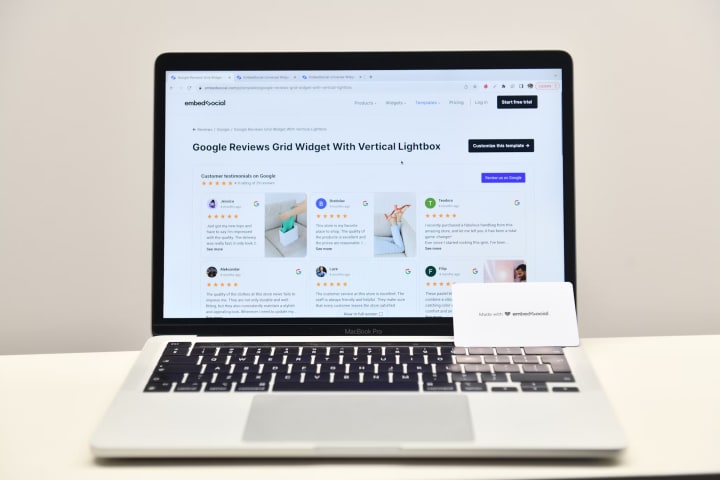
Chapter 1: Setting Up for Success
Creating and Verifying Your Google My Business Account
To get started with Google My Business Photos and reviews, you need to set up and verify your Google My Business (GMB) account. Here’s how:
1. Sign Up: Go to the Google My Business website and sign up for an account.
2. Enter Business Details: Fill in all necessary business information, such as name, address, phone number, and category.
3. Verify Your Business: Google will send a verification code to your business address. Enter this code in your GMB account to complete the verification process.
Ensuring Accurate Business Information
Accurate and up-to-date business information is crucial for managing Google reviews effectively. Make sure to:
• Update Your Details Regularly: Ensure your business hours, contact information, and address are always current.
• Use Consistent NAP: Ensure your Name, Address, and Phone number (NAP) are consistent across all online platforms.
Chapter 2: Strategies for Collecting More Reviews
Encouraging Satisfied Customers to Leave Reviews
Satisfied customers are your best advocates to manage google review. Here are some strategies to encourage them to leave reviews:
• Ask Directly: A simple request at the end of a successful transaction can go a long way.
• Provide Easy Access: Share direct links to your manage Google review page in follow-up emails or on your website.
Using Email Campaigns, Social Media, and In-Store Requests
Utilize various channels to request reviews:
• Email Campaigns: Send personalized follow-up emails requesting feedback and providing a direct link to your review page.
• Social Media: Use your social media platforms to encourage followers to share their experiences.
• In-Store Requests: Display signage in your physical location asking customers to leave a review.

Chapter 3: Best Practices for Responding to Reviews
Importance of Timely and Thoughtful Responses
Responding to reviews promptly shows customers that you value their feedback. Whether the review is positive or negative, a thoughtful response can enhance your reputation.
Examples of Effective Responses to Positive and Negative Reviews
• Positive Reviews: “Thank you for your kind words! We’re thrilled to hear you had a great experience. We look forward to serving you again soon.”
• Negative Reviews: “We’re sorry to hear about your experience. Your feedback is important to us, and we’d like to make things right. Please contact us directly at [contact information] so we can address your concerns.”
Chapter 4: Addressing Negative Reviews and Feedback
Strategies for Handling Negative Reviews Professionally
Negative reviews are inevitable, but they can be turned into opportunities for improvement. Here’s how to handle them:
• Stay Calm and Professional: Never respond emotionally or defensively.
• Acknowledge the Issue: Show empathy and acknowledge the customer’s concerns.
• Offer a Solution: Provide a constructive solution to resolve the issue.
Turning Negative Experiences into Positive Outcomes

Addressing negative reviews effectively can turn dissatisfied customers into loyal advocates. Follow up with them to ensure their issue is resolved and encourage them to update their review if they are satisfied with the outcome.
Chapter 5: Leveraging Reviews for Business Growth
Using Reviews in Marketing and Promotions
Positive reviews are powerful marketing tools. Here’s how to leverage them:
• Testimonials: Use positive reviews as testimonials on your website and marketing materials.
• Social Proof: Share glowing reviews on your social media channels to build trust with potential customers.
Highlighting Positive Reviews on Your Website and Social Media
Create a dedicated section on your website for customer testimonials and regularly update it with new reviews. Share positive feedback on your social media platforms to showcase customer satisfaction.
Chapter 6: Monitoring and Analyzing Reviews
Tools for Tracking and Analyzing Review Data
Several tools can help you track and analyze your reviews:
• Google My Business Dashboard: Provides insights into your review performance.
• Review Management Software: Tools like Yext, BirdEye, and Review Trackers can help you monitor reviews across multiple platforms.
Using Insights to Improve Your Products and Services
Regularly analyze and manage google review data to identify trends and areas for improvement. Use this feedback to enhance your products and services, ensuring you meet customer expectations.
Conclusion
Managing Google reviews effectively involves setting up a robust GMB profile, collecting more reviews, responding thoughtfully, addressing negative feedback, leveraging reviews for marketing, and continuously monitoring and analyzing feedback.
By actively managing your Google reviews, you can improve your online reputation, attract more customers, and grow your business. Don’t underestimate the power of customer feedback in shaping your business’s success.
Frequently Asked Questions
Q1: How can I encourage more customers to leave reviews?
A1: Encourage more reviews by asking customers at the right time, providing clear instructions, and using multiple channels like email, SMS, and social media.
Q2: What should I avoid when requesting reviews?
A2: Avoid fake or incentivized reviews, as they can harm your reputation and violate Google’s policies. Focus on genuine feedback from real customers.
Q3: How can I incorporate reviews into my marketing strategy?
A3: Incorporate reviews into your marketing strategy by showcasing them on your website, sharing them on social media, and including them in email campaigns.
About the Creator
Anie Mazie
A avid writer crafting various content for the past 8 years and more to cater the needs and queries of the audience for their seamless gathering of knowledge regarding any topic.
Keep reading
More stories from Anie Mazie and writers in Education and other communities.
Definitive Guide to Local SEO Ranking Factors in 2024
Introduction Local SEO refers to the process of optimizing your online presence to attract more business from relevant local searches. These searches take place on Google and other search engines. For instance, if you run a bakery in New York, local SEO helps you appear in search results when someone nearby searches for "bakery near me" or "best bakery in New York."
By Anie Mazie2 years ago in Education
How Interest Rates Impact Real Estate Investments and Investor Decision Making
Interest rates impact real estate investments at every stage of the buying and owning process. From the first loan application to long term holding strategies, interest rates influence costs, demand, and overall returns. Many investors focus only on property price, but interest rates often play a larger role in success or failure. This article explains how interest rates affect real estate investments in a clear and simple way, using practical examples that are easy to understand.
By Manny Khoshbin2 days ago in Education
Businesses Where AI Does Most of the Work
The idea of a side business used to mean late nights, endless hustle, and doing everything yourself. Today, artificial intelligence has changed the rules. With the right setup, you can start a side business where AI handles most of the heavy lifting—content creation, analysis, customer interaction, and even basic decision-making—while you focus on strategy and growth.
By Anthony Bahamonde3 days ago in Education


Comments
There are no comments for this story
Be the first to respond and start the conversation.