
UBIQUITI PowerBeam 5AC GEN2 — what do you need to know
what do you need to know
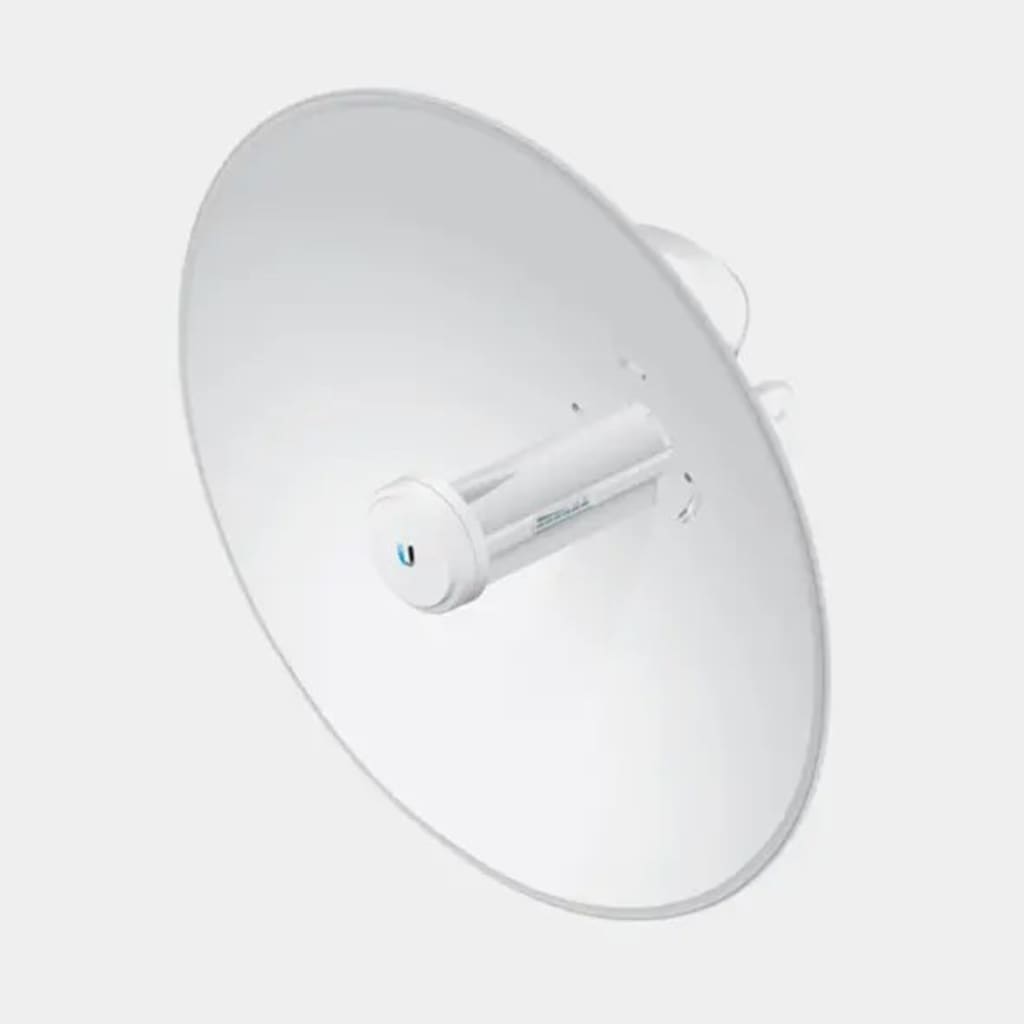
In a world that demands fast and reliable internet connectivity, the Ubiquiti PowerBeam 5AC GEN2 stands tall as one of the most powerful long-range wireless bridge devices on the market. Designed for professional-grade point-to-point (PtP) and point-to-multipoint (PtMP) wireless connections, this device delivers up to 450 Mbps of real throughput—making it ideal for businesses, ISPs, and remote installations.
Whether you need to connect two buildings, extend a network across large distances, or deploy surveillance systems in rural areas, this PowerBeam is a game-changer in wireless performance.
Why High-Speed Wireless Connectivity Matters
Reliable connectivity is no longer a luxury—it’s an essential. From business communication and remote work to IoT devices and smart security, stable wireless links ensure seamless data flow.
The PowerBeam 5AC GEN2 eliminates the need for costly fiber installations while delivering enterprise-level speed and reliability even in outdoor environments.
Ubiquiti: The Brand Behind Cutting-Edge Network Solutions
Ubiquiti Inc. has long been recognized as a leader in wireless networking hardware. Their AirMax and UniFi product lines have revolutionized the way businesses and service providers build scalable networks. The PowerBeam series, in particular, is crafted for users who demand high throughput and stable long-distance communication without compromising affordability.
What Is the Ubiquiti PowerBeam 5AC GEN2?
Overview and Design Philosophy
The PowerBeam 5AC GEN2 is a compact, integrated wireless bridge that combines an advanced radio and a high-gain parabolic antenna into a single, sleek unit.
Its goal: deliver maximum performance with minimal interference.
Target Users and Applications
This model is designed for:
- Internet Service Providers (ISPs) extending broadband coverage
- Enterprises connecting remote branches
- Security installations using IP cameras
- Rural connectivity and community Wi-Fi projects
AirMax AC Technology Explained
The PowerBeam utilizes Ubiquiti’s proprietary AirMax AC technology, which provides improved network scalability and reduced latency compared to standard Wi-Fi protocols. It uses TDMA (Time Division Multiple Access) to ensure each client transmits in organized time slots—eliminating signal collisions and improving overall throughput.
Beamforming for High-Precision Connectivity
Beamforming technology helps direct the radio signal toward connected devices, minimizing interference and maximizing signal strength.
The result? Stable, high-speed connections even across long distances.
Wireless Point-to-Point (PtP) and Point-to-Multipoint (PtMP) Links
PtP Mode: Connects two distant sites like headquarters and a branch office.
PtMP Mode: Connects multiple clients to a central hub, ideal for rural ISPs or large campuses.
Installation and Setup Process
Step-by-Step Setup Using the UISP Mobile App
Ubiquiti has made configuration incredibly easy through the UISP mobile app (available on Android and iOS):
Mount the device using the provided bracket.
Connect to PowerBeam via Bluetooth or PoE injector.
Launch UISP app to scan and detect the device.
Assign IP settings and network roles (Access Point or Station).
Align the antenna using real-time signal strength metrics.
Test throughput and finalize settings.
Mounting and Alignment Tips
Maintain clear line of sight between connected points.
Avoid obstructions like trees, buildings, or hills.
Use Ubiquiti’s AirLink tool to simulate expected performance.
Real-World Performance Review
Throughput Testing and Latency Results
In field tests, the PowerBeam 5AC GEN2 consistently delivered 400–450 Mbps throughput over distances up to 15 km, with latency as low as 2–3 ms in point-to-point mode—perfect for VoIP, video streaming, and real-time monitoring.
Stability in Harsh Environments
Thanks to its IP67-rated housing, it resists dust, rain, and temperature extremes. Even under monsoon or desert conditions, it maintained solid uptime and stable signal strength.
Top Advantages of Using Ubiquiti PowerBeam 5AC GEN2
Superior Signal Quality and Range
With a 25 dBi high-gain antenna, this device transmits data across up to 25 km—ideal for bridging remote sites.
Easy Management with Ubiquiti Software
Through UISP and AirOS, you can monitor bandwidth, control access, and analyze performance from anywhere.
Energy Efficiency and Low Maintenance
Drawing less than 8 watts, it’s both eco-friendly and cost-effective, reducing long-term power consumption.
Why Ubiquiti Still Leads the Game
Ubiquiti’s hardware integration, global community support, and powerful management tools give it a lasting edge, especially for professional-grade deployments.
Ideal Use Cases
- Rural and Remote Internet Distribution
- Connect villages, schools, or farmlands where fiber isn’t feasible.
- Surveillance and IoT Networks
- Perfect for IP cameras and industrial sensors needing stable bandwidth.
- Enterprise Wireless Backhaul
- Use it as a cost-effective link between offices, towers, or data centers.
Maintenance and Firmware Updates
Using UISP Controller for Management
Through the UISP Cloud Controller, users can track performance, update firmware, and manage multiple devices remotely.
Firmware Upgrade Steps
Log into the PowerBeam dashboard.
Navigate to System > Firmware Update.
Upload the latest firmware or allow auto-update via UISP.
Reboot and verify functionality.
Frequently Asked Questions (FAQs)
1. What is the maximum speed of Ubiquiti PowerBeam 5AC GEN2?
Up to 450 Mbps under optimal conditions.
2. What is its maximum range?
It can achieve stable connectivity up to 25 km with clear line-of-sight.
3. Can it be used indoors?
No, it’s designed for outdoor use and requires mounting in open-air environments.
4. Does it support Power over Ethernet (PoE)?
Yes, it operates via 24V passive PoE, included in the box.
5. What is the difference between PowerBeam M5 and 5AC GEN2?
The GEN2 model supports higher throughput, better noise filtering, and Bluetooth configuration.
6. Is it compatible with other Ubiquiti devices?
Yes, it seamlessly integrates with AirMax and UISP ecosystems.
Conclusion: Is the PowerBeam 5AC GEN2 Worth It?
If you’re looking for a reliable, long-range, and high-speed wireless bridge, the Ubiquiti PowerBeam 5AC GEN2 is one of the best investments of 2025. With its 450 Mbps throughput, IP67 durability, and intuitive management tools, it outperforms many competitors in both performance and value.
Whether you’re an ISP building last-mile connectivity, a business connecting remote facilities, or a security system integrator, this device ensures your network stays fast, stable, and future-ready.
About the Creator
Keep reading
More stories from Abdul Alim and writers in Education and other communities.
Hardboard Sheet Size Chart 2025
When you’re planning any project involving sheet-materials, knowing the standard dimensions of the sheet you’ll use helps you minimise waste, properly budget your material purchase, and ensure that your installation is smooth. With a hardboard sheet size chart, you’ll know what widths, lengths and thicknesses are commonly available, and you can pick what fits your job — whether that’s cabinetry, wall panelling, underlayment, or packaging.
By Abdul Alim3 months ago in Education
Why Great Customer Service Is Non-Negotiable for Modern Businesses
Excellent customer service is no longer something businesses can choose to offer later. It is a basic requirement in today’s fast-moving market. Customers expect respect, clear communication, and fast solutions. When they do not get these things, they leave. This is why excellent customer service is non-negotiable for businesses that want to survive and grow.
By Apex Service Partners5 days ago in Education
The Devil's Cut
“Comrade, finally you’re awake.” The voice was smooth, sensual. A flickering incandescent bar was all that lit the white, sterile room. All Vladimir remembered was everything going black. He tried to move his arms and found them strapped to the gurney.
By Matthew J. Fromm4 days ago in Fiction


Comments
There are no comments for this story
Be the first to respond and start the conversation.