
Top Online Teaching Tools For Teachers
Not just in the UK, online teaching has seen a tremendous uptick in growth throughout the world.

Introduction
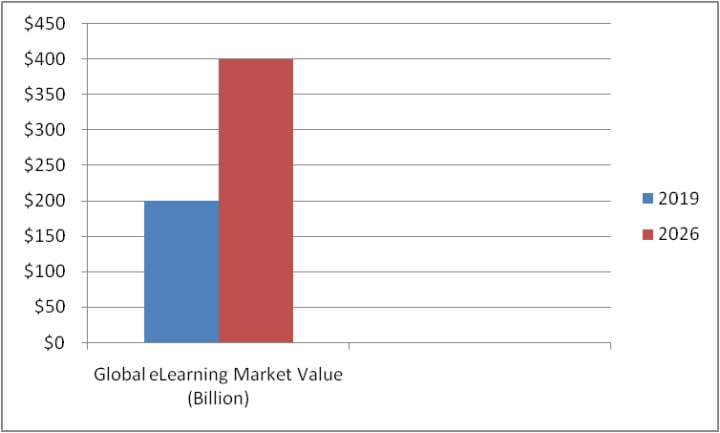
The global eLearning market had a 2019 value of $200 billion. You can anticipate that the estimated market size will increase to $400 billion by 2026, depending on the rate of adoption. These statistics support the idea that future students will greatly benefit from smart tools for studying.
The year 2020 has been one of change. Everything has changed, even how children commute to school. Much of the world implemented social distancing laws, 20-second hand washing procedures, and public mask wearing throughout the pandemic. It would be an understatement to suggest that this had an impact on how teachers and students interacted.
Millions of kids switched in March from traditional classrooms to home-based virtual learning environments. You had to work quickly to set up a virtual classroom that would keep your students interested during the early stages of the pandemic.
Throughout these months, educators at all levels experimented with various smart tools and systems for teaching before settling on their favourites. To learn what those are, we searched the web and listed them down here.
What are the Tools for Online Teaching?
Any web-based software, app, or technology that is specifically created to improve your capacity to present and explain knowledge and to assist the students in processing and collaborating over novel ideas and concepts is referred to as an online teaching tool.
Virtual classroom platforms, photo and video collections, online communication tools, instructional games and quizzes, assessment tools, productivity tools, and other things can all be used as online teaching resources.
Online vs. Offline Tools for Teaching
The assignments can be finished by students independently at their convenience. In the interim, you make use of crucial class time for remediation, Q&A, etc. For teachers, smart teaching tools frequently offer vital features like immediate feedback and commenting capabilities, automatic evaluation and engagement metrics, and a host of other functions.
Best Online Teaching Tools for Teachers
1. Socrative
How can you tell if your student has actually absorbed what you are teaching? The only method is through student feedback, and Socrative has made it easier to solicit that feedback.
This application enables you to keep an eye on student work in the classroom to ensure that nobody slips between the cracks, whether you want rapid assessments or check-ins after some time.
A fun and interesting assessment tool, Socrative lets you know how your students are performing and function on a range of devices. Also, you get instant access to making tests and polls for your classroom. Students can always use it for free.
2. Khan Academy
Parents and teachers love this well-liked free online learning resource. From first-grade arithmetic through high school economics, you may access top-notch courses with instructional videos.
Even PSAT and SAT prep are available from Khan Academy with criteria that match those of the best schools and universities. The video-based courses have practice tests and quizzes as well as guided placement to assist difficult students in finding the appropriate subject.
You can build up classes and invite students after having access to the whole course catalogue. While assignment due dates and learning goals can be created and modified to suit shifting demands in the classroom, grading is automatic.
3. Edpuzzle
With the use of Edpuzzle, "make any video a lesson." Utilise YouTube and Khan Academy as well as other websites' videos and resources. Next, to make them more relevant to your students, add commentary and comprehension questions.
Although there is accountability and assessment integrity, students are given movies to watch. Check out who is watching the videos and how they are interacting with them.
You may then determine who might want a little additional assistance using the data. For students who are unable to participate in "live" sessions, this service—which is free for both you and your students—is a great self-paced alternative.
4. Google Classroom
Google Classroom includes a tonne of functionalities that K–12 instructors can use, making it one of the most sophisticated free online learning platforms. It is based on the same technology that Google provides for both consumers and companies in its paperless office suite. It's possible that many school districts currently employ this eLearning tool for in-class assignments.
With the use of integrated technology found in applications like Gmail, Google Slides, and Google Documents, among others, you and your students may share files with ease. You can quickly integrate your preferred app when it's time to add more features.
Students can attach and submit tasks to Google Classroom for simple grading, feedback, and assessment when you invite them via a code to a private classroom. Also, it's a mobile-friendly solution, thanks to compatible iOS and Android apps.
5. Zoom
Zoom can be utilised for meetings as well as webinars. Zoom Meetings work best for online lectures, while Zoom Webinars are ideal for interactive classes. You always have the choice of choosing an employer.
One of the helpful features of Zoom Meetings that simplifies online instruction is the breakout rooms. They help you divide the students into groups, just as you would in a conventional classroom.
Each group can communicate with one another, and you can be informed to enter and offer support as required. Zoom has become so popular for remote learning that many more online smart teaching tools now offer user-friendly interfaces.
6. Ted Talks
Ted Talks are an excellent resource for online education. In our opinion, it serves more as a storehouse than a tool. On Ted's website, you may watch videos of 18-minute lectures by well-known speakers on a variety of topics.
Even some of the children's Ted Talks can inspire students greatly. The fact that all talks can be used for free in schools is the nicest aspect. You can embed the videos or share them with a link. Any LMS can easily incorporate them.
7. Teacherbot
A smart online tool, Teacherbot, is designed by us for teachers like you. It allows you to create activities and plans for any level (from nursery all the way to university) and any subject, limited only by your imagination. It will help you save a lot of time allowing you to spend more time with your family!
8. Canvas
Almost 30% of higher education communities use the online teaching technology Canvas. It is also emerging as a leading provider of K–12 education. It's an additional open-source choice with a variety of integrated solutions to meet the demands of you, your distant students, and their parents.
Parents may view the tasks their children must complete using this app-friendly system, which also offers data metrics for administrators to use in performance evaluations.
Assessing and Measuring Performance
The capability to evaluate and gauge each student's performance is a crucial component to have in mind regardless of the programme you choose. To prevent students from falling behind, you must make sure they are following lesson plans. Also, it's important that the student completes the assignment rather than an older sibling or parent.
Teachers can now check in with students at any moment within the curriculum thanks to responsive assessment tools, not just at the conclusion of a course or unit. They may be able to see students' needs more "real-time" as a result. That might compensate for the fact that some students need an in-person presence to keep on track.
The Future of Online Teaching Tools
The market for online teaching tools is expanding, there are more options, and the tools that are now available are continually being enhanced since the teacher community is particularly interested in the topic. With all the sophisticated apps we have at our disposal for the classroom, we remark that these are exciting times to be a teacher. We are already anticipating what the upcoming year will bring. Try out the tools we discussed in this article in the meanwhile. You'll be adored by your students for it!
Conclusion
You'll discover that there are more options than ever before, regardless of whether you've been utilising digital tools for years or are just beginning to do so due to a crisis.
The programmes on our list, fortunately, are all made with the busy educator in mind and provide you with online help. They'll assist you in getting up to speed quickly and starting your students' education. The time is now to embrace online learning tools since education is evolving daily.
About the Creator
Keep reading
More stories from Hannah Jackson and writers in Education and other communities.
Elementary teaching resources
Elementary school teachers face a unique set of challenges in their classrooms. They must balance teaching fundamental skills such as reading, writing, and math with creating a positive learning environment that encourages exploration and creativity. Fortunately, there are many resources available online to help elementary teachers navigate these challenges and provide their students with the best possible education.
By Hannah Jackson3 years ago in Education
Navigating Business Consulting Challenges to Build Stronger Companies
The modern business world moves fast and puts pressure on businesses from all sides. Leaders often know something is wrong but cannot see the whole picture. This is where strategic consulting pain points become precise and vital. Consultants help companies slow down, gain clarity, and solve problems that block growth. Their role is not to take control but to guide teams toward better decisions and steady progress.
By Nicole Metz6 days ago in Education
Observability, Telemetry, and Incident Recovery in Forex Trading Software
Forex trading software works in a very fast, non-stop environment. Prices change every second, trades happen automatically, and the system must run smoothly at all times. To stay reliable and accurate, modern forex platforms use three important ideas: observability, telemetry, and incident recovery. These help trading systems stay clear, stable, and strong. This blog shows what these ideas mean and why they are important for professional forex trading software.
By james hall5 days ago in Education




Comments
There are no comments for this story
Be the first to respond and start the conversation.