
Things You Should Know About Source Code Plagiarism Checker
Codequiry

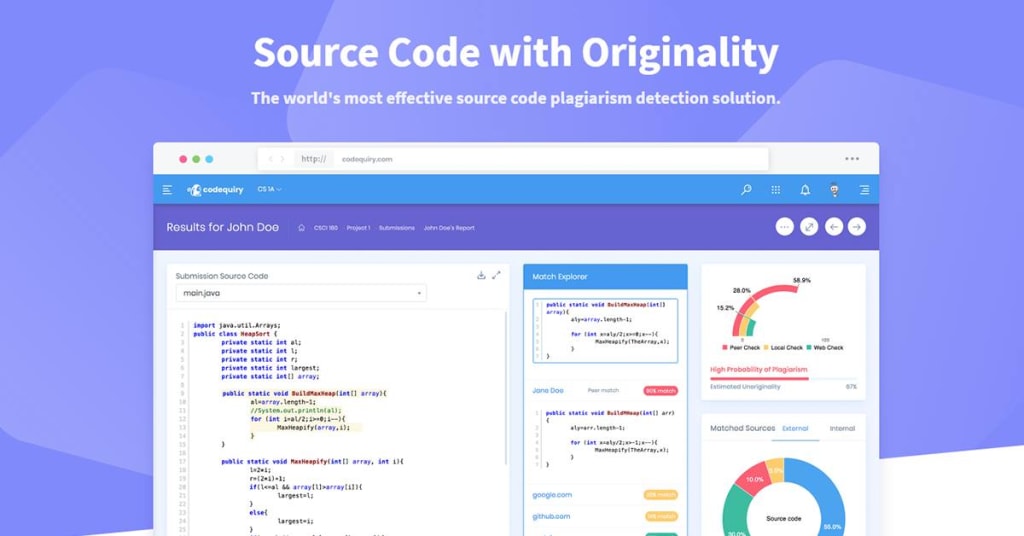
In the world of computers, code is like a special language that tells machines what to do. But sometimes, people might copy someone else’s code and pretend it’s their work. This is called code plagiarism, and it’s not fair. There are special tools called source code plagiarism checkers that can help catch this. These checkers are like detectives for code.
They compare your code to a massive collection of other code, searching for any big similarities. If they find too much overlap, it might be a sign of plagiarism. If you’re new to understanding code source plagiarism and looking for some answers about source code plagiarism checkers then, this blog is here to help you. Before moving further, first, let’s fully understand source code plagiarism in detail below.
Understanding Source Code Plagiarism In Detail: What It Is
Imagine you’re writing a school report. Source code plagiarism is like copying someone else’s report word-for-word and pretending it’s your own. In the coding world, it means using another programmer’s code without giving them credit. This could be copying big chunks of code, or just changing a few things to make it look different.
Now, coding is a skill you learn by doing. If you just copy someone else’s work, you’re not learning. It’s also not fair to the original programmer who put in the effort to write the code. There are lots of resources online to help you learn to code, so don’t be afraid to ask for help if you’re stuck. But remember, it’s always better to write your code, even if it takes longer.
How Source Code Plagiarism Checker Works
Source code plagiarism checker is like super code bloodhounds! They sniff out copied code. First, let’s imagine the check has a giant vault of code from all over the internet, like public code collections and past assignments. When you submit your code, the checker breaks it down into tiny pieces, like code words. Then, it compares these code words to the ones in its vault. It’s like checking if your words match someone else’s essay.
But checkers are smarter than just looking for exact copies. They can also find changes, like if someone renames a variable (like calling something “number” instead of “count”) or shuffles the order of lines. By finding such similarities, the checkers can tell you how much of your code might be copied, even if it’s been disguised a bit.
Benefits of Using Source Code Plagiarism Checker For Students and Developers
It’s a big help for both students and developers. Here’s why:
For Students
It ensures honesty and learning. By checking your code before submitting assignments, you can avoid accidentally copying someone else’s work. The source code plagiarism checker highlights similar code snippets, allowing you to understand the source and rewrite it in your own words. This strengthens your coding skills and helps you learn from scratch. Think of it as a coach pointing out areas where you can improve your own game!
For Developers
It saves time and keeps things original. If you’re working on a project and get stuck, it’s tempting to borrow code online. But the checker that’s similar to Moss Plagiarism Checker can help you find existing solutions that you can adapt instead of copying entirely. This keeps your code unique and avoids any copyright issues.
Moreover, you can focus on building new features instead of spending time rewriting borrowed code. It’s like having a teammate who can suggest solutions without stealing the show!
Tips For Using Source Code Plagiarism Checker Effectively
Below are some easy tips for using a code plagiarism checker like a pro:
- First of all, understand the checker. Think of it like a helper tool, not a magic answer machine. It finds code that looks similar, but it can’t tell the difference between copying and learning.
- Check early and often. Don’t wait until the last minute! Run your code through the checker as you work. By doing this, you can address any issues at an early stage.
- Look at the report, not just the score. The source code plagiarism checker will highlight similar code. See and observe what parts are flagged and understand why.
- Sometimes there are right ways to do things, and that code might look similar. The checker might flag these, but it’s usually okay.
- If you find copied code, don’t just change variable names. Rewrite the logic and structure in your own words.
Final Words
Therefore, a Source Code Plagiarism Checker can be a valuable tool for anyone who works with code. It can help ensure that your code is original and that you’re not accidentally copying someone else’s work. These checkers can also be useful for educators who want to make sure their students are completing their assignments independently.
There are many different Source Code Checkers for Plagiarism available, both free and paid. The best checker for you will depend on your specific needs. However, all checkers work similarly, by comparing your code to a large database of other code. If you’re in search of the best and most reliable checker, then we recommend opting for Codequiry.
It’s a professional tool used for checking code plagiarism that uses smart algorithms, extensive reach, and produces meaningful results. It helps you find unoriginal code and software similar to the most advanced plagiarism detection solution. Visit the website today and learn more about its features.
About the Creator
Codequiry
Codequiry provides cutting-edge solutions for detecting Code Plagiarism, and ensuring integrity in academic and professional environments.Trust Codequiry for reliable code plagiarism detection and integrity assurance.
Striking the Right Balance: Modern Tech and the Human Touch in Harmony
As technology continues to reshape every corner of business and daily life, the balance between innovation and personal interaction becomes increasingly important. Automation, artificial intelligence, and digital communication have allowed companies to operate faster, smarter, and more efficiently. These tools improve productivity and offer consumers greater convenience, transforming how services are delivered and experiences are shaped.
By Ian Schenkel Haliburton5 days ago in Education
Oppression of a Laborer
Oppression of a Laborer Mubashir worked in a factory and was the sole breadwinner of his household. The responsibility of supporting his wife, children, and elderly parents rested entirely on his shoulders. For fifteen long years, he had worked tirelessly in the same factory for a very low salary. Despite his dedication and loyalty, his financial condition never improved, and his basic rights as a worker were consistently ignored.
By Sudais Zakwan3 days ago in Education



Comments
There are no comments for this story
Be the first to respond and start the conversation.