
The Modern Art of WiFi Password Security: Hacking Techniques of 2026 and How to Defend Your Network
Learn how to hack a WiFi network easily.

The Invisible Battlefield
In our hyper-connected world, wireless networks form the invisible infrastructure of modern life. From smart homes to enterprise systems, WiFi has become the circulatory system of digital communication. Yet, this convenience comes with significant risks. Every wireless signal broadcast into the air represents a potential entry point for malicious actors. As we progress through 2026, hacking techniques have evolved dramatically, leveraging artificial intelligence, quantum computing principles, and sophisticated social engineering. This article explores the cutting-edge methods cybercriminals employ to compromise WiFi networks and provides actionable strategies to fortify your digital perimeter.
Understanding Wireless Network Fundamentals
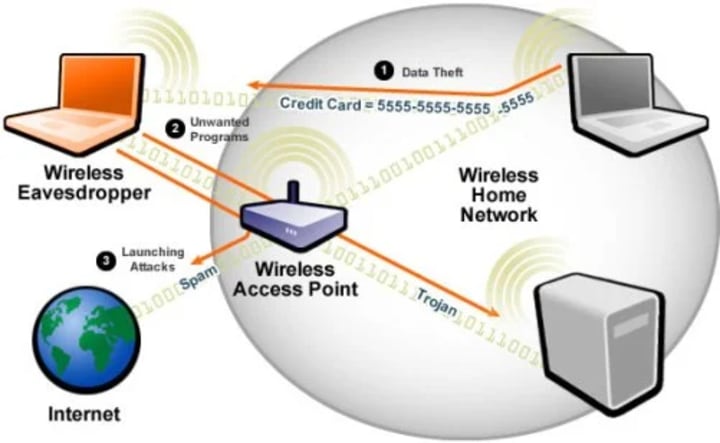
A wireless network uses radio waves to connect devices within a specific geographical area, operating at the physical layer of network architecture. Unlike wired connections, these radio transmissions can extend beyond physical boundaries, making them inherently more vulnerable to interception. The security of these transmissions depends entirely on the encryption protocols and authentication methods employed.
Evolution of Wireless Security Protocols
The Legacy of WEP: A Broken Foundation
Wired Equivalent Privacy (WEP) was developed to provide confidentiality comparable to wired networks. However, its fundamental flaws—including weak initialization vectors (IVs), poor key management, and the vulnerable RC4 encryption algorithm—made it trivial to crack. By 2026, WEP exists only in legacy systems and represents low-hanging fruit for attackers.
WPA/WPA2: Improvements with Persistent Vulnerabilities
WiFi Protected Access (WPA) addressed WEP's shortcomings with stronger encryption (TKIP) and improved integrity checking. WPA2 introduced the robust AES-CCMP protocol. Despite these advances, vulnerabilities like KRACK (Key Reinstallation Attack) exposed weaknesses in the four-way handshake mechanism. The prevalence of weak passphrases continues to make WPA2 networks susceptible to dictionary and brute-force attacks.
WPA3: The Current Standard with Emerging Challenges
Introduced in 2018, WPA3 represents the current security benchmark with features like:
• Simultaneous Authentication of Equals (SAE) replacing the vulnerable four-way handshake
• Forward secrecy preventing decryption of captured traffic
• Enhanced protection against brute-force attacks
However, early implementation flaws like Dragonblood vulnerabilities demonstrated that even modern protocols require rigorous configuration and monitoring.
How to Hack a WiFi Password
In this practical scenario, we will learn how to crack a WiFi password. We will use Cain and Abel to decode wireless network passwords stored in Windows. We will also provide useful information that can be used to decrypt WEP and WPA keys for wireless networks.
Step 1 - Download the PASS WIFI tool
Download PASS WIFI from the link here: https://www.passwordrevelator.net/en/passwifi
Open PASS WIFI, hack Wireless Network Passwords
Step 2 - Select the network tab and choose Wireless Passwords
Make sure the hacking tab is selected, then click Wireless Passwords in the navigation menu on the left.
Click the button with a plus sign
Step 3 - The passwords will be displayed
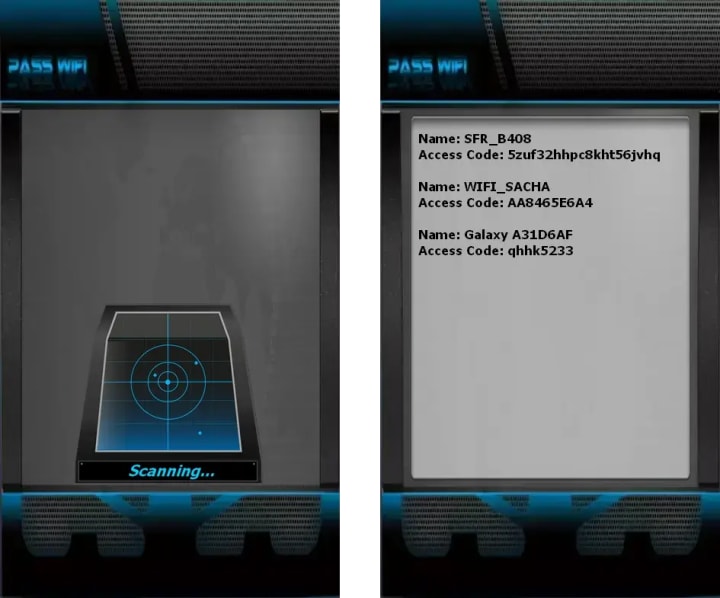
Assuming you have already connected to a secure wireless network, you will get results similar to those shown below.
Step 4 - Get the passwords along with the encryption type and SSID
The hacker will show you the encryption type, the SSID, and the password used.
Advanced Hacking Techniques of 2026

1. AI-Assisted Password Cracking
Modern attackers employ machine learning algorithms that analyze:
• Common password patterns based on geographical and demographic data
• Previously leaked credentials from database breaches
• Social media information to generate personalized wordlists
Tools like HashCat Neural now use neural networks that learn from each cracking attempt, becoming exponentially more efficient with time.
2. Quantum-Enhanced Cryptanalysis
While practical quantum computers remain emerging technology, attackers now use:
• Hybrid algorithms combining classical and quantum-inspired approaches
• Cloud-based quantum processing for specific cryptographic problems
• Side-channel attacks enhanced by quantum sensing techniques
3. Advanced Evil Twin Attacks
Modern rogue access points now feature:
• Machine-learning-driven SSID spoofing that mimics legitimate network behavior patterns
• Automated SSL stripping with real-time certificate generation
• Integration with phishing frameworks that clone captive portals perfectly
4. Wi-Fi Sensing Exploitation
Emerging research shows that WiFi signals can be used to detect movement and keystrokes through walls. In 2026, sophisticated attackers use:
• Channel State Information (CSI) analysis to infer typing patterns
• Signal reflection algorithms to map physical spaces
• Behavioral analytics to predict network usage patterns
5. Supply Chain Compromises
Attackers increasingly target:
• Firmware vulnerabilities in consumer routers
• Default credentials in IoT devices that bridge to primary networks
• Manufacturer backdoors in networking equipment
Modern Hacking Tools and Methodologies
Hardware Evolution
• Software-Defined Radios (SDRs): Devices like HackRF One and BladeRF allow attackers to monitor and transmit across broader frequency ranges
• AI-Enabled Pineapple Devices: Automated man-in-the-middle platforms that require minimal operator intervention
• Quantum Random Number Generator Exploits: Tools that predict supposedly "random" values in certain implementations
Software Arsenal
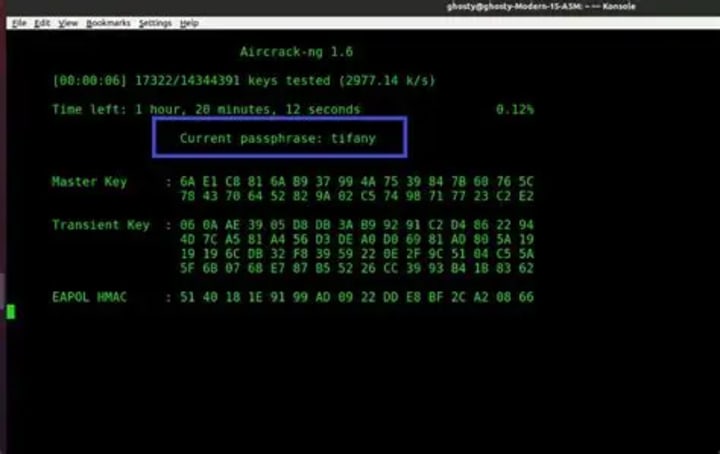
While classic tools like Aircrack-ng, Wireshark, and Kismet remain relevant, they've evolved with:
• Aircrack-ng Quantum: Incorporating quantum annealing for optimized attack strategies
• Wireshark AI: Machine learning modules that automatically identify sensitive data in encrypted streams
• Phantom-Driver: Framework for exploiting vulnerabilities in WiFi driver implementations
The Phased Approach to Network Compromise
Phase 1: Reconnaissance
• Spectrum analysis to identify all nearby networks
• Device fingerprinting to identify vulnerable clients
• Traffic pattern analysis to determine optimal attack timing
Phase 2: Initial Access
• Exploiting WPS implementation flaws where available
• Deauthentication attacks to capture handshakes
• Evil twin deployment with superior signal strength
Phase 3: Persistence and Expansion
• Installing persistent backdoors in connected devices
• Lateral movement through the network
• Credential harvesting from unencrypted services
Comprehensive Defense Strategies for 2026
1. Implement WPA3 with Proper Configuration
• Enable WPA3-Enterprise for organizational environments
• Ensure proper SAE implementation with protection against side-channel attacks
• Regularly update firmware to patch emerging vulnerabilities
2. Adopt Zero-Trust Network Principles
• Implement strict device authentication regardless of network location
• Use certificate-based authentication instead of pre-shared keys where possible
• Employ network segmentation to limit lateral movement
3. Advanced Monitoring and Detection
• Deploy WiFi Intrusion Detection Systems (WIDS) with machine learning capabilities
• Monitor for anomalous signal patterns and rogue access points
• Implement continuous vulnerability assessment for connected devices
4. Multi-Factor Authentication (MFA) Integration
• Require MFA for network administration interfaces
• Implement certificate-based authentication for sensitive resources
• Consider biometric verification for high-security environments
5. Physical Layer Security Measures
• Use directional antennas to limit signal propagation
• Implement Faraday cage solutions for sensitive areas
• Regularly conduct wireless penetration tests
6. Quantum-Resistant Preparations
• Begin transitioning to quantum-resistant algorithms
• Implement hybrid cryptographic systems
• Stay informed about NIST post-quantum cryptography standards
7. Organizational Policies and Training
• Regular security awareness training focusing on WiFi risks
• Clear policies regarding personal device connections
• Incident response plans specific to wireless compromises
Future Trends and Projections
As we look beyond 2026, several developments will shape WiFi security:
WiFi 7 Integration: The upcoming 802.11be standard will offer enhanced security features but may introduce new vulnerabilities during early adoption phases.
AI-Driven Adaptive Security: Networks that continuously learn and adapt to emerging threats in real-time.
Blockchain-Based Authentication: Decentralized identity management for wireless networks.
Regulatory Changes: Increasing government regulations mandating minimum security standards for consumer networking equipment.
Conclusion: The Eternal Vigilance
WiFi security represents a continuous arms race between defenders and attackers. The techniques of 2026 demonstrate increasing sophistication, leveraging emerging technologies to exploit both technical and human vulnerabilities. However, with proper implementation of modern security protocols, continuous monitoring, and a culture of security awareness, organizations and individuals can significantly reduce their risk profile.
Remember: The most secure network is one that balances robust technical controls with educated users. Regular updates, strong unique passwords, multi-factor authentication, and skepticism toward unexpected network changes form the foundation of wireless security in our interconnected age.
As technology evolves, so must our defensive strategies. By staying informed about emerging threats and proactively implementing layered security measures, we can enjoy the convenience of wireless connectivity without sacrificing our digital safety.
Frequently Asked Questions (FAQ)
Q1: What is the most common method hackers use to crack WiFi passwords in 2026?
A: While methods vary, AI-assisted brute force attacks targeting weak passphrases remain most prevalent. Machine learning algorithms analyze patterns from billions of leaked credentials, cultural references, and social media data to generate highly effective custom wordlists. These attacks are increasingly automated, requiring minimal technical expertise from the attacker.
Q2: Is WPA3 completely secure against hacking?
A: No security protocol is completely invulnerable. While WPA3 represents a significant improvement over previous standards with features like SAE (Simultaneous Authentication of Equals) and forward secrecy, implementation flaws and side-channel attacks have been demonstrated. Like all security measures, WPA3 requires proper configuration, regular updates, and complementary security layers to provide effective protection.
Q3: Can hackers really use WiFi signals to see through walls or detect keystrokes?
A: Research in WiFi sensing has advanced significantly. While not providing visual "seeing through walls" capabilities, sophisticated analysis of Channel State Information (CSI) can detect movement patterns, breathing, and even approximate keystrokes based on hand movements. These techniques require specialized equipment and significant computational resources but represent an emerging threat vector.
Q4: How long should my WiFi password be to resist brute force attacks in 2026?
A: For WPA2/WPA3 personal networks, we recommend:
• Absolute minimum: 12 completely random characters (mix of uppercase, lowercase, numbers, symbols)
• Recommended: 16+ random characters
• For passphrases: 6+ random words (using diceware method) totaling 25+ characters
Remember: Complexity and randomness matter more than simple length. "Password123!" is weak despite having 12 characters.
Q5: Are public WiFi networks safe to use with a VPN?
A: A reputable VPN significantly improves safety on public networks by encrypting your traffic from local interception. However, risks remain:
• Malicious hotspots may attempt VPN blocking or degradation
• DNS leaks can still expose your browsing habits
• The network itself might be compromised at router level
For sensitive activities, consider using a cellular connection or waiting for a trusted network. Always verify VPN connection is active before transmitting sensitive data.
Q6: What's the difference between WPA3-Personal and WPA3-Enterprise?
A: WPA3-Personal uses SAE with a pre-shared key (password) for authentication. WPA3-Enterprise employs 802.1X/EAP authentication, typically requiring a username/password combination and often using digital certificates. Enterprise offers individualized credentials, better accounting, and the ability to revoke single users without affecting others—making it far more secure for organizations.
Q7: How can I detect if someone is attacking my WiFi network?
A: Warning signs include:
• Unexpected network slowdowns or disconnections
• Unknown devices appearing in your router's connected devices list
• Router lights flashing abnormally when no devices are actively transferring data
• Login attempts to your router's administration interface
For serious monitoring, consider dedicated WiFi intrusion detection systems or security-focused firmware like OpenWRT with appropriate add-ons.
Q8: Should I disable WPS (WiFi Protected Setup)?
A: Absolutely. Despite its convenience, WPS contains fundamental design flaws making it vulnerable to brute-force attacks that can recover your network password in hours. Most implementations remain vulnerable even when "appearing" disabled—true security requires completely disabling WPS in router firmware, which may require flashing alternative firmware if the option isn't provided by the manufacturer.
Q9: Can smart home devices make my network more vulnerable?
A: Yes, dramatically. IoT devices often have:
• Weak default credentials that are rarely changed
• Outdated firmware with unpatched vulnerabilities
• Poor implementation of security protocols
• Constant network traffic that provides attackers with more opportunities
Isolate IoT devices on a separate VLAN or guest network, change all default credentials, and regularly check for firmware updates.
Q10: What are quantum-resistant algorithms, and do I need them now?
A: Quantum-resistant algorithms are cryptographic systems designed to withstand attacks from quantum computers. While practical quantum computing that breaks current encryption remains years away, the transition to quantum-safe cryptography is a gradual process beginning now. For most home users, focus on current best practices. For organizations handling sensitive data with long-term confidentiality needs, developing a migration strategy is becoming increasingly important.
Q11: How often should I change my WiFi password?
A: Contrary to old advice, frequent password changes aren't necessary if you have a strong, unique password. However, change it immediately if:
• You suspect a breach
• Someone with access leaves your household/organization
• You shared it with guests (use guest network feature instead)
• It's been several years (technology improves)
Better than frequent changes: use a strong password initially and enable WPA3 with proper configuration.
Q12: Are mesh WiFi systems more or less secure than traditional routers?
A: Modern mesh systems generally offer equivalent or better security when properly configured, as they often ship with WPA3 enabled and automatic security updates. However, the increased number of nodes expands the attack surface. Ensure all nodes are physically secure, use wired backhaul where possible, and regularly check that all components receive security updates.
Q13: What should I do if I suspect my network has been compromised?
A: Immediate steps:
1. Disconnect the router from the internet
2. Change all passwords (router admin, WiFi, connected accounts)
3. Perform factory reset on router and reconfigure with secure settings
4. Check all connected devices for malware
5. Update firmware on all networking equipment
6. Consider professional security assessment for repeated incidents
Q14: Is hiding my SSID (network name) an effective security measure?
A: Not significantly. Hidden networks can be discovered through various methods, including analyzing management frames. This approach provides "security through obscurity" at best and may actually make your devices more vulnerable as they constantly probe for the hidden network, revealing its presence to attackers. Focus instead on strong encryption and authentication.
Q15: How do future developments like WiFi 7 affect security?
A: WiFi 7 (802.11be) introduces multi-link operation and 320 MHz channels, which could potentially create new attack surfaces while also enabling enhanced security features. Early adoption always carries risks, so for critical environments, allow time for security researchers to identify and patch vulnerabilities before upgrading. The fundamental security principles remain unchanged regardless of the protocol version.
________________________________________
Disclaimer: This article is intended for educational purposes and to promote understanding of cybersecurity principles. Unauthorized access to computer networks is illegal in most jurisdictions. Always ensure you have explicit permission before testing security measures on any network that you do not own or administrate.
About the Creator
Alexander Hoffmann
Passionate cybersecurity expert with 15+ years securing corporate realms. Ethical hacker, password guardian. Committed to fortifying users' digital safety.
Keep reading
More stories from Alexander Hoffmann and writers in Education and other communities.
The Evolution of Cyber Threats: Account Hacking Techniques in 2026 and How to Fortify Your Digital Defenses
The Ever-Changing Landscape of Digital Security As we progress through 2026, the sophistication of account hacking techniques has evolved dramatically, presenting unprecedented challenges to individuals and organizations worldwide. This article examines the cutting-edge methods employed by contemporary threat actors and provides actionable, forward-looking strategies to protect your digital identity. Understanding these threats is no longer optional—it's essential for anyone navigating our interconnected digital ecosystem.
By Alexander Hoffmannabout 4 hours ago in Education
Losing Track of Expenses?Bookkeeping Services Explained
Receipts tucked into wallets, spreadsheets half-updated, and bank statements opened with a sigh, expense tracking slips through the cracks faster than most owners expect. The problem usually isn’t effort; it’s the lack of a clean system that works quietly in the background. When finances feel scattered, clarity becomes the most valuable asset a business can regain. That’s where bookkeeping services step in, not as a luxury, but as a stabilizing force that brings order, insight, and confidence back into financial decision-making.
By Lily Noblet2 days ago in Education
The Neural Network: China’s Automotive Wiring Harness Revolution in 2026
The automotive industry is often judged by its exterior design or engine horsepower, but in 2026, the real battle for dominance is happening under the chassis. As China solidifies its position as the world’s leading Electric Vehicle (EV) powerhouse, the Automotive Wiring Harness the literal nervous system of the vehicle has undergone a radical transformation. What was once a bundle of simple copper wires has evolved into a high-tech, high-voltage network capable of supporting rapid charging and autonomous driving. Driven by the 15th Five-Year Plan and the "Smart Mobility" mandate, the China automotive wiring harness market is currently valued at over $18.4 Billion in 2026. This "Neural Revolution" is not just about connectivity; it is about the survival of the fittest in an era where vehicles are becoming "computers on wheels."
By Neeraj kumarabout 14 hours ago in Education
Cabin Fever Because of Snow, Sleet, and Freezing Rain That Turned to Icy Roads
What Is Cabin Fever? The short answer is that cabin fever is restlessness from being in a confined area. Cabin fever is the distressing irritability or restlessness experienced when a person or group is stuck at an isolated location or in confined quarters for an extended time. Research shows that prolonged cold, gray skies, and being stuck indoors can trigger mood shifts similar to “winter blues.”
By Margaret Minnicksa day ago in Humans




Comments
There are no comments for this story
Be the first to respond and start the conversation.