
The Essential Guide To UI Design: Master The Basics And Become An Expert
The essential guide to user interface design: an introduction to GUI design principles and techniques

If you're looking to master the fundamentals of UI design and become an expert, then this article is for you!
We'll take a look at the essential elements of UI design, from the basics of layout and typography to more complex topics like motion graphics and user experience.
By the end of this article, you'll have a much better understanding of UI design and how to apply it in your own projects.
Introduction to UI Design
Designing the user interface for any product is a complex process that requires a deep understanding of the end user and their needs.

The goal of UI design is to create a user interface that is both effective and efficient. In order to achieve this, designers must have a strong understanding of the principles of UX design.
The first step in designing a UI is to understand the user’s needs and goals. What are they trying to accomplish with your product? How will they be using it? Once you have a solid understanding of the user, you can begin brainstorming ways to make their experience as easy and enjoyable as possible.
There are several important elements to keep in mind when designing a UI, such as usability, visual appeal, and branding. It’s important to strike a balance between these elements in order to create an effective and successful design.
If you’re interested in becoming a UI designer, or if you’re simply curious about what goes into designing an effective user interface, this guide will give you all the information you need to get started.
Principles of Good UI Design
There are several key principles that any good UI designer should keep in mind.

First and foremost amongst these is the principle of simplicity. A good UI should be intuitive and easy to use, without being cluttered or overly complex.
Secondly, a good UI must be effective in conveying the information it is meant to communicate. This means using clear and concise text, and effective visuals where appropriate.
Thirdly, a good UI should be consistent, both in terms of its visual design and its functionality. This means using similar element types throughout the UI, and ensuring that buttons and other interactive elements work in a consistent manner across the different parts of the UI.
Finally, a good UI must be responsive, both in terms of reacting to user input and in terms of being compatible with different screen sizes and devices.
Color Theory and its Relationship with UI Design
Color theory is a vital part of UI design. It helps designers create harmonious color schemes and choose colors that will be effective for their specific goals.

A basic understanding of color theory can help you make better choices when designing your UI.
For example, you might use warm colors to create a feeling of excitement or energy, while cool colors can be used to promote relaxation or calmness.
In addition to its practical applications, color theory can also help you better understand the relationships between different colors. This knowledge can be helpful when choosing colors for your UI elements, as well as when considering how different colors will work together in your overall design.
Typography and Layout in UI Design
In any UI design, typography and layout are two of the most important elements. They work together to create a visual hierarchy that helps users understand the relationships between various pieces of content.
Good typography makes content easier to read and understand, while a well-designed layout ensures that everything is organized in a way that makes sense. Both elements are essential for creating an effective UI.
There are a few basic principles to keep in mind when it comes to typography and layout in UI design:
- Use typography to create hierarchy and contrast. Different typefaces can be used to emphasize different kinds of content. For example, you might use a larger, bolder font for headlines and smaller, lighter fonts for body text.
- Consider how different fonts will work together. When choosing multiple fonts for your UI, make sure they complement each other. Avoid using too many different fonts, as this can make your design look cluttered and chaotic.
- Pay attention to line height and spacing. Properly spacing out your content makes it easier to read and navigate. Line height specifically refers to the vertical space between lines of text; aim for around 1.5 times the size of your font if possible.
- Make use of whitespace. Whitespace is an important part of any UI design; it helps break up content and makes it easier on the eyes. Don’t be afraid to use negative space in your layouts; sometimes less is more.
UX vs. UI: What’s the Difference?

In the world of web and app design, there is a lot of confusion surrounding the terms “UX” and “UI.” To help clear things up, we’ve put together this essential guide to UI design.
Here’s what you need to know about UX vs. UI:
What is UX?
UX stands for “user experience.” It refers to how easy or difficult it is for users to interact with a website or app.
Good UX makes for a positive user experience by making the interface easy to use and navigate. bad UX can frustrate users and cause them to abandon a website or app altogether.
What is UI?
UI stands for “user interface.” It refers to the visual elements of a website or app, such as the layout, color scheme, and typography.
Good UI is visually appealing and easy on the eyes. bad UI can be off-putting and may even cause users headaches.
Creating Wireframes and Mockups
Creating wireframes and mockups is a critical part of the UI design process. They help designers map out the functionality and layout of their designs, and ensure that all elements are properly aligned and sized.
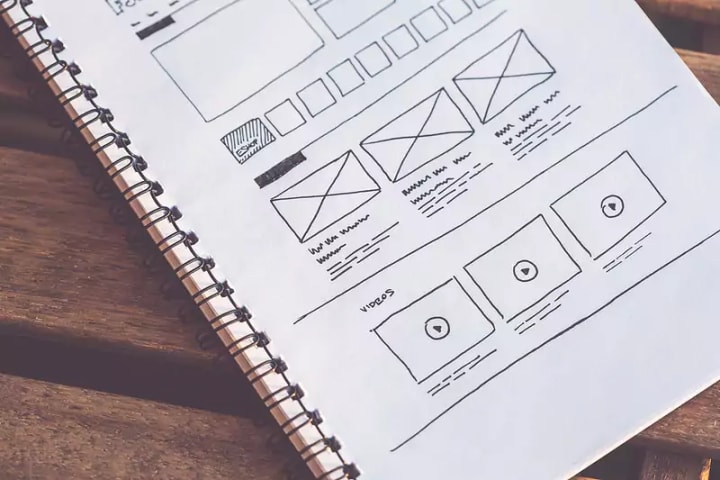
Wireframes are typically created using simple shapes and lines, without any color or branding. This makes them quick and easy to create, and helps designers focus on the overall layout and structure of the design.
Mockups, on the other hand, are more detailed versions of the design that include colors, branding, and other visual elements.
Creating both wireframes and mockups is important to ensure that your design is well-thought-out and user-friendly.
Follow these tips to create effective wireframes and mockups:
1. Keep it simple: When creating wireframes, use basic shapes and lines to map out the layout of your design. This will help you keep your focus on the overall structure of the design.
2. Add color and branding: Once you have a basic wireframe, you can add color and branding to create a mockup. This will give you a better idea of how your final design will look.
3. Get feedback: Always get feedback from others on your wireframes and mockups before finalizing your design. This will help you catch any errors or areas that need improvement.
Testing Strategies for User Interface Design
There are a few key things to keep in mind when testing strategies for user interface design:
1. Make sure to test early and often. The sooner you can identify issues, the better.
2. Try to get as much feedback as possible from real users. This can be done through beta testing, surveys, or other research methods.
3. Be sure to take into account the different ways users may interact with your UI. This includes testing on different devices and browsers.
4. Keep an eye out for any common patterns or issues that come up during testing. This can help you refine your design and avoid potential problems down the road.
Best Practices for Implementing UI Design
There is no one-size-fits-all answer to the question of how to implement UI design, as the best approach will vary depending on the specific project and team involved.

However, there are some general best practices that can help ensure a smooth and successful implementation process:
1. Define the scope and goals of the UI design project upfront, and involve all relevant stakeholders in this process.
This will help everyone involved understand the objectives of the project and agree on what needs to be delivered.
2. Create a detailed UI design specification document that outlines all aspects of the proposed design, including screenshots or wireframes of each page or screen.
This will serve as a valuable reference point for both the designers and developers during implementation.
3. Work closely with developers throughout the implementation process to ensure that the designed interface is faithfully reproduced in code.
This collaboration is essential to avoid any last-minute surprises or disappointments.
4. Conduct user testing once the UI is implemented to ensure that it meets users' needs and expectations.
This feedback can then be used to improve the overall design.
Conclusion
UI design is a critical component of any product and it’s important to have a solid understanding of the basics in order to create effective designs. This guide has provided an overview of UI design fundamentals, including key concepts such as user interface elements and principles.
We hope that this information has been useful for those looking to get started with UI design or brush up on their existing skillset. With practice, you can become an expert in UI design and create memorable user experiences for your customers!
About the Creator
Keep reading
More stories from writers in Education and other communities.
ISO Implementation Challenges Dubai Companies Face, And How Consultants Solve Them
ISO certification is widely viewed as a marker of credibility in Dubai. Many organizations begin the journey with confidence, expecting a structured path to better control and consistency. But once implementation starts, reality looks different. Timelines slip. Teams resist change. Documents exist but daily operations remain unchanged.
By Umar Quality Jounal6 days ago in Education
Instructions Included Challenge Winners
For the Instructions Included challenge, we asked writers to tell a story through instructions and to trust the form to carry what could not be said outright. Across the top entries, that trust paid off in many different ways.
By Vocal Curation Team4 days ago in Resources



Comments
There are no comments for this story
Be the first to respond and start the conversation.