
Reinvent Checkout with Shopify Invoice Payment App
Offer Flexible Payment Options and Boost B2B Conversions
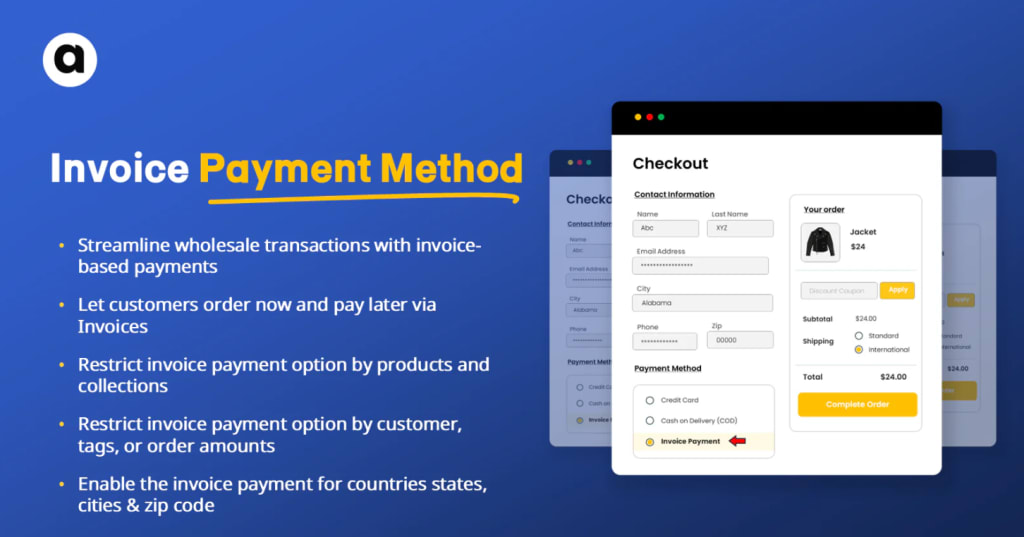
The traditional “Add to Cart – Checkout – Payment” flow doesn’t always make sense especially for B2B merchants,. While this process works perfectly for standard consumer purchases, businesses often require more flexibility—custom pricing, delayed payments, purchase approvals, and negotiated terms. That’s where invoice-based checkout systems come into play.
Shopify, being one of the most powerful and customizable eCommerce platforms, now offers solutions that allow you to switch from a traditional cart system to a more tailored invoice-based checkout. Using apps like INV ‑ Invoice Payment Method, merchants can simplify the payment process, build trust, and better cater to business buyers.
Let’s explore why this approach matters, how it works, and what benefits it brings to your store.
The Problem: One-Size-Fits-All Checkout Doesn't Work for Everyone
Most eCommerce checkouts are optimized for retail where customers pay immediately with a credit card and expect fast delivery. But this model creates friction for B2B businesses. Their needs often include:
- Negotiated pricing or volume discounts
- Approval workflows before purchase
- Deferred payments or payment on delivery
- Purchase orders and invoicing
- Custom shipping requirements
Trying to force these transactions through a typical Shopify checkout leads to abandoned carts, frustrated buyers, and unnecessary support tickets.
The Solution: Invoice-Based Checkout for Shopify
Enter the INV – Invoice Payment Method by addify apps. This app allow merchants to enable a payment method at checkout that lets customers submit an order without paying immediately. Instead, the merchant receives the order, reviews it, sends an invoice, and the customer can pay via their preferred method—bank transfer, credit, or custom payment terms.
This transforms Shopify from a retail-first system into a flexible B2B platform capable of supporting more complex order flows.
Key Features of Shopify Invoice Payment
If you’re wondering how this works in practice, here are some standout features of the Shopify invoice payment app and what makes it ideal for B2B sellers:
1. Add "Pay by Invoice" at Checkout
You can add “Pay by Invoice” as a custom payment method directly on the checkout page. This lets the customer place the order without entering card details upfront—perfect for B2B deals or negotiated sales.
2. Custom Messaging and Branding
Merchants can personalize the invoice message, instructions, and payment terms. Want to include NET 30 terms? Bank details for wire transfer? No problem. It’s all customizable to match your business tone.
3. Secure and Trackable Workflow
Once the order is placed, the merchant gets a notification and can manually approve and send a branded invoice. You maintain full control over the fulfillment and invoicing process, reducing errors and missed payments.
4. Seamless Integration with Order Management
Because the app works natively within Shopify’s order dashboard, there’s no need for third-party platforms or external invoicing tools. You can track invoice status, send payment reminders, and convert quotes to orders all in one place.
Benefits of Using Invoice Payment Over Traditional Checkout
Let’s look at some of the ways switching to an invoice-based checkout can improve your business operations and customer experience:
✅ Reduces Cart Abandonment
Many B2B buyers hesitate to make immediate payments. By offering a “Pay by Invoice” option, you reduce friction and increase the likelihood that customers will complete the purchase.
✅ Supports Custom Pricing Models
Invoices let you fine-tune pricing for each client. Instead of listing one price for everyone, you can send personalized invoices based on volume, past history, or negotiated rates.
✅ Builds Trust with Clients
Allowing a customer to place an order and pay after receiving an invoice signals trust. It’s a small gesture that can lead to long-term relationships and repeat business.
✅ Simplifies Internal Accounting
Rather than managing multiple systems, Shopify’s invoicing apps allow you to centralize order, invoice, and payment tracking inside one unified dashboard.
Use Case: Ideal for B2B, Wholesale, and High-Ticket Sales
Invoice-based checkout isn’t for everyone—but it’s a game-changer for specific industries and sellers, including:
Wholesale Distributors who deal in bulk orders
Custom Product Manufacturers with variable pricing
High-Ticket Retailers where buyers need time before payment
Service-Based Businesses that use Shopify for invoicing digital products or consultations
If your customers often ask for quotes or require PO-based orders, an invoice payment method can drastically improve your sales process.
How to Get Started
You don’t need to rebuild your store or hire a developer. Installing the INV – Invoice Payment Method app takes just a few minutes:
Go to the Shopify App Store and search for INV – Invoice Payment Method
Install the app and enable it under your payment methods
Customize your invoice settings (messaging, instructions, payment terms)
Test the flow using a dummy customer account
Go live and notify your B2B customers of the new flexible checkout option
Final Thoughts
A one-size-fits-all checkout no longer works. By moving from cart to invoice, Shopify merchants can offer a more personalized and business-friendly experience that aligns with how real B2B buyers shop.
If you’re looking to streamline operations, reduce abandoned carts, and give your clients more flexibility, now is the time to explore the Shopify Invoice Payment App. With tools like INV, transforming your Shopify store into a powerful B2B engine has never been easier.
About the Creator
The Comfort of the New: Why Some Places Instantly Feel Like Home
Travelers often experience a strange phenomenon: arriving in a place for the first time and feeling as though they have always belonged. Whether it is a bustling city street, a quiet mountain town, or a sun-drenched coastal village, some locations evoke an immediate sense of familiarity and comfort. This feeling goes beyond aesthetic appeal or convenience; it touches deeper psychological, emotional, and even social aspects of human experience. Understanding why certain places feel like home can enrich travel, relocation, or even brief visits, creating connections that feel effortless and profound.
By Producer James Simona day ago in Education


Comments
There are no comments for this story
Be the first to respond and start the conversation.