
Portfolio website with html only
portfolio website

What needs to be done to build a portfolio website just using HTML.?
Table tags used for create section for the website.
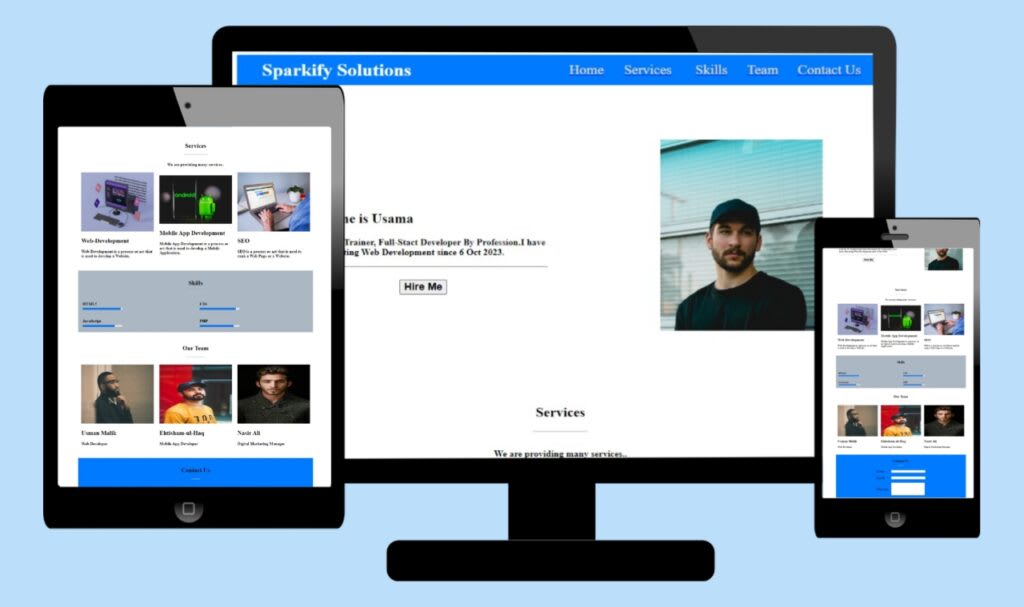
Header Section: which has a bar of navigation at the bottom.
Main Section: Provides name and Experience.
Services Section: This section presents an array of services provided by Sparkify in detail.
Skills Section: This section describes main strengths and areas of expertise of Sparkify.
Team Section: This section introduces the people within the company that create the Sparkify Solutions team.
Contact Section: This section contains a form that could be filled by interested clients with an intention of getting in touch with the Sparkify team.
What is a Portfolio website?
Firstly, a portfolio website is a perfect tool to present your portfolio and make a first impression on the clients. Resume writing is one of the best methods of passing on your personality, experience, and qualifications to your employer.
On this page where we are going to teach you how to create a portfolio website, we shall also give you the source code of portfolio website.
You can download the source code for this project from a link labeled ‘Download Now,’ or use the Git Clone command to load it from GitHub.
HEADER SECTION
Inside the header section there is a table Tag with Three Attribute and two <td> Tags.
Properties used in Table Tag.
Width: It is used to make the table width is equal to the width of the screen.
bgcolor: The Stands for background color to set background color of table to ‘#007aff’.
#007aff: It is a hex code for blue colour.
Cellpadding: It helps to create vertical distance of 7px on the right, left, top and the bottom of the text in a cell.
In the header section two <td> are seen.
First <td> tag contains the LOGO of the website ‘Information Technology for Management’ and Second <td> tag also contain Logo.
The second <td> tag comprise the Navigation bar.
MAIN SECTION
The main section also includes a table tag with Three properties but the value of these properties is somewhat distinctive from the properties in the above table tag.
Properties used in Table Tag.
Width: The table takes 85% width of the screen.
Align: This will help to center the table to the middle of the screen.
Cellpadding: The space of 20px is generated on all sides around the text in a cell.
In the Main section, there are two <td> Tags.
In the first <td> tag, a person can put in their full name in the h2 tag and a description of what they do in the p tag.
The second one is <td> tag which is used to display profile image.
SERVICES SECTION
Another section is the services section which begins with Table Tag.
Table tag is used to gather information about some object and contains three properties as mentioned above.
Three tr tags are found in the tag Table Tag.
The first two tr tags have one td tag while the third tr tag contains three td tags therefore colspan property is used in td tag that is in the first two tr tags.
colspan attribute is used in the td tag to merge two or more columns of a table.
The first td tag contains Web Development as a service Provided.
The second td tag stands for Mobile App Development as the service the company offers to its clients.
The Third td tag captures SEO as a service.
SKILLS SECTION
Same as above.
TEAM SECTION
Same as above.
CONTACT SECTION
Here one concept is used which is ‘The Nested Table’.
The table that is located within another table is termed as a nested table.
This section begins with the form tag which can be used to design the login page, the signup page or a ‘contact us’ page.
The first tr tag in the inner table which contains Contact us is an h2 header.
The second tr tag contains a label name which is the label of the input and an input field.
In the third tr tag, one can identify the label Email and an input field as well.
In the fourth tr tag there is label Message and there is Textarea.
The fifth tr tag is used where you want to create a button.
As you have gone through this article, we hope that it has been informative and insightful to you.
About the Creator
Usama Yousaf
I am the founder of Sparkify Solutions
Keep reading
More stories from Usama Yousaf and writers in Education and other communities.
React Js va Angular Js
Javascript frameworks React JS and Angular JS are typically used to build web applications that are interactive and dynamic. The benefits and limitations of both approaches mean they are fit for particular applications. In this article, the intention is for the writer to review the features, pros, and cons of React JS in relation to Angular JS.
By Usama Yousafabout a year ago in Education
Scaling a Business by Doing Less, Not More
Many business owners believe growth comes from adding more. More services, more markets, more tools, and more staff. While this sounds logical, it often leads to confusion and burnout. Scaling a business becomes easier and more sustainable when leaders choose to do less, but do it better.
By Darrell Hulsey6 days ago in Education
How Regulatory Rules Are Reshaping the Complexity of Modern Lending Facilities
Lending facilities are a core component of the financial system, enabling banks and financial institutions to provide liquidity, manage credit flow, and support economic stability. In today’s highly regulated financial environment, regulatory compliance, financial regulations, and lending rules have become central to how these facilities function. As oversight increases, lenders must navigate a growing web of requirements that directly affect the structure, speed, and accessibility of lending facilities.
By Eric Kleiner6 days ago in Education
Wild Card Weekend Recap: What Happens Now?
I think I figured out why I love Wild Card Weekend so much. It's because it's the first playoff anything of the calendar year. The NFL season starts in the fall, and once upon a time, the champion was crowned either on or slightly before New Year's. The evolution of the NFL schedule has resulted in the playoffs starting just into the New Year, and currently, the final week of the season falls on the first weekend of the New Year, with Wild Card Weekend coming a week after that. So yes, chronologically, the NFL's Wild Card Weekend serves as the first playoff anything of the calendar year.
By Clyde E. Dawkins5 days ago in Unbalanced



Comments
There are no comments for this story
Be the first to respond and start the conversation.