
Introduction to CSS – A Beginner's Guide
Wants to learn CSS from the basics. this tutorial will help you. In the end all properties mentioned for your use.


What is CSS?
CSS (Cascading Style Sheets) is a styling language used to control the appearance of web pages. It allows you to change colors, fonts, layouts, and animations to make websites visually appealing.
Why Use CSS?
- Separates content from design: HTML is for structure, CSS is for styling.
- Enhances website appearance: Makes web pages attractive and professional.
- Improves user experience: Provides better layouts and responsiveness.
- Saves time: A single CSS file can style multiple HTML pages.
How to Use CSS
There are three ways to apply CSS:
- Inline CSS (applies styles directly to an HTML element)
<p style="color: blue; font-size: 20px;">This is a blue paragraph.</p>
- Internal CSS (styles written inside a <style> tag in the HTML file)
<style>
p { color: red;
font-size: 18px;
}
</style>
- External CSS (styles are written in a separate .css file and linked to the HTML)
<link rel="stylesheet" href="styles.css">
Styles.css
p {
color: green;
font-size: 16px;
}
- Element Selector (targets all elements of a specific type)
- Class Selector (targets elements with a specific class)
- ID Selector (targets a single unique element)
- Group Selector (applies styles to multiple elements)
- static (default)
- relative
- absolute
- fixed
- sticky
Basic CSS Selectors
CSS selectors target HTML elements to apply styles.
p {
color: blue;
}
.my-class {
font-size: 20px;
}
#my-id {
background-color: yellow;
}
h1, p {
text-align: center;
}
CSS Properties
Text and Font Styling
p {
font-size: 18px; /* Text size */
font-weight: bold; /* Text boldness */
font-style: italic; /* Italics */
text-align: center; /* Align text */
color: purple; /* Text color */
}
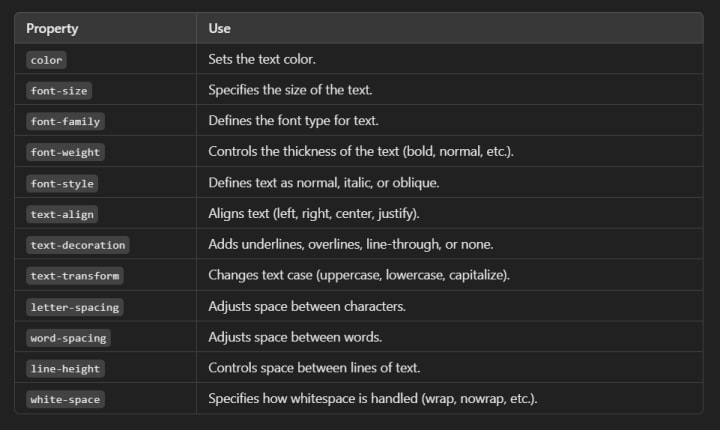
All Text & Font Styling
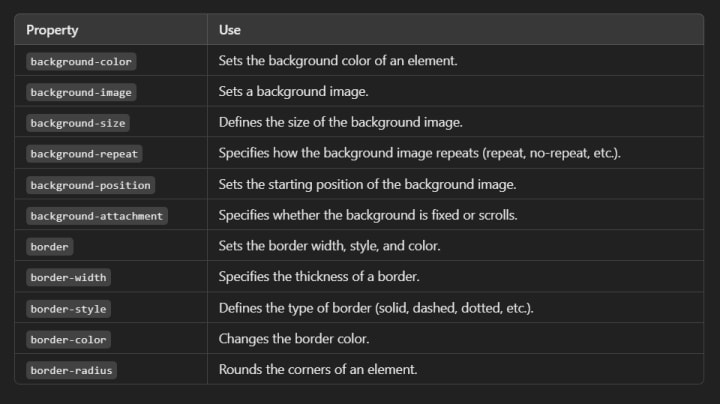
Background and Borders
div {
background-color: lightgray; /* Background color */
border: 2px solid black; /* Border */
border-radius: 10px; /* Rounded corners */
}
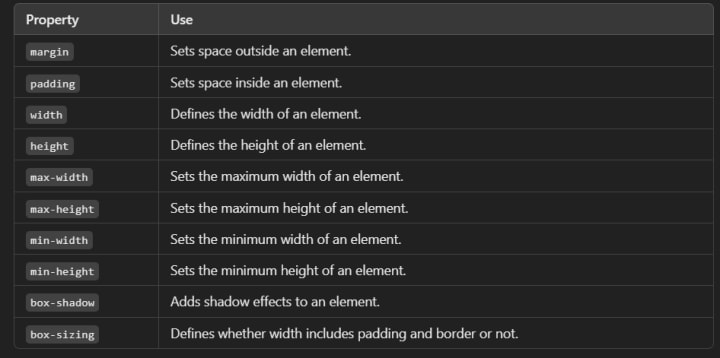
Margins and Padding
div {
margin: 20px; /* Space outside the element */
padding: 15px; /* Space inside the element */
}
Box Model
The box model consists of margin, border, padding, and content.
.box {
width: 200px; /* Content width */
height: 100px; /* Content height */
padding: 20px; /* Space inside the border */
border: 5px solid black; /* Border around the box */
margin: 30px; /* Space outside the border */
background-color: lightblue; /* Just for visibility */
}
Positioning Elements
div {
position: absolute; /* Positions element relative to its nearest positioned ancestor */
top: 50px;
left: 100px;
}
Other positions:
CSS Layouts
Flexbox (for flexible layouts)
.container {
display: flex;
justify-content: space-between; /* Align items */
align-items: center;
}
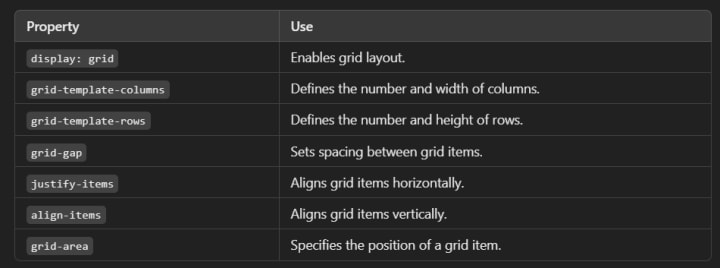
Grid (for complex layouts)
.container {
display: grid;
grid-template-columns: 1fr 1fr 1fr; /* Three equal columns */
}
Responsive Design
Media Queries
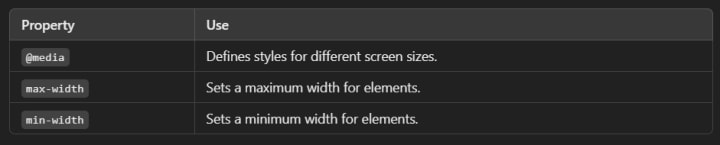
Media queries allow you to apply styles based on screen size
@media (max-width: 600px) {
body {
background-color: lightblue;
}
}
Animations and Transitions
CSS Transitions
button {
background-color: red;
transition: background-color 0.5s ease;
}
button:hover {
background-color: green;
}
CSS Animations
@keyframes move {
from { left: 0px; }
to { left: 100px; }
}
div {
position: relative;
animation: move 2s infinite;
}
Conclusion
This is just the beginning of CSS! Mastering CSS helps you build beautiful, responsive websites. Keep practicing by experimenting with different properties and layouts.
All css Properties and their Use
Text & Font Styling
Background & Borders
Spacing & Box Model
Positioning & Display

Flexbox (For Responsive Layouts)

Grid (For Complex Layouts)
Responsive Design
Transitions & Animations

Advanced Features

About the Creator
Xavier
Global news reporter covering science, tech, environment, Entertainment & sports. Delivering balanced insights to inform and inspire readers worldwide. Sometimes a poet.
Top Website Monetization Platforms to Maximize Your Revenue in 2026
Website monetization platforms are tools that help website owners generate revenue from their traffic. These platforms support different monetization models, including programmatic advertising, affiliate marketing, sponsored content, and performance-based ads.
By Iryna Podliesna3 days ago in Education
Why ISO Certification Is Becoming a Business Standard for Companies in the UAE
Businesses in the UAE operate in a competitive environment. Clients expect reliability. Regulators expect compliance. International partners expect structured operations. Because of these expectations, companies are adopting management systems that improve how they operate.
By Umar Quality Jounal3 days ago in Education



Comments (1)
Amazing coffee codes! Great work