
Improve your youtube channel with video editing tips
video editing tips
In the world of content creation video editing is crucial. It can make your YouTube channel stand out and grab your audience’s attention. This guide covers the key video editing techniques to boost your channel. Whether you’re new to YouTube or have been creating content for a while, these tips will help you make videos that engage and grow your audience.
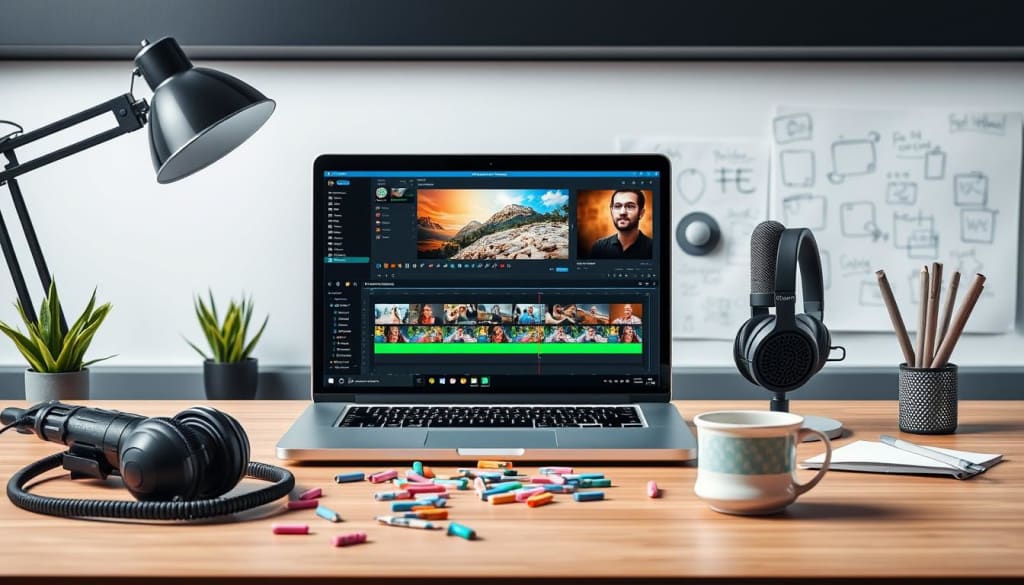
A modern, well-lit computer workspace featuring a sleek laptop displaying video editing software interface, colorful video clips arranged on a timeline, vibrant thumbnails scattered around, a high-quality microphone, headphones, and a cup of coffee, with creative notes and storyboard sketches in the background.
Create captivating videos : Budget friendly Editing Solutions
Key Takeaways
Discover the best video editing software options for beginners and professionals.
Understand the essential technical requirements for high-quality video production.
Learn how to create captivating video intros and hooks to hook your audience.
Explore professional editing techniques, timeline management skills, and color correction basics.
Master audio quality and leverage advanced transitions and visual effects.
Optimize your video thumbnails and pacing for maximum viewer engagement.
Incorporate branding elements to reinforce your channel’s identity.
Understanding YouTube Video Editing Fundamentals
Making great YouTube videos is more than just filming and having an idea. You need to know how to edit your videos well. This is key to growing your channel. We’ll look at the basics, from beginner-friendly software to the tech and formats needed for top-notch videos.
Basic Editing Software Options for Beginners
Starting with video editing can seem tough. But, there are many easy-to-use video editing software options. These tools help beginners make videos that look pro without needing to learn too much. Some top picks for new YouTubers are:
iMovie (for Mac users)
Windows Video Editor (for Windows users)
Filmora (works on both platforms)
DaVinci Resolve (works on both platforms)
Essential Technical Requirements
Before you start editing, knowing the technical requirements for top YouTube videos is crucial. Key things to think about include:
Camera resolution (aim for 1080p, but 4K is better)
Audio quality
(use an external mic for clear sound)
Storage and processing power (a fast computer with lots of storage is needed)
Key Video Formats and Resolutions
It’s important to know about video formats and YouTube resolutions. The most used formats are MP4, MOV, and AVI. For resolutions, YouTube supports many, but 1080p is best for quality and size.
“Investing time in understanding the technical aspects of video editing will pay off in the long run, helping you create content that engages and captivates your audience.”
Creating Attention-Grabbing Video Intros and Hooks
In the fast-paced world of YouTube, the first few seconds are crucial. Crafting compelling video intros and hooks is key to grabbing your audience’s attention. It keeps them interested in what you have to say.
Start with something bold, a question that makes them think, or a striking scene. This sparks curiosity and makes them want to see more. Sharing personal stories or surprising facts can also draw them in, boosting audience retention on your YouTube channel.
The goal is to make a strong first impression. By perfecting your video intros and hooks, you can increase YouTube engagement. This will keep your viewers coming back for more.
“The first 10 seconds of your video can make or break your entire YouTube campaign.” — Video Marketing Expert
To start, try these techniques in your video_introductions:
Open with a question or statement that sparks curiosity
Showcase a visually striking or unexpected scene
Share a personal anecdote or relatable story
Reveal a surprising statistic or little-known fact
Tease the main topic or highlight a key benefit for the viewer
By using these strategies, you can make video intros and hooks that grab your audience’s attention. This boosts YouTube engagement and keeps viewers engaged until the end.
How to Improve Your YouTube Channel with Video Editing
Boosting your YouTube video quality can really help your channel grow. Learning to edit professionally, manage timelines well, and correct colors can make your videos stand out. This will grab your viewers’ attention and keep them coming back for more.
Professional Editing Techniques
Start exploring professional video editing techniques. These can change your YouTube videos for the better. From smooth cuts to cool visual effects, there’s a lot to learn. Spend time improving your editing skills to make your videos look amazing.
Timeline Management Skills
Good timeline management is key for editing efficiently. Learn to organize your clips, handle different layers, and mix them smoothly. This makes your editing process easier and your videos more engaging for your audience.
Color Correction Basics
Color correction is a big deal in video editing. It helps you balance colors, adjust brightness, and keep colors consistent. Getting good at color correction can make your videos look more polished and professional.
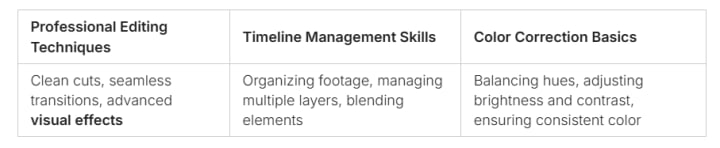
Investing in these video editing skills can really improve your YouTube channel. Use professional editing, timeline management, and color correction to make your videos better. This will help you create a more engaging and professional channel.
Mastering Audio Quality in Your YouTube Videos
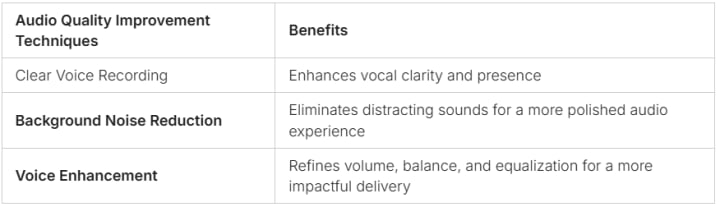
Creating great YouTube videos is not just about visuals. Audio quality is key to a professional and engaging experience. From clear voice recording to reducing background noise, improving audio can make your channel stand out.
Create captivating videos : Budget friendly Editing Solutions Achieving Crystal-Clear Voice Recordings
Start with the right equipment and techniques for high-quality audio. Choose a reliable microphone that captures your voice well and cuts down background noise. Try different microphone placements and use a pop filter to improve vocal clarity.
Cutting Out Background Noise
Background noise can be a big problem in video making. Use sound editing software to find and remove unwanted sounds. This could be a fan hum, traffic noise, or an empty room echo. Good background noise reduction can greatly improve your audio quality.
Enhancing Voice Clarity and Presence
Along with noise reduction, use voice enhancement to make your audio even better. Adjust the volume, balance, and equalization of your voice with sound editing tools. Small changes can make a big difference in your audio quality.
By improving your audio, you can make your YouTube videos more engaging and professional. Spend time on audio quality to attract and keep viewers. This will help grow your channel and improve its overall quality.
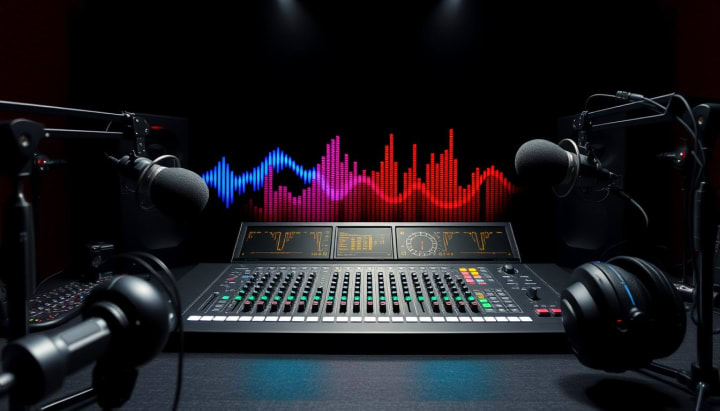
A sleek, modern audio mixer with colorful sound waves emanating from it, surrounded by high-quality microphones and headphones, set against a dark, atmospheric backdrop that evokes a professional recording studio environment.
Advanced Transitions and Visual Effects That Work
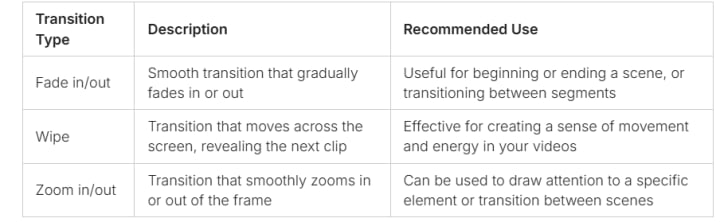
To take your YouTube videos to the next level, you need more than basic editing. Learning advanced video transitions and visual effects can really make a difference. These elements, from cool video transitions to stunning visual effects, can make your videos pop.
Popular Transition Types
There are many video transitions that can make your videos more interesting. Some top choices include:
Fade in/out
Wipe (horizontal, vertical, or diagonal)
Zoom in/out
Slide (left, right, up, or down)
Spin
Mosaic
When and How to Use Effects
Using visual effects wisely can really boost your video’s look. But, it’s key to use them just right. Try adding color grading, motion blur, or text overlays to make certain parts stand out.
Creating Custom Transitions
Creating your own custom transitions can add a special touch. Mix different effects and animations to make transitions that fit your channel’s style. Try new things and look at pro YouTube editing for ideas to make your own unique transitions.
“Mastering advanced video editing techniques can elevate your YouTube content and captivate your audience.”
Thumbnail Creation and Video Preview Optimization
In the world of YouTube
competition is tough. A catchy thumbnail and an optimized video preview can draw in viewers. They help boost your channel’s click-through rate. Learning to create great thumbnails and previews is key to standing out online.
Crafting Compelling YouTube Thumbnails:
Use High-Quality, Visually Striking Imagery: Choose images that grab attention and show what your video is about.
Incorporate Relevant Text Overlays: Add text that clearly states the video’s main point or highlights its best parts.
Leverage Emotional Responses: Try thumbnails that make people feel good or curious, making them want to click.
Maintain Consistency with Your Brand: Make sure your thumbnails match your channel’s look and feel, creating a consistent experience.
Optimizing Video Previews for Maximum Impact:
Craft Captivating Video Titles: Write titles that grab attention and accurately describe your video.
Prioritize Informative Video Descriptions: Use detailed, keyword-rich descriptions to showcase your video’s best features.
Leverage YouTube’s Interactive Playback Settings: Use end screens and cards to get viewers to engage more with your content.
Improving your thumbnail and preview skills can boost your YouTube channel. It attracts
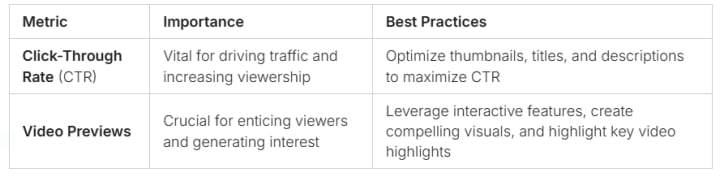
viewers and increases engagement. Keep learning about pacing and video length to make your content even better.
A vibrant and eye-catching YouTube thumbnail design featuring bold colors, dynamic shapes, and engaging imagery, showcasing elements like play buttons, video frames, and digital graphics that convey excitement and creativity. The composition should evoke a sense of action and appeal, with an emphasis on visual storytelling and optimization for viewer attraction.

Effective Pacing and Video Length Strategies
Making great YouTube videos is more than just good visuals and stories. It’s also about keeping viewers interested. By using the right pacing and video length, you can keep your audience watching until the end.
Maintaining Viewer Engagement
To keep viewers interested, try these tips:
Change the pace of your video. Mix slow moments with fast ones.
Use visual cues and transitions to guide your viewers.
Place hooks and cliffhangers to keep viewers curious.
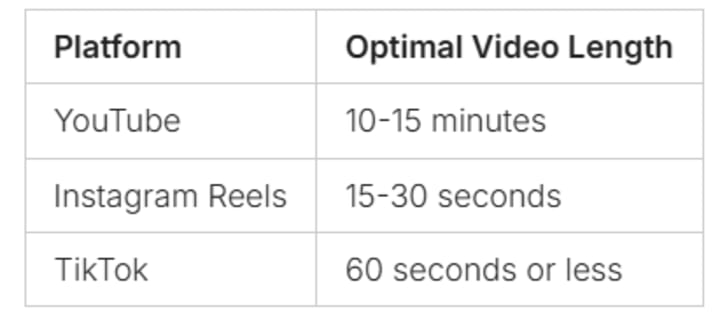
Platform-Specific Duration Guidelines
Video length varies by platform. Here are some guidelines:
Content Structure Best Practices
For a great viewing experience, follow these tips:
Start with a clear intro that sets the tone.
Break your content into sections with a focus.
Use smooth transitions between sections.
End with a call-to-action or summary that leaves viewers wanting more.
Mastering video pacing, following optimal video length guidelines, and using content structure best practices can boost your YouTube channel. It will keep your viewers engaged from start to finish.
Incorporating Branding Elements in Your Videos
Building a strong brand on YouTube is key to attracting loyal viewers. By adding your brand’s visual and messaging elements to your videos, you make your channel stand out. This approach helps create a memorable experience for your audience.
Visual consistency is crucial for your brand’s identity. Use the same logo, colors, and style in all your videos. This makes your brand easy to recognize. Also, include consistent opening sequences and custom graphics that match your brand’s look.
Your brand’s tone and messaging should shine through in your videos. Make sure your on-camera presence and scripts reflect your brand’s values. A unique brand voice and personality can help you connect with viewers and set your channel apart.
FAQ
What basic editing software options are available for beginners?
Beginners can use iMovie, Windows Movie Maker, and DaVinci Resolve for YouTube editing. These tools are easy to use and have the basics you need to start.
What are the essential technical requirements for creating YouTube videos?
You’ll need a good camera, microphone, and a strong computer for YouTube videos. It’s also important to know about video formats and resolutions to make your content look great.
How can I create attention-grabbing video intros and hooks?
To grab attention, use interesting visuals and clear messages in your video intros and hooks. A strong call-to-action will keep viewers watching.
What professional editing techniques can I use to improve my YouTube videos?
To improve your videos, learn about timeline management, color correction, and advanced transitions. These skills will make your videos look more professional.
How can I improve audio quality in my YouTube videos?
Better audio makes your videos more engaging. Use clear voice recording, reduce background noise, and improve overall sound quality for a polished audio.
What are some popular transition types and visual effects that work well on YouTube?
Use smooth fades, dynamic zooms, and custom animations to add interest to your videos. Knowing when to use these can keep your audience engaged.
How can I create eye-catching thumbnails and optimize video previews?
Make your thumbnails and video previews stand out with eye-catching images and clear text. Follow YouTube’s best practices to get more clicks.
What strategies can I use to maintain effective pacing and optimal video length?
Keep your videos engaging by pacing them well and following YouTube’s length guidelines. Use good content structure and know what your audience likes.
How can I incorporate branding elements into my YouTube videos?
Use consistent visuals, logos, and graphics to make your channel recognizable. This will help your brand
stand out on YouTube.
Create captivating videos : Budget friendly Editing Solutions
About the Creator
Keep reading
More stories from Universal Media and writers in Education and other communities.
Online Coaching Platforms
Are you looking for a convenient and effective way to enhance your knowledge and skills? Online coaching platforms have emerged as a game-changer in the field of education, providing individuals with access to high-quality learning resources and expert guidance from the comfort of their own homes. One such platform that has gained significant popularity is Skool.com. In this article, we will explore the benefits of online coaching platforms and dive deeper into the features and advantages offered by Skool.com.
By Universal Media3 years ago in Education
Effective Mentorship Strategies to Help Clinicians Lead Patient-Centered Healthcare Innovation
Healthcare organizations today face growing expectations to deliver higher-quality care while improving efficiency and patient satisfaction. Innovation is often discussed at the leadership level, yet some of the most valuable ideas originate from clinicians working directly with patients. These professionals understand daily challenges in care delivery and recognize opportunities for improvement that others may overlook. When healthcare leaders actively mentor clinicians, they unlock the potential for meaningful, patient-centered innovation.
By Dr. Janet Chollet7 days ago in Education
Zero Trust Security for Small Business: A Simple Guide for Owners
If you run a small business, you probably think cyber attacks only happen to big companies. I used to think the same way. It feels like hackers would rather go after large banks or global tech companies, not a small shop, startup, or local service provider.
By Stephano kambeta7 days ago in Education




Comments
There are no comments for this story
Be the first to respond and start the conversation.