
How to use Google Search Console Effectively?
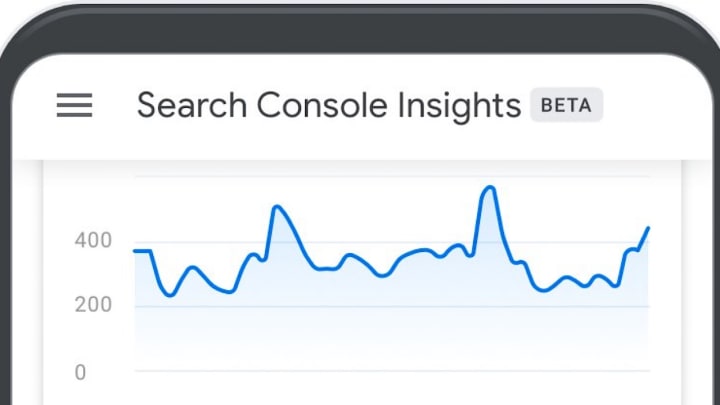
Google Search Console Insights


Introduction
Google Search Console is a powerful tool that can help you optimize your website for search engine rankings and improve your online presence. Here are some tips on how to use Google Search Console effectively

Verify your website - The first step to using Google Search Console is to verify your website. This ensures that you are the owner of the website and can access all the data and features of the console.
Set up search preferences - In the search preferences section of the console, you can set your preferred domain, country targeting, and crawl rate. These settings help Google better understand your website and can improve your search engine rankings.
Monitor performance - The performance report in Google Search Console gives you valuable insights into your website's search engine rankings, click-through rates, and impressions. Use this data to identify opportunities for optimization and improvement.

Submit sitemaps - Submitting a sitemap to Google Search Console helps search engines crawl and index your website more efficiently. This can help improve your website's visibility in search results.
Monitor crawl errors - The crawl errors report in Google Search Console highlights any issues that search engines encounter while crawling your website. Fixing these errors can improve your website's overall search engine rankings.
Use the URL inspection tool - The URL inspection tool in Google Search Console allows you to check the status of individual pages on your website. You can use this tool to identify any issues that may be preventing your pages from ranking well in search results.
Monitor backlinks - The links report in Google Search Console shows you which websites are linking to your site. Use this information to monitor your backlinks and identify any low-quality or spammy links that may be hurting your search engine rankings.
Use the Mobile Usability report - With the majority of internet traffic coming from mobile devices, it's essential to ensure that your website is optimized for mobile users. The Mobile Usability report in Google Search Console highlights any issues with the mobile usability of your website, such as text that is too small or buttons that are too close together. Fixing these issues can improve the user experience and search engine rankings of your website.
Set up email notifications - Google Search Console allows you to set up email notifications for specific events, such as when Google detects a manual penalty on your website or when your website has been hacked. These notifications can alert you to potential issues that require immediate attention.
Use the Performance Enhancement reports - The Performance Enhancement reports in Google Search Console provide insights into how to improve your website's performance, including suggestions for improving page load speed and reducing the number of requests made by your website. Implementing these suggestions can improve the user experience and search engine rankings of your website.
Conclusion
Google Search Console is a powerful tool that can help you optimize your website for search engine rankings and improve your online presence.
By following these tips and regularly monitoring your website's performance in the console, you can make informed decisions about how to improve your website's search engine rankings and visibility.
Google Search Console is an essential tool for any website owner or marketer looking to improve their search engine rankings and online presence.
By regularly monitoring your website's performance in the console and taking action on the insights provided, you can make informed decisions about how to optimize and improve your website.
With these tips, you can use Google Search Console effectively and efficiently to achieve your online marketing goals.
About the Creator
iyal ezhilan
I help to transform your business and reach new audiences through targeted digital marketing efforts, So I'm here to help you with my articles.
I'm Iyal Ezhilan, a digital marketer who works with a wide range of clients in multiple domains.
Keep reading
More stories from iyal ezhilan and writers in Education and other communities.
How to do effective posters for social media?
Introduction In today's digital age, social media has become an essential tool for businesses and individuals to promote their brands and reach a wider audience. One of the most effective ways to grab people's attention on social media is through eye-catching posters.
By iyal ezhilan3 years ago in Education
How Global Experiences Shape Smarter, More Creative Leaders
Leadership today demands more than experience and technical skill. It requires imagination, empathy, and the ability to see problems from new angles. One of the most potent ways leaders develop these qualities is through travel. When leaders step outside familiar routines, they gain insight that books and meetings cannot offer. Exposure to new cultures, environments, and ways of thinking shows clearly how creative leadership through travel can unlock ideas that change how leaders think, decide, and inspire others.
By Nathalie Kyriakoua day ago in Education
Can You Really Earn Money With Transcription? The Real Income Reality
The short answer is yes—you can earn money with transcription. But the more honest, useful answer is this: transcription only becomes worthwhile when you understand how the income actually works, not how it’s often presented online.
By Mahesh Kumar2 days ago in Education
Ludacris and Nelly draw backlash over bookings at MAGA-coded music festival
Ludacris and Nelly headlining a mostly right-wing event is good for them. It’s also great for the genre of hip hop. The two rap veterans have showcased their talents on other stages. Why can’t they perform for mostly MAGA folks and grab that bag?
By Skyler Saunders2 days ago in Beat


Comments
There are no comments for this story
Be the first to respond and start the conversation.