
How to resolve the Google Search Console error "Duplicate, Google chose different canonical than user"
Website Indexing

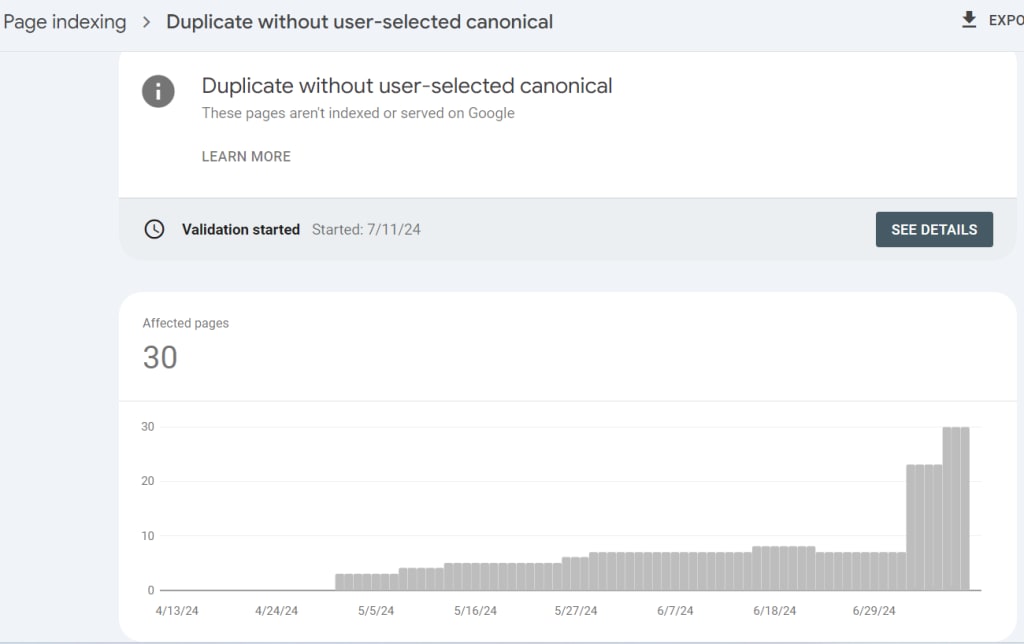
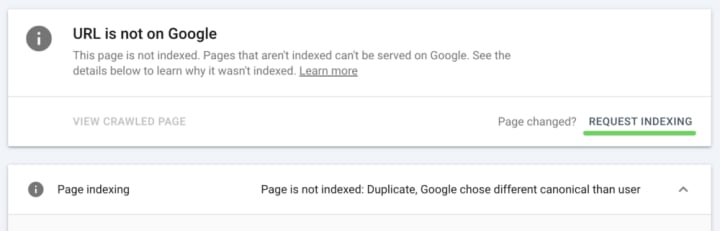
The indexing status of "Duplicate, Google chose different canonical than user" is displayed in Google Search Console. It means that Google did not index the affected canonical page and instead indexed a different duplicate page.
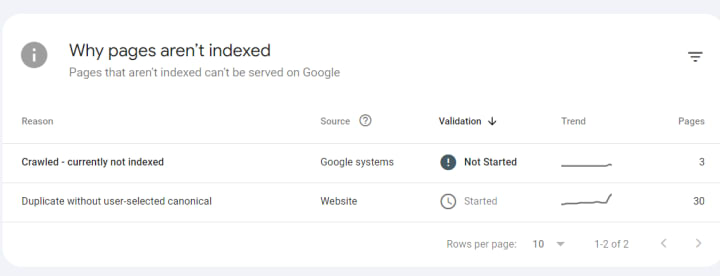
Google usually choose to index the canonical URL—only one of the duplicate URLs—when examining identical or duplicate pages on the internet.
Google will probably only select one page to index, for instance, if your eCommerce site offers several product variations under several URLs, unless these URLs are noticeably different.
How to fix “Duplicate, Google chose different canonical than user”
Other canonical signals that conflicted with your selection of the canonical URL are the reason why Google disregarded the self-referencing canonical link on your canonical URL.
Realigning all of the canonical signals is the recommended solution, and you should wait for Google to crawl your website again to see the updates.
The canonical hints listed below, along with the corresponding best practices, should help you get Google to respect your selection of the canonical URL:
Steps to Fix the Issue
Verify the Correct Canonical URL:
Ensure that the URL you want as the canonical is the most relevant and useful version of the page.
Check for Multiple Canonical Tags:
Ensure there's only one canonical tag per page pointing to the correct canonical URL.
Use Absolute URLs:
Always use absolute URLs in your canonical tags (including the full URL, not relative paths).
Check HTTP and HTTPS Versions:
Make sure you're consistent with HTTP and HTTPS. If your site supports HTTPS, use HTTPS in your canonical tags.
Avoid Noindex Pages in Canonicals:
Ensure the canonical URL isn't pointing to a noindex page. A noindex page should not be considered the canonical version.
Manage Parameters Properly:
Use Google's URL Parameters tool to tell Google how to handle different URL parameters.
Consistent Internal Linking:
Ensure internal links point to the canonical version of the URL.
301 Redirects:
Implement 301 redirects from duplicate pages to the canonical page to consolidate link equity and avoid confusion.
Check Sitemap:
Ensure your XML sitemap includes the canonical URLs you want Google to recognize.
Monitor and Adjust:
Regularly check Google Search Console for updates on how Google is handling your canonical URLs and make adjustments as needed.
Website indexing is a crucial aspect of SEO
1. Submit XML Sitemap
An XML sitemap helps search engines understand your site structure and find all the important pages.
Create an XML Sitemap: Tools like Yoast SEO for WordPress, Screaming Frog, or XML-sitemaps.com can help generate one.
Submit to Google Search Console: Go to the “Sitemaps” section and enter the URL of your sitemap.
Submit to Bing Webmaster Tools: Similarly, use Bing’s Webmaster Tools to submit your sitemap.
2. Use Robots.txt File
The robots.txt file tells search engines which pages they can and cannot crawl.
3. Optimize Internal Linking
A strong internal linking structure helps search engines discover and index new pages.
Link to New Pages: Ensure new content is linked from important, frequently crawled pages.
Use Descriptive Anchor Text: Use relevant keywords in your anchor text to provide context to search engines.
Tools to Assist
Google Search Console: For monitoring and diagnosing issues.
Screaming Frog SEO Spider: For auditing canonical tags and internal links.
Ahrefs/Semrush: For analyzing backlinks and identifying any potential canonicalization issues.
Conclusion
Fixing "Duplicate, Google chose different canonical than user" requires a methodical approach to ensure consistency and correctness in how your website’s pages are represented. Regular monitoring and adjustments are key to maintaining optimal canonicalization.
NEXT STEPS
Here’s what you can do now:
Contact us. the Best SEO Agency in Kerala
Receive a personalized plan from us to deal with your indexing issues.
Enjoy your content in Google’s index!
About the Creator
Mathew
Weft Technologies is a premier IT solutions provider in India, specializing in software development and online marketing. Weft strategic insight to deliver customized solutions that drive business growth and enhance digital presence.
The Increasing Gender Disparity in College Degree Attainment
The gender gap in American higher education has widened significantly, with men falling behind women in both college enrollment and completion rates. As of the early 2020s, women have outpaced men in earning bachelor's degrees for several decades, with the divide continuing to grow, often referred to as the "enrollment flip". In 2021, men received only 42% of bachelor's degrees, the lowest share on record, which is roughly equal to the 43% of degrees awarded to women in 1970 (source: https://aibm.org/research/male-college-enrollment-and-completion/).
By Megan Wilsona day ago in Education
The Interview That Tested More Than Skills
The interview was scheduled for ten in the morning, but I arrived at the building an hour early. I didn’t want to risk being late, not today. This opportunity meant more than just a job. It felt like a doorway to a future I had been quietly working toward for years. As I sat in the lobby, watching people pass by with confident strides, I realized how small the moment looked from the outside—and how enormous it felt on the inside.
By NAIB REHMAN3 days ago in Education




Comments
There are no comments for this story
Be the first to respond and start the conversation.