
How to Open an EPUB File
A Complete Guide for All Devices

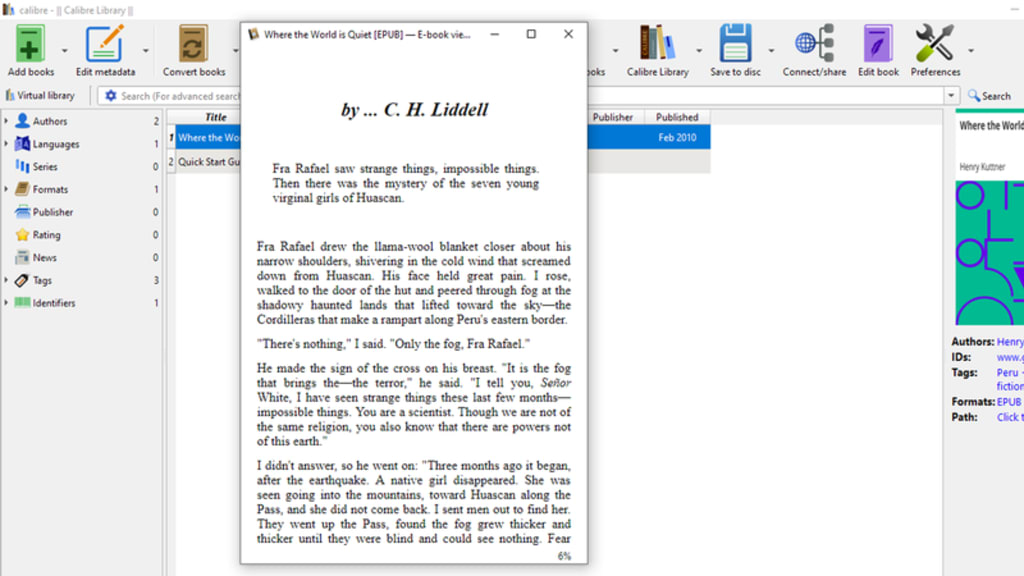
In today's digital world, eBooks have become a convenient and accessible way to enjoy reading. One of the most common formats for eBooks is EPUB (Electronic Publication), known for its flexibility and compatibility with different devices. However, many users still wonder how to open EPUB files, especially when switching between computers, smartphones, or eReaders.
Whether you're a tech-savvy reader or just starting your eBook journey, this guide will show you how to open EPUB files on various devices and platforms with ease.
What Is an EPUB File?
EPUB stands for “Electronic Publication,” and it's a popular open eBook standard developed by the International Digital Publishing Forum (IDPF). The format allows text to reflow to fit different screen sizes, making it ideal for mobile reading.
EPUB files typically contain:
1. Reflowable text and images
2. Stylesheets (like in a website)
3. Navigation tools (like a table of contents)
4. Metadata and cover images
Unlike PDF, EPUBs adapt to your screen, giving a better reading experience on small devices.
🖥️ How to Open EPUB Files on a Computer
1. Windows
If you're using a Windows PC, there are several ways to open EPUB files:
Microsoft Edge (Windows 10 & 11)
Microsoft’s Edge browser now supports EPUB files natively in some versions. You can simply right-click the file and choose Open with → Microsoft Edge.
Calibre
Calibre is a powerful, free eBook management software that works on Windows, macOS, and Linux. It allows you to open, edit, convert, and manage EPUB files easily.
Adobe Digital Editions
This free software by Adobe is designed for EPUB and PDF files. It’s great for books with DRM (digital rights management) protection.
FBReader or Sumatra PDF
Lightweight alternatives if you just want to read EPUBs without additional features.
2. Mac (macOS)
Apple Books (formerly iBooks)
Just double-click the EPUB file and it will open in Apple Books by default. This app also syncs your books across iOS devices using iCloud.
Calibre or Adobe Digital Editions
These work the same way on macOS as on Windows.
How to Open EPUB Files on Mobile Devices
1. iPhone and iPad (iOS)
Apple Books
The easiest way to open an EPUB file on iPhone or iPad. Just tap on the file (from Mail or Files), and choose Open in Books. It will be added to your library.
Third-party apps like Marvin or KyBook offer more customization options.
2. Android Phones and Tablets
Google Play Books
Upload the EPUB file to your Google account and it will sync to the Play Books app across your devices.
Moon+ Reader or Lithium
These are popular Android apps that support EPUB, offering themes, bookmarks, and highlighting tools.
FBReader
Another solid choice for Android with customizable reading experience.
How to Open EPUB Files on eReaders
1. Amazon Kindle (Basic or Paperwhite)
Kindle does not natively support EPUB, but there are workarounds:
Convert EPUB to MOBI or AZW3 using Calibre
Send to Kindle feature now supports EPUB (in newer versions) — email the EPUB to your Kindle’s email address or use the Send to Kindle tool
2. Kobo or Nook
These eReaders support EPUB files out of the box. Simply transfer the file via USB or sync with the official desktop apps.
Open EPUB Files Online (No Installation Needed)
If you don’t want to install software, use an online EPUB reader:
EPUBReader
Online ePub Reader
Google Play Books – Upload EPUB to your library and read in-browser
These tools are helpful when you're on a shared or restricted computer.
Tips for Managing EPUB Files
Use Calibre to organize, convert, and tag your eBooks
Store EPUBs in cloud services (Google Drive, Dropbox) for access from any device
Always check for DRM protection if the file won’t open – some EPUBs from stores like Kobo or OverDrive are encrypted
Opening an EPUB file is simple once you know what tools to use. Whether you’re on a PC, smartphone, or eReader, there’s a solution for every platform. By using apps like Calibre, Apple Books, or Google Play Books, you can unlock the full potential of EPUB and enjoy your digital library anytime, anywhere.
About the Creator
Sen Sab
Join me in exploring the extraordinary in the ordinary, and let's dive deep into the realms of imagination and understanding together
Breaking Free from Traditional Hiring: The Skill-Based Revolution
The world of work is evolving at an unprecedented pace. As industries adapt to rapid technological advancements and shifting workforce dynamics, traditional hiring practices are being reimagined. Gone are the days when a degree or years of experience were the sole indicators of a candidate's potential. Enter skill-based hiring—a fresh approach that prioritizes competencies over credentials.
By Sanjeev Kumar4 days ago in Education
Pearl
1980 something. we all hung out at Pearl and you and i were nothing special, or so i thought. i mean we all danced, drenched in our own sweat, our own saline solution of fear, too many beers, shots, laughter, tears, fucks in the bathroom and i don't know when we began to be afraid. do you?
By ROCK aka Andrea Polla (Simmons)4 days ago in Fiction




Comments (1)
nice one