
How to Implement Digital Signage in Your Pharmacy
Everything pharmacists need to know, from planning and content to top software platforms

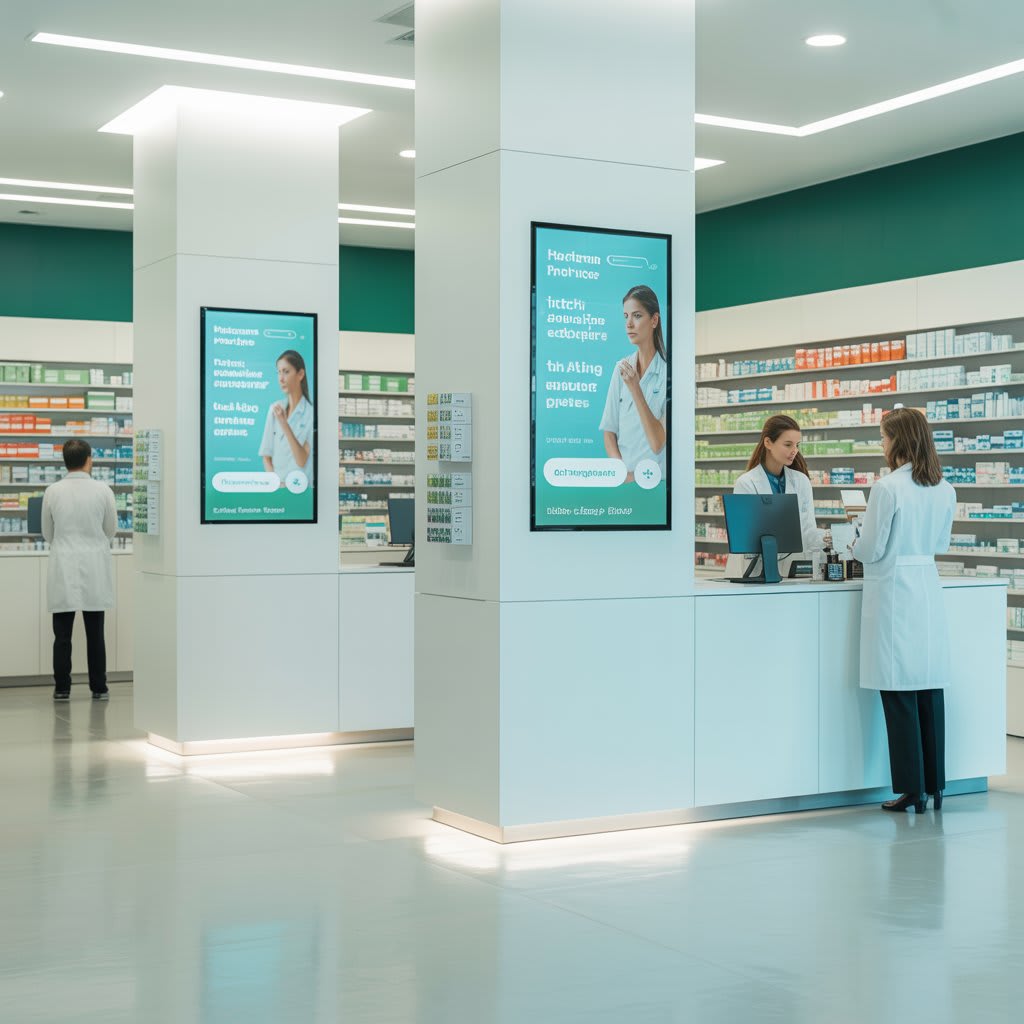
I'll never forget the first time I walked into a pharmacy with digital signage displays showing real-time prescription wait times and health tips. As someone who'd spent years waiting in line wondering how much longer I'd be there, seeing that information displayed so clearly felt revolutionary. That experience stuck with me, and when I later helped my cousin implement digital signage in her independent pharmacy, I realized just how transformative this technology could be for both pharmacy owners and customers.
If you're considering making the switch from static posters to digital displays, you're on the right track. But the implementation process can feel overwhelming if you don't know where to start. Here's what I've learned about doing it right.
1. Define Your Goals for Digital Signage for Pharmacy Settings
Before you start shopping for screens and digital signage software, take a step back and ask yourself what you're actually trying to achieve. When my cousin and I started planning, we made a list of specific problems we wanted to solve. Her customers were constantly asking about wait times, missing seasonal health campaigns, and not knowing about available services like flu shots or medication reviews.
Your goals might include:
- Reducing perceived wait times through engaging content
- Promoting health awareness campaigns and preventive care
- Cross-selling wellness products strategically
- Displaying prescription status updates in real-time
- Showcasing pharmacy services many customers don't know about
The clearer you are about your objectives, the easier it'll be to measure success later and choose the right digital signage solution. I've seen pharmacies jump straight into buying hardware without this planning phase, and they end up with expensive screens displaying nothing but a rotating slideshow of stock photos. Don't be that pharmacy.
2. Choose the Right Digital Signage Software for Your Pharmacy
This is where things get interesting because the software you choose will determine everything from how easy it is to update content to whether you can integrate with your pharmacy management system. I've tested quite a few platforms over the past couple of years, and the differences are significant.
Essential Features to Look For in Digital Signage Software
When evaluating options, prioritize these capabilities:
- Cloud-based management so you can update content from anywhere
- Content scheduling to automate your displays throughout the day
- Template libraries that make design easier even if you're not a graphic designer
- Multi-screen management if you plan to expand beyond one display
- Integration possibilities with your existing pharmacy systems
My Experience Testing Different Platforms
Solutions like ScreenCloud and Optisign offer solid basic features and work well for straightforward implementations. CrownTV provides good options particularly if you're looking for enterprise-level support. However, when I was helping my cousin evaluate options, AIScreen stood out for its flexibility tailored to pharmacy-specific needs. The platform provides powerful features like content scheduling, real-time updates, and access to over 100 apps and integrations.
What really sold us was the template library designed specifically for healthcare settings, which made it incredibly easy to create professional-looking displays for everything from medication reminders to seasonal health campaigns without needing a design degree.
The integration capabilities matter more than you might think. Being able to pull data from your pharmacy management system to display actual wait times or prescription status makes the difference between digital signage that wows customers and digital signage that just looks pretty.
3. Plan Your Hardware Setup for Digital Signage
Once you've selected your digital signage software, it's time to think about the physical setup. This is where I made some mistakes initially that I want to help you avoid.
Strategic Display Locations in Your Pharmacy
Start by mapping out your pharmacy layout and identifying high-traffic areas:
- Waiting area (the obvious choice where customers spend the most time)
- Checkout counter where customers are a captive audience during transactions
- Behind the pharmacy counter for staff-facing information and training
- Near the entrance for welcoming messages and store hours
- Specific departments like over-the-counter medication aisles for targeted product information
Essential Hardware Components for Digital Signage for Pharmacy
You'll need:
- Commercial-grade displays (not consumer TVs) built for 24/7 operation
- Media player or mini-PC to run your digital signage software
- Reliable internet connection for cloud-based systems
- Mounting hardware appropriate for your chosen locations
One mistake I see constantly is people buying cheap consumer TVs thinking they'll save money, only to have them fail within months of continuous operation. For a typical pharmacy waiting area, 43 to 55-inch displays work well. Larger spaces or areas where viewers will be farther away might need 65 inches or more. We went with three 50-inch displays in my cousin's pharmacy strategically placed in the waiting area, near the consultation room, and at checkout.
4. Develop Your Content Strategy for Pharmacy Digital Signage
Here's where digital signage for pharmacy either becomes genuinely valuable or turns into glorified wallpaper. The content you display needs to serve your customers and your business goals simultaneously.
Content Categories That Actually Engage Customers
I recommend creating these categories and rotating them throughout the day:
Health Education Content:
- Medication safety tips and proper storage information
- Seasonal health information like flu prevention strategies
- Chronic condition management advice
- Wellness reminders tailored to your community
Promotional Content:
- New services your pharmacy offers
- Seasonal campaigns for immunizations and health screenings
- Loyalty program information and rewards
- Featured wellness products with educational context
Operational Information:
- Real-time prescription wait times
- Pharmacy hours and holiday schedules
- Insurance providers accepted
- Staff introductions to personalize the experience
Engagement Elements:
- Local community news and events
- Health trivia that educates while entertaining
- Calming visuals during high-stress times
- How to log into your digital signage software from any device
- Updating basic content like hours or promotional messages
- Scheduling content for upcoming campaigns and seasonal changes
- Troubleshooting common issues like connectivity problems
- Knowing when to contact support for bigger technical issues
- All health claims are properly substantiated
- Patient privacy is protected if displaying prescription-related information
- Content meets pharmacy board regulations in your state
- Spend time with different digital signage software platforms through free trials
- Map out your pharmacy layout and identify where displays would have the most impact
- Draft a content calendar for your first month so you're not scrambling for what to display
- Get your team on board early because their buy-in will make or break your success
Timing Your Content for Maximum Impact
The key is balance. In my cousin's pharmacy, we run content on a loop that changes based on time of day. Morning content focuses more on wellness and preventive care when people are picking up medications before work. Afternoon content shifts to service promotion and health education. Evening content emphasizes next-day preparation and after-hours contact information.
We update the content weekly with seasonal adjustments and monthly deep reviews of what's performing well. Customer feedback has been overwhelmingly positive, especially regarding the wait time displays.
5. Train Your Staff and Launch Your Digital Signage for Pharmacy
The best digital signage software in the world won't help if your staff doesn't know how to use it. I learned this the hard way when we initially launched and only trained my cousin, thinking she could handle everything. Within two weeks, she was overwhelmed trying to update content while running the pharmacy.
Creating an Effective Training Program
Your training should cover:
We created a one-page quick reference guide and laminated it, keeping copies at the pharmacy counter and in the office. For more complex updates, my cousin handles those, but for daily operational changes, any team member can jump in.
Launching Smart with a Soft Rollout
Start with a soft launch if possible. We ran the system for a week displaying simple, non-critical content to work out any technical kinks before going live with prescription wait times and important health information. This testing period saved us from some embarrassing moments and helped staff get comfortable with the technology.
Common Mistakes to Avoid with Pharmacy Digital Signage
After watching several pharmacies implement these systems, I've noticed patterns in what goes wrong. Here are the pitfalls I see most often.
1. Information Overload
One pharmacy I visited had so much text on each slide that you'd need to stand there for five minutes to read everything. People won't do that. Keep each message focused on one key point and make it digestible in 5 to 10 seconds.
2. Neglecting Regular Updates
If customers see the same outdated flu shot promotion in March that they saw in October, they'll tune out everything you display. Commit to regular updates or don't bother with digital signage.
3. Ignoring Compliance and Regulations
In healthcare settings, you need to ensure:
We had a compliance consultant review our content strategy before launch, which gave us peace of mind.
4. Poor Screen Placement
Screens positioned too high, too low, or in areas with terrible glare might as well not exist. Test visibility from multiple angles and lighting conditions before permanently mounting displays.
5. Choosing Software Based Only on Price
The cheapest option usually lacks critical features or has terrible user interfaces that make updates so painful you stop doing them. This is why I spent time comparing different platforms and ultimately recommended AIScreen to my cousin, even though it wasn't the absolute cheapest option. The time saved on content creation and the reliability of the platform have more than justified the investment.
Moving Forward with Your Digital Signage Implementation
Implementing digital signage in your pharmacy isn't just about buying screens and calling it done. It's about creating a communication channel that serves your customers better, promotes important health information, and yes, helps your business thrive.
Your Next Steps
Start small if you need to. My cousin began with just one display in the waiting area and expanded as she saw the impact. You don't need to transform your entire pharmacy overnight.
Here's what to do next:
The pharmacy landscape is competitive, and patient experience matters more than ever. Digital signage gives you a tool to communicate more effectively, reduce perceived wait times, and provide valuable health education right when your customers are most receptive to it.
The pharmacies that implement digital signage thoughtfully see real results in customer satisfaction, service awareness, and even revenue from promoted services and products. The ones that treat it as a "set it and forget it" technology end up disappointed. Which pharmacy will yours be?
About the Creator
Jerry Kane
Jerry Kane is a marketing professional focused on digital signage, trends, and audience behavior. He translates market shifts into clear, engaging brand strategies.
Keep reading
More stories from Jerry Kane and writers in Education and other communities.
How to Transform Hospitality with Digital Signage Software
I'll never forget walking into a boutique hotel in Austin last year and being greeted by a stunning digital display that not only showed my reservation details but also recommended local restaurants based on the time of day. That moment made me realize: we're past the era of static lobby posters and outdated event boards. Digital signage has become the silent ambassador of hospitality, and after testing numerous solutions across different venues, I've learned what actually works.
By Jerry Kane 2 months ago in Education
Beginner Investing Blueprint: A Simple Path Toward Wealth and Financial Freedom
Investing is one of the most powerful ways to build wealth and reach financial freedom. Yet many people delay investing because it feels complex or risky. The truth is that investing does not need to be complicated. A clear beginner investing blueprint can help anyone start building a strong financial future.
By Millicent Prince5 days ago in Education
Ferrara Enterprises Inc: A Trusted Manufacturer of NSN Components for Aviation and Industrial Systems
In the aerospace and defense supply chain, reliable component manufacturers play a crucial role in maintaining aircraft systems and industrial equipment. One such manufacturer is Ferrara Enterprises Inc, a company associated with producing components that appear in various National Stock Number (NSN) catalogs used across aviation, defense, and industrial sectors.
By Beckett Dowhanabout 19 hours ago in Education


Comments
There are no comments for this story
Be the first to respond and start the conversation.