
How to Create a Professional Home Acting Studio for Online Course
How to Set Up an Ideal Home Studio for Online Acting Course

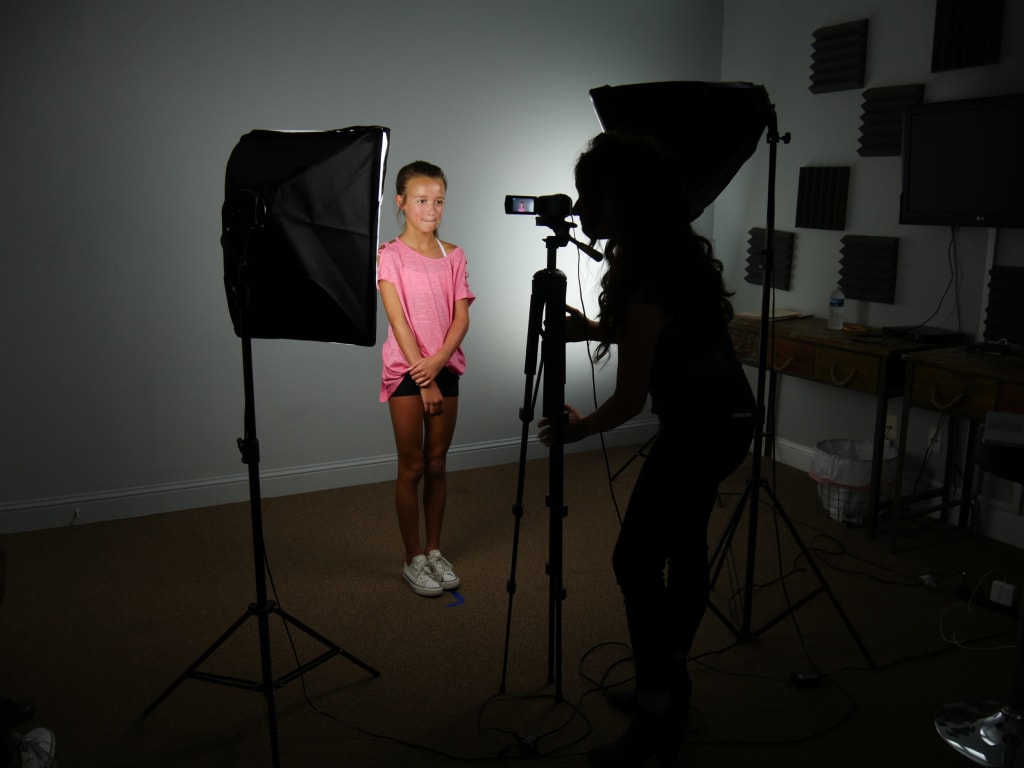
With the rise of online acting courses, having a professional home studio has become essential for serious acting students. A good setup can make a big difference in your performance and how you are perceived by instructors and peers. This guide will help you create a professional home acting studio that will enhance your online learning experience.
Understanding Your Needs
Before you start setting up your home studio, it’s important to understand what you need for an online acting course. Think about the space you have available and your budget. You don’t need to spend a lot of money to create a functional studio, but investing in some key pieces of equipment can make a big difference.
First, consider the space you have. Ideally, you want a quiet, well-lit area where you won’t be disturbed. If possible, choose a room with a door that you can close to block out noise and distractions.
Next, think about your budget. You don’t need the most expensive equipment, but you do need some basics to get started. A good camera, microphone, and lighting setup are essential for online acting courses.
Choosing the Right Space
Finding the right spot in your home is crucial for setting up your studio. Look for a place that is quiet and well-lit. Natural light is best, but if that’s not an option, you can use artificial lighting.
Avoid areas with a lot of background noise, such as near the street or in a busy part of the house. Choose a spot where you can focus and won’t be interrupted during your online acting course.
Make sure the area is free of clutter and distractions. A clean, simple background is best for online acting courses. You want the focus to be on you, not on what’s behind you.
Essential Equipment
Now that you have chosen your space, it’s time to get the essential equipment. Here are the basics you’ll need:
- Camera: A good webcam is essential for online acting courses. Look for a camera that offers high resolution and clear image quality. Many laptops come with built-in webcams, but if yours doesn’t, consider investing in an external one.
- Microphone: Clear audio is just as important as clear video. A good microphone will ensure that your instructors and peers can hear you clearly. USB microphones are a great option because they are easy to set up and provide good sound quality.
- Lighting: Proper lighting can make a big difference in how you look on camera. If you don’t have good natural light, invest in some affordable lighting equipment. Ring lights are a popular choice because they provide even lighting and are easy to use.
- Background: Your background should be clean and professional. Avoid busy or distracting backgrounds. A plain wall or a simple curtain can work well. If you want to get creative, you can set up a backdrop that reflects your personality or the scene you are working on.
Setting Up Your Space
Once you have your equipment, it’s time to set up your space. Follow these steps to create a professional home acting studio:
- Position your camera: Set up your camera at eye level, about arm’s length away. Make sure it’s stable and won’t move during your performance.
- Set up your lighting: Position your lights so they illuminate your face evenly. If you’re using natural light, make sure it’s coming from in front of you, not behind.
- Arrange your background: Make sure your background is clean and free of distractions. If you’re using a backdrop, set it up so it fills the frame behind you.
- Test your setup: Before your online acting classes, test your setup to make sure everything looks and sounds good. Adjust your camera, microphone, and lighting as needed.
Testing and Adjusting
Testing your setup before class is crucial. Here’s how to do it:
- Check your video: Make sure your camera is at the right height and angle. Adjust the lighting if needed to avoid shadows on your face.
- Check your audio: Test your microphone to ensure it’s picking up your voice clearly. Adjust the volume and position if needed.
- Make adjustments: If something doesn’t look or sound right, make the necessary adjustments. It’s better to spend a few extra minutes getting everything perfect than to struggle with technical issues during your online acting course.
Tips for Maintaining Your Studio
Keeping your home acting studio in good shape will ensure you’re always ready for class. Here are some tips:
- Regularly check your equipment: Make sure your camera, microphone, and lights are working properly. Replace any equipment that’s not functioning well.
- Keep your space organized: A clean, organized space will help you stay focused and perform your best. Put away any distractions before your online acting course.
- Update your setup as needed: As you gain more experience and confidence, you may want to upgrade your equipment or change your setup. Don’t be afraid to make changes that will improve your online acting experience.
Conclusion
Creating a professional home acting studio for your online acting course doesn’t have to be complicated or expensive. By understanding your needs, choosing the right space, and investing in some essential equipment, you can create a setup that will enhance your performance and help you succeed in your online acting classes. Remember to test your setup before each class and make adjustments as needed. With a little effort and creativity, you can create a home studio that will help you shine as an actor.
About the Creator
Harsh
I'm a passionate content writer with a knack for storytelling and a keen interest in the arts. With a background in literature and a love for cinema, I create engaging content. I enjoy exploring new cultures and watching classic films.
The Light She Gave Us
A Tribute to Dr. Shirley Ann Jackson and the Power of Fiber Internet Ladies and gentlemen, today I want to tell you a story a story about light, legacy, and the brilliance of a Black woman whose mind helped shape the very way our world communicates. Before fiber‑optic lines stretched across America… Before light traveled through glass to carry our voices at breathtaking speed… Before companies like Frontier and Verizon built vast modern networks… There was a little girl in Washington, D.C., collecting honeybee's in jars, studying the patterns of nature, and discovering curiosity as her superpower. That little girl grew into **Dr. Shirley Ann Jackson a name that deserves to be spoken with honor, with reverence, with pride.
By Organic Products a day ago in Education
Growing Strong Customer Loyalty Through Exceptional Customer Service
Building loyalty through exceptional customer service is one of the most effective ways to create long-term business success. Customers have many choices today, and they can easily leave if they feel unimportant. Loyalty is not built only through products or prices. It is built through experiences. The way a business treats its customers can make the difference between a one-time buyer and a lifelong supporter.
By Apex Service Partners3 days ago in Education


Comments
There are no comments for this story
Be the first to respond and start the conversation.