
How to Create a Binance Account and How to do Deposit/Withdraw Cryptocurrency
Here's a step-by-step guide to open a account and How to do Deposit/Withdraw Cryptocurrency on Binance

Binance is a cryptocurrency exchange platform that was founded in 2017. It is one of the largest and most popular cryptocurrency exchanges in the world, offering a wide range of trading options and digital assets. Binance provides a platform for trading cryptocurrencies, such as Bitcoin, Ethereum, and many others, as well as other digital assets like stablecoins. The exchange is known for its user-friendly interface, low fees, and fast transaction speeds. Binance also offers a suite of other services, including a decentralized exchange (DEX), a lending platform, and a blockchain-based platform for developing decentralized applications (dApps)
How to Create a Binance Account
1. Go to the Binance website: Start by visiting the Binance website at www.binance.com.
On the homepage, click on the "Register" button located in the top-right corner and click sign up with phone or email.
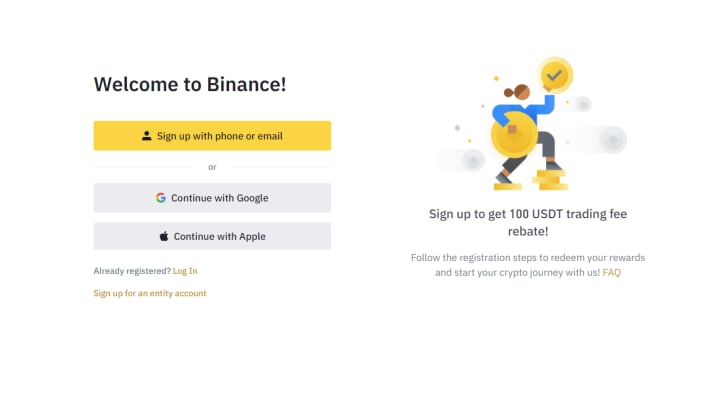
3. The registration process on Binance is as follows:
Enter your email address and create a password.
Complete the verification process, which may include confirming your email and phone number
4. Verify your Account :
Login: Once you have verified your email, log in to your Binance account using your email address and password and verify your account
To verify your account on Binance, follow these steps:
Click on the "Account" tab, and then select "Verification."
Choose your account verification level (e.g. Basic, Enhanced). The higher the level, the more information and documentation you'll need to provide.
Follow the instructions and upload the required documents, such as a government-issued ID, passport, or driver's license.
Provide any additional information and documentation as requested by Binance.
Wait for the verification process to be completed, which may take several minutes to several hours.
Note: Binance may periodically update its verification requirements and procedures. It's important to check for the latest information on their website or by contacting customer support.
5. Enable two-factor authentication (2FA): For added security, Binance recommends enabling 2FA on your account. You can do this by downloading an authenticator app and linking it to your Binance account
Why is Two-Factor-Authentication (2FA) so important?
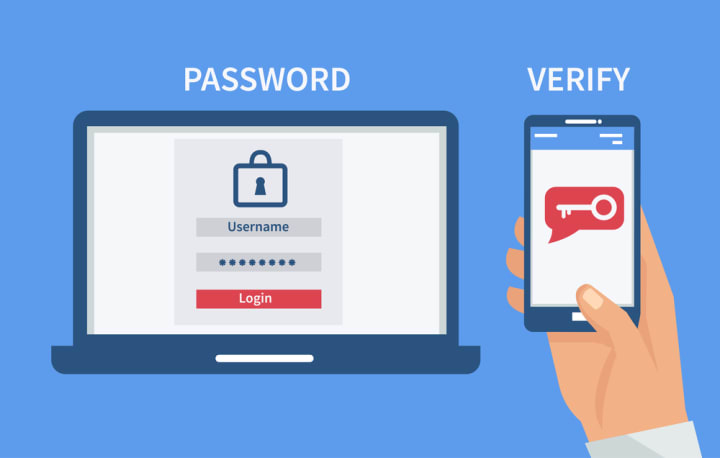
2FA (Two-Factor Authentication) is important because it adds an extra layer of security to the login process. By requiring a second factor of authentication, it helps to prevent unauthorized access to an account, even if a password is stolen or guessed. This second factor could be a code generated by a physical device (such as a security key or a smartphone) or sent via SMS or email. By combining something you know (your password) with something you have (the second factor), 2FA makes it much harder for attackers to gain access to your accounts.
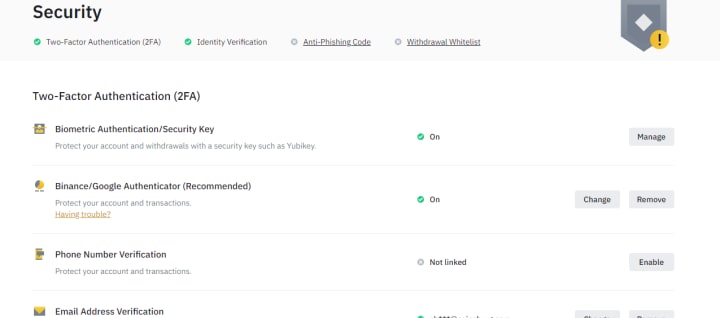
After Completing the verification
To deposit funds into your Binance account, follow these steps:
Goto to your Binance account.
Click on the "Deposit" button.
Select the type of cryptocurrency or fiat currency you want to deposit.
Follow the instructions to generate a deposit address or a deposit link.
Transfer the funds from your external wallet or bank account to the deposit address or link provided by Binance.
Wait for the deposit to be confirmed and credited to your Binance account, which may take several minutes to several hours, depending on the blockchain network's confirmation time.
Note: Different cryptocurrencies may have different deposit limits and fees, and some types of deposits may require additional verification. Be sure to check the deposit conditions and requirements on Binance's website before making a deposit.
To withdraw funds from your Binance account, follow these steps:
Log in to your Binance account.
Click on the "Withdraw" button.
Select the type of cryptocurrency or fiat currency you want to withdraw.
Enter the withdrawal amount and the destination wallet address or bank account information.
Review and confirm the withdrawal details.
Enter your 2-factor authentication code or verify the withdrawal through your email or other security method.
Submit the withdrawal request.
Note: Different cryptocurrencies may have different withdrawal limits, fees, and processing times. Be sure to check the withdrawal conditions and requirements on Binance's website before making a withdrawal. Also, make sure to provide accurate wallet addresses or bank account information to avoid losing your funds to a wrong or invalid destination.
Note: Before making any trades, it is important to familiarize yourself with the risks and regulations involved in cryptocurrency trading
About the Creator
Keep reading
More stories from writers in Education and other communities.
Implications for Custody Arrangements in Early Childhood
Timotheus Homas Abstract Custody arrangements during early childhood can profoundly influence attachment formation and long-term developmental outcomes. This article examines how disruptions in attachment relationships—whether due to custody changes, visitation conflicts, or parental separation—affect emotional, social, and cognitive development. Drawing on empirical research and legal scholarship, the paper argues that family courts often underestimate the developmental risks associated with unstable caregiving environments. By integrating attachment theory with custody jurisprudence, the article advocates for a developmentally informed application of the “best interests of the child” standard that prioritizes relational stability alongside parental rights.
By Emma Wegenasta day ago in Education
The Golden Crust China’s $132 Billion Bakery Revolution in 2026
For centuries, the Chinese breakfast was defined by steamed buns and rice congee, but in 2026, the aroma of sourdough and artisanal pastries is taking over the streets of Beijing and Shanghai. China’s bakery industry has transitioned from a niche curiosity into a massive economic powerhouse. According to the latest research, the China bakery products market size reached USD 91.7 Billion in 2025 and is now on a high-velocity path to reach USD 132.7 Billion by 2034. With a steady CAGR of 4.20% during 2026-2034, China is not just consuming bread; it is redefining the global standards of "East-meets-West" patisserie.
By Neeraj kumar5 days ago in Education
Stories Before a Wedding, or The Happily Ever After of Cinderella
Cinderella had always dreamt of marrying a prince. She had dreamt of nothing else since she was a small girl. Now, however, as the Prince’s wife of three days, she had to admit that the reality was not as she had dreamt it to be.
By Dionearia Red2 days ago in Fiction
Public Announcement Challenge Winners
For the Public Announcement Challenge, writers were asked to work inside voices built for control. These were notices, warnings, and updates meant to inform rather than confess. The strongest entries committed to that form and didn't break from it. Corporate memos, formal government alerts, and internal policy language were held consistently, allowing emotion, fear, grief, or humor to surface indirectly through pressure rather than declaration. The following poems recognize the voice of authority, and let human feeling slip through despite all its rules and restraint.
By Vocal Curation Teamabout 13 hours ago in Resources




Comments
There are no comments for this story
Be the first to respond and start the conversation.