
How to Build a Website
Learn how to build websites with Frontend Mentor


Frontend Mentor is a website that helps developers learn how to build websites. The website provides developers with challenges that they can complete to improve their skills. Frontend Mentor has been growing in popularity in recent months as more and more developers are looking for ways to improve their skills.
In this blog post, I will show you how to build a website using Frontend Mentor. I will walk you through the steps involved in creating a new project, choosing a challenge, and completing the challenge. I will also provide some tips and tricks that will help you get the most out of Frontend Mentor.
Getting Started
The first step is to create a new project on Frontend Mentor. To do this, go to the Frontend Mentor website and click on the Create a Project button.
You will be asked to provide a name for your project and to select a difficulty level. I recommend that you start with a beginner-level challenge.
Once you have created your project, you will be taken to the challenge page. The challenge page will contain the design of the website that you will be building.
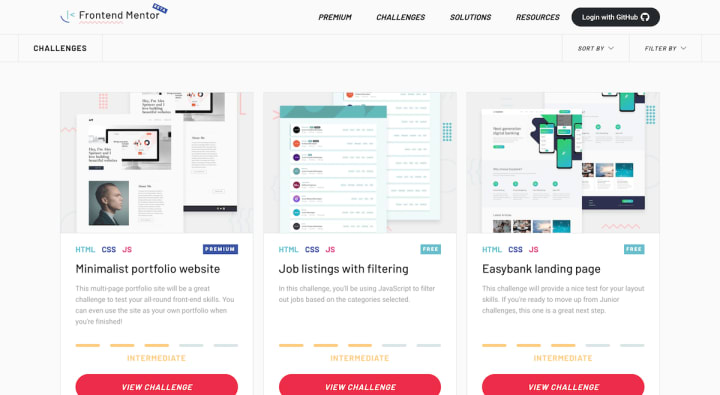
Choosing a Challenge
Frontend Mentor offers a variety of challenges to choose from. The challenges are categorized by difficulty level and by topic.
If you are a beginner, I recommend that you choose a challenge that is labeled as "beginner" or "intermediate." These challenges will be less challenging and will help you learn the basics of web development.
If you are more experienced, you can choose a challenge that is labeled as "advanced." These challenges will be more challenging and will help you improve your skills.

Completing the Challenge
Once you have chosen a challenge, you can begin building the website. The challenge page will contain all of the information that you need to complete the challenge.
The challenge page will contain the following information:
The design of the website
The requirements for the website
The starter files for the website
The design of the website will show you how the website should look. The requirements for the website will tell you what features the website should have. The starter files for the website will give you a starting point for building the website.
To complete the challenge, you will need to code the website using HTML, CSS, and JavaScript. You can use any editor that you like to code the website.
Once you have coded the website, you can test it to make sure that it works correctly. You can test the website in your browser or on a mobile device.
Once you have tested the website and you are satisfied with it, you can submit it to Frontend Mentor. Frontend Mentor will review your submission and will give you feedback.

Tips and Tricks
Here are a few tips and tricks that will help you get the most out of Frontend Mentor:
Start with a beginner-level challenge. This will help you learn the basics of web development.
Read the requirements carefully. This will help you understand what features the website should have.
Use the starter files. This will give you a starting point for building the website.
Test the website regularly. This will help you catch any errors early on.
Submit your work. This will give you feedback from Frontend Mentor.

Conclusion
Frontend Mentor is a great resource for developers who want to learn how to build websites. The website offers a variety of challenges to choose from, and the challenges are categorized by difficulty level and by topic.
If you are a beginner, I recommend that you start with a beginner-level challenge. These challenges will be less challenging and will help you learn the basics of web development.
If you are more experienced, you can choose a challenge that is labeled as "advanced." These challenges will be more challenging and will help you improve your skills.
About the Creator
Keep reading
More stories from Victor Mutugi and writers in Education and other communities.
The State of the Superhero Movie: Are We in a Golden Age?
In the realm of cinema, the superhero genre has experienced unprecedented growth and popularity over the past few decades. From the iconic Superman and Batman films of the late 20th century to the massive Marvel Cinematic Universe (MCU) and the DC Extended Universe (DCEU) dominating the box office today, superheroes have captured the imaginations of audiences worldwide.
By Victor Mutugi3 years ago in FYI
Education Reform for the 21st Century
Friends, have you ever watched a bright teenager like Priya in Mumbai sit through another day of rote memorization, her eyes dimming as high-stakes exams sucked the joy out of learning? She once told me she loved science but felt trapped in a system built for another century. That moment hit me hard because Priya’s story echoes across continents. In our world of rapid AI growth, climate crises, and shifting job markets, education must evolve from industrial-era factories into vibrant spaces of discovery. Research from UNESCO, OECD’s PISA, and the World Economic Forum shows the gap is widening, yet reform offers real hope. Together, we can build systems that prepare every child for the skills of the 21st century.
By Arjun. S. Gaikwad4 days ago in Education
Understanding the Quiet Shift: What You Need to Know About the Move Toward Value-Based Healthcare
A significant transformation is unfolding in the healthcare industry, yet many people outside the field may not fully realize its impact. This quiet shift is the transition from volume-based care, where providers are paid for the number of services they deliver, to value-based healthcare, where reimbursement depends on quality, outcomes, and patient satisfaction. This evolution is reshaping how providers deliver care, how patients experience treatment, and how the entire system measures success. As healthcare becomes more complex and costly, value-based care offers a more sustainable, patient-centered path forward. Understanding what this shift means is essential for anyone interested in the future of healthcare delivery.
By Evan Weiss St Louis4 days ago in Education
Unofficial Challenge: Black History Celebration
Forward: February 28th, 10:53 PM, EST... The final hour of Black History Month, 2026. Hello fellow writers. I've had this challenge waiting in my drafts for most of the month. But I held off on publishing it, until now.
By Sam Spinelli5 days ago in Writers




Comments
There are no comments for this story
Be the first to respond and start the conversation.