
How do I make an HTTP request in JavaScript?
JavaScript

In the world of web development, it's common to need to make HTTP requests from client-side code, such as JavaScript. HTTP (Hypertext Transfer Protocol) is the underlying protocol used by the World Wide Web and allows for the transfer of data between clients and servers. Making an HTTP request in JavaScript involves creating an instance of an HTTP client and sending a request to a server.
The two most popular ways of making HTTP requests in JavaScript are using the XMLHttpRequest object or the fetch function.
XMLHttpRequest (XHR) is a JavaScript object that provides an easy way to retrieve data from a URL without having to do a full page refresh. It can be used to make HTTP requests in the background, without interrupting the user experience. Here's how to make a GET request using XHR:
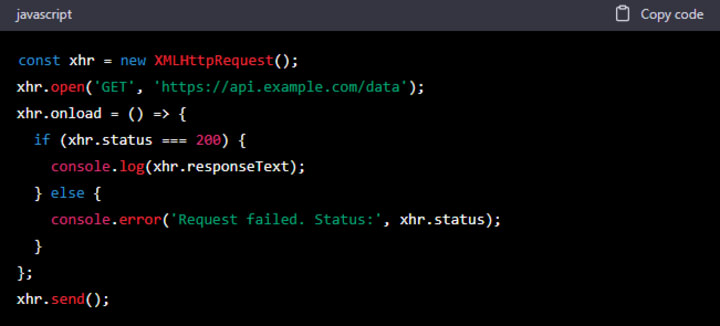
In this example, we're creating a new instance of XMLHttpRequest, and setting the method and URL to send the request to using open(). We then set an event listener for the load event, which is triggered when the request completes. In the event listener, we check the response status code to determine if the request was successful, and log the response text to the console if it was. If the request was not successful, we log an error message instead.
Fetch is a modern API for making HTTP requests that is now widely supported by modern browsers. It uses promises to handle asynchronous operations, making it easier to manage the flow of data in your code. Here's how to make a GET request using fetch:
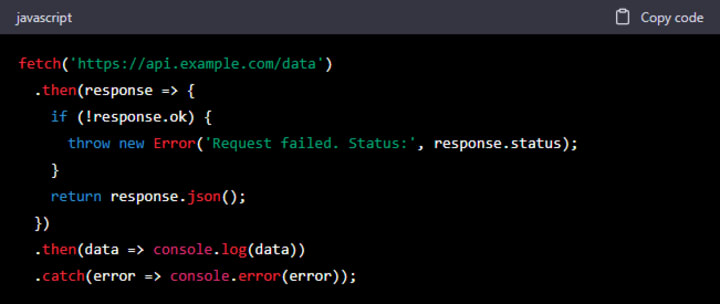
In this example, we're using the fetch function to send a GET request to the URL. The then method is then used to handle the response. If the response is successful (i.e. has a status code of 2xx), we extract the JSON data using the json() method and log it to the console. If the response is not successful, we throw an error and log the status code using console.error(). Finally, we add a catch method to handle any errors that may occur during the request.
It's worth noting that fetch returns a promise that resolves to the Response object, which provides additional methods for handling the response data. For example, you can use the text() method to retrieve the response as a string, or the blob() method to retrieve it as a binary blob.
In both examples, we're using GET requests to retrieve data from a server. However, HTTP requests can also be used to send data to a server, such as when submitting a form or making a POST request to an API. In these cases, you would need to set the request method to POST and provide any data to be sent using the send() method (for XHR) or the body property (for fetch).
In conclusion, making HTTP requests in JavaScript involves creating an instance of an HTTP client and sending a request to a server. There are two main ways to do this in modern JavaScript: using XMLHttpRequest or the fetch function. Both methods provide a way to send and receive data from.
HTTP requests are used to exchange data between a client (e.g. a web browser) and a server. A request is typically initiated by the client and consists of a request method (such as GET, POST, PUT or DELETE), a URL, and headers. The server then responds with a response status code (such as 200 OK, 404 Not Found or 500 Internal Server Error), headers and potentially a response body.
In client-side JavaScript, there are several ways to make HTTP requests, the two most popular being the XMLHttpRequest object and the fetch function. Both of these options are asynchronous, meaning that the JavaScript code can continue to execute while the request is being processed.
About the Creator
Chloe Marie
My name is Chloe Marie I am 20yo.
Keep reading
More stories from Chloe Marie and writers in Education and other communities.
Feature of Vocal Media | Benefits
Vocal Media is a unique platform that has revolutionized the way we share our stories, ideas, and perspectives with the world. As an AI language model, I can confidently say that Vocal Media is an outstanding platform that has allowed individuals to showcase their talents and creativity in ways that were previously unimaginable.
By Chloe Marie3 years ago in Education
What Is the Role of Banking and Finance Management Programs in Higher Education
Banking and finance management programs play a critical role in higher education by preparing students to understand, manage, and influence modern financial systems. As economies become more interconnected and financial decisions carry wider social and institutional consequences, the demand for professionals with structured financial knowledge continues to grow. These programs are not designed merely to teach money management, but to develop analytical thinkers who understand risk, regulation, strategy, and ethics within complex economic environments. Their relevance has increased alongside globalisation, digital banking, and financial innovation.
By John Ashley6 days ago in Education
AI in eLearning Market to Reach USD 12.2 Billion by 2033: Driving Personalized Learning
Market Overview Artificial Intelligence in eLearning represents the integration of machine learning, natural language processing, and advanced analytics into digital learning systems. These technologies allow educational platforms to analyze learner behavior, automate assessments, and provide adaptive learning experiences. AI driven tools can identify learning gaps, recommend personalized study paths, and improve student engagement through interactive digital environments. As education increasingly shifts toward digital platforms, the role of AI technologies in improving learning efficiency continues to expand.
By Roberto Crumabout 9 hours ago in Education



Comments
There are no comments for this story
Be the first to respond and start the conversation.