
How Can Architects and Civil Engineers Best Use Revit for BIM?
Autodesk Revit is a widely used software across the AEC industry. Learn its benefits and best practices to deliver projects better and faster.


Technology has redefined the architecture and civil engineering field. New-age software and tools have enabled professionals to go beyond the ordinary and perform tasks with more efficiency.
It has become a game-changer for Architecture, Engineering, and Construction (AEC) projects, aiding innovation and agility. One such software that has become integral to the design and build industry is Autodesk Revit.
What is Revit?
Revit is a Building Information Modelling (BIM) software widely used by architects, engineers, and contractors for designing, documenting, and visualising AEC projects. It enables users to create intelligent 3D models that represent real-world building components and systems. Revit incorporates parametric modelling, which makes the model interconnected and helps respond dynamically to changes.
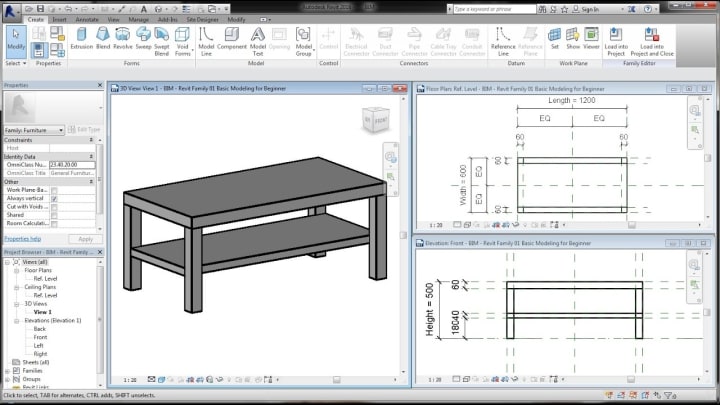
This approach allows for efficient design iteration and coordination among different disciplines. Moreover, Revit offers a comprehensive suite of tools for various aspects of the building design process, including architectural design, structural engineering, MEP (Mechanical, Electrical, and Plumbing) systems, and construction documentation.
Users can generate detailed drawings, schedules, and visualisations directly from the model, streamlining the production of construction documents and enhancing communication with stakeholders.
What are Revit Families?
Revit families are fundamental components within the Revit software ecosystem, serving as building blocks for creating intelligent 3D models. These families encapsulate specific building elements, such as doors, windows, furniture, fixtures, and equipment, along with their associated parameters, properties, and graphical representations.

Each family contains predefined parameters that define its geometry, dimensions, behaviour, and other characteristics. These parameters can be modified to customise the family's appearance, dimensions, and performance, allowing users to adapt the elements to fit their project requirements.
When users place a family instance in their project, they can interact with its parameters to adjust its size, orientation, material, and other properties. These changes are dynamically reflected in the model, ensuring that the family adapts seamlessly to design modifications and updates.
Furthermore, Revit families can be organised into hierarchical structures, allowing for the creation of complex assemblies and systems that accurately represent real-world building components. With a vast library of pre-built families available from Autodesk and third-party sources, users can efficiently populate their models with a wide range of elements, saving time and enhancing the quality of their designs.
3 Best Revit Plug-ins for Architects and Civil Engineers
The useability of Revit can be enhanced with add-on tools, also known as plug-ins. These functions enhance the quality of 3D models and bring more flexibility to the design and construction process. Mentioned below are the top 5 Revit plug-ins that are gaining prominence in the AEC industry.
1. Enscape
Enscape is a real-time rendering and visualisation plug-in for Revit. It can generate high-quality renderings directly within the Revit environment enabling users to visualise design concepts, communicate ideas to clients, and make informed decisions about materials, lighting, and spatial arrangements.
2. Dynamo
Dynamo is a visual programming plug-in for Revit that helps automate repetitive tasks, create custom scripts, and explore design iterations through algorithmic modeling. Using the plug-in, professionals can manipulate Revit elements, extract and analyse data, and generate complex geometries that would be challenging to achieve manually.
Ideate BIMLink is a data management plug-in enabling architects and civil engineers to extract, edit, and manipulate BIM data in a spreadsheet format. With Ideate BIMLink, users can streamline data management tasks such as mass editing parameters, creating custom schedules, and performing quality control checks on project data.
7 Key Benefits of Using Revit for AEC Professionals
Revit has a robust user interface that helps in streamlining workflows, enhancing collaboration, and elevating the project quality. Below are advantages of Revit for architecture and engineering professionals:

Best Revit Practices to Follow for Architects and Civil Engineers
Revit is a versatile software that can enhance the overall performance and productivity of AEC professionals. So, let’s delve deeper into how Revit can be used to further accentuate the quality of work in the segment of design and construction.
1. Standardise Templates and Families
Developing standardised templates and families ensures consistency across projects, streamlining workflows, and facilitating collaboration. By establishing common standards for project setup, including view templates, annotation styles, and graphic standards, teams can work more efficiently and effectively.
2. Utilise Worksharing
Revit's worksharing functionality allows multiple users to collaborate on the same project simultaneously. Dividing the project into manageable worksets and assigning specific tasks to team members can help firms enhance productivity, reduce conflicts, and accelerate project delivery.
3. Optimise Model Performance
Monitoring and optimising model performance is essential for maintaining project efficiency and preventing slowdowns. Techniques such as managing file size, using detail levels appropriately, and optimising view settings help ensure smooth navigation and responsiveness.
4. Organise Project Browser
A well-organised project browser improves navigation and accessibility within the Revit model. This establishes logical naming conventions, grouping similar elements, and structuring views hierarchically, thereby allowing users to quickly locate and manage project information.
5. Implement BIM Execution Plans
BIM execution plans outline the project-specific protocols, standards, and deliverables required for successful BIM implementation. By developing clear guidelines for modelling practices, data exchange formats, and collaboration workflows, teams can ensure consistency and alignment with client expectations.
6. Leverage View Templates
They standardise view settings across multiple views within the project, ensuring consistency in appearance and presentation. Defining parameters such as visibility, graphic overrides, and annotation styles empowers users to streamline the creation of views and maintain a cohesive visual language throughout the project.
7. Use Phasing and Design Options
This enables professionals to explore design alternatives, simulate construction sequences, and communicate project phasing. By utilising these features, teams can evaluate different design scenarios, visualise project progression, and make informed decisions that align with project goals.
8. Maintain Model Health
Regularly auditing and maintaining model health is crucial for preventing errors and inconsistencies. Tasks such as resolving warnings, cleaning up unused elements, and validating model integrity help ensure the accuracy and reliability of the Revit model throughout the project lifecycle.
Also Read: Revit and Navisworks: The Dynamic Duo for Flawless Clash Detection
In Conclusion
Revit is the future and the go-to software for architects and civil engineers to build one-of-a-kind projects. Professionals are now constantly seeking avenues to master Revit and seek lucrative work opportunities.
The adoption of Revit in the workflows of AEC professionals is changing the face of the industry. Its ability to aid BIM processes is enhancing collaboration, streamlining processes, and helping achieve greater precision in projects.
About the Creator
Ryan Stein
I am a renowned author, speaker and educator on Building Information Modeling (BIM) technology in the Architecture, Engineering, and Construction (AEC) industry.
Keep reading
More stories from Ryan Stein and writers in Education and other communities.
How to Manage a Residential Construction Project?
There are four types of construction projects: commercial construction, industrial construction, infrastructure construction and residential construction. Residential construction might be the easiest for laypeople to understand as most of us live in these types of structures. But do we really know what residential construction is?
By Ryan Stein2 years ago in Education


Comments (1)
Thanks for sharing