
How AI Tools Can Help You Boost Productivity
In today’s busy world, everyone wants to get more done in less time.


Luckily, technology can help us be more productive. One of the best advancements in tech is artificial intelligence (AI). AI tools are no longer just for experts—they are for everyone, whether you're a student, a worker, or a business owner.
AI can help us do things faster, automate boring tasks, and give useful information to help us make better decisions.
In this article, we’ll look at how AI tools can help you be more productive every day.
What is AI?
Before we talk about how AI tools can help, let’s quickly explain what AI is. AI stands for artificial intelligence. It means creating machines or computer programs that can think, learn, and do things that usually need human intelligence. For example, AI can help computers understand language, recognize pictures, and even make decisions based on data.
How AI Helps You Be More Productive
AI tools can improve your productivity in many ways. Let's explore a few key ways AI can help you get more done:
1. Automating Repetitive Tasks
One of the biggest time-wasters is doing the same tasks over and over. This is where AI can help. AI tools can automate routine tasks, saving you time and effort. For example, if you’re in a job where you have to answer the same emails or schedule meetings, AI can do these tasks for you.
Tools like scheduling assistants (e.g., Google Calendar, or Microsoft Outlook’s AI assistant) can help you organize your day without you having to spend too much time on it. AI can also help with sending out automatic reminders or creating reports.
2. Improving Time Management
Time is precious, and AI tools can help you use it wisely. AI-powered apps can analyze your work patterns and give you advice on how to manage your time better. These apps can tell you when you’re most productive during the day, so you can plan your most important tasks during those times.
Some AI tools even help you block out distractions, like turning off social media notifications while you’re working. This helps you stay focused and finish your tasks quicker.
3. Organizing and Sorting Information
We all deal with lots of information every day—emails, files, messages, and more. It can be hard to keep everything organized. AI can help by sorting and organizing information for you.
For example, email apps powered by AI can automatically sort your emails into categories like important, spam, and newsletters. This saves you time by helping you focus on what really matters.
Some AI tools can also help you organize files and data, making it easier to find things when you need them.
4. Boosting Creativity
AI isn’t just for tasks that are boring or repetitive—it can also help you be more creative. AI-powered design tools, for example, can help you create graphics, websites, and even write content. These tools can give you ideas, suggest improvements, or help you put together something that looks professional, even if you don’t have much experience.
AI tools for writing, like GPT-based programs, can help you brainstorm ideas, improve your writing, and even suggest topics to explore. This can be very helpful for students, writers, or anyone who creates content regularly.
5. Personalized Learning and Development
Learning new skills is important, whether for your career or personal growth. AI tools can help you learn faster and more effectively. AI-powered platforms like language apps or online courses can adjust to your pace and offer personalized lessons.
For example, language-learning apps like Duolingo use AI to give you lessons based on what you’ve learned and where you need improvement. This makes learning more efficient because you’re focusing on what’s most important for you.
6. Enhancing Customer Service
For businesses, AI can help improve customer service, which is a big part of productivity. AI chatbots can answer common customer questions, solve problems, and even help with purchases. This means that businesses can provide support 24/7, without needing a large team of people working around the clock.
By handling the more basic tasks, AI can free up employees to focus on more complex problems. This can improve the overall speed and quality of customer service, leading to happier customers and better productivity for the company.
7. Making Smarter Decisions
AI can also help you make better decisions. By analyzing large amounts of data, AI can provide you with insights and recommendations that might not be obvious at first.
For example, if you’re running a business, AI can analyze sales data to help you understand which products are popular, what times of year are busiest, and what marketing strategies work best. This allows you to make smarter decisions that save time and money.
8. Managing Projects More Efficiently
AI tools can also help you manage projects more effectively. Apps like Trello or Asana have AI features that help organize tasks, set deadlines, and remind you of important dates. AI can even suggest changes to your plan to make your project run more smoothly.
With AI, you can easily track your progress, collaborate with teammates, and keep everything on schedule. This makes managing complex projects easier and faster.
9. Improving Communication
Good communication is key to productivity, whether you’re working with a team or talking to clients. AI-powered tools can help improve communication in different ways. For example, speech recognition software can transcribe meetings or interviews, making it easy to review important information later.
Some AI tools can even help you write better emails by suggesting improvements or helping you correct grammar and tone.
10. Working From Anywhere
With AI-powered cloud tools, you can work from anywhere, whether you’re at home, in a coffee shop, or traveling. These tools allow you to access your files, emails, and projects from any device, making it easier to stay productive no matter where you are.
Cloud-based AI tools also make collaboration easier, as teams can work together in real-time on the same documents or projects, even if they’re in different parts of the world.
How to Start Using AI for Productivity
If you’re new to AI tools, don’t worry—it’s easier than you think to get started. Many AI tools are free or low-cost and can be used with little training.
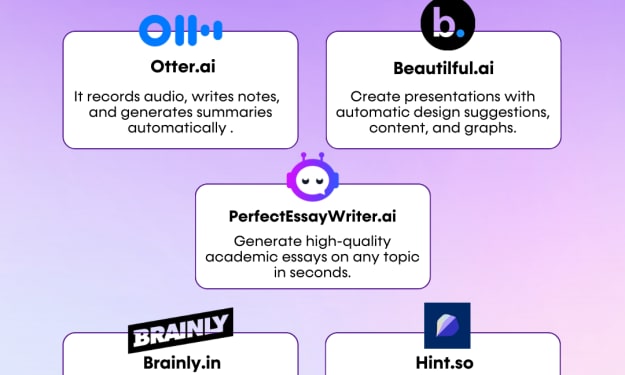
Pick a Tool That Fits Your Needs: Whether you need help managing your time, organizing information, or being more creative, there’s an AI tool for you e.g MyEssayWriter.ai & PerfectEssayWriter.ai. Start by identifying the tasks you need help with and find a tool that fits those needs.
Start Simple: Begin with simple tools that offer easy-to-understand features. As you get more comfortable, you can explore more advanced tools.
Learn As You Go: Many AI tools have tutorials or help guides to help you learn how to use them. Don’t be afraid to experiment and explore the different features they offer.
Use AI to Save Time: Once you’ve found the right tools, use them to save time on routine tasks, freeing up more time for important work.
Monitor Your Progress: Keep track of how AI tools are helping you. Are you getting more done? Are you saving time? If the answer is yes, you’re on the right track.
Conclusion
AI tools are here to help us work smarter, not harder. They can automate tasks, help us make better decisions, and even boost our creativity. Whether you’re managing a business, studying, or just looking to be more productive, AI can make your life easier. So why not give it a try? Start small, and you’ll soon see how AI can make a big difference in your productivity.
Check Out More Articles Related To AI Tools
Best AI Essay Writer in 2025 to Solve Common Students’ Problems
About the Creator
James Daniels
James Daniels is a dedicated scholar currently pursuing a Postdoctorate in English Literature at Harvard University in Cambridge.
Keep reading
More stories from James Daniels and writers in Education and other communities.
AI Writing Tools for Speechwriting and Public Speaking
Introduction Effective communication is paramount in today's fast-paced world, especially in public speaking. Crafting persuasive speeches that resonate with the audience requires creativity, research, and eloquence.
By James Daniels3 years ago in Education
Online Education/E-Learning Market to Surpass USD 1,460.8 Billion by 2033
Market Overview The global Online Education or E-Learning market has experienced substantial growth as digital technologies reshape the way education is delivered and accessed. Online learning platforms enable students, professionals, and organizations to access educational resources through internet-based systems without geographic limitations. The market benefits from rising internet penetration, increasing smartphone usage, and the growing acceptance of digital learning platforms across schools, universities, and corporate training programs. These factors have created strong demand for flexible and scalable education solutions.
By Roberto Crum6 days ago in Education


Comments
There are no comments for this story
Be the first to respond and start the conversation.