
From Concept to Creation: Developing an AI Image Generator
Develop Ai Image Generator App

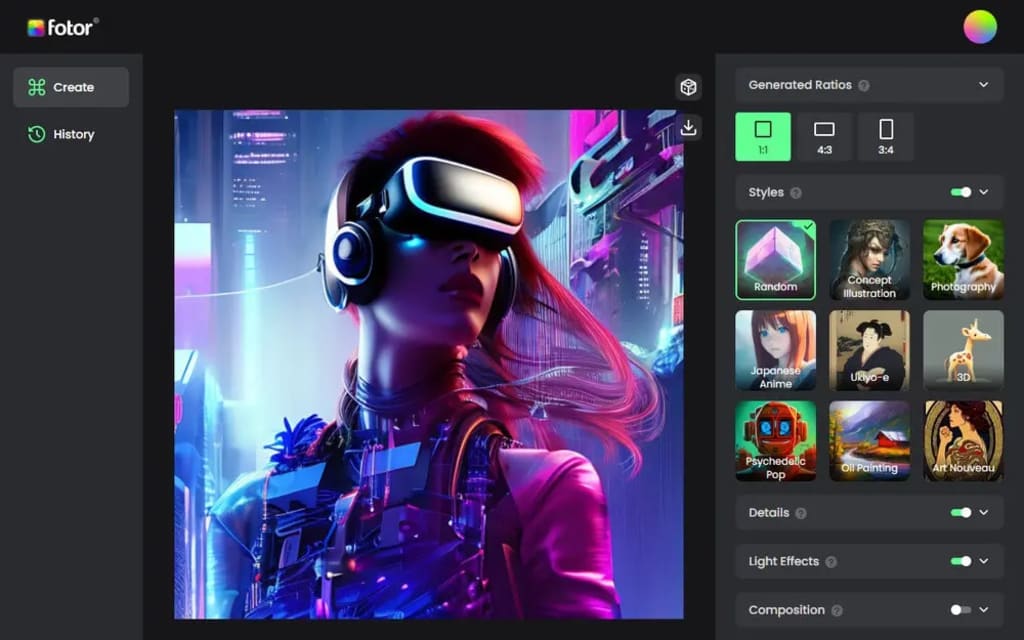
An AI digital art generator is a computer program that uses artificial intelligence and machine learning techniques to automatically generate digital images, such as paintings, illustrations, or graphics. It typically uses deep learning algorithms, such as generative adversarial networks (GANs), to create new images based on training data. The training data is typically an extensive collection of images, which the AI model uses to learn about the characteristics and patterns of the desired output.
The resulting AI digital art generator can then be used to produce new images on demand, either by directly specifying the desired output or by allowing the user to interact with the app to control the generation process. The generated images may be simple or complex, abstract or realistic, depending on the training data and the algorithms used.
Working of AI Image Generator App:
An AI image generator app typically works by using deep learning algorithms to generate new images based on a set of training data. The process can be broken down into the following steps:
1. Data collection: The first step is to collect a large set of images that will be used to train the AI model. This data is typically sourced from public datasets or explicitly created for the AI model's training.
2. Data preparation: The collected data is then pre-processed to ensure it is in a format suitable for training the AI model. This may involve resizing images, normalizing pixel values, and splitting the data into training and validation sets.
3. Model training: The AI model is then trained using the prepared data. This typically involves using deep learning algorithms, such as generative adversarial networks (GANs) or variational autoencoders (VAEs), to learn the relationships between the input images and the desired output.
4. Model deployment: Once the AI model is trained, it can be deployed in an AI image generator app. The app can then be used to generate new images by passing random noise or user input into the AI model, which will then produce new images based on the learned relationships.
5. User interaction: The AI image generator app can be designed to allow users to interact with the generated images, either by specifying parameters such as color, texture, or shape or by using machine learning techniques such as reinforcement learning to allow the user to guide the generation process.
Steps to Develop an AI Image Generator App:
Developing an AI image generator app involves several steps, including gathering requirements, researching existing solutions, designing the architecture, and implementing the solution. Here is an overview of the process:
1. Gather requirements: Determine the specific use case and requirements for your AI image generator app, such as the type of images you want to generate, the desired output format, and the user interface.
2. Research existing solutions: Explore existing AI image generator apps and techniques to understand what's possible and to gain inspiration.
3. Design the architecture: Decide on the technology stack and architecture for your app, taking into consideration the requirements and existing solutions you have researched.
4. Prepare the data: Gather and preprocess the data you will use to train your AI model. This may include collecting images and annotations, splitting the data into training and testing sets, and normalizing the data.
5. Train the AI model: Train a deep learning model using the prepared data to generate new images. You can use existing deep learning frameworks such as TensorFlow or PyTorch.
6. Implement the app: Use the trained AI model to implement the AI image generator app, integrating it into the user interface and any necessary supporting components.
About the Creator
DigiPrima Technologies
Digiprima Technologies is the partner for all your need of various IT services including Web presence, Mobile application, document management and Process. visit- https://www.digiprima.com/
Keep reading
More stories from DigiPrima Technologies and writers in Education and other communities.
The Role of Data Storytelling in Effective Marketing Strategies
The ability to analyze data is immensely valuable, but presenting it effectively holds even greater importance. In a world overflowing with information, data storytelling bridges the gap between raw numbers and actionable insights. By transforming complex datasets into relatable and engaging narratives, businesses can make it easier for stakeholders to comprehend trends, patterns, and implications. Data storytelling empowers decision-makers to act with clarity and confidence while fostering collaboration across teams. In today’s data-driven environment, where decisions rely heavily on analytics, storytelling is key to simplifying complexity, communicating ideas clearly, and building stronger connections with audiences. This blog explores the growing importance of data storytelling as an indispensable tool for achieving success in today’s highly competitive landscape.
By DigiPrima Technologiesabout a year ago in Education
What to Expect From Bookkeeping Outsourcing Services
Money has a way of revealing how well a business is truly operating. Clean records signal control. Messy books hint at missed opportunities, tax risks, and sleepless nights. Many growing companies reach a point where spreadsheets, late-night reconciliations, and rushed reports are no longer sustainable. That’s usually when leaders begin exploring Bookkeeping Outsourcing as a smarter, scalable solution.
By Charles Bright6 days ago in Education
How Aerospace Electronics Depend on Winbond Electronics Components in Modern Aviation
When I analyze the supply chain behind aviation electronics, I often return to the role of semiconductor memory manufacturers. One company that frequently appears in component databases is Winbond Electronics Corporation, a global semiconductor producer known for reliable memory solutions used in embedded systems.
By Beckett Dowhan2 days ago in Education


Comments
There are no comments for this story
Be the first to respond and start the conversation.