
DNS Lookup: The Unsung Hero of the Internet
What is DNS?
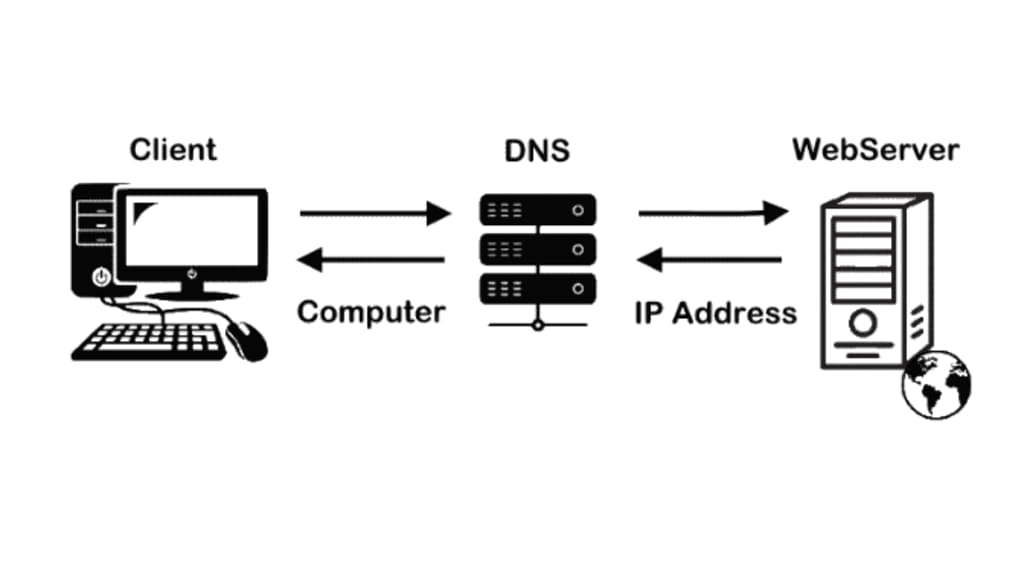
Have you ever wondered how your web browser seamlessly transforms a domain name like google.com into an IP address like 142.250.186.142? The magic behind this transformation lies in a fundamental Internet protocol known as the Domain Name System (DNS). In this blog post, we'll delve into the intricacies of DNS, exploring its core concepts, the lookup process, and its crucial role in the modern digital landscape. Learn what is dns lookup command and what it is used for.
What is DNS?
DNS is essentially a hierarchical naming system that translates human-readable domain names into machine-readable IP addresses. Think of it as the phonebook of the Internet. When you type a domain name into your browser's address bar, your computer sends a DNS query to a DNS resolver, which then initiates a series of requests to DNS servers to find the corresponding IP address.
The DNS Hierarchy
The DNS hierarchy is structured like an inverted tree, with the root domain at the top and various top-level domains (TLDs) like .com, .org, and .net branching out. Below TLDs are second-level domains (SLDs) and third-level domains, forming the complete domain name.
The DNS Lookup Process
Recursive Query:
Your computer sends a recursive query to a local DNS resolver.
The resolver is responsible for contacting other DNS servers to find the IP address.
Iterative Query:
The resolver starts with the root nameserver, asking for the address of the TLD nameserver.
It then queries the TLD nameserver for the SLD nameserver.
This process continues until the authoritative nameserver for the domain is reached.
The authoritative nameserver provides the IP address to the resolver.
Caching:
DNS resolvers and servers cache DNS records to improve performance and reduce network traffic.
This cached information is used to quickly respond to future DNS queries for the same domain.
Types of DNS Records
A Record: Maps a domain name to an IPv4 address.
AAAA Record: Maps a domain name to an IPv6 address.
CNAME Record: Creates an alias for another domain name.
MX Record: Specifies mail exchange servers for email delivery.
NS Record: Identifies authoritative name servers for a domain.
TXT Record: Stores arbitrary text information, often used for verification or security purposes.
DNS Security and Threats
DNS is a critical infrastructure component, and its security is paramount. Malicious actors can exploit vulnerabilities in DNS to redirect traffic to malicious websites, launch phishing attacks, or distribute malware. Some common DNS security threats include:
DNS Spoofing: Attackers intercept DNS traffic and redirect users to malicious websites.
DNS Cache Poisoning: Attackers inject false DNS records into DNS resolvers' caches.
DNS Tunneling: Attackers use DNS to exfiltrate data from networks.
DNS Security Best Practices
Use DNSSEC: DNS Security Extensions (DNSSEC) add digital signatures to DNS records, ensuring their integrity.
Implement DNS Filtering: Filter malicious domains and IP addresses to protect users.
Monitor DNS Traffic: Use tools to monitor DNS traffic for anomalies and potential threats.
Keep DNS Software Updated: Regularly update DNS software to address vulnerabilities.
The Future of DNS
As the Internet continues to evolve, so too does DNS. Some emerging trends in DNS include:
DNS over HTTPS (DoH): Encrypts DNS traffic to enhance privacy and security.
DNS over TLS (DoT): Another encryption method for DNS traffic.
EDNS0: Extensible DNS provides additional features and functionality.
Conclusion
DNS is the backbone of the Internet, silently enabling the seamless browsing experience we rely on daily. By understanding the intricacies of DNS, we can appreciate its importance and take steps to protect it from potential threats. As technology advances, DNS will continue to adapt and evolve to meet the demands of the digital age. Learn the SAN vs NAS difference and discover which is best.
Additional Tips for DNS Optimization
Leverage DNS Caching: Configure your web servers and DNS resolvers to cache DNS records effectively.
Use a Reliable DNS Provider: Choose a reputable DNS provider that offers high availability and performance.
Minimize DNS Lookup Time: Reduce the number of DNS lookups required to load a webpage by using techniques like DNS prefetching and resource hints.
Monitor DNS Performance: Regularly monitor DNS response times and error rates to identify and resolve issues promptly.
Consider Using a CDN: A Content Delivery Network (CDN) can significantly improve website performance by caching content closer to users and reducing the
About the Creator
Keep reading
More stories from Casper LAWRENCE and writers in Education and other communities.
Website Monitoring: A Comprehensive Guide
In today's digital age, a website is often the face of a business. Ensuring its optimal performance and availability is crucial for maintaining customer satisfaction and driving online success. Web page monitoring tools play a vital role in achieving this goal by providing real-time insights into a website's health, performance, and uptime.
By Casper LAWRENCEabout a year ago in Education
College ESA Roommate Conflicts: How to Navigate Successfully Guide
Managing student life can be challenging, especially when mental health intersects with housing arrangements. Emotional Support Animals (ESAs) have become essential companions for many students, providing comfort, reducing anxiety, and supporting overall well-being. College students face high-pressure academic environments, shared housing, and strict university policies, which makes understanding ESA accommodation rules critical. ESAs help create stability and a sense of routine that can significantly enhance a student’s mental and emotional health while promoting academic success.
By Zalen Vortana day ago in Education
How Spending Time Together Strengthens Family Relationships Long Term
Spending meaningful time together is one of the most powerful ways families can build stronger, healthier relationships that last for years. Even though busy schedules and constant distractions often pull people in different directions, intentional togetherness helps families stay emotionally connected.
By Joe Sottolano3 days ago in Education




Comments
There are no comments for this story
Be the first to respond and start the conversation.