
. Core Component of Computer System 2. Motherboard: The Computer’s Central Hub 3. System Board in Modern Computers 4. Mainboard Connects All Computer Parts 5. Understanding the Computer Motherboard Structure
"An In-Depth Look at the Motherboard: Understanding Its Structure, Functions, and Role in Connecting and Powering All Essential Computer Components Efficiently."
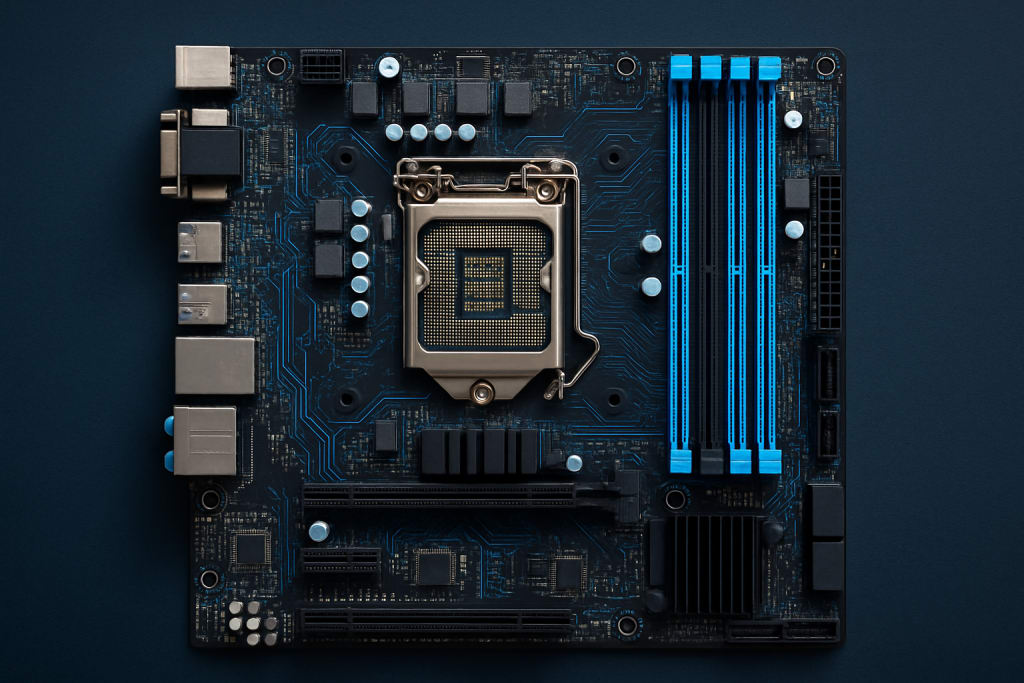
Motherboard or System Board
The motherboard, also referred to as the system board, mainboard, or logic board, is one of the most critical components in a computer system. It is a large, flat piece of circuitry made from fiberglass or similar non-conductive materials, with numerous circuits and components mounted on its surface. Often considered the "backbone" of the computer, the motherboard acts as the central hub to which all other computer components are connected, enabling them to communicate and work together effectively.
At the most basic level, the motherboard houses the Central Processing Unit (CPU), which is the brain of the computer. The CPU is inserted into a socket on the motherboard and communicates with other components through the chipset and system buses. These connections allow the CPU to process data, run programs, and perform instructions as required by the user or operating system. The chipset on the motherboard manages data flow between the CPU, memory, storage devices, and peripherals. It consists of two main parts: the Northbridge, which connects directly to high-speed components like RAM and graphics cards, and the Southbridge, which connects to lower-speed peripherals like USB ports and storage devices.
Another essential component found on the motherboard is RAM (Random Access Memory) slots. These slots allow the installation of memory modules that provide temporary data storage while the computer is operating. RAM plays a crucial role in the overall performance of a computer, as it stores the data and instructions that the CPU needs immediate access to. The motherboard must support the type and speed of RAM used to ensure compatibility and performance.
The BIOS (Basic Input/Output System) or UEFI (Unified Extensible Firmware Interface) is a small memory chip on the motherboard that stores the firmware responsible for booting the computer and initializing hardware components during startup. It provides a basic interface for configuring hardware settings such as boot order, clock speeds, and power management features.
Motherboards also feature expansion slots, such as PCIe (Peripheral Component Interconnect Express) slots, which allow users to install additional components like graphics cards, sound cards, network cards, and more. These slots provide the flexibility to upgrade and customize a computer system to meet specific needs, such as enhanced graphics performance for gaming or video editing.
Power connectors are also integrated into the motherboard to distribute power from the power supply unit (PSU) to various components. This includes a large 24-pin ATX power connector for the motherboard itself, as well as additional 4-pin or 8-pin connectors for the CPU and other hardware components.
Storage device connectors are another important feature. These include SATA ports for connecting hard drives and solid-state drives (SSDs), and in more modern motherboards, M.2 slots for faster NVMe SSDs. These connections allow for the storage and retrieval of data, enabling the operating system and applications to be installed and accessed quickly.
In addition to internal connectors, the motherboard also provides a range of external ports and connectors accessible from the back panel of the computer case. These include USB ports, audio jacks, Ethernet ports, and video outputs such as HDMI, DisplayPort, or VGA. These ports allow users to connect peripherals like keyboards, mice, speakers, monitors, and external drives.
The layout and form factor of a motherboard determine how it fits within a computer case. Common form factors include ATX, Micro-ATX, and Mini-ITX. Each form factor has different sizes, features, and expansion capabilities. Larger motherboards like ATX offer more expansion slots and connectivity options, while smaller boards like Mini-ITX are ideal for compact systems.
Modern motherboards also include features such as integrated graphics, Wi-Fi modules, Bluetooth, and RGB lighting controls, catering to a wide range of users from casual consumers to gaming enthusiasts and professionals. They may also support overclocking, which allows users to push hardware beyond its factory settings for improved performance—though this must be done with care to avoid overheating or instability.
In summary, the motherboard is an essential component of any computer system. It serves as the central platform that connects and coordinates all other hardware components, ensuring they work together seamlessly. From the CPU and RAM to storage drives and peripheral devices, every critical element of the computer relies on the motherboard for communication and power. Choosing the right motherboard is important when building or upgrading a PC, as it affects compatibility, performance, expandability, and overall functionality.
About the Creator
Keep reading
More stories from Muhammad Yar and writers in Education and other communities.
1. Master Typing with Powerful Tools
Typing Tutor Software is an all-in-one solution designed to help users of all ages and skill levels improve their typing proficiency. Whether you are a beginner just getting started or someone looking to refine your existing skills, this program offers a wide range of features tailored to your needs. Below is a detailed breakdown of the features and functionalities that make this typing software an ideal choice for learners, students, professionals, and educators alike.
By Muhammad Yar10 months ago in Education
Top Website Monetization Platforms to Maximize Your Revenue in 2026
Website monetization platforms are tools that help website owners generate revenue from their traffic. These platforms support different monetization models, including programmatic advertising, affiliate marketing, sponsored content, and performance-based ads.
By Iryna Podliesna2 days ago in Education
Why ISO Certification Is Becoming a Business Standard for Companies in the UAE
Businesses in the UAE operate in a competitive environment. Clients expect reliability. Regulators expect compliance. International partners expect structured operations. Because of these expectations, companies are adopting management systems that improve how they operate.
By Umar Quality Jounal3 days ago in Education



Comments
There are no comments for this story
Be the first to respond and start the conversation.