


C++ Function Overloading
Function Overloading
With function overloading, multiple functions can have the same name with different parameters:
Example
int myFunction(int x)
float myFunction(float x)
double myFunction(double x, double y)
Consider the following example, which has two functions that add numbers of a different types:
Example
int plusFuncInt(int x, int y) {
return x + y;
}
double plusFuncDouble(double x, double y) {
return x + y;
}
int main() {
int myNum1 = plusFuncInt(8, 5);
double myNum2 = plusFuncDouble(4.3, 6.26);
cout << "Int: " << myNum1 << "\n";
cout << "Double: " << myNum2;
return 0;
}
Instead of defining two functions that should do the same thing, it is better to overload one.
In the example below, we overload the plusFunc function to work for both int and double:
Example
int plusFunc(int x, int y) {
return x + y;
}
double plusFunc(double x, double y) {
return x + y;
}
int main() {
int myNum1 = plusFunc(8, 5);
double myNum2 = plusFunc(4.3, 6.26);
cout << "Int: " << myNum1 << "\n";
cout << "Double: " << myNum2;
return 0;
}
Note: Multiple functions can have the same name as long as the number and/or type of parameters are different.
C++ Recursion
Recursion
Recursion is the technique of making a function call itself. This technique provides a way to break complicated problems down into simple problems which are easier to solve.
Recursion may be a bit difficult to understand. The best way to figure out how it works is to experiment with it.
Recursion Example
Adding two numbers together is easy to do, but adding a range of numbers is more complicated. In the following example, recursion is used to add a range of numbers together by breaking it down into the simple task of adding two numbers:
Example
int sum(int k) {
if (k > 0) {
return k + sum(k - 1);
} else {
return 0;
}
}
int main() {
int result = sum(10);
cout << result;
return 0;
}
Example Explained
When the sum() function is called, it adds parameter k to the sum of all numbers smaller than k and returns the result. When k becomes 0, the function just returns 0. When running, the program follows these steps:
10 + sum(9)
10 + ( 9 + sum(8) )
10 + ( 9 + ( 8 + sum(7) ) )
...
10 + 9 + 8 + 7 + 6 + 5 + 4 + 3 + 2 + 1 + sum(0)
10 + 9 + 8 + 7 + 6 + 5 + 4 + 3 + 2 + 1 + 0
Since the function does not call itself when k is 0, the program stops there and returns the result.
The developer should be very careful with recursion as it can be quite easy to slip into writing a function which never terminates, or one that uses excess amounts of memory or processor power. However, when written correctly recursion can be a very efficient and mathematically-elegant approach to programming.
C++ OOP
C++ What is OOP?
OOP stands for Object-Oriented Programming.
Procedural programming is about writing procedures or functions that perform operations on the data, while object-oriented programming is about creating objects that contain both data and functions.
Object-oriented programming has several advantages over procedural programming:
OOP is faster and easier to execute
OOP provides a clear structure for the programs
OOP helps to keep the C++ code DRY "Don't Repeat Yourself", and makes the code easier to maintain, modify and debug
OOP makes it possible to create full reusable applications with less code and shorter development time
Tip: The "Don't Repeat Yourself" (DRY) principle is about reducing the repetition of code. You should extract out the codes that are common for the application, and place them at a single place and reuse them instead of repeating it.
C++ What are Classes and Objects?
Classes and objects are the two main aspects of object-oriented programming.
Look at the following illustration to see the difference between class and objects:
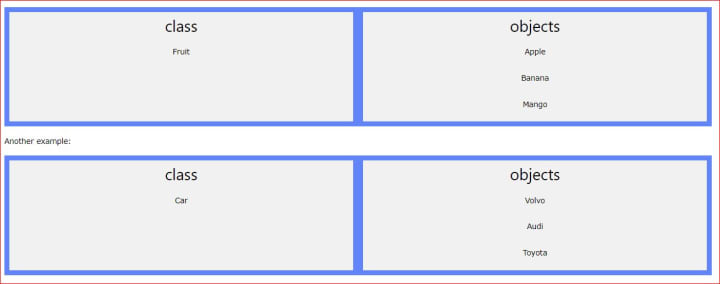
So, a class is a template for objects, and an object is an instance of a class.
When the individual objects are created, they inherit all the variables and functions from the class.
You will learn much more about classes and objects in the next chapter.
C++ Classes and Objects
C++ Classes/Objects
C++ is an object-oriented programming language.
Everything in C++ is associated with classes and objects, along with their attributes and methods. For example: in real life, a car is an object. The car has attributes, such as weight and colour, and methods, such as drive and brake.
Attributes and methods are basically variables and functions that belong to the class. These are often referred to as "class members".
A class is a user-defined data type that we can use in our program, and it works as an object constructor or a "blueprint" for creating objects.
Create a Class
To create a class, use the class keyword:
Example
Create a class called "MyClass":
class MyClass { // The class
public: // Access specifier
int myNum; // Attribute (int variable)
string myString; // Attribute (string variable)
};
Example explained
The class keyword is used to create a class called MyClass.
The public keyword is an access specifier, which specifies that members (attributes and methods) of the class are accessible from outside the class. You will learn more about access specifiers later.
Inside the class, there is an integer variable myNum and a string variable myString. When variables are declared within a class, they are called attributes.
At last, end the class definition with a semicolon ;.
Create an Object
In C++, an object is created from a class. We have already created the class named MyClass, so now we can use this to create objects.
To create an object of MyClass, specify the class name, followed by the object name.
To access the class attributes (myNum and myString), use the dot syntax (.) on the object:
Example
Create an object called "myObj" and access the attributes:
class MyClass { // The class
public: // Access specifier
int myNum; // Attribute (int variable)
string myString; // Attribute (string variable)
};
int main() {
MyClass myObj; // Create an object of MyClass
// Access attributes and set values
myObj.myNum = 15;
myObj.myString = "Some text";
// Print attribute values
cout << myObj.myNum << "\n";
cout << myObj.myString;
return 0;
}
Multiple Objects
You can create multiple objects of one class:
Example
// Create a Car class with some attributes
class Car {
public:
string brand;
string model;
int year;
};
int main() {
// Create an object of Car
Car carObj1;
carObj1.brand = "BMW";
carObj1.model = "X5";
carObj1.year = 1999;
// Create another object of Car
Car carObj2;
carObj2.brand = "Ford";
carObj2.model = "Mustang";
carObj2.year = 1969;
// Print attribute values
cout << carObj1.brand << " " << carObj1.model << " " << carObj1.year << "\n";
cout << carObj2.brand << " " << carObj2.model << " " << carObj2.year << "\n";
return 0;
}
C++ Class Methods
Class Methods
Methods are functions that belong to the class.
There are two ways to define functions that belong to a class:
Inside class definition
Outside class definition
In the following example, we define a function inside the class, and we name it "myMethod".
Note: You access methods just like you access attributes; by creating an object of the class and using the dot syntax (.):
Inside Example
class MyClass { // The class
public: // Access specifier
void myMethod() { // Method/function defined inside the class
cout << "Hello World!";
}
};
int main() {
MyClass myObj; // Create an object of MyClass
myObj.myMethod(); // Call the method
return 0;
}
To define a function outside the class definition, you have to declare it inside the class and then define it outside of the class. This is done by specifying the name of the class, followed by the scope resolution :: operator, followed by the name of the function:
Outside Example
class MyClass { // The class
public: // Access specifier
void myMethod(); // Method/function declaration
};
// Method/function definition outside the class
void MyClass::myMethod() {
cout << "Hello World!";
}
int main() {
MyClass myObj; // Create an object of MyClass
myObj.myMethod(); // Call the method
return 0;
}
Parameters
You can also add parameters:
Example
#include <iostream>
using namespace std;
class Car {
public:
int speed(int maxSpeed);
};
int Car::speed(int maxSpeed) {
return maxSpeed;
}
int main() {
Car myObj; // Create an object of Car
cout << myObj.speed(200); // Call the method with an argument
return 0;
}
C++ Constructors
Constructors
A constructor in C++ is a special method that is automatically called when an object of a class is created.
To create a constructor, use the same name as the class, followed by parentheses ():
Example
class MyClass { // The class
public: // Access specifier
MyClass() { // Constructor
cout << "Hello World!";
}
};
int main() {
MyClass myObj; // Create an object of MyClass (this will call the constructor)
return 0;
}
Note: The constructor has the same name as the class, it is always public, and it does not have any return value.
Constructor Parameters
Constructors can also take parameters (just like regular functions), which can be useful for setting initial values for attributes.
The following class have brand, model and year attributes, and a constructor with different parameters. Inside the constructor we set the attributes equal to the constructor parameters (brand=x, etc). When we call the constructor (by creating an object of the class), we pass parameters to the constructor, which will set the value of the corresponding attributes to the same:
Example
class Car { // The class
public: // Access specifier
string brand; // Attribute
string model; // Attribute
int year; // Attribute
Car(string x, string y, int z) { // Constructor with parameters
brand = x;
model = y;
year = z;
}
};
int main() {
// Create Car objects and call the constructor with different values
Car carObj1("BMW", "X5", 1999);
Car carObj2("Ford", "Mustang", 1969);
// Print values
cout << carObj1.brand << " " << carObj1.model << " " << carObj1.year << "\n";
cout << carObj2.brand << " " << carObj2.model << " " << carObj2.year << "\n";
return 0;
}
Just like functions, constructors can also be defined outside the class. First, declare the constructor inside the class, and then define it outside of the class by specifying the name of the class, followed by the scope resolution :: operator, followed by the name of the constructor (which is the same as the class):
Example
class Car { // The class
public: // Access specifier
string brand; // Attribute
string model; // Attribute
int year; // Attribute
Car(string x, string y, int z); // Constructor declaration
};
// Constructor definition outside the class
Car::Car(string x, string y, int z) {
brand = x;
model = y;
year = z;
}
int main() {
// Create Car objects and call the constructor with different values
Car carObj1("BMW", "X5", 1999);
Car carObj2("Ford", "Mustang", 1969);
// Print values
cout << carObj1.brand << " " << carObj1.model << " " << carObj1.year << "\n";
cout << carObj2.brand << " " << carObj2.model << " " << carObj2.year << "\n";
return 0;
}
C++ Access Specifiers
Access Specifiers
By now, you are quite familiar with the public keyword that appears in all of our class examples:
Example
class MyClass { // The class
public: // Access specifier
// class members goes here
};
The public keyword is an access specifier. Access specifiers define how the members (attributes and methods) of a class can be accessed. In the example above, the members are public - which means that they can be accessed and modified from outside the code.
However, what if we want members to be private and hidden from the outside world?
In C++, there are three access specifiers:
public - members are accessible from outside the class
private - members cannot be accessed (or viewed) from outside the class
protected - members cannot be accessed from outside the class, however, they can be accessed in inherited classes. You will learn more about Inheritance later.
In the following example, we demonstrate the differences between public and private members:
Example
class MyClass {
public: // Public access specifier
int x; // Public attribute
private: // Private access specifier
int y; // Private attribute
};
int main() {
MyClass myObj;
myObj.x = 25; // Allowed (public)
myObj.y = 50; // Not allowed (private)
return 0;
}
If you try to access a private member, an error occurs:
error: y is private
Note: It is possible to access private members of a class using a public method inside the same class. See the next chapter (Encapsulation) on how to do this.
Tip: It is considered good practice to declare your class attributes as private (as often as you can). This will reduce the possibility of yourself (or others) to messing up the code. This is also the main ingredient of the Encapsulation concept, which you will learn more about in the next chapter.
Note: By default, all members of a class are private if you don't specify an access specifier:
Example
class MyClass {
int x; // Private attribute
int y; // Private attribute
};
C++ Encapsulation
Encapsulation
The meaning of Encapsulation, is to make sure that "sensitive" data is hidden from users. To achieve this, you must declare class variables/attributes as private (cannot be accessed from outside the class). If you want others to read or modify the value of a private member, you can provide public get and set methods.
Access Private Members
To access a private attribute, use public "get" and "set" methods:
Example
#include <iostream>
using namespace std;
class Employee {
private:
// Private attribute
int salary;
public:
// Setter
void setSalary(int s) {
salary = s;
}
// Getter
int getSalary() {
return salary;
}
};
int main() {
Employee myObj;
myObj.setSalary(50000);
cout << myObj.getSalary();
return 0;
}
Example explained
The salary attribute is private, which has restricted access.
The public setSalary() method takes a parameter (s) and assigns it to the salary attribute (salary = s).
The public getSalary() method returns the value of the private salary attribute.
Inside main(), we create an object of the Employee class. Now we can use the setSalary() method to set the value of the private attribute to 50000. Then we call the getSalary() method on the object to return the value.
Why Encapsulation?
- It is considered good practice to declare your class attributes as private (as often as you can). Encapsulation ensures better control of your data because you (or others) can change one part of the code without affecting other parts
- Increased security of data.
C++ Inheritance
Inheritance
In C++, it is possible to inherit attributes and methods from one class to another. We group the "inheritance concept" into two categories:
derived class (child) - the class that inherits from another class
base class (parent) - the class being inherited from
To inherit from a class, use the : symbol.
In the example below, the Car class (child) inherits the attributes and methods from the Vehicle class (parent):
Example
// Base class
class Vehicle {
public:
string brand = "Ford";
void honk() {
cout << "Tuut, tuut! \n" ;
}
};
// Derived class
class Car: public Vehicle {
public:
string model = "Mustang";
};
int main() {
Car myCar;
myCar.honk();
cout << myCar.brand + " " + myCar.model;
return 0;
}
Why And When To Use "Inheritance"?
- - It is useful for code reusability: reuse attributes and methods of an existing class when you create a new class.
C++ Multilevel Inheritance
Multilevel Inheritance
A class can also be derived from one class, which is already derived from another class.
In the following example, MyGrandChild is derived from class MyChild (which is derived from MyClass).
Example
// Base class (parent)
class MyClass {
public:
void myFunction() {
cout << "Some content in parent class." ;
}
};
// Derived class (child)
class MyChild: public MyClass {
};
// Derived class (grandchild)
class MyGrandChild: public MyChild {
};
int main() {
MyGrandChild myObj;
myObj.myFunction();
return 0;
}
C++ Multiple Inheritance
Multiple Inheritance
A class can also be derived from more than one base class, using a comma-separated list:
Example
// Base class
class MyClass {
public:
void myFunction() {
cout << "Some content in parent class." ;
}
};
// Another base class
class MyOtherClass {
public:
void myOtherFunction() {
cout << "Some content in another class." ;
}
};
// Derived class
class MyChildClass: public MyClass, public MyOtherClass {
};
int main() {
MyChildClass myObj;
myObj.myFunction();
myObj.myOtherFunction();
return 0;
}
C++ Inheritance Access
Access Specifiers
You learned from the Access Specifiers chapter that there are three specifiers available in C++. Until now, we have only used public (members of a class are accessible from outside the class) and private (members can only be accessed within the class). The third specifier, protected, is similar to private, but it can also be accessed in the inherited class:
Example
// Base class
class Employee {
protected: // Protected access specifier
int salary;
};
// Derived class
class Programmer: public Employee {
public:
int bonus;
void setSalary(int s) {
salary = s;
}
int getSalary() {
return salary;
}
};
int main() {
Programmer myObj;
myObj.setSalary(50000);
myObj.bonus = 15000;
cout << "Salary: " << myObj.getSalary() << "\n";
cout << "Bonus: " << myObj.bonus << "\n";
return 0;
}
About the Creator
Keep reading
More stories from Shri Valsan and writers in Education and other communities.
Designing a Meaningful Future: Strategic Planning for Mission-Focused Entrepreneurs
In today’s evolving business landscape, entrepreneurs are increasingly motivated by more than financial success. Many are building companies around a mission to create social, environmental, or community-driven impact. While passion and vision ignite these ventures, strategic planning transforms purpose into a lasting, scalable business. For mission-focused entrepreneurs, planning is not about restriction but about clarity, alignment, and sustainable growth.
By Mario Payne3 days ago in Education
Why Did Einstein Dislike Quantum Mechanics? The Greatest Scientific Disagreement Ever
Einstein Helped Create Quantum Mechanics It is often forgotten that Einstein was a pioneer of quantum physics. In 1905, Einstein proposed that light comes in discrete packets called photons. This explained the photoelectric effect and earned him the Nobel Prize. His work was one of the pillars of quantum theory.
By shahkar jalal7 days ago in Education


Comments
There are no comments for this story
Be the first to respond and start the conversation.